Redirecting non-www requests to the www version of your website’s universal resource locator is useful for SEO functions. Not solely can it assist you to avoid duplicate content on the Google index, however, it’ll additionally avoid the chance of split page rank and or split incoming links. during this article, we’ll learn the way to send non-www to www URLs mistreatment the .htaccess move into your public_html folder.
Editing .htaccess File
Step 1:
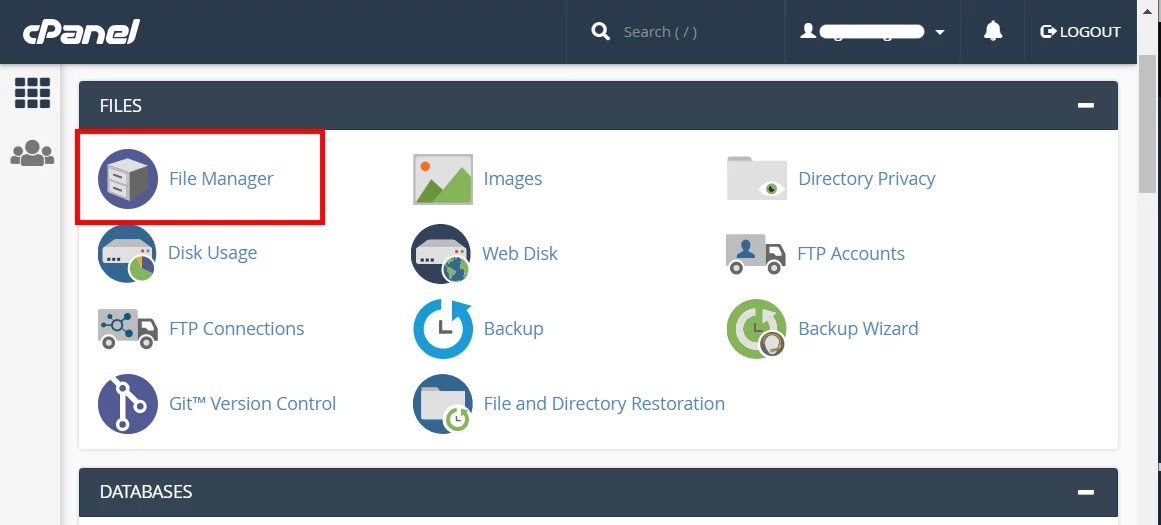
- If you are using cPanel, login into your account, and choose the File Manager.
Step 2:
- Navigate to the public_html directory, right-click on the .htaccess file and select Edit.
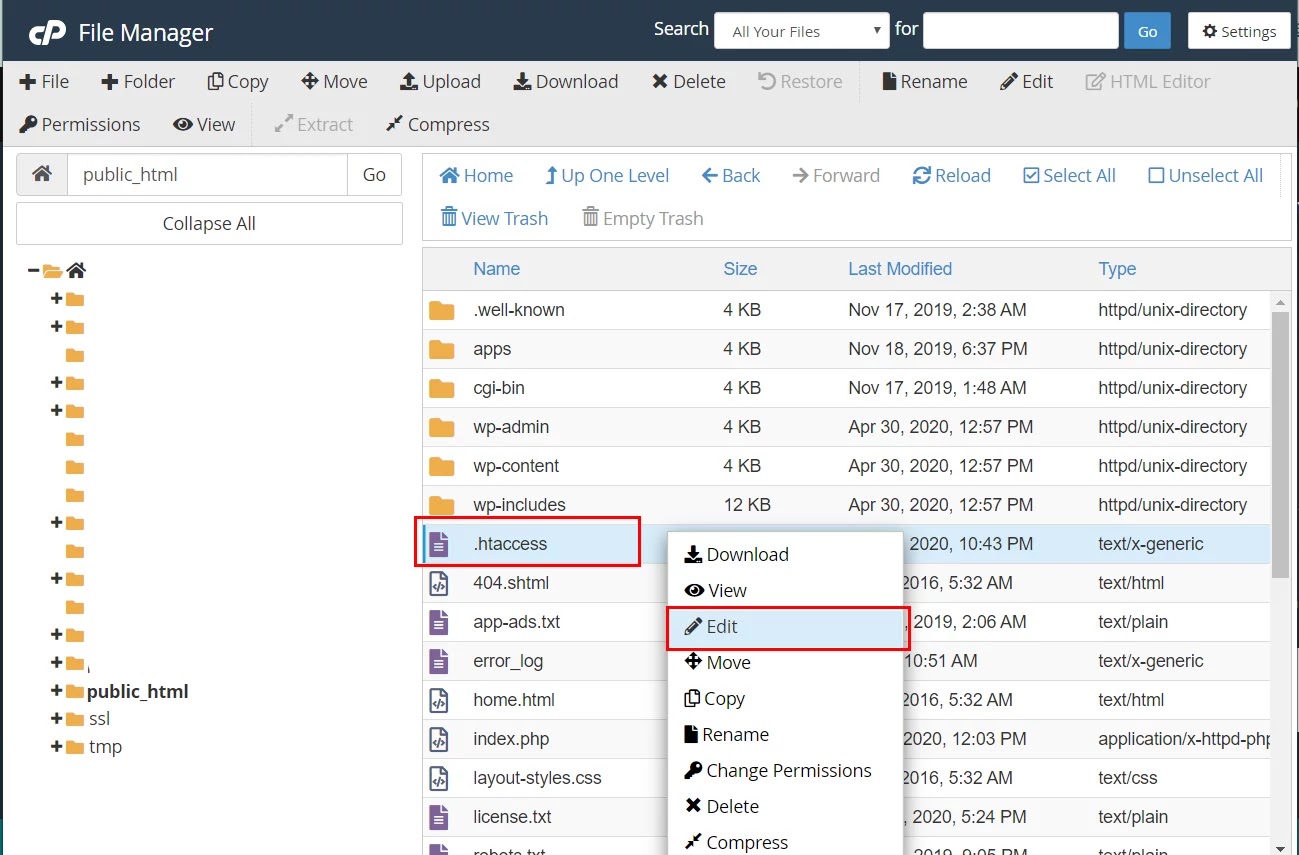
Note- Sometimes, dotfiles (files their names start with a dot) because the .htaccess file is hidden from the manager. to form them visible, click the Settings button within the top right corner and check the Show Hidden Files (dotfiles) option from the Preferences tab.
Step 3:
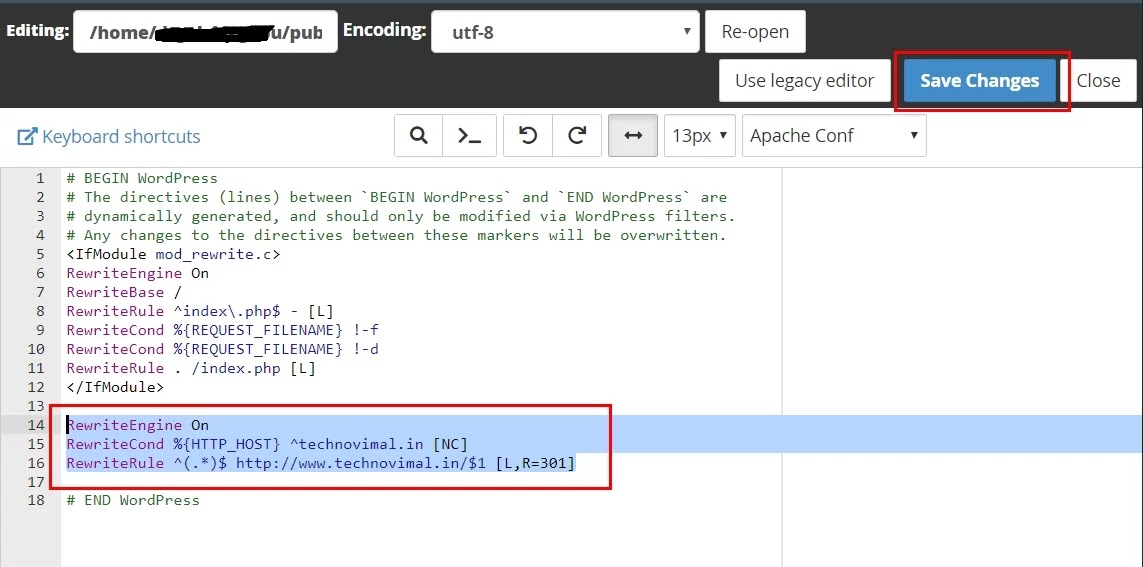
- Insert the following lines under the Rewrite Engine On:
RewriteEngine On
RewriteCond %{HTTP_HOST} ^yourdomain.com [NC]
RewriteRule ^(.*)$ http://www.yourdomain.com/$1 [L,R=301]
Where yourdomain.com is your actual domain name.
Step 4:
- Don’t forget to switch the code together with your actual name rather than yourdomain.com. Once you’re done don’t forget to save lots of the changes.
Congratulations, you’ve got successfully enabled a .htaccess file that will redirect all visitors from a non-www URL to the www version of your website! Wasn’t hard in the least, was it?
Redirect Non-www to www With HTTPS (.htaccess)
Most websites now run on HTTPS, so redirect straight to the secure www version. This avoids a second redirect from http to https:
RewriteEngine On
RewriteCond %{HTTP_HOST} ^yourdomain\.com [NC]
RewriteRule ^(.*)$ https://www.yourdomain.com/$1 [L,R=301]
Redirect Non-www to www on Nginx
If your server runs Nginx, add a separate server block for the non-www domain:
server {
    listen 80;
    listen 443 ssl;
    server_name yourdomain.com;
    return 301 https://www.yourdomain.com$request_uri;
}
Redirect With Cloudflare
If your domain uses Cloudflare, go to Rules → Redirect Rules and create a rule: when the hostname equals yourdomain.com, redirect dynamically to concat("https://www.yourdomain.com", http.request.uri.path) with status code 301 and Preserve query string turned on.
Update Your WordPress URLs
In WordPress, go to Settings → General and set both WordPress Address (URL) and Site Address (URL) to the www version, for example https://www.yourdomain.com. Then check the redirect by opening the non-www address in a private window.
Frequently Asked Questions
Is www or non-www better for SEO?
Neither ranks better. What matters is choosing one version and using it everywhere: the 301 redirect, your WordPress settings, the canonical tag and Google Search Console.
Should I use a 301 or 302 redirect?
Use a 301 (permanent) redirect. It tells search engines that the move is permanent and passes the ranking signals to the www version.
Conclusion
There you’ve got it! By finishing this tutorial, you’ve got learned the way to redirect non-www URLs to www. From now on, when someone accesses
From now on, when someone accesses http://yourdomain.com. The visitor will be redirected to http://www.yourdomain.com.
Hopefully, this tutorial was helpful. allow us to know within the comments below if you face any issues.