Home Blog Page 14

बिना OTP बिना रजिस्टर्ड मोबाइल नंबर के आधार कार्ड कैसे डाउनलोड करे या निकाले?

0

आज हर जगह आधार कार्ड अनिवार्य हो गया है। ऐसे में हमारे पास आधार कार्ड का होना बेहद जरुरी है। अगर आपका Aadhaar Card गुम हो गया है और आपके पास आपका रजिस्टर्ड मोबाइल नंबर भी नहीं है…?

तो आप बिल्कुल भी परेशान न हो अब रजिस्टर्ड मोबाइल नंबर के बिना भी आप अपना घर बैठे आधार कार्ड निकलवा सकते हैं. इस पोस्ट में आपको बताऊंगा कि बिना OTP के ऑनलाइन आधार कार्ड कैसे निकाले ?

आधार कार्ड अपने मोबाइल में कैसे डाउनलोड करें, फॉलो करें ये टिप्स

Bina OTP Bina Register mobile number ke aadhaar card Kaise download kare

यह बात जान ले की बिना aadhaar link मोबाइल नंबर के aadhaar card UIDAI के साइट से डाउनलोड करना संभव नहीं है. इसलिए, हम यहाँ पर आधार कार्ड रीप्रिंट सर्विस का उपयोग करेंगे. इस सर्विस के द्वारा आप न्यू आधार कार्ड के लिए घर बैठे आर्डर कर सकते हैं. पूरी जानकारी के लिए निचे दिए गए स्टेप्स को फॉलो करे:

  1. पहले, UIDAI के ऑफिसियल साइट पर जाय.
  2. गेट आधार सेक्शन में आर्डर आधार रीप्रिंट ऑप्शन पर क्लीक करे.
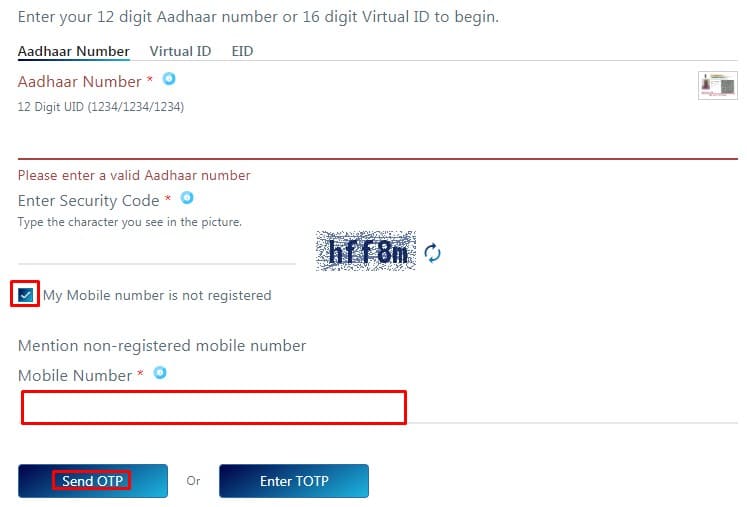
  3. अब, अपना आधार नंबर और कैप्चा कोड भरे.
  4. अब, “My Mobile Number Is Not Registered” को टिक मार्क करे और कोई-भी चालु फ़ोन नंबर भर दें.
  5. फिर, “Send OTP” पर क्लीक करे और भेजा गया ओटीपी इंटर करे.
  6. अंतिम में 50 रूपए का पेमेंट करे
  7. पेमेंट हो जाने के बाद आपको आर्डर ट्रैकिंग नंबर दिया जायेगा.
  8. इंतजार करे नया आधार कार्ड  आने के आने का.
  9. ध्यान रखें, आधार कार्ड वही पता में भेजा जाता है आधार में दिया हुवा होता है.

इस तरह बिना OTP बिना यानि TOTP के द्वारा आधार कार्ड डाउनलोड हो जायेगा।

आप चाहे तो पहले अपने नजदीकी आधार सेवा केंद्र जाके नया मोबाइल नंबर अपडेट करवा ले. इसके बाद आप काफी आसानी से Online UIDAI के website से तुरंत नया आधार कार्ड PDF फाइल डाउनलोड कर पाएंगे.

यह सब भी पढ़े:

10+ “Best” Free Lightweight WordPress Themes 2021

0

Light Weight WordPress Theme: Your WordPress theme is the basis of your site, which means that it plays an important role in the speed of loading your site.

However, the best thing about WordPress is that you don’t have to open your wallet to get a fast-charging theme.

In fact, it has many free options, and we’ve put together some of the fastest free WordPress themes for you in this post.

To test this, we will also do some speed tests for each subject.

Ready to start? Here are the ten fastest free WordPress themes we can find…

Read Also:

What Makes a Theme “Lightweight”?

If you are interested in how we have tested each topic, we will explain the methodology at the end of this post.

Here are the 6 Best free Lightweight WordPress themes in 2021

ThemeTypeActive installsRating
GeneratePress Multi-Purpose80,000+5.0
Sarkari BhaiyaBlog100+5.0
HestiaOne-page100,000+4.8
SydneyBusiness200,000+4.9
ColorMagMagazine100,000+4.9
Shop IsleEcommerce30,000+4.5

1). GeneratePress

GeneratePress The perfect lightweight theme for your next project.
GeneratePress
  • Load Time: 1.967 s
  • Downloads 2,459,423+
  • Active websites 200,000+
  • Happy customers 50,000+
  • File size on a fresh install: 108.4 KB
  • HTTP requests on a fresh install: 11

GeneratePress is one of the fastest WordPress themes you’ll find. Period.

SECURE & STABLE

  • Our code has been independently reviewed by the WordPress community leaders and uses the latest and most stable coding standards.

LESS THAN 30KB

  • We believe that your site should start with the least possible footprint. This is why a default WordPress installation with our theme is less than 30 KB.

TOP-TIER SPEEDS

  • Speed is one of the most important aspects of your website. Thanks to our small footprint and clean code, we make sure you get started as soon as possible.

2). Neve

Neve  Free Lightweight WordPress Themes
Neve

A WordPress Theme for the Long-Standing Business

  • File size on a fresh install: 206.0 KB
  • HTTP requests on a fresh install: 11
  • Fast and lightweight
  • Flexible and easy to use
  • Easy setup and sleek designs
  • Reliable updates
  • New features coming up
  • Quality code and full support

100 Speed Grade

Google loves fast websites so we make sure we get the best results in Pagespeed Insights performance tests.

Loads in Less than 1 Second

Our highest priority is to ensure that your site runs quickly. In a default installation, Nave took 0.6s to load.

Reduced Weight

We have created a lightweight theme without sacrificing flexibility. The entire default WordPress installation is as small as 28 KB.

You also get page-level controls where you can:

  • Change the number of sidebars
  • Change the width, including a singular choice to specify a custom width percentage
  • Disable the header, title, or footer

In addition, Nave also comes with its own site library that allows you to import any of the seven pre-built sites (these are built with Elementor ).

Currently, Nave is 100% free.

3). Zakra

  • File size on a fresh install: 96.8 KB
  • HTTP requests on a fresh install: 10

The Powerful and Multipurpose Zakra provides endless possibilities to create your site in no time. Outstanding success is guaranteed with its fast, secure, Light Weight WordPress Theme, and SEO friendly structure.

From the WordPress Customizer, you can control:

  • Header layout
  • Single layouts
  • Colors
  • Typography
  • Etc.

There is currently no paid version of Zakra – everything is 100% free.

4). OceanWP

  • Load Time: 1.886 s
  • Size: 198 KB
  • HTTP Requests: 18

Not to repeat myself here, but OceanWP is another streamlined option with an equivalent basic approach as GeneratePress and Astra. It’s a light-weight base theme that you simply can customize to any niche imaginable (though it’s almost as lightweight because of the other two)

Like Astra, OceanWP also offers free pre-built demo sites that you simply can import if you don’t want to start out from scratch.

5). Writee

Writee WordPress Themes
  • Load Time: 1.536 s
  • Size: 205 KB
  • HTTP Requests: 17

Writee is a very flexible and well-suited Premium WP blog theme for personal, food, travel, fashion, corporate, photography, technical, or any other amazing blog.

6). Primer

Primer WordPress Themes
  • Load Time: 1.476 s
  • Size: 141 KB
  • HTTP Requests: 14

Primer is a powerful free WordPress theme that brings clarity to your content. It comes with a fresh design and is fully compatible with all devices due to its responsiveness. Primer is one of GoDaddy’s free WordPress theme spaces.

7). Airi

Air WordPress Themes
  • Load Time: 1.076 s
  • File size: 543.6KB
  • HTTP Requests: 19

Airi is a powerful, flexible and lightweight theme for your company’s website. With a full element integration, this multipurpose theme is a great choice for any type of business or standalone site.

With a modern look and customization opportunities, if you want to start a website from scratch, it’s even better if you want to use world-class element design from our growing collection.

8). Page Builder Framework

Page Builder Framework WordPress Themes
  • Load Time: 1.152 s
  • File size: 206.8 KB
  • HTTP Requests: 12

As the name implies, The Page Builder Framework is specifically designed to pair with your favorite page builder.

Using the WordPress Customizer, you can set up this theme:

  • Your header
  • Typography
  • Blog layouts, including archives and singles

And you also get those page-level controls that let you:

  • Go full-width
  • Change the sidebar configuration
  • Disable the header and/or footer
  • Hide page titles

That premium version costs $59.

9). ColorMag

ColorMag WordPress Themes
  • Load Time: 2.152 s
  • File size: 880.0 KB
  • HTTP Requests: 16

ColorMag A free and responsive magazine style WordPress theme. ColorMag currently empowers 110,000+ websites. Ideal for any type of editorial site, be it news, magazines, or blogs, the design style is versatile and flexible.

It comes with a 1-click demo import option for any available demo you want. For a more efficient interface, the template is also responsive, retina-ready and SEO optimized.

10). News Portal

News Portal WordPress Themes
  • Load Time: 2.152 s
  • File size: 1.5 MB
  • HTTP Requests: 16
  • Price: Free 
  • Current Version: 1.1.18 
  • Update Date: December 17, 2019

News Portal is a creative responsive magazine style Free WordPress Theme. The theme is fully responsive and optimized for all mobile devices such as iPad, iPhone, Android, and Windows Phone, and others.

A theme contains 5+ widgets that are suitable for a magazine layout. You can easily move the magazine widget to your desired location and give your site a perfect magazine look.

Features:

  • Magazine Layout
  • Responsive Design
  • Highly Customizable
  • Retina Ready
  • Multiple Color Scheme
  • Quality Code
  • Multiple category color
  • Awesome Support
  • Plugin Compatible

It is the full widgets theme so as to let users manage the website using the easy to use widgets.

Conclusion

The best WordPress theme for your website doesn’t require you to have an arm and a leg. In fact, free WordPress themes can only be as effective as premium options, and often provide you with all or all of the features you’ll need. Once you choose the right template, the remaining part will register with a quality web hosting provider, start a blog, and generate quality content.

Hopefully, this tutorial was helpful. allow us to know within the comments below if you face any issues.😊

Best Hosting Deals

  • BlueHost Hosting Discount
  • A2 Hosting Discount
  • DreamHost Hosting Discount
  • GeneratePress Theme Discount
  • Mangools Toolkit Discount

ऑनलाइन जमीन का विवरण Bhumi जानकारी कैसे देखें। भू नक्शा, भूलेख, जमाबंदी – सभी राज्यों के लैंड रिकॉर्ड

0

आज, ज्यादातर काम ऑनलाइन माध्यम से होते हैं। ऐसे कई लाभ हैं जो घर बैठे ही काम आते हैं। अब, चूंकि आप अपना अधिकांश काम ऑनलाइन करते हैं, इसलिए अब आप अपने इलाके का विवरण ऑनलाइन देख सकते हैं। इसके लिए आपको कहीं जाने की भी जरूरत नहीं होगी। आज हम आपको इस लेख में बताते हैं कि कैसे आप घर से अपनी जमीन के बारे में कोई भी जानकारी प्राप्त कर सकते हैं, चाहे आप भू-नक्शा, जमाबंदी या भूलेख देखना चाहें। आइए जानते हैं कि सभी राज्यों के लिए 2021 भूमि रिकॉर्ड कैसे देखें।

पहले, किसी भी राज्य के लोगों के लिए सबसे बड़ी समस्या यह थी कि उन्हें भुलेख, भू मानचित्र और जमाबंदी से जानकारी प्राप्त करने के लिए सरकारी कार्यालयों का दौरा करना पड़ता था, लेकिन अब ऐसा करना आवश्यक नहीं है। आपके कदम और आप इलाके से संबंधित सभी जानकारी आसानी से प्राप्त कर सकेंगे। चाहे आप देश के किसी भी राज्य में रहते हों, हम आपको बताएंगे कि जमीन पर जानकारी प्राप्त करने के लिए आपको क्या करना चाहिए।

 शायद आपको यह भी अच्छा लगे:

    उत्तर प्रदेश के लोग इस तरह देखें भूलेख, जमाबंदी और भू नक्शा

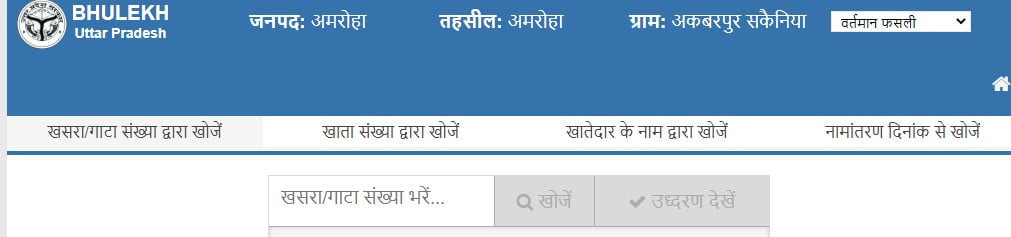
    1. यदि आप उत्तर प्रदेश के नागरिक हैं और अपनी जमीन या किसी अन्य व्यक्ति से संबंधित जानकारी चाहते हैं, तो आपको पहले संलग्न आधिकारिक साइट पर जाना चाहिए। जिसका लिंक http://upbhulekh.gov.in/ है
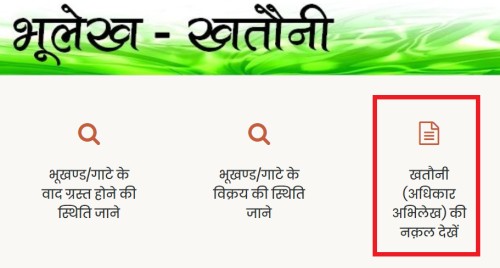
    2. जैसे ही आप लिंक पर क्लिक करेंगे, आपके सामने साइट का होम पेज खुल जाएगा। आपको यहां कुछ विकल्प दिखाई देंगे। जहां से आपको खतौनी प्राधिकरण रिकॉर्ड की प्रति देखने का विकल्प चुनना चाहिए)।

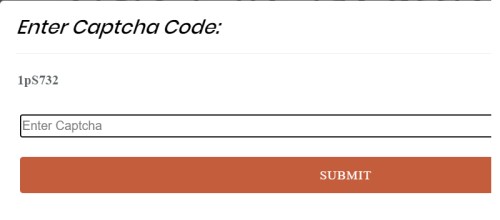
    3. अब आपके सामने एक नया पेज खुलेगा, जहाँ आपको अपना कैप्चा लिखकर भेजना होगा।

    इंटर काप्त्चा कोड

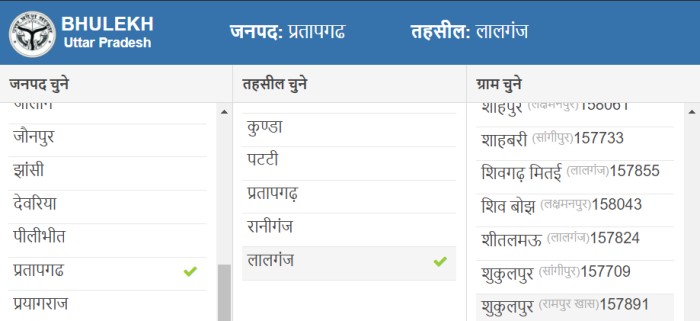
    4. इसके बाद आपके सामने एक और पेज खुलेगा, जहाँ आपको जिला और तहसील को चुनना होगा और इसके बाद आपको शहर चुनना होगा।

    शुकुलपुर , सांगीपुर, प्रतापगढ़

    5. अब आपके सामने एक नया पेज खुलेगा, जहाँ आपको कुछ अन्य विकल्प दिखाई देंगे, जहाँ आपको खाता धारक के नाम से सर्च करने के विकल्प पर क्लिक करना होगा।

    शुकुलपुर , सांगीपुर, प्रतापगढ़

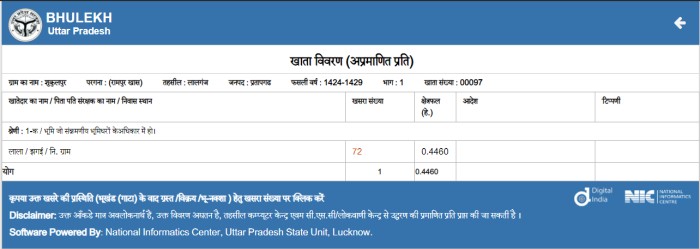
    6. यहां, जैसे ही आप नाम दर्ज करेंगे, आपको उसी नाम की पूरी सूची मिल जाएगी, उसके बाद, अपने अनुसार नाम पर क्लिक करें और आपको भूमि का विवरण दिखाई देगा।

    शुकुलपुर , सांगीपुर, प्रतापगढ़

    All States Land Records Website – Check Online

    S.NOSTATESBHULEKHA/BHUNKASHA
    1UTTAR PRADESHSITE LINK
    2DELHISITE LINK
    3RAJASTHANSITE LINK
    4GUJARATSITE LINK
    5GOASITE LINK
    6JHARKHANDSITE LINK
    7CHHATISGARHSITE LINK
    8MAHARASHTRASITE LINK
    9WEST BENGALSITE LINK
    10ASSAMSITE LINK
    11PUNJABSITE LINK
    12HARYANASITE LINK
    13ANDHRA PRADESHSITE LINK
    14BIHARSITE LINK
    15HIMACHAL PRADESHSITE LINK
    16KARNATAKASITE LINK
    17MADHYA PRADESHSITE LINK
    18MANIPURSITE LINK
    19KERALASITE LINK
    20TRIPURASITE LINK
    21TELANGANASITE LINK
    22ODISHASITE LINK
    23UTTARAKHANDSITE LINK


    शायद आपको यह भी अच्छा लगे:

    Question:

    1.क्या आप जमीन के बारे में जानकारी ऑनलाइन निकाल सकते हैं?
    हाँ! सरकार ने सभी भूमि रिकॉर्ड को डिजिटल कर दिया है। अब लगभग हर राज्य के लोग जमीन की जानकारी ऑनलाइन प्राप्त कर सकते हैं।

    2.जमीन की रजिस्ट्री या जमीन की रजिस्ट्री क्या है?
    भुल्ख शब्द दो शब्दों भु + लेख से बना है: भू का अर्थ है भूमि और लेख का अर्थ है कागज पर लिखना या लिखना। यानी जमीन से संबंधित लिखित रूप में जानकारी।

    3.जैमबांदी क्या है
    जमाबंदी भारत के उत्तरी राज्यों: पंजाब, हरियाणा, राजस्थान और हिमाचल प्रदेश में भूमि रजिस्ट्रियों को संदर्भित करने के लिए प्रयोग किया जाने वाला एक शब्द है। जमाबंदी एक गाँव का अधिकार (ROR) रजिस्टर है। जमाबंदी रजिस्ट्री में मालिकों का नाम, भूमि क्षेत्र, मालिकों के शेयर और अन्य अधिकार शामिल हैं। यह खेती, किराए और आय और भूमि पर देय अन्य अधिकारों को भी इंगित करता है।

    Please Like, Comment, Share THANK YOU!SHARE.

    आधार कार्ड अपने मोबाइल में कैसे डाउनलोड करें, फॉलो करें ये टिप्स

    0

    Aadhaar Card आज की तारीख में बेहतर खास पहचान बन गया है। सरकार से जुड़ी कई जरूरी सेवाएं सब आधार के बगैर मिलना मुश्किल है। आज इसकी जरूरत हर जगहों में पड़ती है। कई बार हम आधार कार्ड घर पर ही भूल जाते हैं और रास्ते में कहीं बाहर जाने पर आधार कार्ड की जरूरत महसूस होने पर कठिनाइयों का सामना करना पड़ता है। लिहाजा अब इय डिजिटल युग नें आपकी इस समस्या का भी समाधान कर दिया है। अब अपने मोबाइल या कंप्यूटर पर अशनी से अपना आधार कार्ड डाउनलोड कर सकते हैं। उसके लिए आपके पास कुछ जानकारी होनी चाहिए।

    आधार कार्ड डाउनलोड कैसे करें जानिए

    स्टेप 1:

    आधार कार्ड डाउनलोड करने के लिए आपको अपने आधार के बारे में सारी बातें मालूम होनी चाहिए।

    स्टेप 2:

    डाउनलोड करने के लिए सबसे पहले आपको आधिकारिक वेबसाइट https://eaadhaar.uidai.gov.in पर विजिट करना होगा।

    स्टेप 3:

    सबसे पहले आपको अपना आधार कार्ड का नंबर डालना होगा। इसके बाद आपको कैप्चा भरना होगा।

    स्टेप 4:

    जिसके बाद आपके रजिस्टर्ड मोबाइल नंबर में एक OTP आएगा। जिसके बाद कुछ सवालों के जवाब देने के बाद वेरीफाई एंड डाउनलोड पर क्लिक करना होगा।

    स्टेप 5:

    इस तरह से आपका आधार कार्ड डाउनलोड हो जाएगा। फिर इसे आप एक पासवर्ड के जरिए खोल सकते हैं।

    स्टेप 6:

    इसको खोलने के लिए पासवर्ड वो कुछ इस प्रकार रहता है। पासवर्ड में नाम और जन्म के वर्ष (YYYY) के पहले 4 अक्षरों का संयोजन।

    उदाहरण के लिए:

    उदाहरण 1

    Name: SURESH KUMAR
    Year of Birth: 1990
    Password: SURE1990

    उदाहरण 2
    Name: SAI KUMAR
    Year of Birth: 1990
    Password: SAIK1990

    उदाहरण 3
    Name: P. KUMAR
    Year of Birth: 1990
    Password: P.KU1990

    उदाहरण 4
    Name: RIA
    Year of Birth: 1990
    Password: RIA1990

    आप भी इसे याद कर लीजिए। कभी भी जरूरत पड़ सकती है। इस तरह से आपका आधार कार्ड ओपन हो जाएगा।

    Tricks Dev

     शायद आपको यह भी अच्छा लगे:

    UP Labour Registration: Apply for Labour Card Mazdoor Registration

    0

    यूपी श्रम पंजीकरण अब आसान हो गया है उत्तर प्रदेश सरकार ने यूपी श्रम पंजीकरण ऑनलाइन करने के लिए एक पोर्टल तैयार किया है, यहां से आप अपने लैपटॉप या मोबाइल कंप्यूटर के साथ श्रमिकों को पंजीकृत कर सकते हैं, यूपी के श्रमिक पंजीकरण के बारे में सभी जानकारी नीचे उनके काम के रूप में दी गई है । पूरी जानकारी के लिए, यूपी श्रम पंजीकरण कैसे करें, श्रम पंजीकरण के लिए आवश्यक दस्तावेज और कोई अन्य जानकारी क्या है, कृपया उत्तर प्रदेश मजदूर पंजीकरण विभाग, उत्तर प्रदेश की आधिकारिक वेबसाइट पर जाएं और जानकारी देखें।

    Important Document for UP Labour Registration

    उत्तर प्रदेश श्रम पंजीकरण करने से पहले, सुनिश्चित करें कि आपके पास पहचान के लिए निम्नलिखित दस्तावेज हैं

    फोटो खींचना
    आधार कार्ड, पहचान पत्र, राशन कार्ड, या कोई अन्य पहचान जिस पर आपका फोटो और आपकी आईडी
    पण कार्ड
    बैंक पासबुक और अन्य दस्तावेज जिन्हें ऑनलाइन करते समय आपसे पूछा जा सकता है

    How to Apply for Labour Card UP

    मजदूर रजिस्ट्रेशन करना बहुत ही आसान है नीचे आपको वह सभी तरीके बताए गए हैं जिस तरह से आप उत्तर प्रदेश मजबूर रजिस्ट्रेशन कर सकते हैं

    ALL-STATE LABOR DEPARTMENT WEBSITE :

    Andaman & NicobarClick Here
    Andhra PradeshClick Here
    AssamClick Here
    Arunachal PradeshClick Here
    BiharClick Here
    ChandigarhClick Here
    ChhattisgarhClick Here
    Dadra & Nagar HaveliClick Here
    Daman & DiuClick Here
    DelhiClick Here
    GoaClick Here
    GujaratClick Here
    HaryanaClick Here
    Himachal PradeshClick Here
    Jammu KashmirClick Here
    JharkhandClick Here
    KarnatakaClick Here
    KeralaClick Here
    LakshadweepClick Here
    Madhya PradeshClick Here
    MaharashtraClick Here
    ManipurClick Here
    MeghalayaClick Here
    MizoramClick Here
    NagalandClick Here
    OdishaClick Here
    PunjabClick Here
    PuducherryClick Here
    RajasthanClick Here
    SikkimClick Here
    Tamil NaduClick Here
    TelanganaClick Here
    TripuraClick Here
    Uttar PradeshClick Here
    UttarakhandClick Here
    West BengalClick Here

    दोस्तों आज का लेख आपको कैसा लगा हमें जरूर बताइएगा, और इस पोस्ट को अपने दोस्तों सोशल मीडिया ग्रुप में जरूर शेयर कर दीजिएगा, ताकि दूसरे लोगों तक भी यह मदद पहुंचे और अगर वह भी इस चीज का तलाश कर रहे होंगे तो वह आसानी से मजदूर रजिस्ट्रेशन कैसे करना है जान पाएंगे🙏🙏🙏

    How to Start a Blog in 2021 | 7 Easy Steps for Beginners

    0

    Passionate about blogging? Do you want to turn this passion into a money-making machine? This article is all about how to start a blog and make money online.

    The foremost thing that you are required to learn about is how to create a professional blog of your own. Blogging is, of course, an awesome platform that will help you to make money online from a blog and other ways. All you need to know is how to play with words. Even if you don’t know how to play with words then don’t worry this platform is only for you to understand how to create and write a blog. You just need to be calm and focus on your goal. There are only things that you need to be a blogger; they are patience and hard work.

    Blogging is not something for which you need a degree and diplomas or you need to be perfect in English. When I heard about blogging and making money from blogging a year back, I thought its nonsense. I was not even good at English nor I knew how to write a single sentence without a mistake. It felt useless but then one day I don’t know from where a thought came in my mind that I should at least give it a try because I will never learn something new until and unless I will make efforts to learn. So, I finally decided to start a blog of my own.

    But how will you gain experience unless you start a blog of your own? So here are some simple guidelines for you to know how to create a blog.

    There are just 7 simple steps that will let you know how to start a blog:

    • Blogging Platform
    • Domain Name
    • Choose Web Hosting
    • Install WordPress
    • Setup a Blog
    • Design a Blog
    • Make Money from Blog

    1. Choosing a Blogging Platform:

    Once you step into the world of blogging you are going to come across hundreds of blogging platforms. Some of them are Blogger, WordPress, Wix, Joomla, Drupal, Weebly, TypePad, and many others. And being a beginner, you might get confused about which platform to choose.

    For the last few years, the best platform for blogging is WordPress because it offers you site-building as well as a content management system that no other platform offers. Almost 9 out of 10 blogs in the world use WordPress because it is considered as the only trustworthy software that offers you a DIY tool and various other advantages.

    Friends don’t get confused with WordPress.org and WordPress.com. They are both different in a number of ways. WordPress.com is a free blogging platform. On the other hand, WordPress.org is not free. You need to buy a domain and hosting for using WordPress.org. You might want more reasons to trust WordPress. Don’t you?

    Here is why you should choose WordPress:

    • WordPress is free.
    • WordPress is easy to use and the best part is you don’t even need to have technical knowledge for creating a website and blog.
    • You can choose approximately 8000 free and paid themes provided by WordPress.
    • You can make your blog fast and efficient using thousands of plugins. Yoast is one of the most popular plugins offered by WordPress.
    • If you face difficulty in any topic you can take help from the WordPress forum.

    2. Select a Domain Name:

    After selecting the blogging platform, the next challenge that comes in your way is a selection of domain names. Select your domain name wisely. It should be easy enough for the reader to remember. Don’t select a complex name that becomes difficult for the reader to remember. Choose the domain name in such a way that it gives a quick idea to the reader about the topic or about what it deals with.

    Suppose your blog is about traveling then you should give it a name related to tour and travel such as TheLastHolidays and if it is about cooking or food then keep a name related to this only like EasyJunky. Don’t go for innovative names that will take you out of the topic. For example, my blog is all about earning by doing nothing and its name is LazyEarning. Its name itself gives an idea to the user that it is all about earning or making money. Keep the name short and simple.

    While purchasing a domain, keep in mind that finding a domain name of your choice might be a difficult task because maybe some other person has also thought of the same name just like you did and it might have been sold. Make a list of a couple of names while looking for domain names. And the domain extensions can be of your choice like .com, .org, .co.in, .info etc. Look for extensions at the time of domain booking.

    3. Choose a Web Hosting for Your Blog:

    Just like there are a number of blogging platforms the same way there are a number of hosting sites too. Some are Bluehost, Namecheap, iPage, GoDaddy, Hostgator, Bigrock, etc. Without a hosting site, you might create a blog but it will not be yours to be called. You might create a blog but where will you keep its content. Hosting is done for the storage of your content.

    You need a web hosting for storing the contents of your blog. If you don’t buy a web hosting, Google will have the right to delete the contents of your blog or your blog itself. To have a domain name of your choice and have complete control over it you need to have web hosting.

    The most popular and recommended web hosting site is Bluehost. It is considered as the best site for hosting because it offers:

    • Money-back guarantee
    • 24×7 support
    • Free SSL certificate
    • Auto Updates

    You can even get discounts while purchasing the hosting. But this golden opportunity comes once in a year that is only on black Friday. You can get a discount of approx 40% to 60% on Black Friday. The price for purchasing a Bluehost is near about $7.99 per month but during Black Friday you can get if for $2.65 per month.

    4. How to Install WordPress:

    5. Setup Your Blog:

    • Do it yourself.

    6. Design Your Blog:

    • Do it yourself.

    7. Starting to Make Money from Your Blog:

    Not everyone starts a blog to earn money. Some start it for their passion also. But it’s not bad if you earn handsome money from blogging. You can even become a professional blogger.

    Here are some tips for you to earn money through blogging:

    I. Write on a daily basis: In the beginning be regular with your blog, rite on a daily basis because everyone is interested in daily stuff. No one would like to read from a blog that posts once in a couple of days. To increase traffic, your content should be innovative as well as true it should not contain any myths or fake ideas neither it should be copied from other sources. Maintain the uniqueness of your blog.

    II. Keep promoting your blog: Traffic is what you want to earn money. To grab the audience’s attention your content should be useful for them and they should find it appealing. Promote your blog on various social networking sites that are widely worldwide used like Facebook, Instagram, Twitter, LinkedIn, Google Plus, and YouTube. Pin it on Pinterest as well. Visit other blogs too, comment on their contents, and invite them to your blog. Keep promoting those contents that are appreciated the most. Use hashtags and above all learn SEO to get traffic from Google.

    III. Monetize your blog: If you have created a blog for earning purpose then let me tell you that there are a number of ways for earning money online through blogging. You can only start earning money through your blog only after you gain some traffic.

    IV. Through AdSense: Once you sign up with AdSense, Google will keep sending advertisements on your blog and if any visitor clicks on the ads present on your blog, Google pays you for this.

    V. Affiliate Marketing: Sign up with Amazon associate, Flipkart, eBay or Bluehost. After you log in to your associate account, you will get a link for promoting the products on your blog and if any visitor visits that affiliate link and goes to the site like Amazon and buys something from that site you will be paid approximately 4% to 12% of that amount. This is called affiliate marketing.

    Why should we not start with a free blog?

    You might have heard it somewhere that starting a blog is free but keep in mind that everything that is free comes with some limitations. There are going to be a number of problems once you start with a free blog. You will not have full control over it. It won’t be a blog of your own with full authority. It will not even have a name of your choice.

    For example, if you go for free blogging platforms like Blogger or WordPress, then you might get a domain that will have your name and then the name of the site with the extension of yourname.blogspot.com. Which will not at all look attractive nor it will give the idea to the user about its content.

    1. Your content will be controlled by the free blogging platform and you will not be able to do anything if they delete your content, webpage or whole website.
    2. Your domain name which will not suggest anything to the reader will make your blog non-serious for him/her.
    3. Even you can’t do SEO (Search Engine Optimization) in a better way and couldn’t get huge traffic.
    4. After you start getting traffic and you want to shift on a paid blog of your own it becomes difficult in shifting.

    My Personal Experience:

    The first few months or you can say the first year really forced me to quit blogging because I was neither getting any traffic nor any appreciation. I started losing my temper but as I said don’t ever lose your temper, be patient. One day your hard work will fetch you results that you have never imagined. The last article which I wrote before losing my temper was liked by lots of people and they even started commenting on it. I think that was the turning point of my career as a blogger.

    From zero to some and from some to a lot. I started making money. People started asking for more articles. My friends, if I can do it why can’t you? Slowly and steadily you will learn your mistakes and you can improvise them side by side. With experience, your writing skills will enhance.

    Thanks

    I HOPE THE ABOVE ARTICLE ON HOW TO START A BLOG WILL HELP THE NEWBIES AND YOU WILL FIND IT APPEALING. DO GIVE THE FEEDBACK READERS.

     Please Like, Comment, Share  THANK YOU!SHARE.

    Ramadan Mubarak Wishing Script 2021 | WhatsApp Viral Script

    0

    Download Free Happy Ramadan Mubarak 2021 Wishing Script, Eid Mubarak Wishing Script 2021 | Best Whatsapp Viral Script | Ramadan Festival Wishing Script

    You can use all these scripts in google blogger for free. These scripts can increase your revenue by showing Google Adsense Ads. We have implemented loss of features in these scripts.

    Happy Ramadan Mubarak 2021 Wishing Script

    Ramadan Wish: Ramadan Karim is one of the most awaited Islamic festivals. It is a festival of about 30 days (sometimes 29 days) when Muslims fast. This holy month ends with Eid al-Fitr and as a Muslim, we all know this.

    Ramadan is the ninth month of the Islamic calendar, observed by Muslims worldwide as a month of fasting, prayer, reflection, and community.

    • Celebrations: Community iftars and Community prayers
    • Date: 13 April – 12 May
    • Ends: On the last night of the month of Ramadan
    • Frequency: every year (lunar calendar)
    • Number of days: 30
    • Observed by: Muslims

    Featured of Happy Ramadan Mubarak Wishing Script

    • Adsense Friendly 
    • Mobile-Friendly (Issei aap Mobile View me open kar sakte ho) 
    • Easily Shareable on Whatsapp 
    • Super Fast Speed 
    • Iske Through aap High Revenue earn kar sakte hai 
    • Isme aapka name bhi share Hoga

    Benefits of this Ramadan, Eid Mubarak Wishing Script

    • You can earn up to 1000$ From this script (Adsense Ads)
    • Get High Amount Traffic
    • Get Huge Facebook Likes

    Download Free Happy Ramadan Mubarak 2021

    Happy Ramadan 2021 (Ramzan) Wishes, Messages and Quotes

    Happy Ramadan, and Ramadan greetings and messages in English that you can send to your loved ones and share your feelings in a unique way.

    Best Ramadan Wishes for Friends

    During the month of Ramadan, praying before Allah gives us the right direction and can save us from the dark side of bad deeds.

    Allah is very forgiving and forgives the sins of anyone who confesses his sins in time. If we pray with true heart during the month of Ramadan then our voice is heard by Allah.

    Prophet Muhammad (SAW) said that a person who gives iftar to another fasting person will reward the fasting person in the same way.

    Happy Ramadan Mubarak

    If Allah fulfills all desires, work can be done for the welfare of humanity. A homeless child can be taught by donating, with this Allah gives you every happiness in your life.

    Think Ramadan every day and keep calm, focus on the name of Allah, which is beyond our thoughts.

    According to the Quran, on the last day of judgment, every sin committed in life will be counted and Ramadan is an opportunity to apologize to Allah. I wish you a happy Ramadan!

    So, it is often about Happy Ramadan Mubarak Whatsapp Vising Script for Blogger. If you have any queries related to these festivals, the script’s wish is confirmed to comment below and I will definitely solve your problems associated with these scripts. Please support this blog too as it took me 1 week to create all these scripts. So please share this article.

    NOTE –

    You can earn huge money from Whatsapp shareable wishing sites, it’s also called Event blogging, for more information about this theme you need to watch this video till the end, so you can understand how it works

    Eid Wishing Script for Blogger 2021 | WhatsApp Viral Script

    0

    Eid Mubarak Wishing Script 2021 | Get here WhatsApp viral scripts based on HTML & PHP with custom CSS and new attractive looks and latest designs.

    We offer you the latest and responsive viral scripts. Here you’ll get “Eid Mubarak Viral Script” or in other words, we can also write “Happy Eid Viral Scripts”. I hope you like our Ramadan wishing script & Eid Mubarak Script.

    Our viral scripts are compatible with Blogger & WordPress both you can also install Eid Mubarak script in your c panel hosting, or in your cloud hosting also. You can also edit Eid Mubarak or Happy Eid script as you want or you can also able to change background and images or gif.

    What is Eid?

    Eid virtually means that a “festival” or “feast” in Arabic. There area unit 2 major Eids within the Mohammedan calendar annually – Eid al-Fitr earlier within the year and Eid al-Adha later.

     Eid al-Fitr could be a three-day-long competition and is understood because the “Lesser” or “Smaller Eid” in comparison to Eid al-Adha, is four-days-long and is understood because of the “Greater Eid.”

    • Observances: Zakat al-Fitr charity, Eid prayers
    • Date: Sat, 23 May 2021 – Sun, 24 May 2021
    • Featured in religions: Islam
    • Type of holiday: Lebaran, Religious holiday, an Islamic holiday

    Happy Eid Mubarak 2021 Wishing Script For FREE

    Now, let’s talk about viral Eid wishing script 2021 for blogger, above are some frequently asked questions. 

    Step 1. How to Download Viral Happy Eid Mubarak Wishing Script ?

    Download Eid Mubarak wishing script by clicking the download button given below and copy all the HTML code and paste it on the note pad, or in your hosting panel.

    Then edit the code by changing the WhatsApp share link, and the link was given in the line between 600 to 650 by your site link. So if anyone or anybody shares the wish your link was given there and your site was gone viral.

    I hope you understand how to download and edit Eid Mubarak wishing script or site.

    Featured of Happy Eid Mubarak Wishing Script

    • Adsense Friendly 
    • Mobile-Friendly (Issei aap Mobile View me open kar sakte ho) 
    • Easily Shareable on Whatsapp 
    • Super Fast Speed 
    • Iske Through aap High Revenue earn kar sakte hai 
    • Isme aapka name bhi share Hoga

    Benefits of this Eid Mubarak Wishing Script

    • You can earn up to 1000$ From this script (Adsense Ads)
    • Get High Amount Traffic
    • Get Huge Facebook Likes

    Step 2. How to Edit Eid Mubarak Wishing Script?

    Yes !! you can edit the wishing script as you want, you can also change the whole background of the site/script and all images. Some poetry is also there you can also edit that poetry by your own favorite poems and quotes.

    You can also mention your name in the middle of the site of the wishing script. So people should get to know about you & your work. Remember don’t edit anything if you do not have any knowledge about coding and editing HTML codes.

    Step 3. How to Earn With Eid Mubarak Script ?

    The best way to earn via wishing viral script is AdSense ads or earn via any ad serving platform. There are more than 50+ advertising platforms for publishers that are available with which you can earn millions of dollars daily. You can edit the script and paste your code ads on their respective areas as given on the script.

    Step 4. How to Viral our Eid Mubarak Script?

    The best way to viral any site and script is WhatsApp by wishing your friend Eid Mubarak or Happy Eid by using your Eid Mubarak script and told the friend to share this link with others, in this way you can viral your site by using all social media sites and platform. The more can visit your site the more impression you get and the more you are earning increasing day by day.

    Step 5. How much Money you can Earn by this ?

    Top bloggers who are viral and share their sites before a month ago from the day of the event or any festival they are earning more than $5000 or more and some of the new bloggers who start with all the right things and tips they may earn more than $500 or more. and some of the small or new bloggers with zero knowledge of blogging and event blogging may earn up to $100 with the right coordination. 

    Happy Eid Mubarak Quotes, Messages

    Happy Eid, and Eid greetings and messages in English that you can send to your loved ones and share your feelings in a unique way.

    Eid Mubarak Quotes

    None of you truly believes until he wishes for his brother what he wishes for himself.

    May Allah shower countless blessing upon You and Your Family. Keep me in your prayers.

    Eid Mubarak to all Muslims around the world, may the blessings of Allah be with you today, tomorrow, and always.

    Eid Mubarak HD Images, Greeting Cards, Wallpaper, and Photos

    Please support this blog too as it took me 1 week to create all these scripts. So please share this article.

    Material Smart App Rating Dialog for Android

    0

    Material Smart app rate dialog for Android which considers user rating. If the user rates the app below the defined threshold rating, the dialog will change into a feedback form. Otherwise, It will take the user to the Google PlayStore.

    Material Smart Rating App

    Features

    • Auto fetches the app icon to appear on top of the dialog
    • Make the dialog appear on a defined app session
    • Opens Feedback form if the user rates below the minimum threshold
    • Extracts the accent color from your app’s theme
    • Customizable title, positive button, and negative button texts
    • Customizable button colors and backgrounds
    • Override dialog redirection to Google Play or Feedback form according to your needs

    If you want the dialog builder method and move the code to the setOnClickListener() method of your Activity class.

    Installation

    Add jetpack in your root build.gradle at the end of repositories:

    	allprojects {
    		repositories {
    			...
    			maven { url 'https://jitpack.io' }
    		}
    

    Step 2. Add the dependency

    	dependencies {
    	
    	         implementation 'com.github.vimalcvs:Material-Smart-Rating:1.0.6'
    	}
    

    How to use

    Use the dialog as it is setOnClickListener() Just like MainActivity.java

            LinearLayout linearLayout = findViewById(R.id.rate_ok);
            linearLayout.setOnClickListener(new View.OnClickListener() {
                @Override
                public void onClick(View v) {
    	    
                    ///Rate Dialog
                    RateDialogManager.showRateDialog(MainActivity.this, savedInstanceState);
    
                }
            });

    Add Icon

    Add email drawable/ic_rate_feedback.png to your drawable file. Auto fetches the app icon to appear on top of the dialog.

        ...drawable/ic_rate_feedback.png
        ...drawable/ic_rate_star.png

    Add Email

    Add email res/values/ to your strings.xml file. Auto fetches the app email id.

    ....
    <resources>
        <string name="email">technovimalin@gmail.com</string>
    ....

    Add Button Color

    Add email res/values/ to your color.xml file. Auto fetches the Button Color.

    ....
       <resources>
        <color name="rate_icon_color">#0d7eff</color>
        <color name="rate_button_color">#006cbc</color>
    	  
        <color name="rate_active_color">#edbd31</color>
        <color name="rate_normal_color">#959595</color>
    ....

    Credits

    This project was initiated by TechnoVimal. You can contribute to this project by submitting issues or/and by forking this repo and sending a pull request.

    How to Start a Blog