All countries have their own currency, which we call paisa or money. Indian currency is called Rupee. And the US currency is called the dollar. Similarly, there is a digital currency which is called CryptoCurrency.
In this article, You will understand Cryptocurrency’s meaning. What is Cryptocurrency? How many types of Cryptocurrency are There? Which is the most popular Cryptocurrency? And What Are Its Advantages and Disadvantages?
What is Cryptocurrency?
First of all, know what is CryptoCurrency? Crypto means secret or secret and currency means currency. That is the secret currency. Cryptocurrency is a virtual currency, it is not available in physical form. That is, we cannot take it in us like notes and coins, nor can we keep it in our pocket. Because it is stored in digital form in our digital wallet only on the internet. It can also be called online currency. Because it is capable of doing transactions only online.
Bitcoin was introduced as a Cryptocurrency for the first time in 2009, since then it is the most popular Cryptocurrency Bitcoin. And bitcoin has been produced only 21 million. And this number is fake. That is, like a note, it cannot be printed anymore.
For this reason, the price of Bitcoin keeps going up and down. When the demand increases, the bitcoin price increases, and when the demand decreases, the price also decreases. By the way, you must know that the government has complete control over all the currencies like our Indian currency or US dollar, Euro, etc. But there is no such control on Cryptocurrency like bitcoin.
There is no control of government authority like central banks, any country, or agency on this virtual currency. That is, Cryptocurrency does not follow the traditional bank. It keeps on transferring from one computer wallet to another computer wallet.
It is not that the only Bitcoin is a Cryptocurrency, but there are more than 5000 different cryptocurrencies like it. But the most popular of these is bitcoin, followed by Ethereum, Ripple, Litecoin, Tether, and Libra. You can invest in these and buy and sell just like bitcoin.
Bitcoin is the most popular Cryptocurrency all over the world. And how popular it is, you can guess from the fact that now many companies of the world have started accepting Bitcoin payments. And the names of these companies are increasing continuously. Shopping, food delivery, trading, traveling, etc. can be done using these Bitcoins.
Is Bitcoin legal in India 2021
The first bitcoin in India was installed by RBI in 2018. Because RBI considered it illegal. But this van has been removed by the Supreme Court in March 2020. And for this reason, its popularity is not so much in India. But now the use of Cryptocurrency has become legal in India too. But still, you cannot use it like Rupee. In this, you can invest, trade, and hold, etc. And now the number of Cryptocurrency users in India is also increasing continuously. And the price of one bitcoin is 32 lakhs at the moment and the price keeps on increasing and decreasing rapidly.
Advantages and Disadvantages of Cryptocurrency in 2021
Advantages of Cryptocurrency :
Cryptocurrency has its own advantages such as
In this you can do easy and quick transactions.
With this, international transactions can be done in a jiffy.
You have to pay negligible transaction charges.
It does not contain any third parties, and is more secure as it uses blockchain technology.
Cryptocurrency is not controlled by the government or any agency. Because of which we can use it whenever we want.
Cryptocurrency is secret, it means no one knows how much currency you have. Where do you use it? All information is secret.
Disadvantages of Cryptocurrency:
The advantages of Cryptocurrency are many but it also has some disadvantages. As if
The biggest disadvantage is that there is no government authority in this, there is no third party agency, so if there is a friend, then no support will be available.
Since it is a secret currency, it is also used by Unethical Users. The details of which cannot be obtained.
It is not eco-friendly because many computers and resources are used to make it secure. Which consumes a lot of electricity. But maybe new technology will come in the future.
How to Invest in Cryptocurrency 2021
If you want to invest in BitCoin then you can do it with the help of the COIN SWITCH KUBER App. Through this app, you can buy and sell bitcoin. If you are interested in bitcoin then you can download this app from the google play store by clicking on the link. After that, you have to sign up. On signing up, you get 50 rupees as a bitcoin bonus.
Follow the following steps to create an account in Coinswitch Kuber
To sign up, you have to enter your mobile number, then proceed with the process using OTP.
After this a 4 digit security code has to be set.
In the next step you have to do KYC. To do KYC, you have to verify by entering your full name, date of birth and email ID. And the email has to be confirmed using the OTP received on the email.
After this, in the next step, you have to fill the details of PAN card. After which, for National Identity Verification, with Aadhaar Card or Voter Card or Passport has to be used.
In the next step, you have to click and upload one of your selfies. And after that you will fill the details of your bank account so that you can buy and sell in it. Now you have to add money to Coin switch kuber’s wallet so that you can invest in Bit Coin or any crypto currency.
Conclusion
There is a lot of profit in Cryptocurrency, but the risk is also the same, so before buying any Cryptocurrency, do a little research on it. Otherwise, you may suffer a lot. A properly made investment can make you a millionaire very quickly. Now big companies are also investing in cryptocurrencies like bitcoin. Which shows that its future is going to be golden. Tell us what you think in the comments. Thanks!
Friends in this Blog article, will tell you the Amazon Affiliate Marketing from Paise earned How? (How to Make Money From Amazon Affiliate?) If you are searching in Google how to earn money online sitting at home. So through this blog post, we are going to give you complete information in simple language. After reading this post you will be able to learn how to earn money on Amazon?
Amazon is the most popular e-commerce website in the world. Where all such Items Sell is done. Like- Mobile, TV, Washing Machine, etc. And apart from this, all types of household items are sold online.
If you do not have any job or are thinking of doing any online business then you are not thinking wrong. Because of the way we are seeing it, the craze of online shopping has increased a lot in the last few years. And it will increase even more in the coming years. Looking at the time, you have to start an online business. Otherwise, we will be left behind in the race of the world. Amazon can be the best option to start an online business.
In today’s time, we have seen that many small traders are doing online business by becoming Amazon Seller. And earning millions of rupees from Amazon. So looking at the time, you should also not delay. And grow your small business with Amazon. Or you want to earn money by joining Amazon Affiliate Marketing. So let’s know.
Millions of people are joining Amazon and earning money online sitting at home. You can also start online with Amazon sitting at home and earn money. This website allows us to earn money in two ways. The first way is that you can earn money by becoming a seller. And another way you can earn money is by joining Amazon Affiliate Marketing Program.
If you have some money then you can start an online business by becoming an Amazon Seller. For which you have to register on Amazon Seller Account. And if you do not have any money at all, then you can do Amazon Affiliate Marketing. For which you have to join the Amazon Affiliate Program.
How to Become an Amazon Affiliate
To earn money from Amazon, you have to create an account on Amazon Affiliate. For which you do not need to pay any money. Nor do you need any kind of documents. You just have to give some important information.
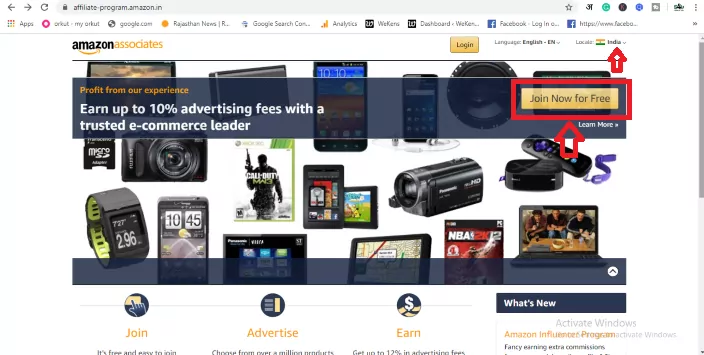
As I told you earlier that to earn money from Amazon Affiliate, you have to create an account. To create an account, you click on the Amazon Affiliate Program link. And follow the steps given below.
After opening the above link, you will get the option of Join Now For Free on the upper right side. Click on it. If you are not from India, then select your country by clicking on the location icon given above.
how to make money from amazon affiliate – join now for free
Step 3- Create Your Amazon Account
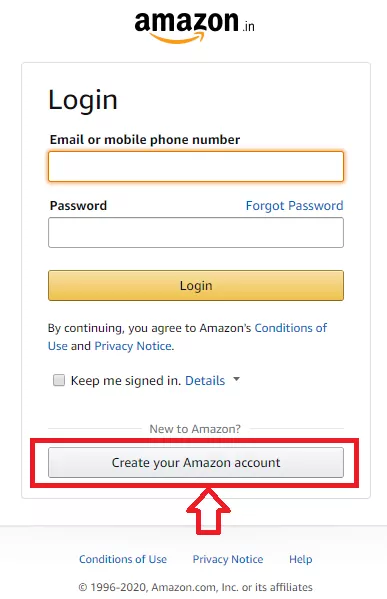
The login page will open in front of you. If you already have an account then you can log in with your Email ID and Password. And to create a new account, click on the option Create Your Amazon Account given on the right side below it.
Create Your Amazon Affiliate Account
Step 4- Fill Your Account Details
After this, you have to fill in personal information in front of you. like-
Your Name – Enter your full name here.
Email – Enter your Email ID.
Password – Enter your password here. Keeping the security in mind, enter Password Strong.
Password Again – Confirm by re-entering your entered password.
Create Your Amazon Account – Make sure that the information you have given is correct. After that tap on Create Your Amazon Account .
Amazon Affiliate Account Create
Step 5- Basic Details
A new page will open in front of you in which you have to fill in your basic details. like-
Amazon Affiliate Basic Information
Payee Name – Enter the same name as you have in your bank account.
Address Lines -1,2,3 – Fill your address here.
City – Enter the name of your city.
State – Enter the name of your state.
Postal Code – Enter your Area Pin code.
Country – Enter the name of your country.
Phone Number – Enter your mobile number.
Who is the main Contact for this Account? Here you are getting to see two options.
The payee listed above – Select this option if you are creating an account for yourself.
Someone else. I need to enter their information – If you are creating Amazon Affiliate Account for any other person then select this option. And fill all the details of that person.
For US tax purpose, are you a US person? Here you are giving two options ‘NO’ or ‘YES’. If you live in the US then select the option of Yes. If you are from any other country then you select the option of NO.
After filling in all the information on this page, you have to click on the option of Next.
A new page has been opened in front of you in which we have to enter the link of that website or mobile app. On which we will sell Amazon’s product. If you have a website then enter its link and if it is mobile then enter its link.
how to make money from an amazon affiliate
Enter Your Website – In this box you have to enter the link of your website. If you have more than one website then you can also add them here.
Enter Your Mobile App URL – If you have any mobile app then add its link here. More than one mobile app link can be added.
Step 7- Profile Information for Amazon Affiliate
A profile page will open in front of you in which you have to fill in information for Amazon Affiliate.
amazon affiliate marketing account
Amazon Affiliate Marketing Se Paise Kaise Kamaye
What is your preferred Associate Store ID – Enter your preferred User name here. User name will be your Store ID.
Your Website and Mobile App list – Here you will see your website and mobile app. Let it be like that.
What are your websites or mobiles apps About? Here you have to write a short description about your website and mobile app. Like what is your website about. And what do you see on your website?
Which of the following Topics Best Describe your Website or Android App? Here you have to select your website topic. And also the secondary topic can also be selected.
What Types of Amazon Items do you intend to list on your websites or mobile apps? – Select all those items here. Which is to be sold through Amazon Affiliate Marketing. Have to do
What type are your websites or mobile apps? Here the type of your website has been asked. Like you are a blogger, select Blog. By which Amazon can give you the advertisement in HTML code to add to the blog.
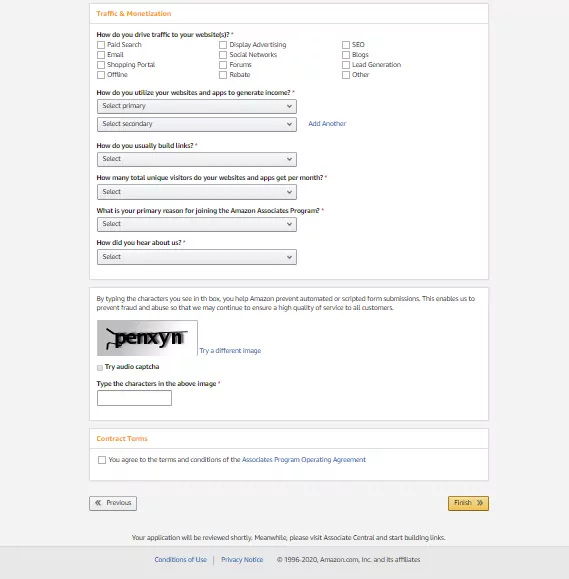
How do you drive traffic to your website? Here you have to tell what is the main traffic source of your website. Accordingly, you have to select any one option given below.
How do you utilize your website and apps to generate income? – In this it is to be told how you make income from blog . You can choose Display in the first option and Widgets in the second option.
How do you usually build links? How do you create a link, for which you choose the HTML editor.
How many total unique visitors do your websites and apps get per month? You have to tell Monthly Traffic of your website and mobile apps. Like if they come from 501 to 5001, then they can choose like this or if they come more than that then they can also choose.
What is your primary reason for joining the Amazon Associates Program? In this , the reason for joining Amazon Affiliate is to be given. In this you choose Monetize my site.
How do you hear about us? – Here you select the Online Search option.
Captcha Type – Type the words visible in the image in the box below. After that click on Contact Terms and click on Finish .
Congrats…… Your Amazon Affiliate Joining process has been completed. You will get your Unique Associates ID here.
In the lower side, you will be asked for Payment Information and Tax Information, which you fill. If you do not want to fill now, then you can go with the Later option.
Have applied for your Amazon Affiliate Account. A mail will come from Amazon on your email ID 24 in which it will be told whether your account has been approved or not.
Once your account is approved, you can how to make money from amazon affiliates? For which see below.
After your Amazon Affiliate Account is approved. When it comes to how to make money from amazon affiliates? For this, you have to follow some easy steps. You have to select that item. The item you want to sell on Website and Mobile Apps. After selecting the item, you have to create an Amazon Affiliate link. And to put an Affiliate link on your website. So that any user will buy the product by clicking on that link. So Amazon will give you commission instead. The commission of every product is different. Some more, some less. Try to affiliate the same product whose commission is very good. Follow the steps given below.
To create Amazon Affiliate Product Link, first login to Amazon Affiliate account.
Search the item in the search bar for the product you want to sell. Select that product.
After the product page is opened, you will see the option of Site Strip at the top. Here the option of Text, Image and Text + Banner will appear next to Get Link.
Decide how you want to display ads on the website. Like if you want to put a text link, then click on the text. After clicking, you will see a link below. which you copy. And share your website or mobile apps. In this way you can create the code of Banner, Text + Banner. This is your choice. If you buy any goods by clicking on the link you are sharing, then you will earn. You can also share this link on your social media account.
Hope you how to create Amazon Affiliate Account? Must have been learned and must have learned to make Affiliate Link of any product as well. Now you can easily earn money from Amazon Affiliate Marketing.
Conclusion
I hope I have given you how to make money from amazon affiliates? Full information is given about. And I hope Amazon Affiliate Se Paise Kaise Kamaye? You must have understood well.
Friends, how was our post on how to make money from amazon affiliate – Online Affiliate Marketing. Do tell us by commenting in the comment box. Apart from this, if you have any questions in your mind then you can ask in the comment box. I will try my best to answer your questions.
Do you want to buy hosting from Bluehost? Bluehost provides many types of hosting services for its user like Linux hosting, windows hosting, WordPress hosting but most of the users in India use Linux hosting to create a blog or website.
This is a very popular company. Which provides many types of good hosting for your blog. But if you are making a new blog then you should first take the Basic hosting plan. When you buy any hosting plan from Bluehost, you are given a free domain along with it.
Today in this article I will tell you how to buy hosting from Bluehost.
Things to Consider Before Buying Bluehost Hosting
Whenever you go to its website to buy hosting from Bluehost, then you see 4 hosting plans like a Basic plan, Plus plan, Choice Plus, and Pro plan.
If you are creating a new blog then the Plus plan will be the best for you. Because in this plan you get unlimited disk space, free SSL, free domain, and unlimited bandwidth. And the best part is that the cost of this plan is also very less.
Here below is the step on how to buy hosting from Bluehost.
How to Buy Hosting from Bluehost
1. First of all you have to go to the Bluehost website and click on Get Started.
2. Now you will be shown three hosting plans:
Basic plan: After taking this hosting plan, you can host only one website. And in this you are provided with 50 GB storage, free ssl, unlimited bandwidth.
Plus plan: In this hosting plan you can host more than one website. And in this plan you get unlimited disk space, free ssl, free domain and unlimited bandwidth.
Choice Plus: Apart from the plus plan, you also get the facility of domain privacy and side backup.
3. As soon as you select a plan a popup window will open. Where you can register a new domain for free. If you already have a domain, then you write the domain name and click on the Next button.
4. Now a new page will open where you have to fill in your name, address, country, pin code, mobile number, email correctly. Then select your hosting time like 1, 2, 6 months, or 1 year, after that you can uncheck the option “Site Backup Pro” and “Sitelock Security” below, so that you can save money while buying hosting.
6. Add payment information on the next page.
9. After that a Confirm link will come to your email. You log in to the account by clicking on the confirm link, after that you will go to the hosting cPanel.
Congratulations…! You have purchased hosting from Bluehost.
Bluehost Benefits
Whenever you buy hosting from Bluehost, you are given a free domain Bluehost. Apart from this, many other free services are provided such as:
Unlimited Disk Space – Unlimited Disk Space is given in all plans except the basic plan in Bluehost.
SSL Certificate – If you buy any hosting plan from Bluehost, then you are given an SSL certificate for free.
Free Domain – By purchasing any plan from Bluehost, a free domain name is given along with it. Due to which the money of the domain is saved while creating a blog.
24*7 Support – Bluehost gives 24*7 support to its users. Meaning if any kind of problem comes in your site then the Bluehost agent stays online for 24 hours to fix it.
Unlimited Bandwidth – If you buy any plan from Bluehost, then you are given Unlimited Bandwidth. It is a type of hosting memory.
Backup – When you buy hosting from Bluehost, you are given the option of backup. This means that in the future, if your site crashes or gets hacked, then you can restore your website using the backup option.
Conclusion:
If you want to buy good hosting for your blog at a low price, then Bluehost will be the best option for you. We hope that today’s article helped us in buying hosting from Bluehost. If you liked our article, then definitely share it with your friends on Facebook, Whatsapp. Thank you
Are you looking for high-domain authority sites to get Dofollow backlinks? Backlinks are one of Google’s oldest ranking factors, but they must be from quality sites.
Gone are the days when a large number of backlinks are used to rank top on the search engine result page. This strategy no longer works and search engines prefer quality backlinks rather than quantity.
So, whenever you are trying to get backlinks, make sure that they are from high-domain authority sites and websites related to your niche.
What is a Backlinks?
Backlinks are incoming links to a webpage. Suppose a link of your site is on my site when visitors click on that link, then you will get a backlink from my site. Backlinks can make a big difference in your website traffic and ranking.
Benefits of High Domain Authority Sites for Backlinks
Domain authority is increased.
Boosts quality traffic and referral traffic.
The website has a fast index in the search engine.
Increases your website SEO and search ranking.
Helps to build relationships with other bloggers.
Alexa Rank improves Traffic Statistics.
How to Submit Website on High DA Backlinks Sites
First, go to the website where you want to create backlinks.
Next, fill in your username, e-mail id, name, DOB, social media details, and a website link.
In some website, you may not find any section to add website URL, in which case you can provide your website link in your bio section.
After filling your details click on submit button.
And all…
High Quality Backlinks Free List 2021
Before submitting your site, it is important to check the DA, PA, and Alexa of the websites where you want to build backlinks.
Below I have prepared a list of 650+ best free high DA, PA, PR profile creation websites:
Now you have a list of sites to create do-follow backlinks. All websites are valuable to increase domain authority and website traffic. All you need to do is build backlinks.
A small request, if this article has been helpful for you, do not forget to share it!
WP Smush Pro: Optimize your images turn on lightweight, resize, compress. And improve your Google Page Speed with the incredibly powerful and 100% free best-performing image compression plugin for WordPress. And whether you spell it ‘optimize’ or ‘optimize’, Smush will compress all your images without a visible drop in quality.
Automatically optimize and resize every image in any directory to save space and speed up your site with WP Smush Pro.
WP Smush Pro best Features of No matter what theme or plugins you employ to raised manage your WordPress media library, Smush has you covered. inspect just a couple of the favored products Smush is functioning with to assist make your site faster and more efficient:
Bulk Smush any image in any directory
Faster Asynchronous Auto-Smush
Super-Smush lossy compression
Smush images up to 32MB
Bulk smush all images at one click
Multiple image format compression support
Automatic image resize
45 point image CDN (up to 10GB space)
Lazy load animation and Image
Auto convert all PNG to lossy JPEG
Keep your original image in your server
Scale your images Compression on upload
Allows to get rid of metadata of images
Detect incorrectly resized image automatically
Multi-site support
HTTPS compatible
Single directory smush feature
Gutenberg support
Integration with WPBakery page builder plugin
Perfect fit auto image resize
And many, many, more!
Official Site WP Smush Pro v3.9.0 – Image Optimization Plugin for WordPress
   Fix: CDN auto-resize option causing issues with images
   Fix: Images with relative paths not processing by CDN
   Fix: Object cache not clearing out stats during Re-Check Images action
   Fix: Pages with lazy loading showing errors during W3C validation
   Fix: Multiple NoScript tags when lazy loading duplicate images
   Fix: NextGen Re-Smush UI
   Fix: Image resize settings not respecting the most important dimension
Difference Between Credit Card and Debit Card: Understanding the terminology of banking has always been a difficult task for the common man. There are many terms which we use in everyday life but do not know their exact meaning. Such as savings account and current account and similar debit cards and credit cards. Actually, most people make the mistake of considering these two as the same product because both have many similarities in appearance and way of working, but from the point of view of the world of finance, there is a difference between the two. By understanding the difference between these two, you can make a lot of improvement in your financial world and your money management will also be better. Also, you will be able to make some savings. Before knowing the difference between these two, let us know what are the similarities between these two?
What are the Similarities Between Debit and Credit Cards?
Both are plastic cards of the same size and color with lots of numbers written on them.
Both are accepted at all payment locations and the usage method for both is almost the same.
You get the services of both through one or the other banking medium and the companies making these cards manufacture both types of cards, so the symbols recorded on them are also more or less same.
The biggest thing is that both of them make our financial transactions easy.
After knowing the similarities, now we try to understand both one by one so that we can easily understand the difference.
Debit cards are similar to credit cards in terms of convenience, but they differ because of the source of their money. Through a debit card, you withdraw money from your savings or current account, this means that as much money is debited from your account as you have done through the card. In this arrangement, the query is generated from the account of the money you pay and reaches your bank. In such a situation, the bank deducts the amount you have paid from your debit card and credits it to the merchant’s account. If it happens that you do not have the amount in your account as you have paid through a debit card, then the bank declares your query and sends a message to the merchant that there is not enough amount in your account and your transaction is not completed Is.
What is Credit Card?
Credit cards were born on the basis of the idea that if a person wants to borrow a very small amount, then how can the bank make it available to him without much paperwork and the borrower does not even have to go to the bank. Credit cards were born to provide this facility to their customers. Where you withdraw the amount from your account through debit cards, while through credit cards, the bank lends you the amount for some time as you have paid through your credit card. The limit of the amount to be paid from the credit card is decided by the bank according to your financial base and it can be anything starting from 5 thousand. You also have to pay fixed interest on this amount.
What is the Difference Between Debit and Credit Card?
With a debit card, you withdraw money from your account, while through a credit card, you borrow that amount from the bank.
You do not have to pay any interest on the amount withdrawn from the debit card and interest has to be paid on the amount withdrawn from the credit card.
Debit card online transaction limit is the amount available in your account whereas credit card limit is decided by your service provider bank.
Credit cards are used uniformly around the world so they are more useful while travelling, whereas debit cards are accepted only in your country.
The service charge levied by the bank on a debit card is generally less than that of a credit card.
Precautions to be Taken While Using Credit and Debit Cards
⚡ These days online frauds and card cloning incidents have become common, which always creates fear in the minds of credit and debit card users. There is every chance of avoiding such fraud if you take the following precautions while using your card.
Do not reveal the series of numbers on your card to anyone and try not to lose sight of it during use.
Do not share the password of your card with anyone even by forgetting it, it is completely confidential and no bank asks its customer for his password in any way.
Do not use sites that do not start with HTTPS but start with HTTP.
Never store your card online on any site because if your login is caught by the hacker then the credentials of your card will also be in his hands.
Keep changing the password of your cards at regular intervals, in this case the chances of online fraud are reduced.
After swapping your card and entering the password at any store, do not forget to collect the receipt after the transaction is completed.
Avoid using the card at unmanaged ATM machines or ATM machines that are located in a secluded place. Hackers use such ATM machines to clone the card.
If you take these precautions, you will be able to enjoy your cashless transactions for a long time without any loss.
WP Super Cache: Looking for a great WordPress caching plugin to speed up your website? We’ve got three words for you – WP Super Cache. In this article, we will highlight the best features of this WordPress caching plugin. And learn how to set it up on your website.
One of the best parts of WP Super Cache is garbage collection. In short your cache directory actually fills up over time and can slow down your site. Therefore WP Super Cache completes an automated garbage collection process on a regular basis cleans up old files and optimizes your site.
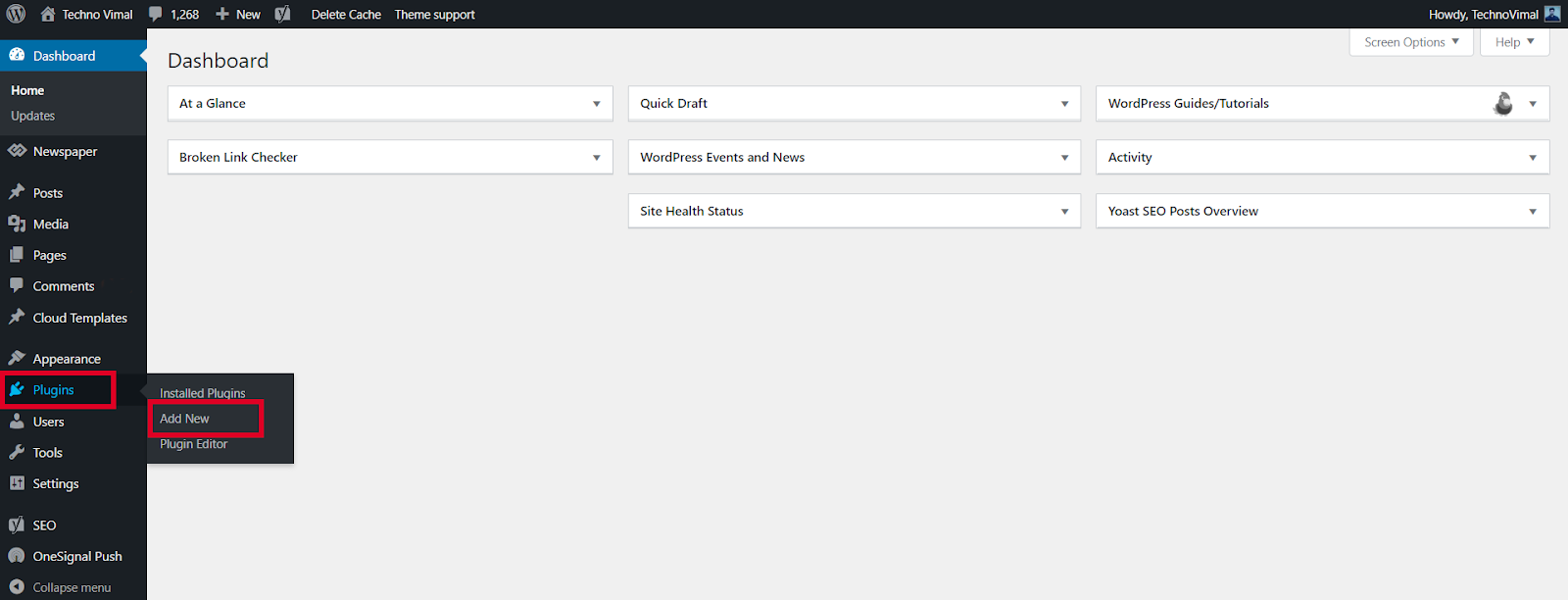
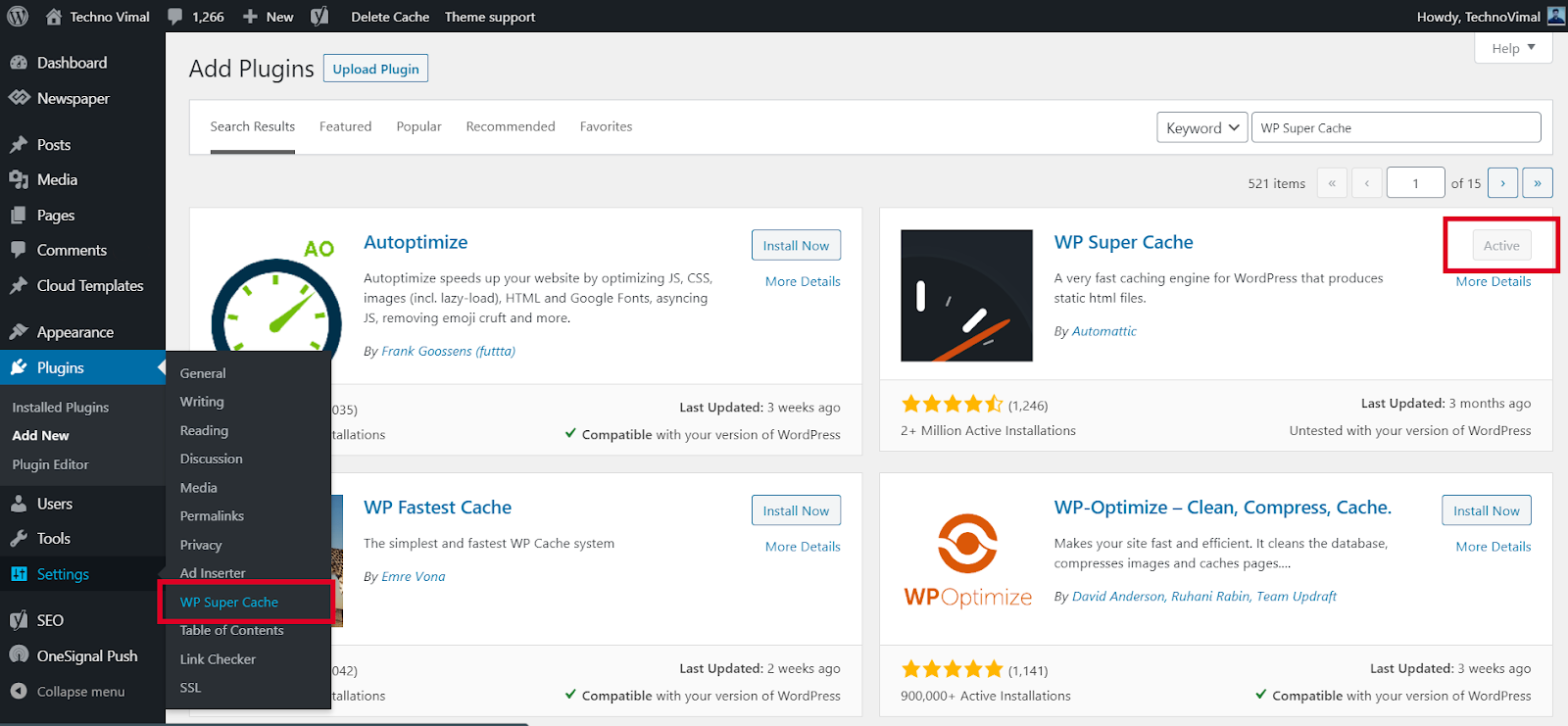
From the WordPress admin dashboard, go to Settings->WP Super Cache.
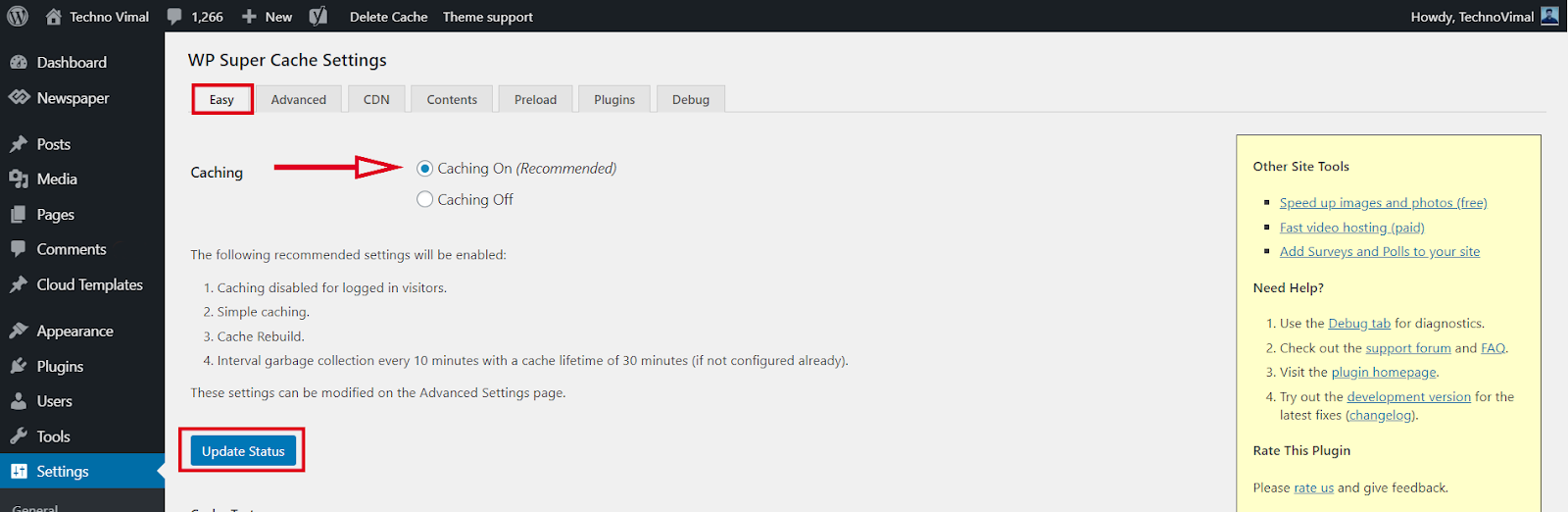
Enable web caching by selecting the Caching On option under the Easy tab. Then press the Update Status button.
WP Super Cache Advanced Set up:
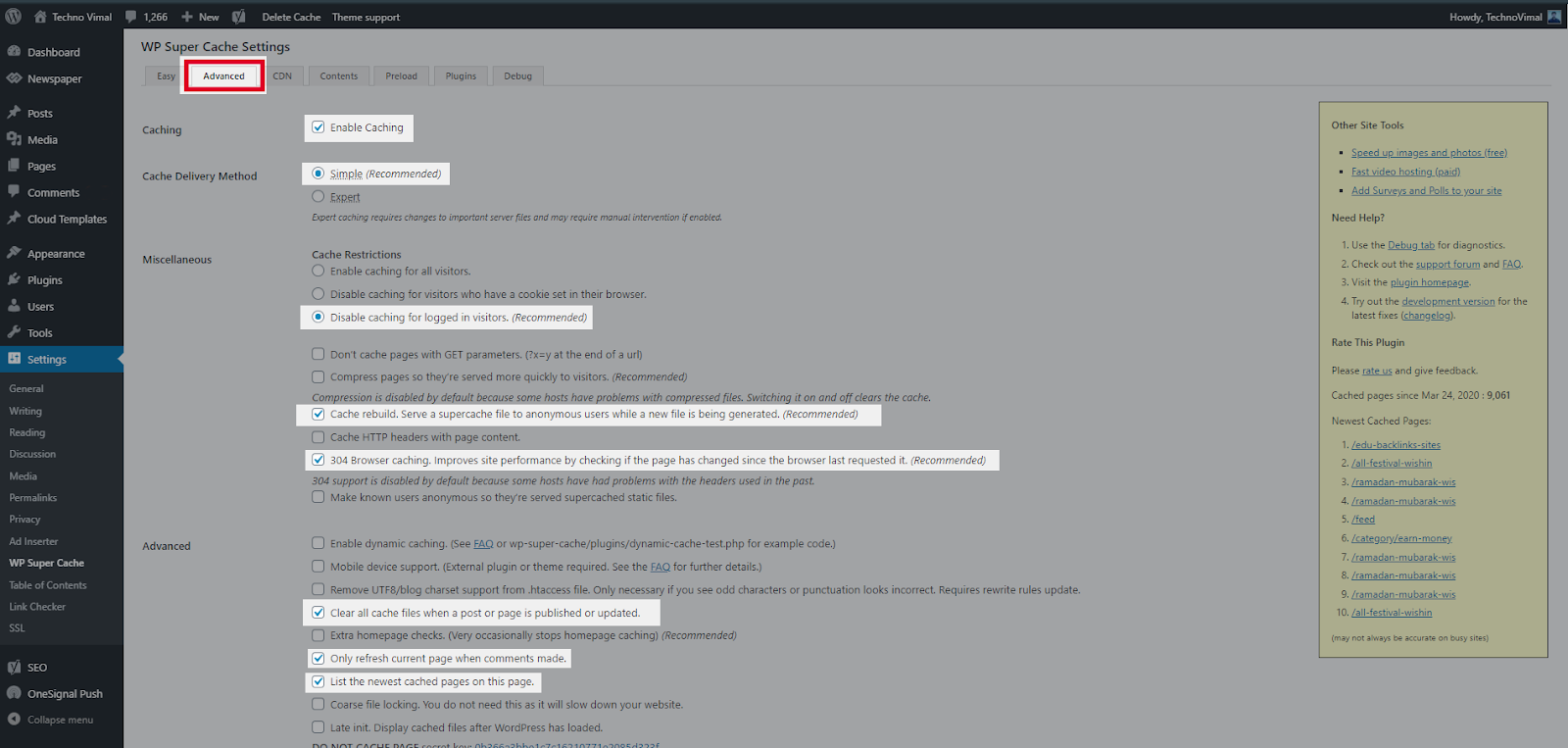
WP Super Cache is a powerful plugin and comes with many Advanced Options. These options can further improve the performance of your site.
Step 4
If you want to configure more settings. Go to the Advanced Tab. There are several recommended settings there, such as disabling caching for registered visitors and enabling page compression. Explore those options and select the ones that suit you best.
Hit Update Status once you’re done. Your website will now be loading much faster.
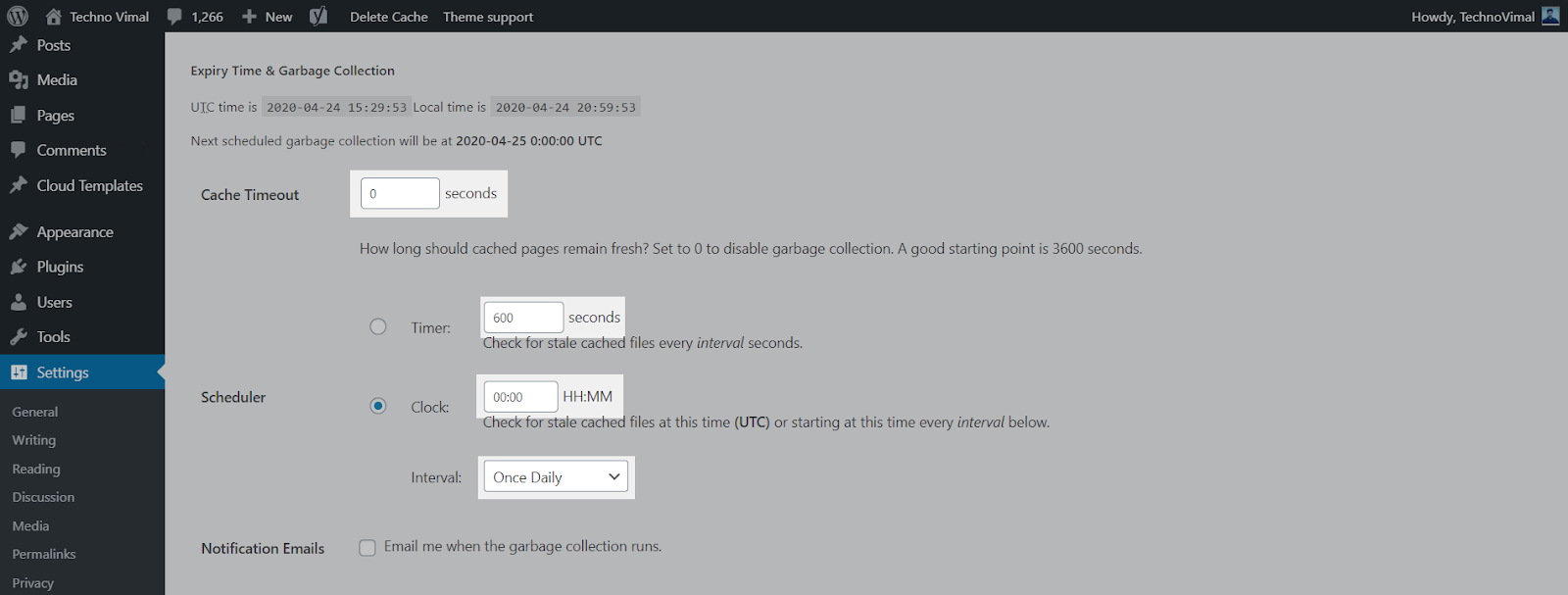
To resolve information about garbage collection, scroll to the Expiration Time and Garbage Collection section on the Advance Settings page and set a time and frequency for garbage collection of cached files on your server.
Step 6
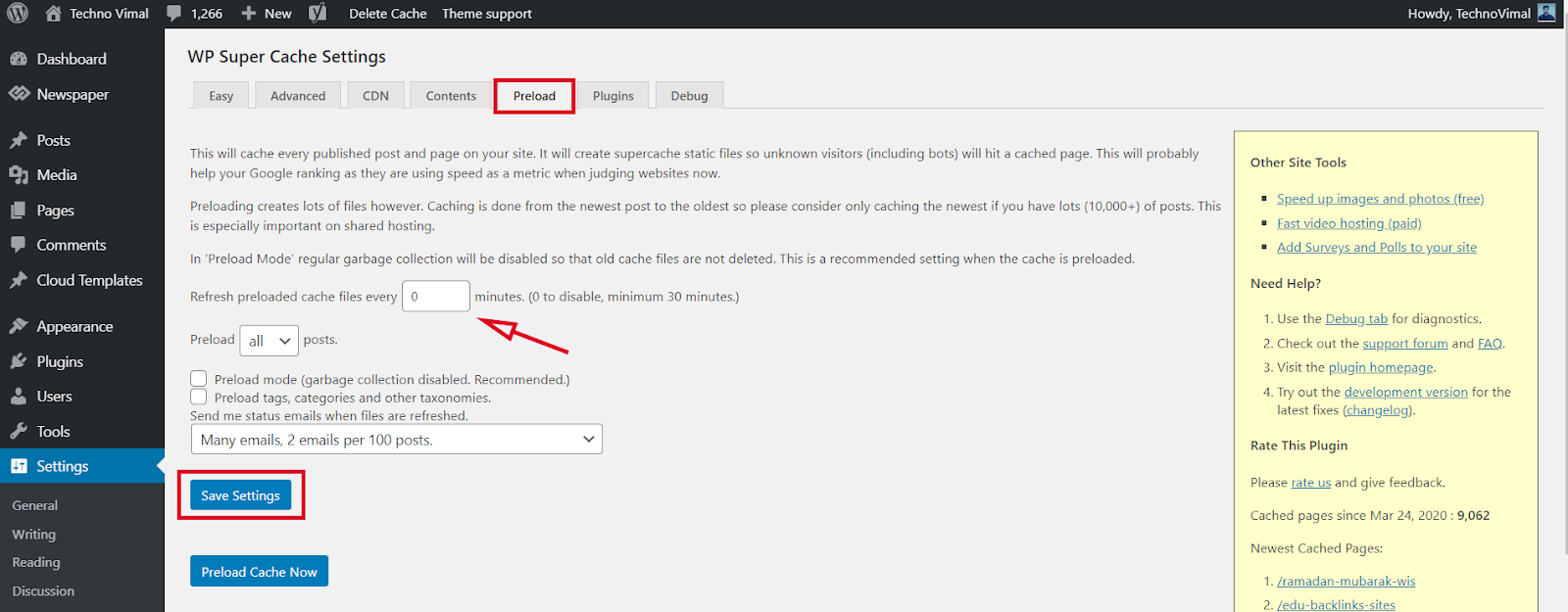
This will cache every published post and page on your site. This super cache will create static files so that unknown visitors (including bots) will hit the cached page. This will probably help your Google rankings because they are now using speed as a metric when looking at websites.
Conclusion
Now that the WP Super Cache plugin is fully installed and configured on your customized website, you should start seeing improvements to your site’s load time.
For other feedback and questions, please leave a comment below.😊
With every passing day, smartphones are becoming more powerful. Smartphones these days have capable cameras, powerful processors, etc. With such processing power and powerful cameras, we can’t resist recording more and more videos.
Recording videos on a smartphone is easy, but having too many videos can cause storage issues. A single 30-minute video file can take up to about 2GB of space on your device. So, why not compress the video to save some extra space?
As of now, there are a lot of apps available on the Play Store which claim to reduce the file size of video files. Video compressor apps can reduce the file size of any recorded or downloaded video without compromising on quality.
Top 10 Free Android Apps for Compressing Video Without Losing Quality
By compressing videos, you can share high-quality videos on social media platforms that were not possible earlier due to size limit issues. So, let’s see.
Well, if you are searching for a YouTube video editing app for Android, then Video Maker can be the best option for you. It is a complete video editing app with a video compressor.
Guess what? The app supports multi-layer editing and lots of useful video editing options. You can also add video filters, transition effects with the help of this app.
It is at least newer than all the others listed in the article. Resize Video Compress the video by resizing the video resolution. It also has a complete video editor which can be used to trim, merge, cut videos.
When it comes to filing type compatibility, Resize Video support almost all major video file formats.
If you are looking for an Android app to reduce video size without losing quality, Video & Movie Compressor can be the best option for you. With this app, you can compress full-length movies, television shows, and series.
After compressing a video, you can also directly share the video on social media platforms from this app.
As we all know that large video files are a big problem for every mobile user. Panda Video Compressor solves that problem for you.
With this app, you can compress videos and send them to others via email and text. It also lets you upload/share your videos on social networking platforms.
As the name of the app says, Video Compressor is an Android app that can compress and convert almost any video format. It provides multiple modes to compress the video by reducing the resolution, bitrate, etc.
Although not famous, Smart Video Compressor & Resizer is still a worthy video compressor app for Android. The tool is straightforward to use, and it is known to feature lossless video compression.
The app also lets you set the quality of the video and the speed of the compression process. Apart from this, you also get a video resizer to set the video dimensions.
Well, Videocompact is one of the best free video compressor and converter apps available for Android smartphones. With this app, you can convert or compress video.
Apart from this, the Android app also lets you crop, cut, and trim video clips. Overall, it is one of the best video compressor you can use today.
So, these are the best video compressor apps for Android. I hope this article helped you! Please share this with your friends also. Also, if you know of any other such apps, do let us know in the comment box below.
There are hundreds of VPN Service Providers (VSPs) in the market today. And every VPN service provider describes itself better. It even claims 100% Data Security and Online Safety. But what is the truth? You will know this in this article. In this article, you will know what is a good VPN? What are its characteristics? And what are the things to keep in mind while choosing a VPN? Also, which are the top-10 VPN in the world? And what are their characteristics?
If you think that by turning on a long password and 2-Step Authentication, now your account is completely secure. And no one can hack it, so this is your biggest mistake. Because the Internet is a place where nothing is secure. Meaning, your data can be stolen anytime, anywhere.
Even big companies like Google and Facebook, which spend crores of rupees on security every year. When their data is stolen, then what is your chessboard and mine? Because our data is like an open book, which anyone can read.
Perhaps you are wondering why I have used the word ‘open book’? So it is because we are tracked every moment on the Internet. That is, our every online activity is monitored. Like who are we? where are you sitting? What are you doing? Which device are you using? Which Apps are you using? Which Websites Are You Visiting? What are you downloading? etcetera etcetera. Records of all these activities are kept. Now you tell yourself whether our data is an open book or not? Your answer will be ‘yes.
What is a VPN?
Now the question is how to keep this book closed? That is, how to keep your data private? So the answer is VPN. Because VPN actual Location and Identity hides. So that no one can recognize you who you are? Where have you come from? And what are you doing? That is, you remain completely anonymous (unknown) on the Internet.
But the problem is that there are hundreds of VPN available in the market at the moment. And everyone calls themselves Best and No.1. So whom to trust? And on whom not? So there are some parameters for this! With the help of which you can decide for yourself which VPN is right for you. So let’s look at some important parameters.
1. Priority
First of all, decide why and for what you need a VPN? That is, what is your priority? If you want to watch Web Series and Movies on OTT Platforms. If High Speed is your biggest priority. At the same time, Anonymity for a Journalist and Encryption for a Spy will be the biggest priority. Similarly, you also have to decide your priority according to your need. So that you can choose the right VPN.
2. Device Compatibility
As you all know that Android, iOS, Windows, Linux, and Mac are the 5 largest operating systems in the market at the moment. And most devices run on these operating systems. But not every VPN needs to support all operating systems. That is why it is very important to pay attention to devise compatibility while buying a VPN.
If you use an Android Phone as well as Windows Tablet and Macbook Pro. So you need a VPN that supports Android, Windows, and Mac, all three. But if you don’t take care of this. And choose a VPN that does not support Mac OS. So obviously you will have to repent. That is why it is very important to pay attention to devise compatibility. Because it is an important factor.
3. Servers & Locations
If you think that the Virtual Private Network (VPN) has as many Servers and Locations will, he will be just as good. So it’s just your illusion. Because having more servers and locations does not mean that its service is also good. Along with the number of servers, geographical diversity is also very important.
If a VPN has 25000 Servers. But the Locations are only 20. And even those 20 locations are not your favorite locations. So would you buy it? Obviously will not buy it. Because you will have to face problems again and again. That’s why the number of servers and locations is not important. The important thing is the VPN you are choosing. Does it cover your favorite locations or not?
4. Payment Plans
It is very important to consider 3 things in payment plans. First Price, Second Plans, and Third Money Back Guarantee. If you talk about the price, then for this you should check the price of a different VPN. And they should be compared with other VPN to see which VPN is giving great features at a low price. And he is giving a Money Back Guarantee or not?
I would like to tell you that most of the VPN gives 30 to 45 days Money Back Guarantee. Which is very important. Because if you do not like the service, you can get your money back. Apart from this, a payment plan is also an important factor. Which is very important to pay attention to. If a VPN is offering you Monthly Plan as well as a Yearly Plan, then it is better. Because if the money is less, you can also buy a 1-month subscription.
5. Data Sharing
Most VPN you Data have no information about. That is, what do they do with your data? And with whom do you share it? You are not given any information in this regard. That is why the choice of VPN should be done very carefully. Because data is very important. And I have said many times that the most valuable thing of the 21st century, if anything, is our data. That is why one should avoid choosing a VPN that does not have transparency about data.
Every VPN has some of the other features. As someone is known for his speed. So for some security. Some are known for Encryption and some for Unblocking Blocked Websites. Similarly, everyone has their characteristics. Here we are going to talk about such Top-10 VPN, which are the best VPN at the moment.
1. Express VPN
Available For
Android, iOS, Windows, Mac, Linux
Countries
102
Locations
160
Servers
3000+
Max. Device Support
5
Money-Back Guarantee
30 Days
Express VPN has been everyone’s favorite VPN for quite some time now. And this is the reason why it is also in the first position in our list of Top-10 VPN. Express VPN is known for its unmatched security, high speed, and reliable service. If we talk about restrictions, then it can also tear apart The Great Firewall of China.
You can use Express VPN on almost every device. Can even be used in Routers, Game Consoles, and Smart TVs. There are also browser extensions available for Google Chrome, Edge, and Mozilla Firefox.
Main Features :-
Superfast Speed
Fast Connection
Unlimited Bandwidth
VPN Split Tunneling
Defeat ISP Throttling
Bitcoin Payment
P2P Support
Kill Switch
DNS Leak Protection
No Logs Policy
Express VPN Netflix, Hotstar, Hulu is, Youtube, BBC iPlayer and with all the popular video streaming sites such as Amazon Prime Videos-even Geographically Blocked Website with can easily Unblock. I would like to tell you that ExpressVPN does not keep records of any of your online activities. Because Express VPN believes in the No Logs Policy.
2. Nord VPN
Available For
Android, iOS, Windows, Mac, Linux
Countries
59
Locations
80+
Servers
5400+
Max. Device Support
6
Money-Back Guarantee
30 Days
Perhaps you have already heard a lot about Nord VPN. Because the name of Nord VPN is heard again and again from Youtube to TV Ads. Although all this is part of a promotion. But that doesn’t mean Nord VPN isn’t a good VPN. It comes at number two in our list of Top-10 VPN.
Nord VPN is known for its excellent security and data privacy. The big thing about it is that Panama is registered (Panama), where Fourteen Eyes Surveillance such organizations also shows no tame. That is, Nord VPN cannot be pressured to share data. That’s why Nord VPN does not store any of your Confidential Data. It gives you great security and privacy.
Main Features :-
Great Performance
Fast Connection
Proxy Extensions
Smart DNS
Kill Switch
DNS Leak Protection
Strict No Logs Policy
If we talk about Restrictions, then Nord VPN is an expert in this matter. It can also easily bypass The Great Firewall of China. It can also easily unblock Geographically Blocked Websites from streaming sites like Netflix, Youtube, Hulu, iPlayer, and Amazon Prime Videos.
3. SurfShark
Available For
Android, iOS, Windows, Mac, Linux
Countries
63
Locations
100+
Servers
1700+
Max. Device Support
Unlimited
Money-Back Guarantee
30 Days
The biggest feature of Surfshark is that it supports Unlimited Devices. That is, you can connect any number of devices to it. If you have many devices in your home or office. And you want to have only one VPN for everyone. Then Surfshark can be a great option for you. Because it provides you the best service at a low cost.
Surfshark uses AES-256 encryption with IKEv2, OpenVPN, WireGuard, and Shadowsocks VPN protocols. Which plays an important role in the security of your data. Apart from this, the CleanWeb feature not only blocks Ads and Trackers. Rather, it also protects from malware.
Main Features :-
Unlimited Device Support
Fast Connection
Ad Blocker
CleanWeb
Unlimited Bandwidth
Kill Switch
DNS Leak Protection
Logging Policy
Although Surfshark supports the Strict No Logs Policy. But despite this, if you create your account on Surfshark. So your Email ID and Billing Information are stored. You can read Surfshark’s Privacy Policy for detailed information.
Wherever it comes to Top-10 VPN, CyberGhost comes up there. It is a simple and easy-to-use VPN, which is known for its excellent security and Massive Server Coverage. Although the number of servers is not as important to us as the security. That’s why we talk about security.
CyberGhost takes full care of the privacy and security of its users. It does not store any data of its users. That is, supports Zero Logging Policy. Also blocks Ads and Trackers. And uses DNS and IP Leak Protection, Automatic Kill Switch, and AES-256 Encryption for better security.
Main Features :-
High Speed
Fast Connection
Torrents Support
Ad Blocker
Automated HTTPS Redirection
Unlimited Bandwidth
Kill Switch
DNS Leak Protection
No Logs Policy
CyberGhost is available for Android, iOS, Windows, Mac, and Linux as well as Browsers, Game Consoles, and Smart TVs. Talking about Unblocking, it can easily Unblock Popular Video Streaming Sites as well as Geo-Restricted Websites. But if you live in China, this is not for you. Because it cannot break The Great Firewall of China.
5. IP Vanish
Available For
Android, iOS, Windows, Mac, Linux
Countries
55
Locations
75+
Servers
1500+
Max. Device Support
Unlimited
Money-Back Guarantee
30 Days
IP Vanish is known for its excellent security and unlimited device support. It is a fast and secure VPN, which covers more than 75 locations in 55 countries. Although IP Vanish is a very good VPN in terms of security. But there are some such features, which are not seen in IP Vanish. Such as Ad Blocker. Although Ad Blocker is a fairly common feature. And can be seen almost in VPN. But it is not in IP Vanish.
Well, IP Vanish is quite rich in terms of features. And always appears in the list of Top-10 VPN. But when it comes to Data Logs, its Privacy Policy seems a bit confusing. Because according to IP Vanish it supports Zero Logs Policy. But when you look at the Privacy Policy of IP Vanish. So it turns out that the user’s email ID and payment methods are logged.
Main Features :-
Unlimited Device Support
Excellent Speed
Fast Connection
Defeat ISP Throttling
Unlimited Bandwidth
Unlimited P2P Support
DNS Leak Protection
Anonymous Torrenting
IP Vanish provides you with 250 GB of Encrypted SugarSync Storage, in which you can store your files. Although IP Vanish is not that good in terms of Unblocking. It can unblock Youtube, Netflix, iPlayer, and Hulu. But not The Great Firewall of China. That is why it is not suitable for China at all.
6. Proton VPN
Available For
Android, iOS, Windows, Mac, Linux
Countries
50
Locations
50+
Servers
1000+
Max. Device Support
5
Money-Back Guarantee
30 Days
Proton VPN is known for its unique features. Although it is a new VPN, it is quite ahead in terms of privacy, anonymity, and security. And that is why it has been included in our list of Top-10 VPN. Although Proton VPN is a Paid VPN. But it also has a free version, which is much more than a free VPN. Because it has many such advanced features, which are not seen in any free VPN.
Now you must be thinking that if there is a free version then there will be a limit of speed and bandwidth in it. Also, there will be the risk of data. But let me tell you that it is nothing like that. You get Unlimited Bandwidth and Superfast Speed even in Free Version. Also, no record of your data and connection is kept. Nor do you get to see ads.
Main Features :-
Unique Features
Different Look
Excellent Speed
Fast Connection
Solid Encryption
Unlimited Bandwidth
Tor Network Support
Perfect Forward Secrecy
Bitcoin Payment
P2P Support
Kill Switch
DNS & IP Leak Protection
No Log Policy
If we talk about security and privacy, then Proton VPN seems to be quite ahead in this matter. It is a Swiss Based VPN, which is free from the control of Fourteen Eyes Surveillance. With the help of Proton VPN, you can send and order your data traffic through the Tor network. Not only this, but you can also easily access .onion websites.
ProtonVPN uses AES-256 encryption with IKEv2 and OpenVPN protocols. Also provides DNS & IP Leak Protection and Unlimited P2P Support. I would like to tell you that Proton VPN is strictly against Internet Censorship and Surveillance Systems. And that’s why it is banned in China.
7. Private Internet Access
Available For
Android, iOS, Windows, Mac, Linux
Countries
74
Locations
95+
Servers
13500+
Max. Device Support
10
Money-Back Guarantee
30 Days
Excellent internet speed, great security, and over 13,500 servers. This is the identity of Private Internet Access. This is a Privacy Centric VPN, which always appears in the list of Top-10 VPN. However, PIA (Private Internet Access) keeps a log of your email address, payment, and locations. But at the same time, it also gives the facility to make payments through Gift Cards. That is, you can pay anonymously.
Security features of PIA include features like P2P Support, Malware Protection, WiFi Protection, and SOCKS5 Proxy. Apart from this, it also provides a Camera and Microphone Protection. Also blocks Ads and Trackers. And provides great internet speed with unlimited bandwidth. And the good thing is that it supports 10 devices simultaneously.
Main Features :-
Good Speed
Easy To Use
Defeat ISP Throttling
Unlimited Bandwidth
P2P Support
Kill Switch
DNS Leak Protection
Camera & Microphone Protection
Private Internet Access is available for Android, iOS, Windows, Mac, and Linux as well as browsers. Talking about unblocking, it can easily unblock Netflix, Youtube, and Hulu as well as Geo-restricted sites. But when it comes to China, it seems to be standing behind.
Hotspot Shield is known for its superfast speed. It is almost twice as fast as other VPN. That is why it is very much liked by Gamers and Streamers. Although it is at number eight in our list of Top-10 VPN. But it is far ahead in terms of speed. If the list of Fastest VPNs is made, then it will come first in it. But our list is based on the overall performance.
Well, Hotspot Shield is a very simple and easy-to-use VPN, which can be set up in one click. Although it also has a free version. But with limited features, only 500 MB of data is available for the day. Also, ads are seen, so differently. That’s why Paid Version is much better than Free Version. Because there is no restriction on it.
Main Features :-
Fastest Speed
Fast Connection
VPN Split Tunneling
Defeat ISP Throttling
Unlimited Bandwidth
P2P Support
Torrents Support
DNS Leak Protection
Although Hotspot Shield is a well-known name in the VPN industry. And always appears in the list of Top-10 VPN. But when it comes to privacy, it is faced with its aggressive logging policy. Not only this, it is a US-based VPN, which comes under the control of Five Eyes Surveillance. That’s why Hotspot Shield is not as reliable as Nord VPN in terms of data privacy.
9. Private VPN
Available For
Android, iOS, Windows, Mac
Countries
60
Locations
60+
Servers
150+
Max. Device Support
6
Money-Back Guarantee
30 Days
PrivateVPN is an All in One VPN, which is known for its Privacy, Security, Anonymity, and Fast Speed. It is a simple and easy-to-use VPN, which can be set up in one click. Although Private VPN does not have any servers yet. But it is continuously expanding its server network. And is growing very fast.
Talking about privacy, PrivateVPN supports Zero Data Logging Policy. That is, no-log of any of your data is kept. But if you create your account on Private VPN. So a log of your Email ID and Password is kept. And this is the only information that is logged. This has been mentioned in the Privacy Policy of Private VPN.
Main Features :-
High Speed
Fast Connection
VPN Split Tunneling
Defeat ISP Throttling
Unlimited Bandwidth
P2P SupportKill Switch
Port Forwarding
IPv6 DNS Leak Protection
Zero Data Logging Policy
Private VPN is a very good option when it comes to streaming. It can easily unblock Netflix, Amazon, iPlayer, and Hulu as well as Geo-restricted sites. Also provides good speed, so that you can stream HD content without buffering. Apart from this, it is not very expensive in terms of price. That is Value for Money VPN.
10. Vypr VPN
Available For
Android, iOS, Windows, Mac
Countries
64
Locations
70+
Servers
700+
Max. Device Support
5
Money-Back Guarantee
30 Days
Viper VPN is a Swiss-based VPN, which is known for its security. Although it is not a perfect VPN. But it is much better in terms of security and encryption. It uses WireGuard, IKEv2, IPSec, and OpenVPN as well as its Chameleon Protocol. Which helps to circumvent Internet Censorship.
Main Features :-
Average Speed
Defeat ISP Throttling
Unlimited Bandwidth
P2P Support
Torrents Support
Kill Switch
Public WiFi Protection
IP Leak Protection
No Log Policy
If Speed speaks of, so Vypr VPN is not much better in this case. Although some servers are very fast, but not all. Most servers are quite average in this regard. Talking about Unblocking, it can easily unblock Geo-Restricted Websites. Also, it works well in China too. Overall, this is a very good option for privacy and security.
The best VPN right now
Now the question is, which is the best VPN among these top-10 VPN? So it depends on what is your priority? So what is your biggest need? If you are a Hardcore Gamer or Streamer. So it is obvious that you need Superfast Speed. And for this Hotspot Shield is the best option. Because with its help you can stream HD content without buffering.
But right there if you want to bypass The Great Firewall of China. So you should choose Express VPN or Nord VPN. Because they are experts in this matter. That is to say, which VPN is perfect according to your need. That is the best VPN for you. Now you can decide for yourself which one of this top-10 VPN is best for you.
Conclusion
A good VPN has features like Security, Privacy, Anonymity, Encryption, and High Speed. Additionally Restrictions to Bypass and Censorship ability to circumvent. Because this is the main job of a VPN. That is why all these things have been taken care of in our list of Top-10 VPN.
In this article, you learned about the Top-10 VPN and its features. Also, go into detail about the shortcomings and features of each VPN. Hope this list of Top-10 VPN will prove to be very helpful for you. If you liked this article then like and share it. And subscribe to techsavvy.com for the more informative information. So that whenever we publish a new article! you get its notification.
With the help of online shopping tips in Hindi, you can easily buy any item found on the Internet. Online shopping is a work started by goods and service seller companies.
What is Online Shopping?
Online shopping means buying things or services on the Internet, through online shopping, you can buy anything sitting at home. When the concept of the world wide web came, then goods and service seller companies started selling their goods online to those users. Those who spend their time at home or in the office on computer or laptop. Through this online shopping, customers can buy many products online sitting at home. Like household material, food items, clothes, furniture, etc. But if you want to do online shopping, then it is necessary that you have access to the internet and you have a card to pay for things like a debit card or credit card, etc.
Who Introduced Online Shopping?
Online shopping was started by Michael Aldrich in 1979. They used television for this and seeing things on TV, customers could place their order through the telephone. In March 1980, he started the region’s office revolution through which consumers, customers, agents, distributors, suppliers, and service companies could connect online. The first-word wide web server and browser were created by Tim Burners Lee in 1990. And its official use happened in 1991.
⚡ Below we have told you its advantages in online shopping. Everything has its own advantages and disadvantages.
With online shopping, you can shop at any time in 24 hours, but if you buy the same from a shop, then it does not happen that you have to shop only at the time of opening of the shop.
Through online shopping, you get a list of many products, so if you want, you can compare the products among themselves.
If you shop online, then you can also compare the price of the product.
If you do online shopping, then your time is saved, you can do shopping from your system in less time sitting at home.
If you do online shopping from your computer while sitting at home, then you avoid the problem of parking in shopping malls.
If you shop online, then you do not have to face the problem of standing in line at the time of billing.
If you do online shopping, then your goods are delivered to your home by the company, on the contrary, if you go to the shopping mall or shop for shopping, then you have to bring your own goods.
If you do online shopping and you are not satisfied with your goods, then you can return your goods, you get your money back.
Disadvantages of Online Shopping
⚡ We will tell you some of the disadvantages of online shopping. If there are some advantages of online shopping then there are also some disadvantages.
If you do online shopping, then you cannot test by touching things like normal shopping, you have to do your shopping by looking at the screen, when on the contrary, in ordinary shopping, you can touch things and try wearing clothes. Yes, their material can be checked etc.
When you do online shopping, you also make your payment online, so there is a possibility of fraud with you.
When you do online shopping and you do not like the goods or due to some reason you have to return the goods, then you have to face a lot of troubles to return your goods and your money back is also a bit difficult because money back also. Comes in your account only.
If you shop online then you have to wait for some time to get your goods, whereas if you shop from normal shop then you can get your goods immediately.
According to the article on online shopping, despite all these advantages and disadvantages, online shopping is very much in trend nowadays, due to the busy schedule, many customers have started using online shopping. That nowadays the first choice of new customers is online shopping. As slowly people are becoming friendly with the system, they have started liking online shopping, nowadays, even if people are sitting empty, their best time pass is online shopping, in their free time, people visit different websites and products. Check and buy them.
The best advantage of online shopping is that you can shop according to your time. But in online shopping, the delivery of any item can be found most quickly till the second day of shopping and this time starts from two hours after you do your shopping. If you do online shopping, then the charges for home delivery of the item are clearly declared on the site, then it should be confirmed by the customer in advance that how much money he will have to pay for delivery or not.
2. Start Shopping
When you start your shopping, type the item you want to buy in the search bar or search it from different categories on any site or you can also select your goods by clicking on an advertisement and buy your goods. can. When you go shopping for yourself, you can click on the item you like, then you can clearly see that item in different ways and zoom, which clears the image of that item in your mind.
3. Select Your Payment Type
When you do online shopping, you can select your payment type yourself, if you want, you can pay through credit card or debit card or if you want, you can also make your payment in cash at the time of delivery of the item. . When you make your payment by credit or debit card, the money does not go from your account until the delivery of the item is done to your home.
When you place your order and you want to amend that order, then you have the option but keep in mind that this modification should be done within a certain time only. At the time when you place an order and the item arrives at your home and you do not like the item or the item does not fit according to your size, you can still change or return the item.
5. Receive Your Shopping
When all the pre-process is completed then the item reaches your home and you can get your shopping item at your home. When the seller company delivers the goods, then it is their responsibility that at the time of delivery there is no damage to the goods or the right item reaches the customer’s home. If there is any damage or mistake in delivery, the seller or delivery company is solely responsible for it.
6. Payment at the Time of Order Placement after Shopping
This is the best facility for online shopping that you can make your payment at the time of delivery of the item. If the customer makes the payment at the time of delivery, then he is not at risk of any kind of fraud, and at the same time that person can check and pay after receiving his goods.