If you also wanted to start a blog but don’t know how to? you are not alone the best way to get your foot into the door is to publish your first blog with one of the free services that are a blogger. So, friends in this article I will tell you how to start a free blog at blogger Simple Step.
Read Also: How To Start A Blog on WordPress?
Start a Blog Follow these Simple Steps
Step 1:
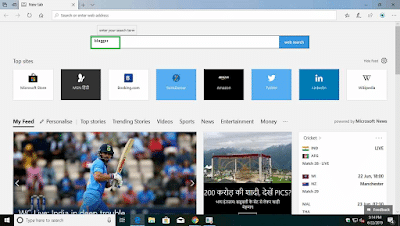
- open your web browser.

Step 2:
- search blogger.com in the search bar.
Step 3:
- Here, click on the blogger official website link.

Step 4:
- Click on create your blog if you already have an account then click on sign in.

Step 5:
- Choose your account to continue.

Step 6:
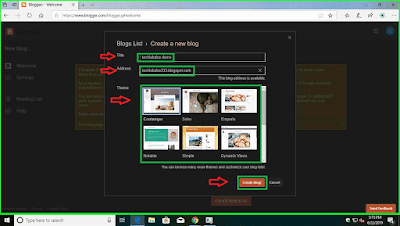
- Next click on create a new blog and give your title and address then select a theme and click on create a blog.
Step 7:
- After fill up you can choose your domain name if you don’t want to choose from there you can click on no thanks.

Step 8:
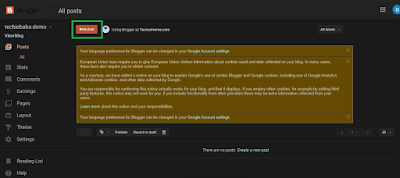
- After that click on a new post to create your new post
Step 9:
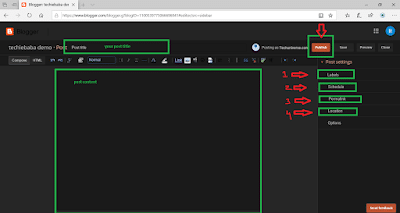
- Here give your post title and post content. In the post, settings give your post labels example Android, windows, in the schedule option-click on a set date and time, in permalink choose custom permalink and in location give your location.
Step 10:
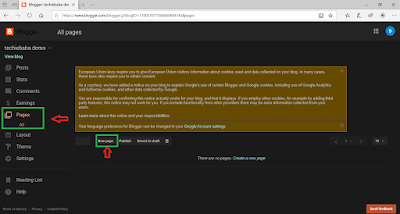
- Next, click on pages and click on new pages to create pages like privacy policy, terms and conditions, contact us, these pages are very very important for your blog.
Step 11:
- Click on the layout where you can customize your blog theme. Choose your favicon can add gadgets in the sidebar and remove waste things from your template.
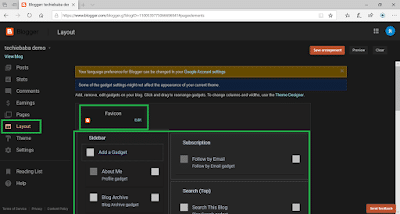
Step 12:
- In the theme option, you will get advanced customization options. In edit HTML you can paste or edit different codes.

» Top 5 Blog Writing Skills & Tips for Better Blog Posts
» How To Remove Date From Blogger Post URL – Make Blogger Permalink Format Like WordPress
Step 13:
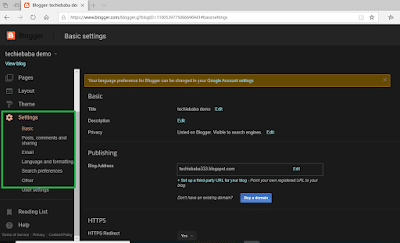
- Click on settings where you will get all the settings for your blog. In basic settings give title, your blog description, in blog address you can set up a third-party URL for your blog such as .com, in search preference you will get settings related to Search Engine Optimisation.
So, friends, you have seen how easy it is to create a blog on blogger.com
How to Add a Custom Domain to Blogger
- Buy a domain name from a domain registrar.
- In Blogger, go to Settings → Publishing → Custom domain and enter your domain with www, for example
www.yourblog.com. - Blogger shows two CNAME records. Add both records in your domain registrar’s DNS settings.
- Wait for the DNS to update (it can take up to a few hours), then save the custom domain in Blogger.
- Turn on HTTPS availability and HTTPS redirect in Blogger settings.
Make Your Blogger Blog SEO Friendly
- Go to Settings → Meta tags, turn on Enable search description and write a short description for your blog.
- Add a search description to every post from the post settings panel.
- Use a fast, mobile-friendly theme. See 20+ Best Blogger Themes.
- Submit your blog to Google Search Console so your posts get indexed faster.
Can You Earn Money With Blogger?
Yes. Once your blog has enough original content and traffic, you can apply for Google AdSense from the Earnings section in Blogger. Read How to Make Money From Google AdSense for the details.
Frequently Asked Questions
Is Blogger free?
Yes. Blogger is a free blogging platform by Google. You only pay if you want a custom domain name.
Blogger or WordPress: which is better?
Blogger is free and simple, which makes it good for a first blog. WordPress gives you more control over design, plugins and SEO. Read How to Start a Blog to compare the two.
Read Also: How To Make Money From Google AdSense
Please Like, Comment, Share THANK YOU!