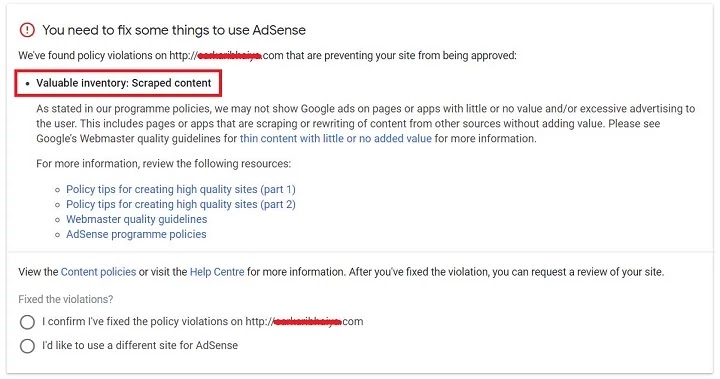
Completely fix Valuable Inventory: Scraped Content – When you apply for Adsense for some time, your account will not be approved due to a valid inventory scraped content issue.
So here we are going to discuss this article. “How to fix the error of Valuable Inventory Scraped: Content Adsense Policy Violation? “
Make sure your website is fully developed. Your website should have unique content. I said it is unique it means it is written by itself not copied, scraped from other articles.
What is scraped content?
Scraping content is taking content from other places on the web and publishing it on your own site.
There are many websites that only have parts or content stolen from other websites. Many sites will take articles from other websites and publish them as if they were their own, or copy entire websites.
This behavior goes against Google’s guidelines and copyright laws in the United States and other countries.
It is worth taking the time to create original content that configures your site. This will retain your visitors and provide more useful results for users who search on Google.
Some examples of scraping include:
Sites that copy and republish content from other sites without adding any original content or value
Sites that copy content from other sites, modify it slightly (for example, using synonyms or automated techniques) and republish it
Sites that reproduce content from other sites without providing some type of organization or benefit unique to the user
Sites dedicated to embedding content such as videos, images or other media from other sites without sufficient added value for the user
How &Why webmasters perform scraping on their blogs?
Singularity is important for Google and for all readers on the Internet. Therefore, producing unique, authentic, correct and valuable information for readers will always be fruitful in blogs for you and your long-term blog.
It is not a good idea if you copy from a large website to create good articles on your site so that your AdSense is approved or you can gather some traffic.
As a blogger, you should focus on the interest of your visitors, their demands. Do proper research and then write unique and relevant content for your blog readers. Not just waste material!
Understanding “Scraped Content.”
The content was published on site A.
Site A was disconnected and content moved to site B.
Site B was disconnected and the content was not available on the web.
The content was available on Wayback Machine.
I started site C and republished the content.
Site C is marked as “scraped content”, although there is only one version available online.
How to fix the “Valuable Inventory: Scraped Content” Adsense violation?
Check your article for plagiarism. If you don’t know which item is plagiarized or scraped.
Don’t copyrighted images, videos or other copyrighted data.
Do not write other blog posts with exactly the same word.
Place too many ads
Check the theme easy to use.
Add privacy policy, disclaimer, DMC page.
Remove most plagiarized publications or edit until they are 100% original.
Write some more posts and request Adsense again.
Conclusion
Fix valuable inventory scraped content – I have been blogging for the last three and a half years. I have seen many changes in Google AdSense policies. If you read them you can easily understand that they are always focused on the direction of the reader and the behavior of the advertiser.
Learn SEO: SEO (search engine optimization) is a process to attract organic traffic or visitors to your website or website by making it available in the main search results for a particular keyword searched by the user.
In the current era websites are at the level of need. Creating a website to do is an easy task in itself and it is even more comfortable if you do it in WordPress. What else do you need besides designing and configuring your website? The answer is search engine optimization. You must be thinking what is SEO?
Search engine optimization (SEO) is the most important thing or an essential requirement for website ranking can be said. Hearing this you might consider it the hardest part. But the answer is no. If you have the right guide then nothing is impossible in this world.
I hope you are well versed in SEO Earth. In addition to the definition of SEO this article tells you everything you need to know about search engine optimization from basic SEO terminology to the importance of SEO.
Basic Concepts of SEO
What do you think is better to jump directly to real-world SEO techniques to skip native ones? Beginners in a hurry to achieve it can leave it. But you never know what step you are missing and how much it matters.
Imagine what you would have done in your preprimary class on the first day of school they gave you to write an essay. Of course you cannot write a single letter because it is not transparent about its basic concepts or has studied A B C D. Now you understand how important the basic concepts are.
Similarly the basics of SEO have the same importance as do advanced SEO techniques. The basics of SEO include:
Know your audience: for best results you must know your target audience. Whether you want to target people from the USA. UU. United Kingdom India or anywhere in the world.
Know your competition: keep track of your competition what they are doing and what they are offering. Winners are those who never underestimate their competitors.
Keyword research: Make a list of the most searched keywords and try to use them 4 to 8 times in your content based on the length of the content. You can use several keyword research tools available online.
Site structure: this means how your website looks. It should look attractive and organized. In addition it should be easy to navigate. Almost every page of your website must be linked to one or more web pages on your site and must be created by considering yourself as a user.
Title: a catchy and catchy title of a minimum of 75 characters and a maximum of 55 characters; Do not exceed the threshold to achieve a better CTR (click rate).
Meta description: gives reasonable meaning in approximately 150 to 140 characters. If your meta description is good the probability of appearing in prominent fragments increases.
URL structure : use concise and descriptive URLs to make it as simple as possible which makes them easy to use.
Canonical URL: used to indicate to the search engine that the master URL of a page is represented by a specific URL so that duplication of the content does not cause problems.
Content optimization: Create content so that users stay on your website for a longer time. Try to explain in simple and short words. Add compressed images (for example compress images of 120 kb to 50 kb or less) so your website takes less time to load.
Screenshot Describing the truth: add screenshots because people believe more in what they see than in what they read or hear.
The site must be suitable for mobile devices (responsive): most Internet users use their mobile phones to perform searches. Your website must be suitable for mobile devices. That is it must be adjusted according to the size of the mobile screen. You can view your website compatible with mobile devices or not through Google Pagespeed Insights.
The site should load quickly: the site should not contain data in cache unused JavaScript and CSS files. And the images must be compressed to their original size so that the website loads faster. If a site takes longer to load the user can close it and move to another location.
Recommendation: If you want to start your blog in WordPress you can install the “WP Rocket” “MaxCDN” and the “Shortpixel” add-in to increase the speed of your blog/website page.
Stay updated: keep track of what’s new; What are the latest SEO techniques? What changes Google is making to its algorithm and many others.
Stay away from Black Hat SEO: this is a risky technique in the short term and is more likely to get into trouble. You must stay away from Black Hat SEO.
Follow the guidelines for Google webmasters: you can’t be sure that what you are doing is right or wrong. So before doing anything follow the guidelines of the webmaster of Google.
Time – Monitor your website at the moment – you probably don’t know that your SEO campaign is valid or not which can generate your site more leads and more sales. For all these things you should continue to measure your results from time to time.
Active in social networks: social media marketing is the best way to reach your customers and know their interests.
SEO Terminology
Before reading more about search engine optimization they should understand the basic SEO terminology which helps them better understand the meaning of SEO. SEO consists of more than 200 essential words the most common of which are below the search engine optimization terms.
Redirection 301: This is a permanent server redirection from your previous URL to the new URL without error “No”. Redirection 301 is a way of telling the search engine that the URL of the web page URL has changed.
Alt Tag: This is a feature of the HTML image tag. The Alt tag is the text that is displayed when an image takes time or does not load.
Anchor text: this is the text to which the second page is linked. In simple words, it is a text that works as a link to another page.
Link recoil: this is a link placed on the web page or website of another person who returns to his web page or website. The process of creating backlinks is called link building. There are two types of backlinks: dofollow and nofollow.
Black Hat SEO: This is an unethical or inappropriate SEO technique that goes against Google’s guidelines.
Canonical URL: This is the master URL of your web page that tells the search engine to retrieve it as a master or main URL (4 domain versions: www non-www HTTP https) which you can send to your visitors I want to see SERP.
Tracking: This is the process by which search engines find new or updated content (web pages images videos and many others).
CTR ( click rate ): is the relationship between the number of clicks and the number of users who visited the particular web page to which that link exists.
Deindexed: this means that your website or website has been removed from the search engine index and therefore does not appear in the search results.
Do-follow: these are links from one site to another which gives SEO credit. In simple words, it provides a backtracking link to other websites.
Domain Authority (DA): This is a search engine ranking score of a third-party tool that describes how well you rank a website.
External links: these links point to a domain other than the region in which they exist.
Function fragments: also known as enriched fragments it is an organic search box that appears at the top of the search results after the search.
Google Search Console: This is a free program provided by Google which uses the owners of the site to verify how their website works in the search.
Header: This is the text that is placed in the HTML header tags that are H1, H2, H3, H4, H5, and H6 tags.
Inbound Link: This is a link to your site from another site and is considered one of the best ways to increase the rank of your website.
Index: An index is a database where all search engine data is stored. If a page is indexed it appears in the search results of a particular keyword.
Indexing: this is the process of collecting and storing data for future use by search engines.
Internal links: internal links are links that point to a page on other pages of your website.
Keyword: this is any word entered by the user in the search box. It is the most searched word.
Keyword density: this is the percentage or number of times a keyword appears on a web page.
Link creation: this is the process of getting more and more inbound links to drive traffic to your website.
Meta tag: this tells the search engine what your post or website is in a couple of words. Includes meta descriptions and meta keywords.
Nofollow: This is a link from one site to another which does not grant SEO credit to the other website. In simple words, there is no vote or any link to the search engine index to notice this.
SEO on the page: it is the SEO that you perform on your page to improve your ranking. For example internal links improvements in keyword density and some others.
Off the SEO page: – This SEO hat off your site to improve your positioning – for example, Link building.
Organic results: in addition to the ads the results that appear for a particular query are organic results.
Organic search: enter any word in the search box click on the search button. This is an organic discovery.
Page Rank (PR): This is an algorithm used by Google to rank web pages which defines the importance of that web page in the ranking factor.
Organic traffic: in addition to the unpaid or natural search results that lead to your website they are called organic traffic.
Page Authority (PA): This is a search engine ranking score that defines how well a web page is ranked in the search results.
Page view: When a visitor visits a website it is known as a page view.
PPC (pay per click): PPC also known as CPC (cost per click) is an online ad that users pay when they click.
RankBrain: This is Google’s current updated algorithm that processes relevant search results.
Site map: A site map is a list of all the pages available on your website.
SERP: means a search engine results page. These are the results pages you see after searching.
Spider (tracker bot robot): The Spider search engine informs new sites new content and reports to verify the data so that the search engines can index and classify them.
URL (Permanent Link): The Uniform Resource Locator is the address of a particular web page.
White Hat SEO: This is a type of ethical SEO technique that follows Google’s guidelines.
If you want a deeper understanding of these SEO terms you can consult my article on SEO terminology.
How does SEO work?
The main objective of search engines is to provide the user with high-quality content and the best services that can meet the user’s search objective. You can achieve this only by optimizing the web pages through search engine optimization. I know that search engine optimization is a complex process but to be honest it’s not that complicated.
The questions you can think of how will SEO work? How can a search engine identify pages that are relevant to your search? How can search engines identify the best content and rank web pages? Let me answer your question.
To know how SEO works you must be clear with the basics of SEO. Once you apply all the necessary SEO techniques your work will be over and it’s time to start working for the search engines.
The search engine scans all websites on the Internet to know your site and then continues to work.
The search engine follows three steps to identify the relevant and best content for tracking indexing and ranking.
Tracking: This is the first step in which search engines send their team of robots such as crawlers spiders or bots to discover what’s new on the Internet and what content is updated. The content not only includes an article but it can vary from an image video PDF to audio content.
Indexing: Any crawler spider or bot that collects search engine information is stored in the search engine database. Note that not all crawled web pages are also indexed. You must make your content good enough to be indexed.
Classification: the order of the lowest result of the best result (10 blue links) is known as classification. In other words you can say that the results are ranked in order from best to the poor.
SEO Types
There are three types of SEO. If you want your website to rank well you must do all three types of SEO:
This is SEO that you do on your website or website to improve your ranking. SEO on the page is the most basic type of SEO you need to understand because when SEO on the page of your website is not perfect how can you expect other SEO techniques to make your site top the list? The
The most important thing to do in SEO on the page is the proper keyword research. See the most searched keywords and add them to your content. In addition to keyword research it also includes internal links the most important technique that underlies meta tags meta descriptions text formatting fast page loading the era optimized for mobile devices and other SEO on the page.
You need to work extremely hard on your content as it is the only thing that attracts visitors. Create a masterpiece with a catchy title.
You must start with the content to be excellent; You only have 10-12 seconds to impress a visitor to stay on your page for longer. Google takes a count of how long a visitor stays on your website. Therefore the longer a visitor stays on your website you can offer a better ranking in search engines.
Off-page SEO is the technique that you apply outside of your site after performing SEO on the page. Most beginners are often confused with the fact that off-page SEO only involves link building. But this is not the truth; It is not limited only to link building. It works with backlinks guest blogs social media marketing social bookmarking and some others.
3. Technical SEO
If your technical SEO is not perfect then there are chances that all your SEO work is in vain. It deals with the tracking and indexing of websites. It provides a good user experience which helps search engines understand the quality of the website.
Technical SEO includes technologies such as JavaScript Sitemaps Optimizing Robots.text and URL structure Site Speed Website Infrastructure Mobile Friendship Instant Mobile Pages (AMP) Security Canonical URLs and some more.
Once you have completed the correct technical SEO you do not need to repeat it again and again. Instead you just need to verify regular SEO audits.
This was a summary of the types of SEO which I think is not enough. But you should not worry because I have prepared a complete article on how many types of SEO for a better understanding.
Seo technique
There are three main types of search engine optimization techniques:
1. White Hat SEO
Google WebMaster provides some SEO guidelines that a website owner must follow. A white hat SEO technique is the most ethical way to optimize the search engine because it follows Google’s webmaster guidelines and maintains the integrity of the website. It refers to techniques that help improve the ranking of the website.
Although it takes more time and money White Hat SEO is the most used and long-term SEO technique with the least chance of risk. Some basic White Hat SEO techniques include quality content fast site load time link building backlinks easy to navigate website good keyword density and some others.
People who use white hat SEO techniques are more successful than those who use other SEO techniques.
If you are looking for a way to gain popularity quickly you can use the Black Hat SEO technique. But let me remind you that you are using it at your own risk. I say this because Black Hat SEO technology is not ethical they do not follow Google’s webmaster guidelines they violate them. It is profitable so maybe you can save your money but not in the long run. Because it is a short term technique and the risk is high.
There may be times when your web page or website may be blocked in search results for violating search engine guidelines. Your website may end in search engine penalties.
This technique only degrades the quality of your website and reduces its ranking. Black hat SEO techniques include unnatural links paid links cover-up keyword stuffing misleading redirects blog comment spam abundant fragment tagging spam and some others.
3. SEO Gray Hat
Gray Hat SEO is the technique that is between the other two SEO techniques. It does not violate or follow Google’s Webmaster Guidelines.
And let me tell you that this does not mean that Gray Hat SEO technology is ethical. However this will not result in a search engine ban on your site. However it is not considered the safest route to follow this technique. Instead it is risky.
Gray hat SEO techniques include buying links duplicate content buying old domains buying social media followers exchanging content link farming unethical redirects and some others.
As advice it is better not to use SEO techniques that violate the Google Webmaster Guidelines.
Importance of SEO
Let me tell you a surprising fact that the keyword “SEO” has been searched for more than 100k per month which also knows that it is not for a low count. You must ask yourself why people search so much about SEO why everyone competes to learn SEO techniques. What is the importance of SEO? The answer to your question is found in my most beloved and shared article about the importance of SEO although 10% of the key points are also mentioned here.
Believe it or not but search engine optimization is the only way to take your website blog or online store to unattainable heights and ensure a huge amount of traffic. Search engine optimization is necessary for several reasons:
Most users prefer to go through the first 5 or top 10 search engine results (SERP) pages of a particular query. And for your website or website to be among the first 5 or 10 best results search engine optimization is really necessary.
If the website of your competition is also working well in that case the website optimized for search engines can attract many visitors or customers.
Google is considered the most reliable search engine hence its search engine results page. Almost all Internet users visit Google once a day and there are billions of users. Therefore SEO is the best way to appear in search results and get organic traffic.
It is important to know the world’s web environment in constant change. Without SEO you can never know the hottest topics in your niche. Search engine optimization ensures that you know the most searched keywords.
Any strategy you adopt can make your website or blog famous but not for long. There is no better option than SEO to achieve a long-term effect.
SEO can tell you how your website works in search engines its bounce rates pros cons how many clicks your website has and many more.
This provides a completely different level of understanding for the public or their clients.
SEO offers ten times better opportunities to get traffic.
Breast Benefits
I know you won’t use SEO unless you’re not aware of its benefits. Learn here some benefits of SEO that everyone needs to know.
The main objective of SEO is to target quality traffic or in other words target organic traffic.
The reason why website owners opt for SEO is that it is an inbound marketing strategy. That is it is a customer-centric approach to get traffic.
SEO maintains the architecture of the website and facilitates the navigation of its users. Not only this but it also makes it easier for search engines to crawl your site and the quality content web pages it contains.
SEO is profitable. You do not need to spend hundreds or thousands of dollars on ads.
You do not need to invest much; You only have to spend the correct amount of time although the content you want to publish must be of high quality.
You may have heard of PPC ads (pay per click). But you may not have heard of the fact that SEO is more efficient and faster than them. This guarantees 80% more clicks than PPC ads.
SEO includes techniques such as link building keyword research which ensures organic traffic and is a long-term strategy.
SEO helps you advance your competition.
It provides a high click rate.
For those who own an e-commerce website SEO helps increase sales and potential customers.
It helps you monitor your weak areas and their fluctuations.
SEO along with other marketing strategies increases the website ranking.
Let’s stop here because SEO provides so many benefits that it can take a full day of reading and even then there may be some left.
How has SEO changed over the years?
Content quality: Previously Google did not focus so much on content quality but now the main focus has been on content quality. If the content is not correct Google does not consider anything else.
Quality over quantity: Previously thequantity was considered more than quality but now everything has changed. Quality is a priority for Google. It doesn’t matter if you have some pages but they must be rich in diversity because a perfect web page is better than a hundred worthless web pages.
Pay more attention to creating links: In the last decade Google counts the number of internal and external links regardless of whether they exist in the related content. But now as a change relationships that point to irrelevant content are exempt.
User experience: Google is everything to the user; If you can make your users happy then there is no doubt Google tells.
Keyword accuracy competition: Previously there wasn’t much competition for a single keyword. However now the game for keyword accuracy has grown so much that Google is considering several things to rank web pages.
Changes in the Google user interface: fragments voice search podcasts site structure data and new changes in the user interface are some of the things that play an essential role in attracting traffic from Google.
Link attributes: Previously rel-tag had only one attribute that is rel = “nofollow” for all paid sponsored UGC and untrusted links. But now the red label has three properties that are rel = “nofollow” rel = “sponsored” rel = “relc”.
Mobile priority: this era is the era of mobile phones; Around 65% of traffic comes from mobile phones. Google focuses more on website optimization for mobile phones. Therefore each website owner takes this into account and creates a mobile-friendly website.
Google Search Console (GSC): There has been a specific breakthrough in Google Search Console or you can say that your pattern changed a few years ago.
Who needs SEO?
Everyone who owns a website blog or who has an online business needs SEO. SEO is definitely impossible without reaching the best results. Even if you offer the best content and the best products you still need SEO to lead the search results. Because the truth is that your contestants are already using it and hitting you. If you want to complete then you must have the help of SEO.
conclusion
Call it a revolution or a demand of the time but SEO is what you need most if you want your website to be located in hundreds. In short if you want to get ideas in thousands you cannot simply depend on their content; You need to do the right SEO.
Without search engine optimization you cannot achieve the desired results. Finally but at least you must be real with the fact that if you are not on the first page of the SERP you are not good.
I hope you found this article informative. What SEO strategy do you prefer? Share your thoughts in the comments.
Black Hat SEO refers to SEO strategies or techniques that increase the ranking of a website or website by violating search engine guidelines.
Reading time: 8 min 5 sec
Black hat SEO tutorial, Black hat SEO techniques, Black hat SEO software, What is black hat SEO Quizlet. The black hat SEO course, Black hat SEO in Hindi
Shortcut searches are human in nature, but do alternatives always guarantee success? This is a question you should ask yourself. You can be successful, but trust me, this success cannot last long.
Shortcuts are useful but do not guarantee long-term effects. My friend, that is SEO Black Hat, which is just an option to increase website ranking. To be clear, let me tell you that Black hat SEO is not a type of SEO, rather it is an SEO technique.
Black Hat SEO or Black Label SEO produces results soon, but it is for a short time. In addition, investment is much higher than white hat SEO.
White hat SEO is right, or you can say ethical type of SEO. This includes activities such as unique and relevant content, keyword research, infographic images, link building, fast-loading web pages, on-page SEO, technical SEO, and more. White Hat SEO ensures the success of long term effects. You can implement White Hat strategies without any doubt or doubt.
Technology is smart and Google Penguin is even smarter. If you have violated Google’s guidelines, you can track once in a while. Also, Google Penguin punishes you for this. Your website may be excluded from the Internet forever.
Black Hat Techniques in SEO
If you follow a strategy, you believe that the ranking of a website may increase, but it is not doing the user well. You are likely to have problems because Google considers it a Black Hat Act act. Therefore, you need to know what are the black hat SEO techniques that can cause big problems on your website.
Some known Black Hat SEO strategies are given below:
1) Duplicate Content
Duplicate content is the biggest crime in Google’s eyes. Duplicate content is not believed to work because content on some websites already exists on the Internet. So what is the need to reload it?
Plagiarism is the copying of material. It can be below 5% because there is a set of words like “on the other side” which another website could have used. And these words are not copied words. Instead, they are generic terms that can be considered less than 5% plagiarism.
If you are looking for a tool that can tell you whether your content is duplicate or not then you can use the Grammarly or Duplicate tool. It also allows you to verify plagiarism and other grammatical errors. Duplichecker is one of the best free SEO tools.
2) Cloaking
The most obvious explanation is that cloaking has to offer a piece of content to the search engine and a different piece to the user. Many spam websites cover-up to qualify for various keywords without being caught by Google robots.
An example of a cover-up is, suppose the user searches for a “type of fish” and comes to the page with prohibited content or pornography.
You can change the size of the web page for mobile users, translate the page into another language to facilitate user readability, or you can also change ads periodically. But changing the contents of the search crawler is not strictly accepted by anyone. Put your website at risk and cover it out.
To find out if your content is acceptable, ask yourself first, then search for particular keywords and read the top ten search results. I hope you find your answer.
3) Hidden Text or Links
This means hiding any text or link in the middle or the bottom of a web page or with a color like gray, white or yellow, or a color equivalent to the background that the search engine cannot see.
Google has mentioned in its blog that by placing text behind images, CSS is used to position text on the screen and set the font size of links or hidden text as violating Google’s guidelines is.
An unethical person uses this technique to introduce irrelevant keywords and links into content that the user or search engine does not notice.
4) Unnatural & Irrelevant Linking
That link is required, as already mentioned. Adding wrong and irrelevant links to your content is also a black hat SEO technique. Adding links to other web pages on your website is good, but it should be relevant. Even if the link you provided is a high-quality authorization link but it is not related to the content, it may violate search engine guidelines.
If your content is about SEO? Can you add a link to your tiled content such as how to start a blog? Of course, you can’t. This is unnecessary, or you can say an irrelevant link.
Add links that are relevant and have some value. If your content does not provide all the details, you can add links related to another web page or website.
5) Content Spinning
Content rotation refers to the creation of a new article to give a new look by changing some words, a set of existing phrases, the format or sequence of phrases, sentences, paragraphs, or elements. Even after converting so much material, there is the right amount of plagiarism as such articles suffer penalties for duplicate content.
Article rotation or content rotation can be manual or automatic. Manual content rotation refers to changing the article automatically by reading it from top to bottom. Conversely, in automatic rotation of articles, use tools to rotate or modify the content.
Good content is the key to better ranking. Don’t mess it up by giving black hat SEO techniques.
6) Keyword Stuffing
Keyword padding is to refer to relevant and irrelevant keywords in each sentence. Irrelevant keywords do nothing but create a bad user experience, and the user closes their site after a few seconds. In addition, some keywords can categorize your website for a number of questions, which are not even addressed in content.
According to Google, keyword stuffing refers to the repetition of the same words or phrases that compromise readability. Repeated keywords create readability.
You can take the help of keyword research tools like keyword everywhere, answer-key ThePublic, Ubbersuggest. And find the most searched keywords, but it is not a good idea to mention them all in one post.
7) (PBN) Private Blog Networks
PBN (personal blog network) is a group of websites that interact with each other and form a guest publishing network. They evenly post on others’ blogs to get backlinks to their website. And they only approve requests for websites found in their personal blog network (PBN).
It is composed primarily of expired domains that have multiple backlinks. People buy domains that expire and change for backlinks to their websites and get SEO credits and traffic by adding backlink “Dofollow”. PBNs offer a large number of high authority backlinks with little effort.
Google’s algorithm takes a little time, but it tracks the PBN and punishes the website too much for illegally backlinking.
8) Reporting a Competitor
Falsely informing your opponent is a cheap and risky way of trying to top the charts. If your website is two years old and your competitor’s site is eight years old, and its content and ranking are much better than yours. Do you think Google accepts your complaint? Instead, he misidentifies you.
Do not inform you’re unnecessary competitors because even in SEO, there are ethics, and as an honest person, you should not leave people out of your way to snatch up your position. If you have the courage, you should take it on your own.
9) Spam Comments
Spam comments are comments in a blog post in which the commenter adds a link to your website. Many people use this Black Hat SEO technique to get links. However these links are “Nofollow”, meaning they do not give any SEO credit. Nevertheless, they help drive traffic to the website.
Comments like spam on my website for better details with links are spam comments. Previously, search engines counted these links, but now Google’s updated Penguin algorithm has started discounting these links. Although they maintain control over how much traffic comes from blog comments.
3 to 4 comments with links are fine, but hundreds of spam comments on various websites can cause major problems, and may even face some penalties from Google. Comments on blogs are a wrong or spam way to get links to your website, which is not allowed at all by Google search engines.
In addition, even your blog posts should not contain spam comments because Googlebot counts spam comments. You can use antispam tools and add-ons (such as Akismet) to detect and remove such comments from your blog.
10) Unnatural & Irrelevant Linking
That link is required, as already mentioned. Adding wrong and irrelevant links to your content is also a black hat SEO technique. Adding links to other web pages on your website is good, but it should be relevant. Even if the link you provided is a high-quality authorization link but it is not related to the content it may violate search engine guidelines.
If your content is about SEO? Can you add a link to your tiled content such as how to start a blog? Of course, you can’t. This is unnecessary, or you can say an irrelevant link.
Add links that are relevant and have some value. If your content does not provide all the details, you can add links related to another web page or website.
Conclusion
There are many Black Hat SEO techniques, although I have mentioned the most common ones. I suggest that instead of finding shortcuts to increase your site’s ranking, invest your time in doing white hat SEO.
Have you ever intentionally or not joined a black hat SEO strategy? Tell me in the comments section.
Make Money from Freelancing. Not satisfied with the salary you get? Are you looking for part-time jobs? This is what you can do. Today, when prices rise from day to day, the salary of a working person remains the same. After hours of working so hard, what do you get? The answer is nothing. Do you know that you can make attractive money in your spare time? Yes, you can sell your service online, and you can earn money by working independently. Don’t worry, it does not mean that you are providing your service for free. You will be paid for this.
Many people do not really know that they can sell their services online. People look for people who are better at their work and can help them. For example, good people in digital marketing, social media marketing, SEO, SEM, graphics and design, writing and translation, video and animation, music, dance, acting, computer programming, etc. are in high demand. There are endless people searching for good people in these jobs.
An independent professional is a person who is self-employed and does not depend on his employer. Nobody likes to be ordered by someone and normal corporate jobs pressurize him, sometimes they pressurize him.
Become a freelancer, teacher of your world. It is not important that you have to leave your job to be a freelancer, you can also take it as a part-time profession to earn a few extra dollars. Working for a freelancer can cost you $ 1- $ 100 per hour. Isn’t it amazing? Slowly and continuously you will gain experience and can charge more than $ 100 USD according to your demand. An independent professional fee per hour, day or project. A freelancer lives the life of a free desk worker.
Here are the Steps to Become a Freelancer
1. Set Your Job or Skills
The most important thing is to decide on your job. Do not look for two or three jobs at the same time, thinking that you will earn well. You can’t win anything with this thinking. Decide what is good, what your secondary skills are, this may include web design, copywriting, graphic design and more. Make sure you are the best at what you do. Everyone has some skills in which they are good. I am sure you also have an inner talent with which you are not yet familiar. You don’t even need experience; Freelance is also a platform for beginners. Believe in yourself Once you decide on your work, you can continue with your profile.
2. Choose a Niche
Now the question arises, how to choose a niche? Niche is a type of subject that describes an area or industry. It is like giving a plot of your work. Your niche should make people directly understand that their work is different from others and it is beneficial for them to strike a deal with you. People run towards brands. You have to create your own brand. Keep improving the quality of your work. Learn from your mistakes, live them. Experience is the best way to grow a brand. You may be confused or you may feel that there is a lack of data to decide the niche.
Here are some simple steps that will help you find an ideal niche:
Ask yourself about your area of interest, your hobbies, your passion, get suggestions from them.
Be fully informed about your competition, find your niche and then create a niche that is better and different from them.
Think like a customer, think about how you would look for an employee.
Evaluate from the niche list you have decided.
If you are satisfied that your niche matches the product, do it randomly twice.
3. Create an Attractive Profile
First, choose any of the independent platforms. The most famous place to work independently is the Fiverr I would suggest. Create an account on it; The steps to create an account in Fiverr are at the end of the article. Your profile should include your skills, previous experience, portfolio and qualifications if you have one. Upload proof of your work, such as photos, videos, documents, etc. If you are taking it as a part-time job or if you have decided to quit your job, then, of course, you have enough skills. Add all your important details which are necessary for the person to know your service. For example, if you are going to work as a content writer, upload some of your striking writing.
4. Learn to Trade
Business is something that requires experience, and you will never get experience without trying it out. If you are not sure enough, check out the profiles of others in freelance, read comments and visit at least 10 profiles. Do you verify what price they are selling their service? Learn from it First, do not set your rates too high or too low, because too little will give the impression that no one is hiring you, so you have reduced your rates.
5. Focus on Your Work
To equalize any business, the first requirement is that you must work really hard. It may seem difficult, but you cannot move forward without working. The first impression is the last impression, so be polite to your employer. Do not be discouraged by the number of questions the employer asks. If he is paying you, he will have hundreds of questions and it is your job to clear them. While working, consider the project conditions, deadlines, and quality of work (signed agreement). Do not lose your mind as soon as you get your first job. Think calmly and discuss time and budget. Make everything clear in the beginning.
6. Set Your Service Fee
Before posting about your service, decide your service fee. You can ask your friends, relatives, supporters or people who have some information about your work to help. You can also search for freelancers who offer jobs similar to yours. See her profile and comments on her page; Verify people’s requirements for that job. Based on this, set your salary. Think about your needs as well. You can continue to increase your price in the future based on your demand.
7. Set up a Billing or Billing System
Set up a billing system through which people can pay you. Many online payment sites have facilitated accounting and billing. Payment terms are transferred as an invoice. Evidence to be left to the employer or employee if there is a problem with respect to payment. The employer also specifies the project deadline and the amount to be paid via invoice. The freelancer, in turn, confirms your commitment by sending an invoice; It also confirms that you are charging by the hour or day. An invoice contains the cost, mode of payment, address of payer and beneficiary, etc.
You can use PayPal, Payoneer, Skrill, Payza, etc. For payment purposes. The best of these is PayPal. PayPal is a reliable international payment application and site that offers to send and receive money quickly and in an unsafe manner. In addition, your previous transactions can help you keep track of your profits and losses.
8. Make a Good Network
Socialize as soon as you establish a profile on any independent platform. Build a great network of people, tell them about the work you offer, ask them to spread the same thing. Share your free site links through social networks such as Facebook, Instagram, Twitter, LinkedIn, Pinterest, YouTube, Google+, email, WhatsApp and text messages.
9. Search for Projects and Start Bidding
You may not get any work or project in the beginning. But don’t stay idle, look for published projects, opportunity won’t knock at your door, you have to make an effort for it. Read the comment on the published project, start bidding. If a person offers a job for $ 50 per day, offer it for $ 40. Do not lower your price too much, as it can give an impression to the employer, who is a novice and who barely knows about the job offer. This will reduce your profile eligibility and also create a bad impression on your work. Comment on projects that have not yet been collected by anyone. Start with them, they can be a good start-up. Also comment on other people’s profiles. Introduce yourself to various blogs and websites.
10. How to Attract Customers
Socialize, ask your friends, family, old colleagues or other people to recommend their work to those people. Maybe you get some work. In many cases, this is a good way to start a business. Submit your work before the deadline; It should not look like it was done in a hurry, maintain its quality. It helps in building goodwill and trust among customers. You can also give them special discounts if you contact them a second time. Your good work will help you get good reviews and comments. People always go to the staff after reading reviews and comments.
Today, many people suffer from high blood pressure (hypertension), gastrointestinal problems, Alzheimer’s disease, accelerated aging, and the reason behind these diseases is stress, which occurs daily when working with someone. Sometimes a person is so irritated that he rarely talks to anyone and when he does, he is always angry.
Nothing is impossible. Have faith in yourself and work hard, it will be easy to relax. Hello readers, I hope this article has helped you and you have got your questions answered.
How To Fill Invalid Clicks Contact Form For Your Suspended Adsense Account: Invalid Traffic Appeal. Many times it happens that there are illegal clicks on advertisements, so our account is suspended. If a blog has fake clicks on ads the Google Adsense team can easily track them. And if the blogger reports illegal clicks the Adsense team will obviously deactivate your Google Adsense account. Then in this post, we will give you step by step information about disabling. Google AdSense due to suspicious activity solutions. You can easily inform Google Adsense about fraudulent clicks by filling in the illegal activity appeal form.
Before explaining anything about this, you should consider the important points
If you have earned from Adsense by purchasing traffic for your website, then your Adsense cannot be restored, as it is against Google Adsense Policy.
If you have clicked on your own ads, that is, in automatic clicks, your account will never be reactivated.
Yes, if a visitor to your site repeatedly clicks on the ads and you have seen it. You can stop completing an invalid clicks contact form and let Google know that you are facing an invalid clicks contact form some sources.
In this article, I am reporting on a disabled Google account due to a suspicious activity solution by completing an invalid activity processing form, by following these steps you can save your Google account and re-up your AdSense account in just 48 hours Can activate.
How To Fill Invalid Clicks Contact Form
Follow the steps described below to complete the invalid click activity appeal form:
Step-1
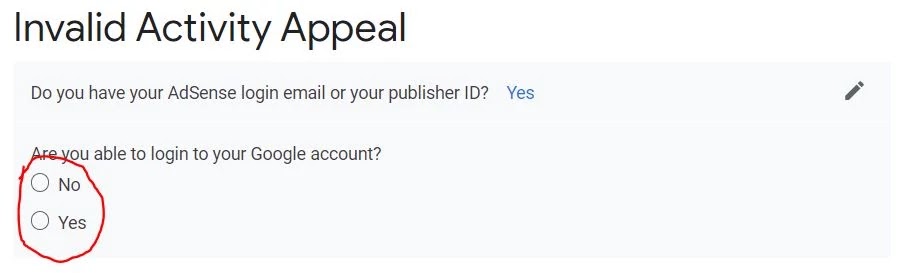
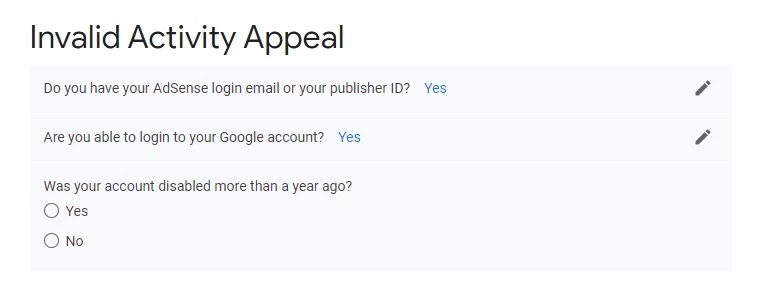
First, open the invalid activity appeal form, click here to open it.
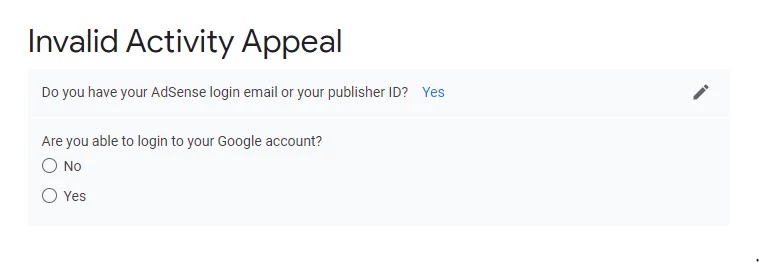
If you have an editor ID, click “Yes”; Otherwise, click “No”. If you can access your AdSense account, open Google AdSense. To see your publisher ID go to Settings -> Account Information. If you cannot access your AdSense account, you can find your publisher ID at the top of the ad unit or in the AdSense script code. Your publisher ID is as follows: “pub-xxxxxxxxxxxxx”.
Now you will be asked whether you can log in to your Google account or not, if you can access the Adsense panel, click “Yes”, otherwise select “No”.
First condition: if you can log into your Google account
Step-3
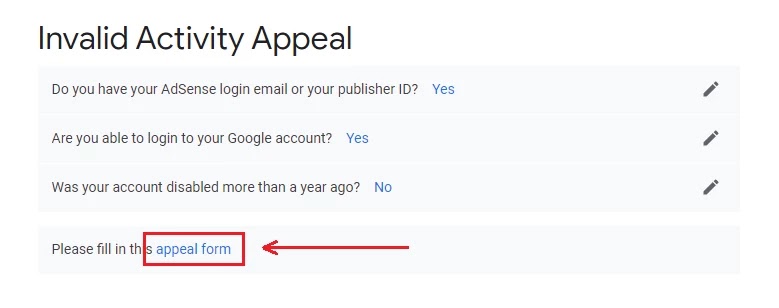
In this you get two options Yes and No, Select No, if you have more than one year, select Yes.
Step-4
Now, you will receive a link to complete the form, so click on the Appeal Form link to get the invalid click activity appeal form.
Step-5
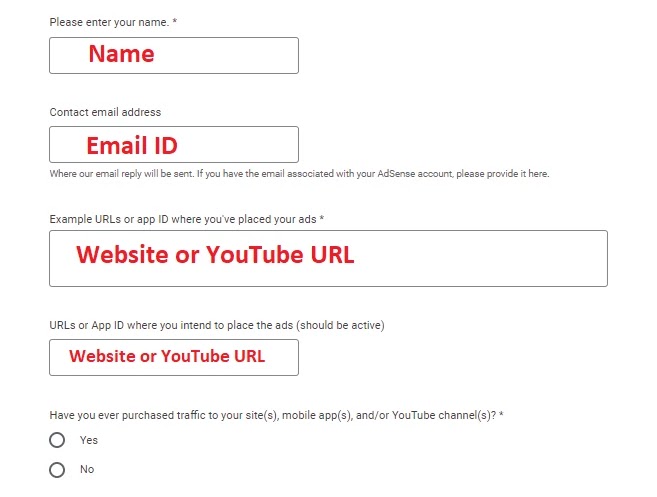
You will now be redirected to an invalid activity appeal page, scroll down and you will see a large form that you must complete correctly.
Put the same name in your Adsense account.
Enter an email address that is associated with your Google AdSense account.
Enter the URL of your website or YouTube channel where there were invalid clicks, YouTube or blog URLs
In it, enter your URL that you approved by Google and place the ad, YouTube or blog URL.
“Have you ever purchased traffic to your site (s), mobile application (s) and/or YouTube channel (s)?” No “Select”.
Next, you must answer some questions correctly and all answers must be absolutely correct, do not try to play games with Google and do not hide anything because Google has all the information about your website or YouTube.
I have paraphrased the answer for you, and I read it and get ideas to write your answer.
Question: How do users access your site, mobile application and/or YouTube channel? How do you promote your content?
Answer: Users access my content through Google search engines, including Google, Bing or YouTube channels and other YouTube features. Some sections of traffic through social networks also include Facebook and Twitter.
Question: What was the cause of the invalid activity on your site, mobile application and/or YouTube channel? Provide detailed information on all the specific reasons that you consider relevant in your case.
Answer: From my point of view, the main reason for the cancellation of my account was “My competitor could have done some invalid activity or there may have been some people who don’t have enough knowledge to use the application. It could be.” Reason for deactivating my account.
Question: Include any data from your site, mobile applications and/or YouTube channel traffic records or reports that indicate suspicious IP addresses, references, or requests that may explain the invalid activity.
Answer: Dear Google, This is the first time my AdSense account has become inactive due to this invalid click activity, I was unable to enter my suspicious IP address, traffic log, and report. I again apologize for this negligence. How should I know about my site or AdSense that I have mentioned? I just intrigue to disregard any invalid server or light action in my record and to have the first and last opportunity to work effectively in my AdSense account. I acknowledge my errors that occurred without knowing it and my lack of regard.
Conclusion:
If you have any questions about the appeal of invalid activity, you have a good idea whether to open an AdSense account with illegal click activity, let us know by commenting.
Also, you can change the answer according to your needs. It is not necessary to write the same answer. You can guess my answers and write according to your choice …
If you have a problem, you can ask, even if you have a problem completing the invalid click activity request form, send me an email or comment, I will definitely answer it, and if this information is good, So share it because sharing is caring and keep up with TechnoVimal.
Hello, guys today I want to talk to you about a quick trick. How to remove the date from the blogger post URL and create the blogger permalink format as WordPress.
In this post, share a step-by-step guide on how to remove a date from the URL of a bloggerpost.
Then stay with me until the end to know in detail. Every time we create a blogger post. This will include the publication date of that publication. Below is a screenshot of the Blogger default post URL.
But when you write a WordPress post your URL is completely different here the date and .html will not appear in the post URL.
The WordPress post URL blogger looks professional compared to the default post URL. So I recommend them to everyone if they have just started a blog on Blogger. Use this technique to extract dates from Blogger’s URL. This will make a Professional Blogger blog like WordPress.
A permanent Blogger link is generated automatically and you can do it manually. But in both cases, the date will be. But with this method you can remove Blogger’s date in each post and even future posts will not have a date.
Benefits of removing the date of the Blogger post URL
A common search term that every blogger searches are how to remove a date from a blogger post URL or how do I remove date from Blogger’s permission?
Fist of all, tell me some benefits of removing the date from blogger post URL
Deleting the blogger’s blog post date will make your content evergreen.
Provide a professional permanent link to your blog post.
This will not allow visitors to know on which date the publication is published.
Helping the best rankings are search engine result pages.
Shorten your blog post URL.
On top of the profit you will get the date extracted from the blogger URL
How to hide post date in Blogger posts
Follow the steps given below and it will be finished in no time.
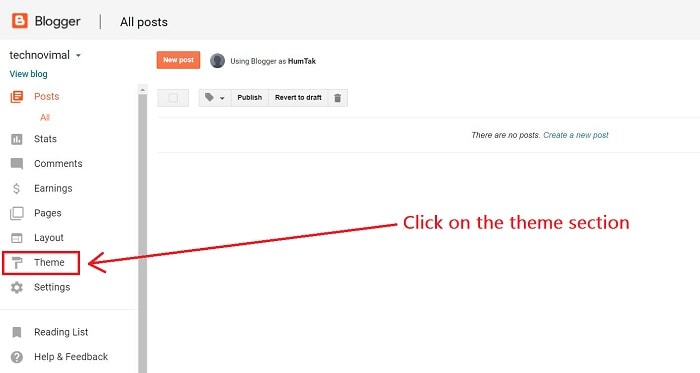
Step 1. Log into your blogger blog and select the theme/template.
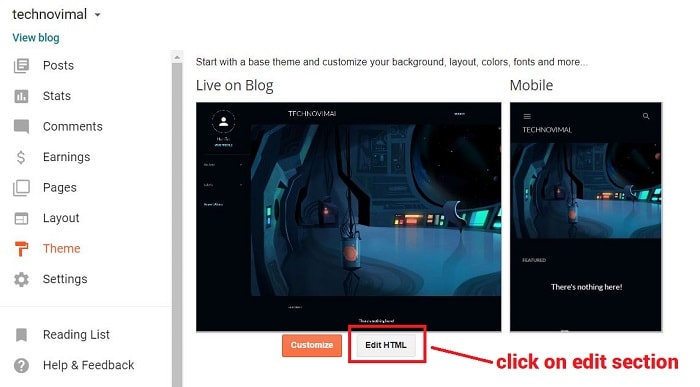
Step 2: After clicking on the Theme section, go to “Edit HTML”.
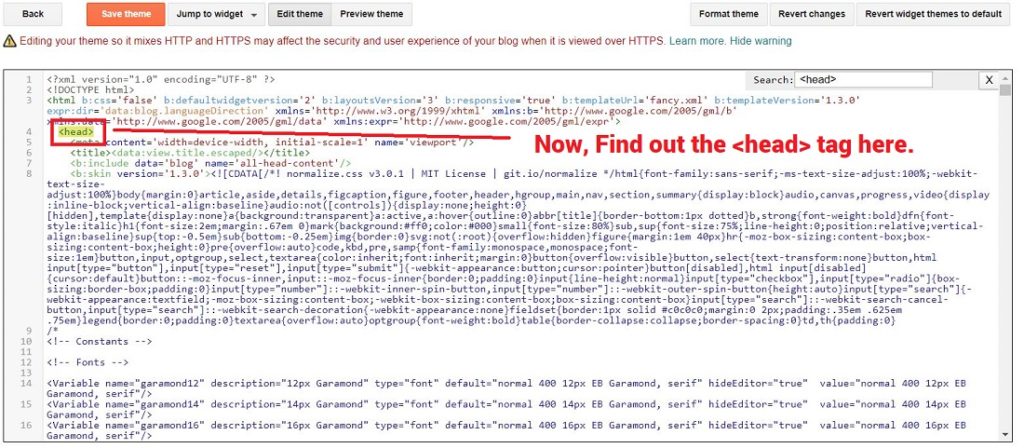
STEP 3: Now, locate thetag here. You can also search for it with the help of Ctrl + F.
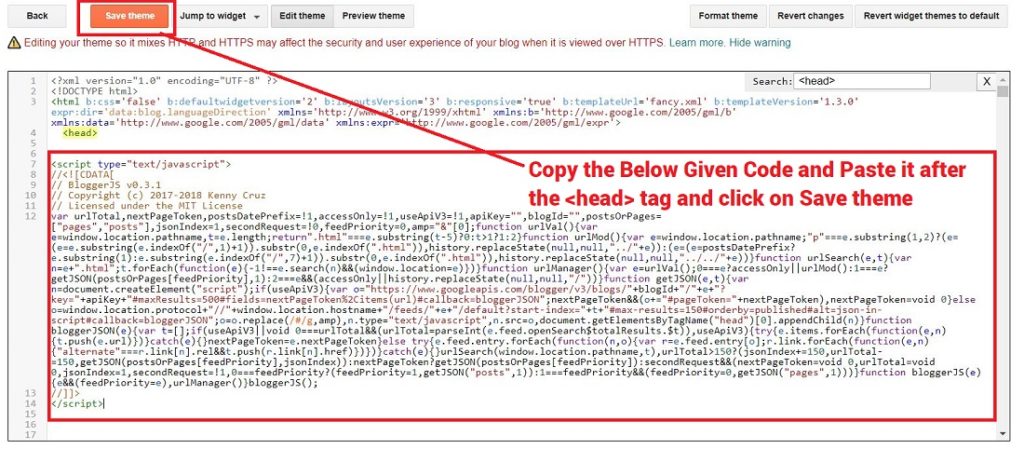
Step 4: Now, copy the following code and paste after the tag and click on Save Theme
With a good experience of success, the third part of affiliate marketing is the best way to earn money online. You can get an answer in a few hours; It requires only fewer clients and will have fewer obstacles in its path. Therefore, having easy access to a large market ruined its decision in the initial stages. Do not waste your precious time in the search; You need a little time to take the initiative now. You only need to build a well-organized commercial aircraft and, last but not least, the selection of a particular product.
The selection of a product is very important, but we often neglect it. We still consider before starting the process, the commission rate, the popularity and the action of the competitor in critical planning. If you have made the right decision to choose the right product, you can make or break a campaign. Therefore, make your decision carefully.
How to Choose Best Affiliate Programs?
Choose Best Affiliate: When you spend a lot of your precious time and also try many different programs and products and, in return, you get nothing. In this modern world, not everyone can succeed and become a super affiliate. The following are some tips that allow you to successfully obtain the best affiliate program.
There are no strict and fast rules and rocket science that you must apply to get the best affiliate programs. There is no such list of affiliate programs, this is because this program is not suitable for you and the audience you are looking for.
Commission
The question of how much money you are earning when acquiring and generating leads is raised. Most of the time you may have difficulties selling a product that is less expensive. It’s like a pyramid, you must think about why it happens. The Missinglettr-smart social media automation tool has a commission of 30% based on the price of the products at $ 180. It will be a commission of $ 54. On the other hand, there are many applications and software that provide you with a commission of more than 50%, such as SEOprofiler, a complete SEO software solution.
Resources
Are you getting help from programs to get conversions? Do the programs provide you with banners, links, advertisements, and promotions? Or maybe you’re just promoting a link without getting status and analysis.
What to do to Choose an Affiliate?
In the modern world of the Internet, an Affiliate must control all conversions and cookies. The moment in which a user accesses through a link stored cookies in your browser puts at your disposal a good amount of cookies to make a sale. Do you need to know how long it will take for cookies to expire? It may happen that a customer buys something of the same affiliate but not what they are promoting. You should know what things, like the Amazon affiliate program, can pay you for anything instead of what you are promoting.
Refunds
If a customer has purchased a product through their link and has received problems and then they want a refund after a few days or months. So what happens a few months after the sale?
Payment Method
Do you receive monthly, quarterly or weekly money? Do you need a bank account or do you have to pay through popular global payment services such as PayPal, Payza, and Payoneer? If the client claims a fund, think about it.
Niche
This is very important when choosing an affiliate program, as it may vary with your target audience. You must choose the same niche, it helps you a lot when choosing an affiliate program and you get more commissions and customers.
Service
Is the product or service you are selling in high quality or low quality? Because having a service or product of lesser value will definitely bother you a lot. Therefore, be careful when choosing products and affiliate programs.
How to Improve SEO: Do you want to see your website on the main pages of search engines? Do you think about implementing all possible SEO strategies to Increase your Ranking and How to Improve SEO? You will then be given a quick guide to learn how you can implement your plans. Improve SEO is playing a long competition, and there is a need to build strong strategies for the same. It’s not just that you need to keep changing your content and improve it to get better rankings. There are many other strategies that can generate traffic. So take some time and read more and more people to visit your website.
Improve SEO: 8 Tactics That Don’t Require New Content
1. CTR Improvisation
CTR means click-through-rate and is basically the number of people who visit your link. The CTR is not listed as a ranking factor but it plays an integral role in obtaining the ranking of your main search page. Finally, traffic can be increased by improving the CTRs that make visitors click on your link and improve the CTR. Then, one of the strategies is to write meta tags and titles that can attract visitors to click on your page.
If you do this, you will surely become a winner and can convince many people to visit your page. Adding powerful words to your title can make it seem more effective and compelling. The title should be written in such a way that you can invoke the curious mind and force it to click on its link to satisfy your curiosity nerves. Adding square brackets can also increase the readability of a content title. Make sure the title is not a complete long story in itself, but rather sweet and simple.
2. Need for Speed
In today’s fast-moving world, people have adapted to the trend, and there is little room for patience. In such a world, it is difficult to have the patience to see the cursor buffer and go around and around to load the page. What today’s world demands are the “need for speed.” Therefore, one must ensure that the loading speed of your website and its pages is quite fast. Otherwise, it is likely that one will not go back to another page.
Not only for visitors who visit your page, but even Google can tend to ignore it and remove it from main searches if the page load speed is low. Slow websites may disinterest the user of your page, and they may not be able to attract them for a long time, which leads to lower rankings. Therefore, speed may be one of the necessary factors that SEO services can offer you so that you want to improve your SEO ranking.
3. Mobile Device Optimization
In today’s world, cell phones have become a part of life. Even for small things, we depend on our mobile. It can be a number trace or online transaction; Mobile phones have brought the world closer to the fingertips. Today, you will not find anyone who turns on their laptop to search.
I would just look for people to get out their phones and write their queries on Google to find relevant solutions. Therefore, one can understand well the importance of websites being optimized for mobile websites. Mobile phones have ended the era of laptops and desktops and have taken a central computer over the years. Therefore, you should not ignore the mobile optimization restriction at any cost, or you may negatively affect the ranking of your website.
4. Fixing Broken Links
Broken links are like a threat and must be corrected. Deleting or moving a page with any drag errors when linking or linking can result in broken links. Broken links are not ideal for your website and should be removed as soon as you need them.
5. Outbound Linking: A Therapy for Credibility
Outbound links are links to other websites that can be included to display the authenticity of data, facts, and figures on your website. The inclusion of outbound links in your content increases the credibility of your website. Your pages look great when packed with some links to authorized websites. This makes your website more genuine and reliable, and it can attract more visitors to your page. But you have to make sure that you do not include high-reliability website links, but also that the data used is recent.
6. Words are not all that Counts
Yes, we understand the value of content, and the fact that “content is definitely king” cannot be denied. But words and phrases are not the only things that matter; There are many things that can help increase the Improve SEO ranking. From audio to video and even slideshow, there are many other aspects that you can add to your website and update the SEO range for your page. These multimedia elements can help improve the user experience and have a more effective effect than words.
Reading words and paragraphs is a very long method and sometimes it makes you lose interest in reading long stories. But alternatively, if you can listen to an audio or watch a short story that expresses the same message, you may find it more convenient than the previous reading method. So, they are not always the spoken words, the images also speak. And, the best thing is that you can keep your target visitors glued to your website for a long time until your video ends. The moment a user remains on your page, you can join to achieve a better ranking in SEO.
7. Creation of to the Point URL’s
Your title and description may be full of emotion, but it does not necessarily apply to the URL of your page. The URL of the page should be such that it can accurately identify visitors about what their page is and what they are colliding with. The URL helps users to differentiate between different categories and also teaches how to access different pages on the website.
8. Take social media to be your ladder to success
It is important to keep your website on social networks. Leaving your site with quality content inevitably takes you to the top, but sharing it on social networks can help you get better rankings and promotions. The more you share your links, the more you’ll appear in front of your target audience. Social exchange campaigns can help improve SEO rankings, so keep sharing and clicking to be at the forefront.
Ground Level
We understand that not all SEO practices can be incorporated into your website, but try to put the maximum possible strategies to increase your visitors. SEO services have changed constantly over the years and have emerged with new ideas and algorithms. Therefore, all business owners should optimize it as soon as possible so that you can gain an advantage so that your website remains competitive.
Hi everyone! Are you looking for the best friendly blogger templates for SEO and Adsense too? If you are looking for this on Google, then you are in the right place.
We all know that Google Adsense is now very strict regarding the approval of Adsense accounts on a blog or website.
You can also customize these SEO-friendly blogger templates according to the need of your website such as: –
How to delete the footer
Menu bar optimization
Widget customization
and many more accessing HTML EDIT.
Top 20+ SEO Friendly Blogger Templates For Free
1) NewsPlus v2 Premium Looking.
NewsPlus is one of the simplest and most powerful magazine templates for bloggers. It is packed with several custom widgets and allows you to customize the theme color yourself! Presently you can shading your topic as you need. Google AdSense approval.
Amia Blogger Template is an exceptional and surprisingly designed theme for the Blogspot platform.
This free blogger template is built with the new generation blogger codes and supports some very unique but simple features at the same time. This blogger theme looks very minimalist and elegant and has an elegant appearance that can look good with any type of blog.
The fastest Blogger template is a definitive fast-loading blogger theme that loads in a very short time.
It is a Blogspot template with a very different design that keeps the official blogger widget intact. It helps you create an incredibly responsive blog that adapts perfectly to any screen or device size.
Seo Mag Blogger Template is a well-designed and professionally designed niche blogger theme, made with the latest trends and high-quality codes with a fast-loading design and responsive design, adapts to any screen size with ease and looks beautiful in every aspect ratio or device.
This theme can be used to create any micro niche website, such as news, technology, travel, blogs, latest trends, events, food, fashion, sports, video, health, etc.
Sora Ads Blogger Template specially designed to blog with the monetization of ads and designed by sora. Blue, personal pages, ready for email subscription Widget Ready, Breadcrumb Navigation Ready, 3 columns, 2 sidebars, left and right sidebars, Magazine, Ads Ready, Technology, White, Clean, Minimalist, Seo Ready, Magazine, Premium Free, Publish thumbnails, Responsive, Social bookmark ready, drop-down menu.
Gridster is a free blogger layout with 2 segments, responsive plan, amicable SEO, right-sidebar, exhibition style, moderate, an elite structure for Blogger, prepared advertisements, social bookmark symbols, distribution thumbnails, bread scraps, pagination, Support of related productions, well-planned strung remarks, and unbiased hues.
The CB theme is a very interesting and free SEO friendly blogger template. With this Blogger template, you can easily customize your website according to your needs and you will not have any difficulty in customizing this template.
How To Start A Blog on WordPress 2020? (The Ultimate Step-By-Step Guide)
It is also a blogger template totally SEO friendly. For once, verify the live demo. Surely you love it.
The ghost blogger template is specially designed for people who have a technology blog or website. So, if you are running a blog or website related to technology, use this template.
This will increase the ranking of your site and will also help decrease the loading time of your website. Specially designed for blogs and technology websites.
This template is specially designed for people who used more images on their blog or website. This helps compress the image size, which automatically reduces the loading time of the website.
This will create a grid of all your latest posts on the home page. The simple grid is a very good template in terms of SEO and Adsense approval.
Digizena is the best blogger template for those who are passionate about blogs. Those who are not here to make money with blogs. They just loved writing things.
If you are that kind of person, then this template is perfect for you. If you are only here to share your opinions or stories, use this template, which will help you increase the opinions on your blog. This is very useful only for passionate bloggers, who love to write.
Sora Ribbon Blogger Template is a straightforward, insignificant, delicate and simple to-utilize Blogger topic that adjusts impeccably to locales that offer news about innovation, style, sports, video, wellbeing, travel, and so forth.
It is also suitable for blog topics such as an event, niche, authority, how, food, recipe, cooking, school, institution, university, medicine, health, etc.
The Simpleon blogger template is a clean and fast-loading theme perfect for a blog that has viral content. As he says, “Simpler is better” This blogger template works completely. Designed by Themeindie.
NewsPro Blogger Template is an SEO-type blogger template ready for magazines with various types of content-based featured post widgets. It is an advanced blogger template with tons of built-in functions. This template focuses mainly on news blogs, but can also be used for technology, review, movies, procedures, sports, niche, authority, schools, institutions, etc.
Website SEO Boost Blogger Template is an insignificant Blogspot topic, which enables you to dispatch a straightforward completely practical webpage in close to a moment.
Make your content look flawless with this specially designed theme and cleaner typography. This template is very flexible, easy to customize and well optimized, approaches to any topic such as News Blog and professional use.
This theme is ideal for lifestyle, fashion, games, food, blogs, health, sports, travel technology, business or entertainment websites.
15)SEO Hub: Best Blogger Template For Adsense Approval
SeoHub Fast Loading Blogger Template is the most upgraded blogger format for SEO on the flow date, the layout has numerous one of a kind highlights and splendidly advanced codes for superb execution in different web search tools.
You can use this template for almost any type of blog, but it is more suitable for specialized blogs, technology, news, blog, magazines, daily blogs, food blogs, authority and the best for event blogs.
16)Sora Front: Blogger Template For Adsense Approval
The Sora Front Minimal Blogger template design can be a theme of HTML5 Blogger and multipurpose CSS3.
It has 2 column formats based on the theme of Blogspot. The theme is a 100% responsive plan that makes it consistent with a wide variety of devices and screen resolutions.
Sora Front is easy to customize through its broader group of distinctive and direct options that are exceptionally simple to obtain.
Sora News Blogger Templates is a powerful blogger template theme with many cutting-edge features and a design that will leave a lasting effect. Ideal for style blogs, lifestyle blogs, travel blogs, food blogs, crafts, technology, creativity, images, etc.
Masy Blogger Template is a super professional and premium-looking free blogger theme. Loaded with tons of useful features and widgets, it allows you to create some exceptional ones from nothing. You can easily create beautiful magazine designs in no time.
The design of the Publisher Simple Blogger Template is extremely optimized for speed and execution to convey the best encounter with the client. It is perfect for numerous specialties that incorporate breaking news, newspapers, legislative matters, gifts, games, innovation, travel and much more.
Sora One Blogger Template is a complete and perfect blogging blogger theme. This template is very flexible, easy to customize and well optimized, approaches to any topic such as News Blog and professional use.
This theme is ideal for lifestyle, fashion, games, food, blogs, health, sports, travel technology, business or entertainment websites.
This template is very useful for fashion bloggers due to its user interface. The interface of this blog is very attractive and has the power to attract viewers to your blog.
It will give you a J curve in your ranking and views.
An amazing blogger template for fashion or lifestyle bloggers. Check it out.
This blogger template is specially designed for SEO. And, it is very good for SEO. If you have a website where you share your personal experience or a story, this is perfect for you. Then, try this once.
Free web hosting sounds good for blogs right? Let’s see some ideas about this. It is provided or offered by a web hosting company or a web hosting service provider. It helps us to make the presence of our blog on the website.
Gone are the days when the Internet was only used to send emails. Currently, many tasks are carried out on the web such as the exchange of images videos and documents.
These tasks require a platform and this platform is provided by a hosting provider. A web host helps us keep the blog active day after day. In addition to sharing documents, many hosting providers also offer SSL security.
Well, hosting providers charge a fee for providing their services. But there are some websites present that offer free web hosting features.
Blogger is one of the oldest platforms for blogging and is also free. In the days when the Internet existed since then, BlogSpot is one of the old blogging platforms.
Speaking of the best free web hosting sites with all the features then Blogger is ready to get started. It is very easy to use this platform.
One just has to register in Blogspot and enter the title of your site along with the default domain. Then after choosing any random topic, you are ready to write your thoughts.
Blogger has some features to customize the blog such as lots of themes some widgets installed and some gadgets to use.
Although it does not include any advanced features existing features are great if you think about blogging for free.
As each platform has some advantages and disadvantages. Some of them are mentioned below:
Pros
It is completely free and consists of the subdomain “blogspot.com”. Provide a free SSL certificate. It provides many resources and the cost of updating is none.
It has an easy to use and very simple to use interface. Blogspot has a smooth design with a good amount of themes and widgets to work efficiently.
As this platform is hosted on Google security is never a problem here. It is handled by leading Google officials and therefore can add a lot of data without the risk of data loss.
Cons
Although Google has forums it does not have any customer support. Like all platforms this can also have problems but solving them depends only on Google searches or forums without customer service.
Another major problem here is an SEO disadvantage. With limited features and no add-ons available, advanced SEO techniques cannot be performed here.
WordPress is one of the powerful and popular hosting platforms today. We can write our thoughts for free here simply by registering on WordPress.org.
Although after that the configuration of the blog must be done by us. It is one of the best free web hosting sites with all the features.
Although to access its full function a paid version is necessary but if one does not want to waste a penny then the free version is also great.
The pros and cons of these sites are:
Pro
WordPress really gives SEO a boost. With many additional features like add tags meta descriptions. WordPress makes things easy to use with personalization of blog posts target keywords etc.
In addition to many themes, it is compatible with mobile devices which means that it is easily charged on any mobile device or tablet. As mobile users are in abundance it only increases their popularity.
As it is self-hosted you are the full owner of this blog. Any changes to be made can easily be made here according to your desire.
As this platform is built in PHP it is very light and can load very fast compared to many others.
With many good customer service forums, one can easily find a solution to their problems at any time which is a point in favor.
Cons
As this platform is hosted by yourself the main problem that arises here is security. Malware can reach our system through the installation of various add-ons and themes that can damage our site and can also lead to hackers.
Unlike BlogSpot WordPress often keeps updating. Sometimes it turns around since the new updated version is not as comfortable to use as the previous one.
Wix surely has a place to do in the list of the best free web hosting sites with all the features. It has many designs and themes to choose from.
Another positive point of this platform is that the back-end here is managed by the main officials of the platform so only we should deal with the front-end.
The drag and drop option to design our blogs is simply amazing. We just have to register to launch the Wix blog or the WixAi can also be used to automatically create the blog by answering some simple questions.
There are several templates and themes to choose from here. Like all platforms here are some pros and cons of Wix.
Pros
It has a simple interface that makes it easy to use. Elements and designs can be easily dragged and dropped anywhere we want.
As professionals deal with these platforms the speed and security of these blogs are excellent. The themes are too optimized to load faster.
The customer service here is excellent as they provide good assistance to their customers in resolving their queries and also with many frequently asked questions available.
Cons
Although the design is simple by simply dragging and dropping sometimes it may not give the expected results. There are parameters the rules present when they help us adjust the design but still, coding can have an advantage here.
There is no option to export data from this platform. To do this we have to manually copy the publication or move it but we can export which turns out to be one of its disadvantages.
Weebly is another platform to blog and host our custom domain. Whether templates or buttons one can easily drag and drop according to your desire. This platform consists of sidebars forms advertising spaces social media icons etc. like most other platforms.
It is one of the best free web hosting sites with all the features.
Well here are some pros and cons to this platform:
Pros
Security is responsible for protection against hackers and spammers. In addition, it helps to load the site faster due to its well-optimized hosting.
In case of any difficulty when setting up the blog you have customer service for convenience. In addition, it has telephone support that simply facilitates the work.
Cons
As one has no total control over the site advanced tools cannot be added here. As one does not have root access here we cannot change much of the configuration. In addition, the content management system is a bit restricted here so we cannot add a lot of pages.
Medium is another best free web hosting site with all the features. It is one of the best sites because it has a large audience base. Almost 60 million people visit this platform and the numbers are increasing.
It’s simple to use the platform and if blogging is your passion and you want to show your talent to the world then this can be great.
Pros
Writing publications on these hosting websites can expose our blog with its 60 million audiences. This could be excellent for new bloggers.
These platforms give SEO momentum as Medium continues to create many backlinks on a regular basis.
It has a clean CMS with a simple interface. We can easily customize it and add pages according to our desire.
Cons
If you prefer things to be done definitely then you could face a problem since it does not provide complete control.
The medium has no built-in characteristics for lead generation. Then another disadvantage of this.
Bravenet is also one of the best free web hosting sites with all the features. This platform provides a good package number with a free subdomain. One can add their custom domain here its eases. Drag and drop help you easily navigate templates and widgets.
Taking tools Bravenet also has an email marketing tool that makes it easy to build a contact list and also design messages through templates.
Pros
With its email marketing tool, it helps us send an unlimited amount of emails. Therefore it can help increase the audience at the initial level.
The platform provides a good amount of features that help optimize the blog well.
Cons
Customer service here is not up to par and customers cannot speak in case of problems.
In addition, free web hosting with cPanel is not provided here so customers have no total control over it.
X10Hosting is also among the best free web hosting sites with all the features. This is a good platform to host our domain and also write our thoughts through blogs.
Also with the use of the latest versions of PHP MySQL provides a stable and good performance environment.
This platform also provides e-commerce tools such as Magento. With the 3 free email accounts provided along with more than 150 templates your performance increases.
Pros
The platform is easy to use and therefore this platform can be used without much difficulty.
With the use of the latest versions of PHP MySQL provides good and stable performance.
Cons
This platform has nothing in the name of customer service. Therefore people should search Google for any questions.
Joomla is the best free web hosting site with all the features somewhat similar to WordPress but it has limited features in comparison. We can easily add our custom domain and we are ready to begin.
It is a flexible interface that facilitates its use and blogs of any kind can be configured.
Joomla has many features to optimize the blog and we can make use of the different formats that consist of running different blog niches.
It also has a classic editor that looks like Microsoft Word and helps set the font color size emoticons tables or background.
Pros
Joomla is a good platform for e-commerce stores and supports e-commerce tools.
It provides several extensions and the Joomla plugin that provides flexibility in the work.
With its great community base, it provides exposure to our work to the world.
Cons
It is a bit complex in terms of design so it is always recommended to hire a developer for the initial setup.
Jimbo has many basic features that allow us to easily host our domain here and start blogging. It is another best free web hosting site with all the features.
It is powered by AI and the blog setup here takes less than 3 minutes. This platform helps to edit web pages logos footers etc. in the front end.
Also with the help of the left sidebar, you can edit or add the date title category status etc. of the publication. Therefore it is a versatile platform.
Pros
Since it provides a drag-and-drop option that makes it simple to install and easy to use.
In addition to blogging facilities, it also provides an electronic commerce tool to perform electronic commerce with ease.
Cons
Although it has a simple interface it has a limited set of designs that reduces perfection.
Freehostia is another best free web hosting site with all the features that allow us to host our domains and start blogging.
Therefore this platform offers a fast server that makes our hosted web page load a little faster. It also provides an eCommerce tool to carry out our eCommerce stores. Therefore if you are looking for free blogs then it is a good platform.
Pros
This platform thus claims to provide a good uptime such that your site remains active for the maximum times.
It provides an affordable price for their plans.
Cons
CUSTOMER SERVICE IS COMPROMISED HERE AND AT THE SAME TIME DOES NOT HAVE A GOOD EMAIL SERVICE.