Home Blog Page 7

How To Create A Custom WordPress Dashboard With Elementor

0

In this post, we will be installing the Elementor Page Builder. (free version) and Importing one of our Elementor user dashboard templates. This is the base template that we used too for you when you visit your TechnoVimal member’s area. Let dive deep to explore the details!

📌Read Also:

Creating a Custom WordPress Dashboard

Elementor vector icon png
Elementor icon

Isn’t it amazing to facilitate your clients with a custom dashboard in WordPress? Here you’ll decorate the welcome area with warm greetings, any special message or a helpful guideline to work the location. Also, it is often a contact form of all kinds of media files. And any elements or sections you would like to feature. Nevertheless, you’ll arrange the fields consistent with your client’s preference.

Therefore, it allows you to leave a singular fingerprint on the board. You’ll reign the doorway where you or your clients arrived after login into the location.

Furthermore, it’ll accelerate your brand value and increase customer satisfaction levels. During this way, you’ll personalize your product and services by giving a singular identification to your WordPress Dashboard.

👉 So, you can add a custom dashboard to display in your reception area:

  • A Welcome Message.
  • Useful Instructions to operate the site.
  • Contact form for more questions or help.
  • Company description and contact information.
  • Description of services and products.
  • Video-tutorial.
  • Answers to common frequently asked questions.
  • Important links, updates, and news.

👉 This will enable its customers to:

  • A quick look on links and important updates
  • Comprehensive guidelines for browsing the site
  • Maintain a private board based on your business processes.

Hense, with Elementor you will get full control over the WordPress welcome panel following a few easy steps.

Step1: How to Create a Custom Dashboard for Elementor

  • To get started, we will need to install and activate Elementor. To do so, click on the Add new option in the Plugins menu.
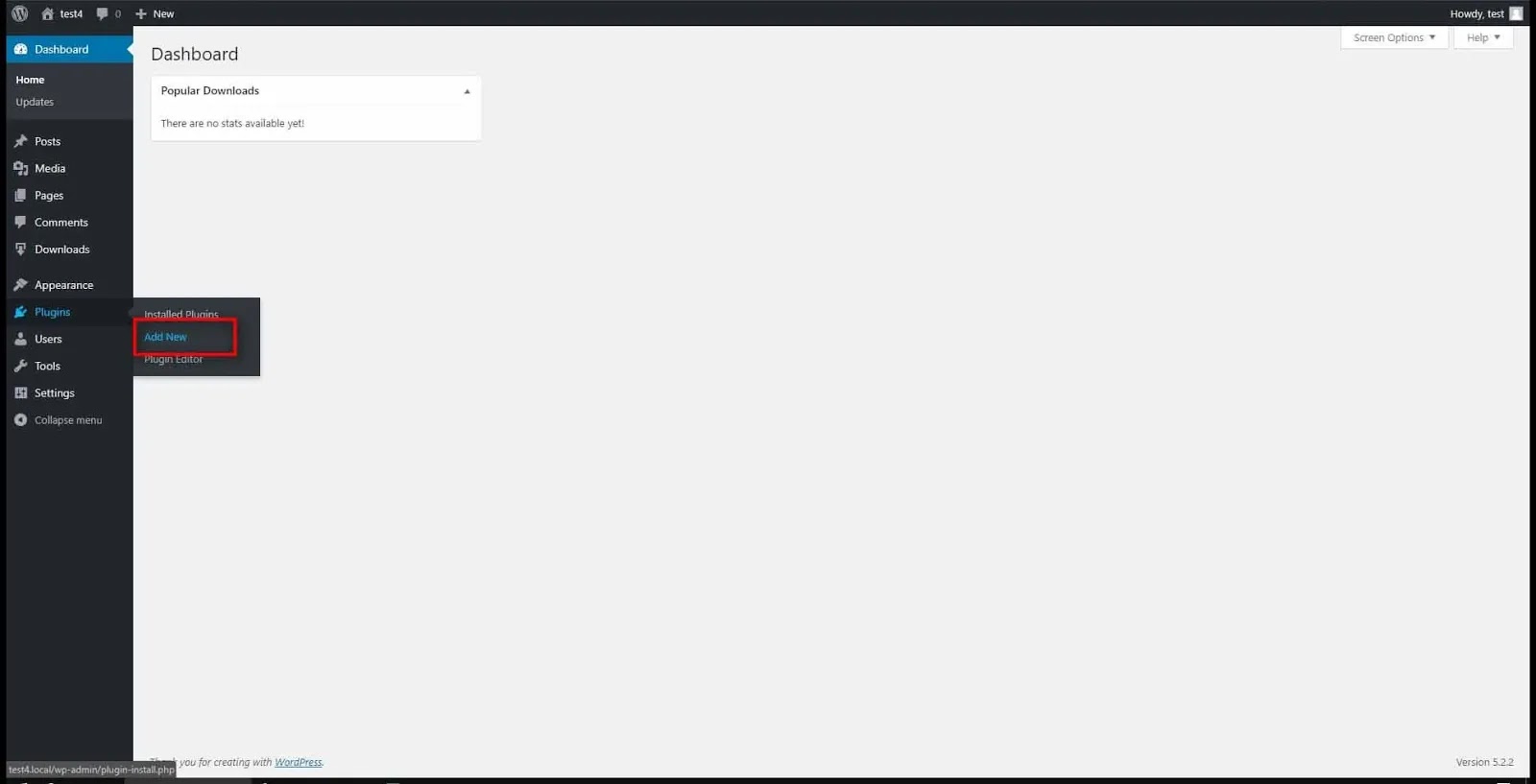
WordPress Add new Plugins menu
  • Next, type “Element Page Builder” in the search field and hit Install for Page Builder. When finished, also hit the active button…
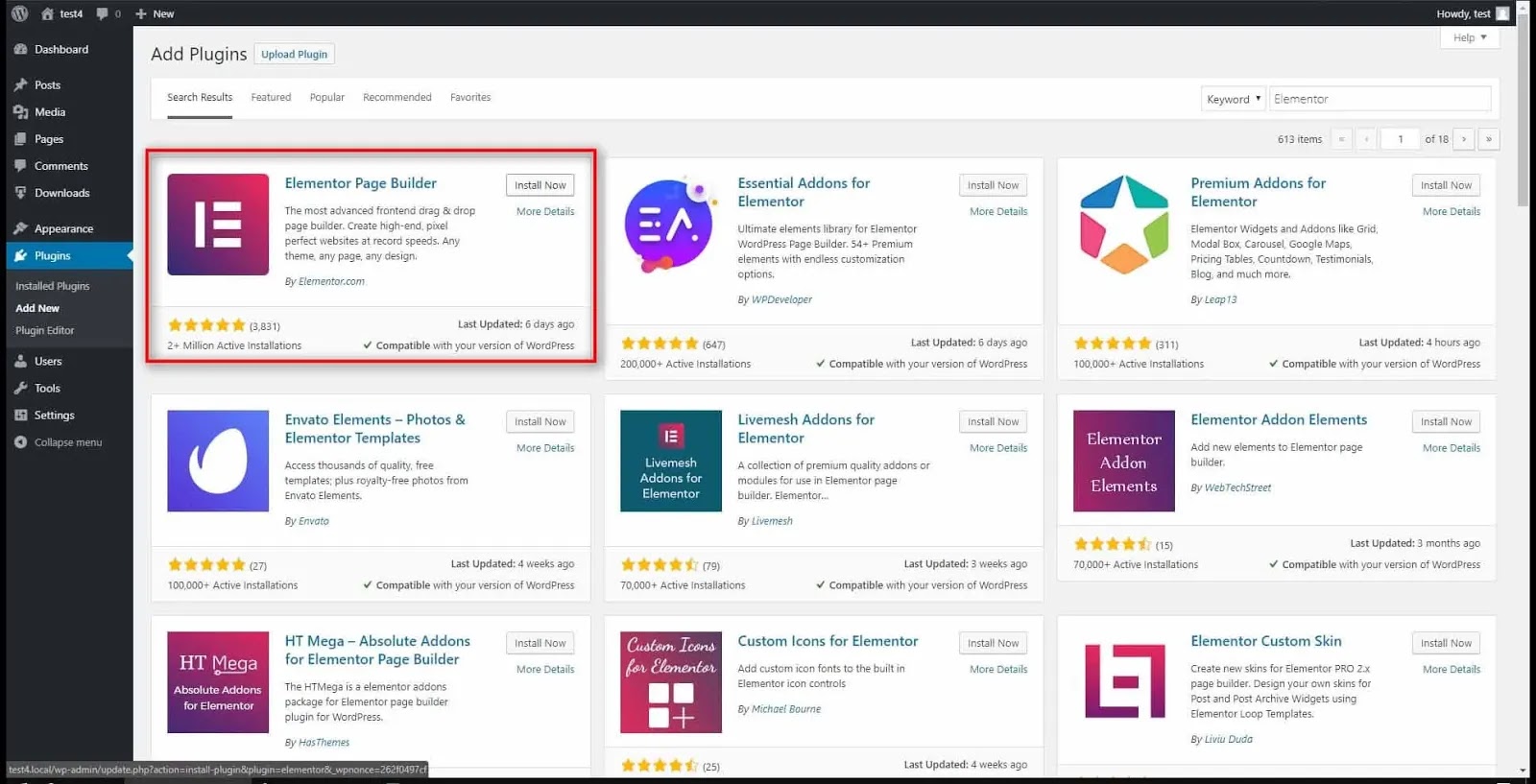
Element Page Builder install also hit the active button
Install for Page Builder
  • After that, it will take us to the element reception page. Scroll to “Templates” and click the Save Template option.
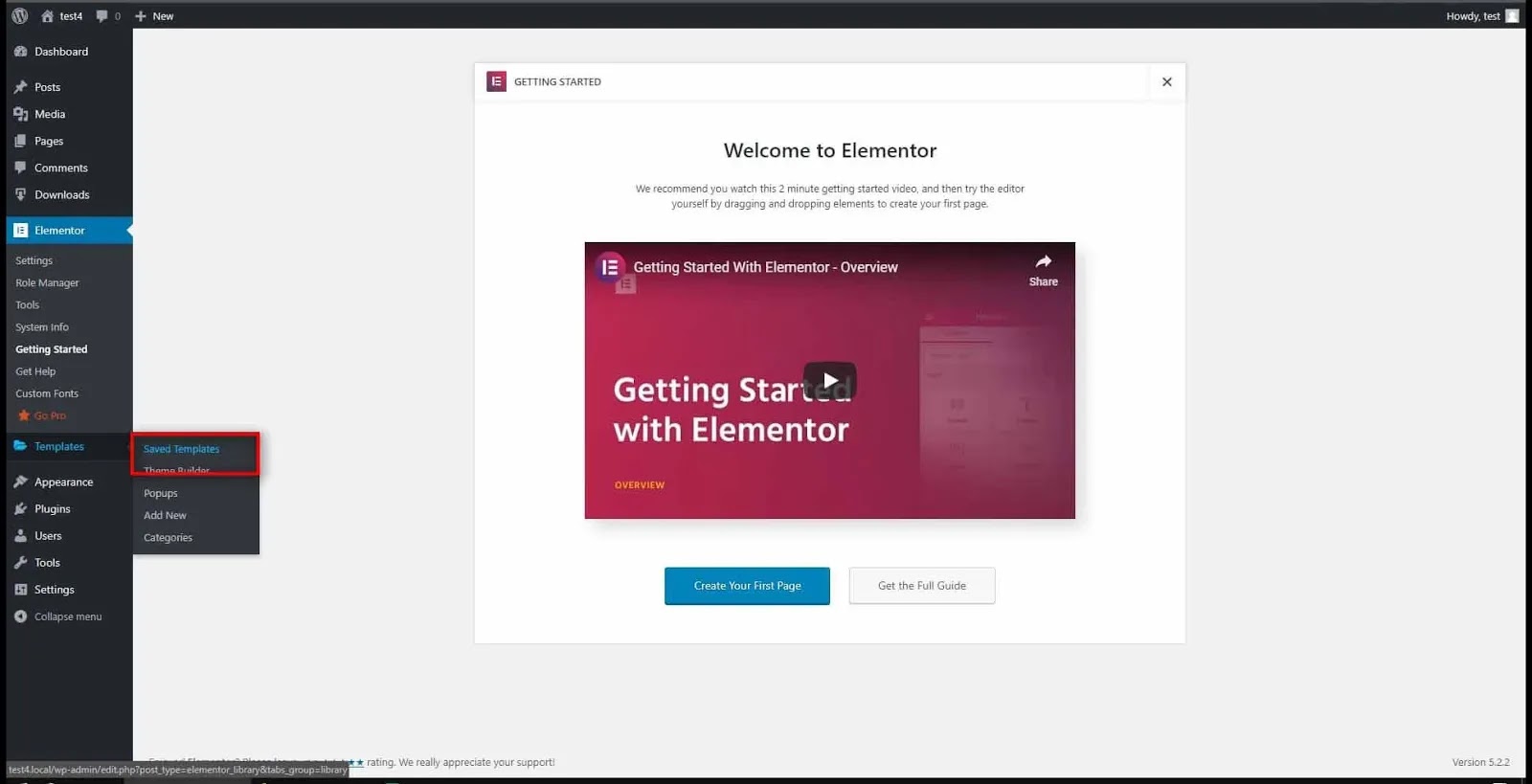
Welcome to Elementor page. Save Template option.
Element Reception Page

Here is your download link for the TechnoVimal Block Templates:

  • WordPress dashboard and navigate Elementor → My Templates → “Import Templates” button on the top. As it is currently empty, we have to import a panel template to start.
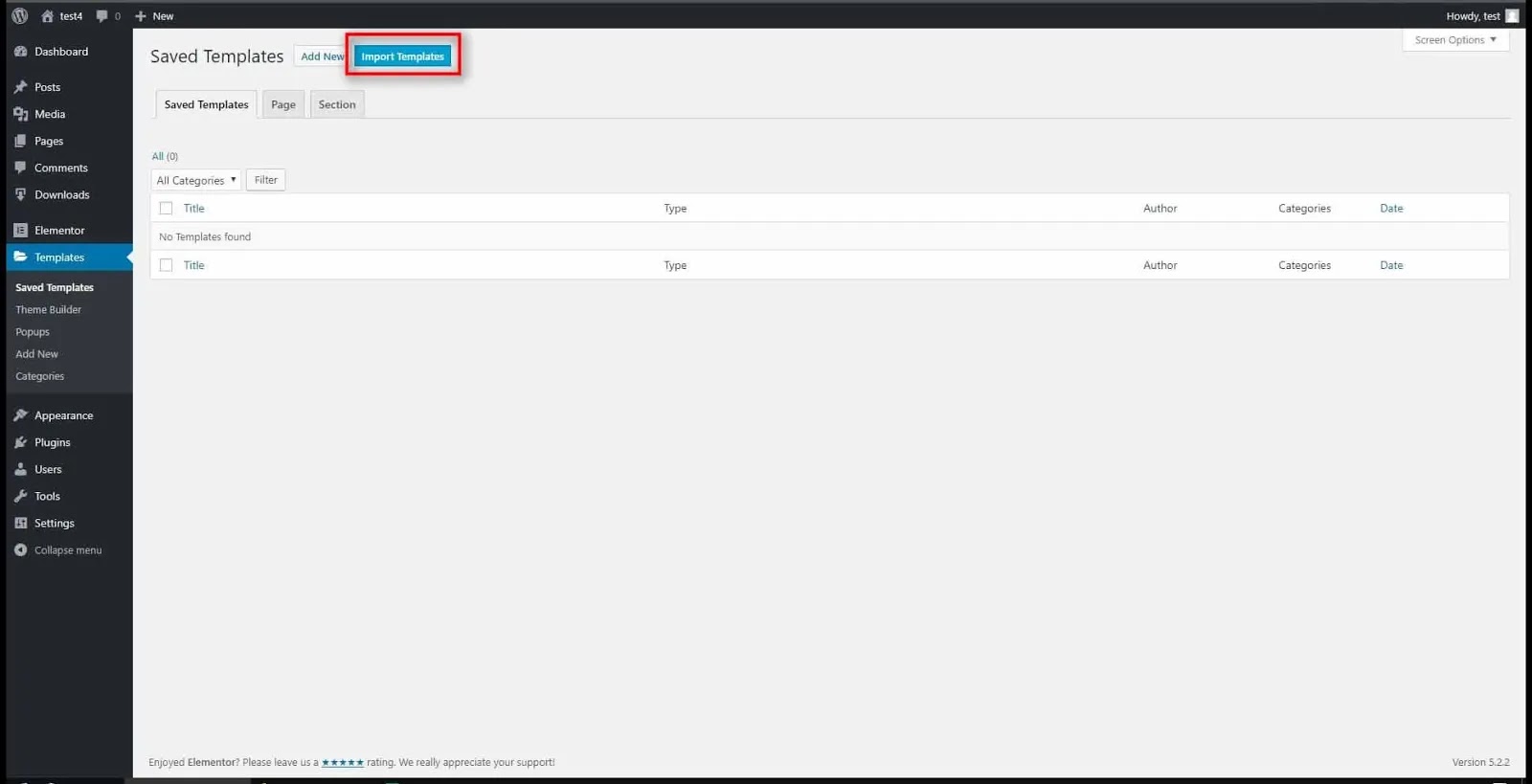
 Import Templates Option
Import Templates Option
  • Next, click on the “Choose file” button and navigate to the dashboard template .zip or a.JSON file you downloaded from your member’s area. For this instance, I will be able to be importing the dark template by clicking on the “Import Now” button.
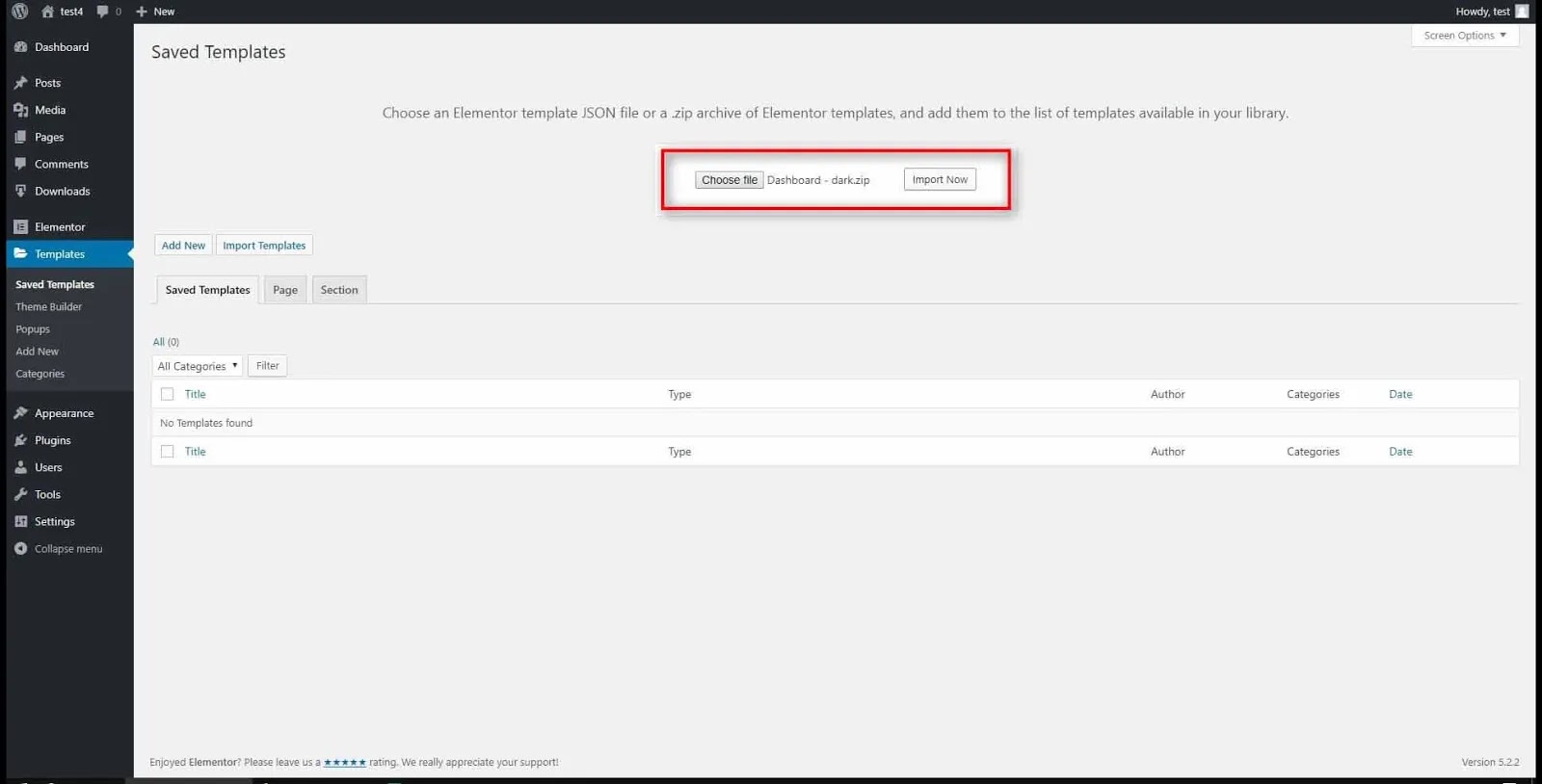
importing the dark template by clicking on the “Import Now” button.
Import option
  • Great, it’s now imported and available to be used for a page.😊 Let’s add a replacement page which will be used as the dashboard.
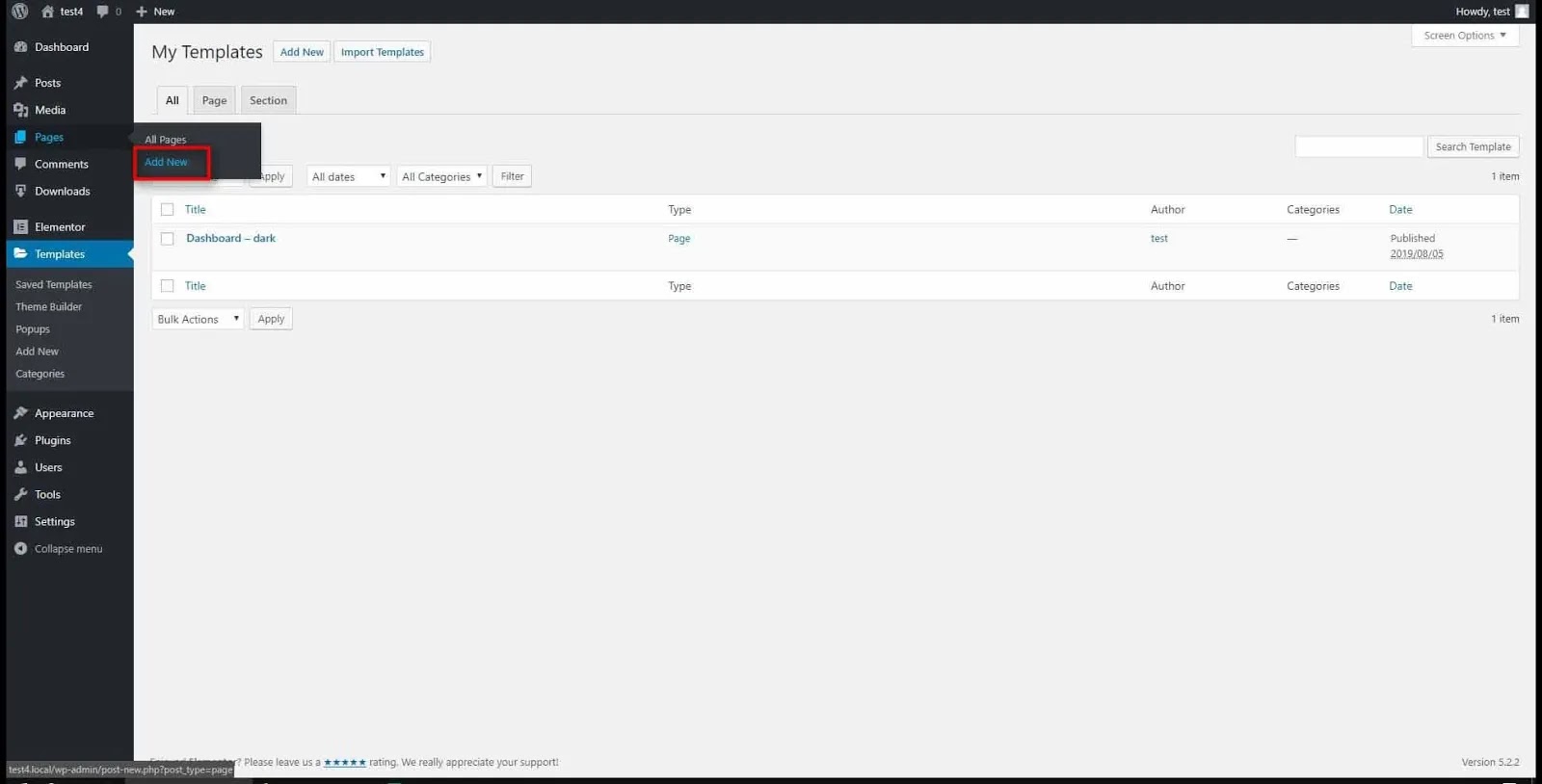
Add new
Add new
  • First, provide a name/title to the current page. Then, in the Page Attributes drop-down menu, select the page template of the elements canvas and edit with the Element button.
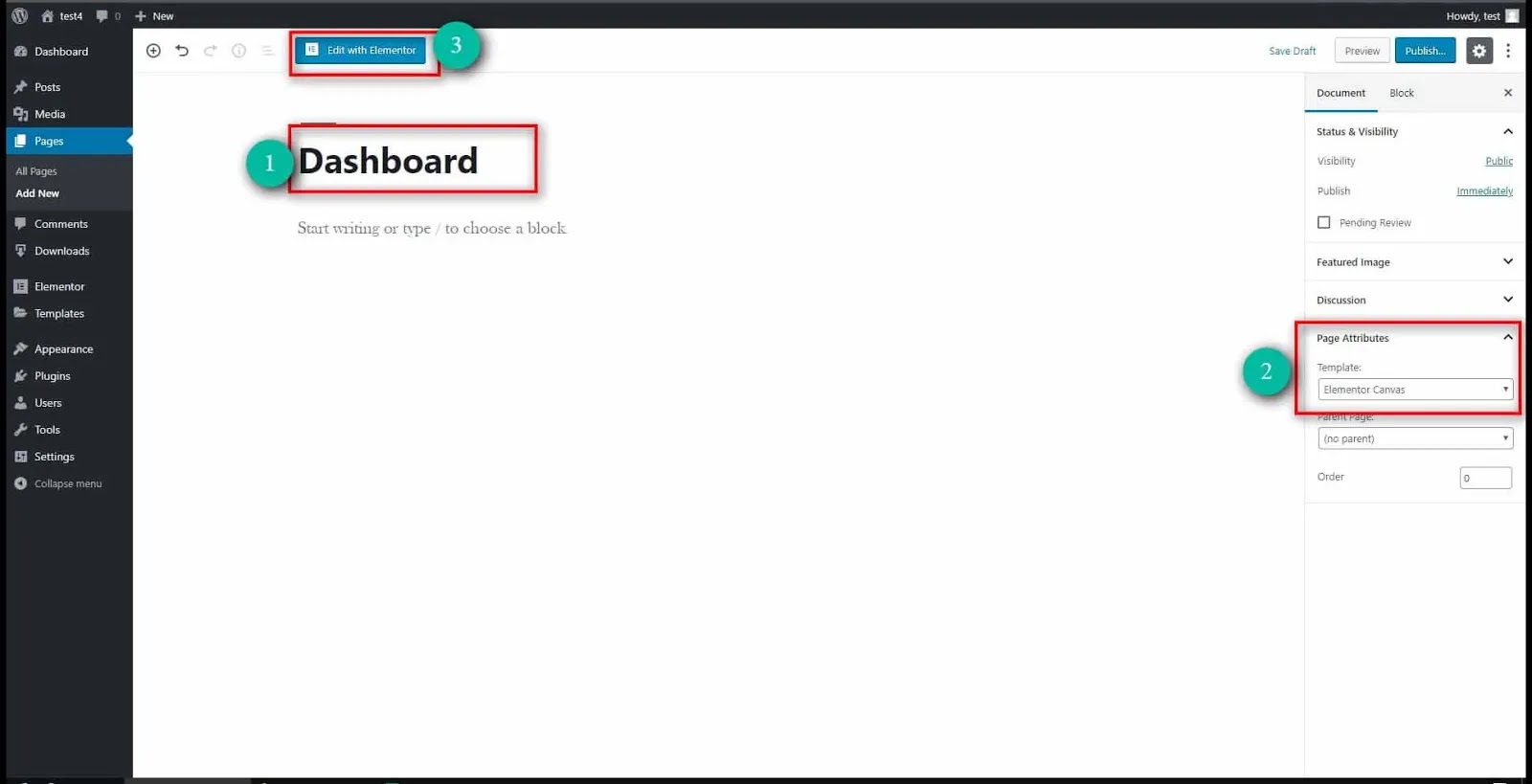
name title to the current page
New Page

👉 You can save the options and start the page generator.

Step 2: Change the Page Layout to Elementor Canvas

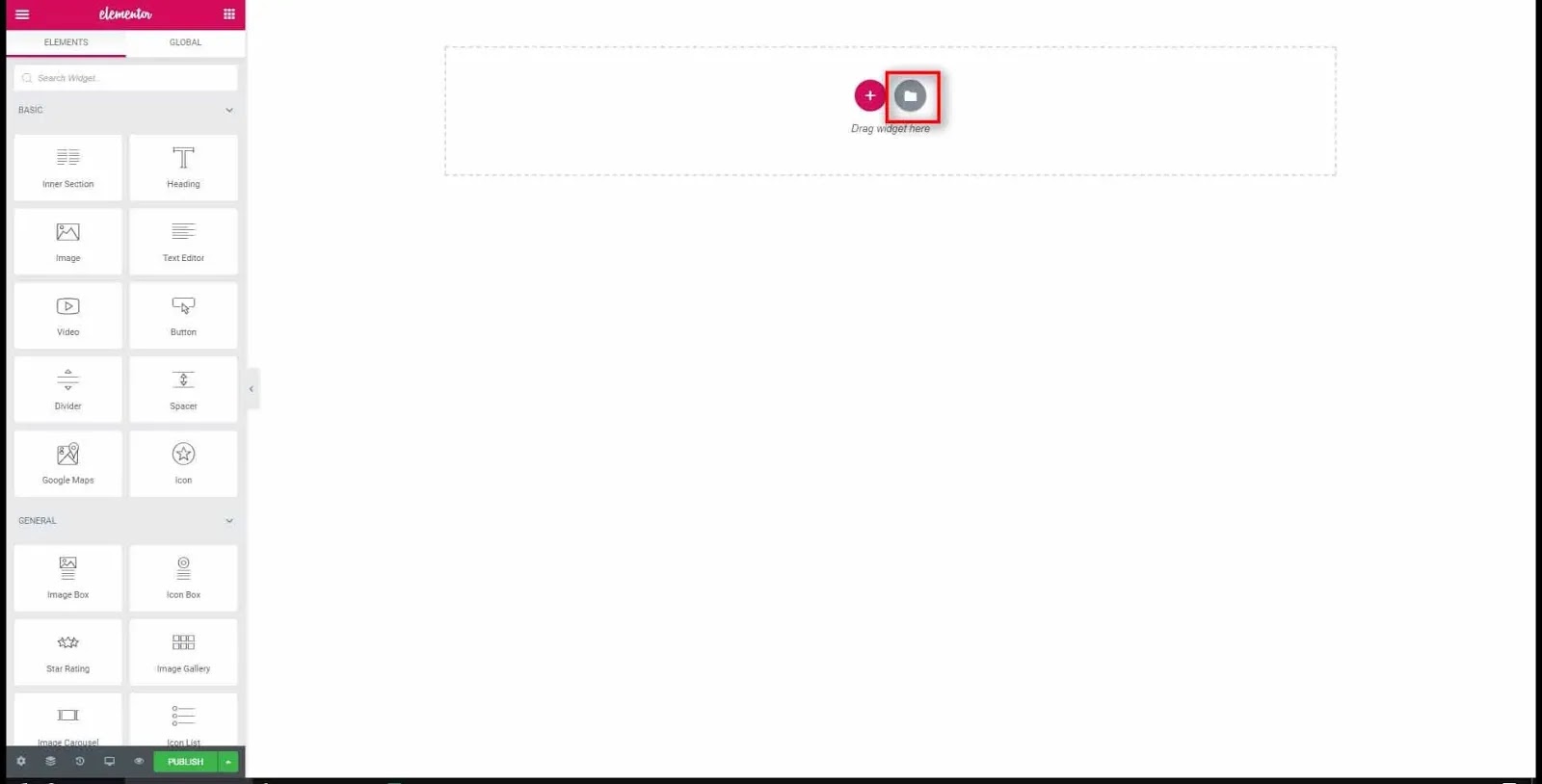
  • When the page generator is loaded we must press the “folder icon” to see the available templates.
  • Click on the “My Templates” tab to see the list of imported templates
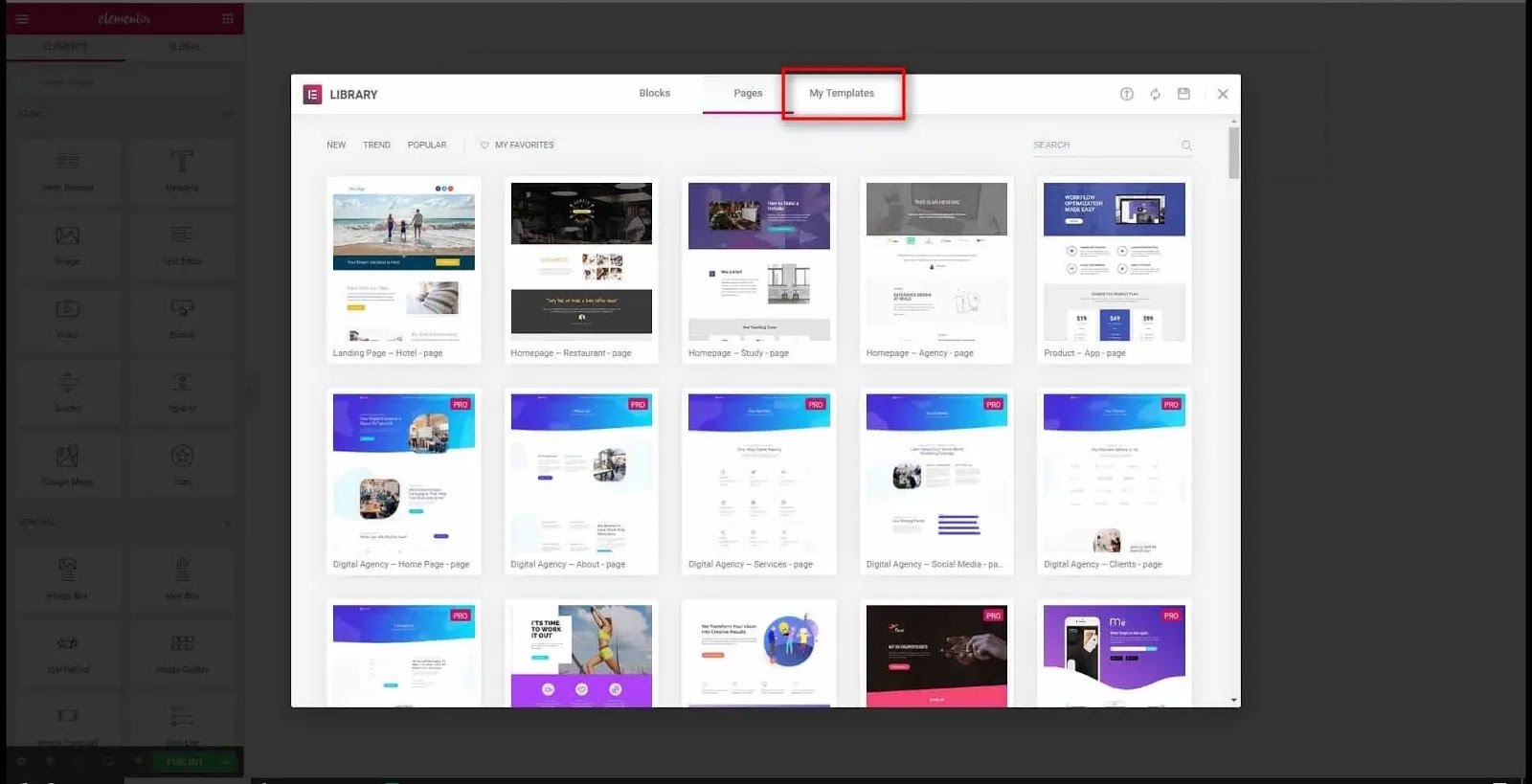
See my template organized template list
My Templates
  • As you can see, the “Dark Dashboard template” will be available and all we have to do is press the “Insert” button.
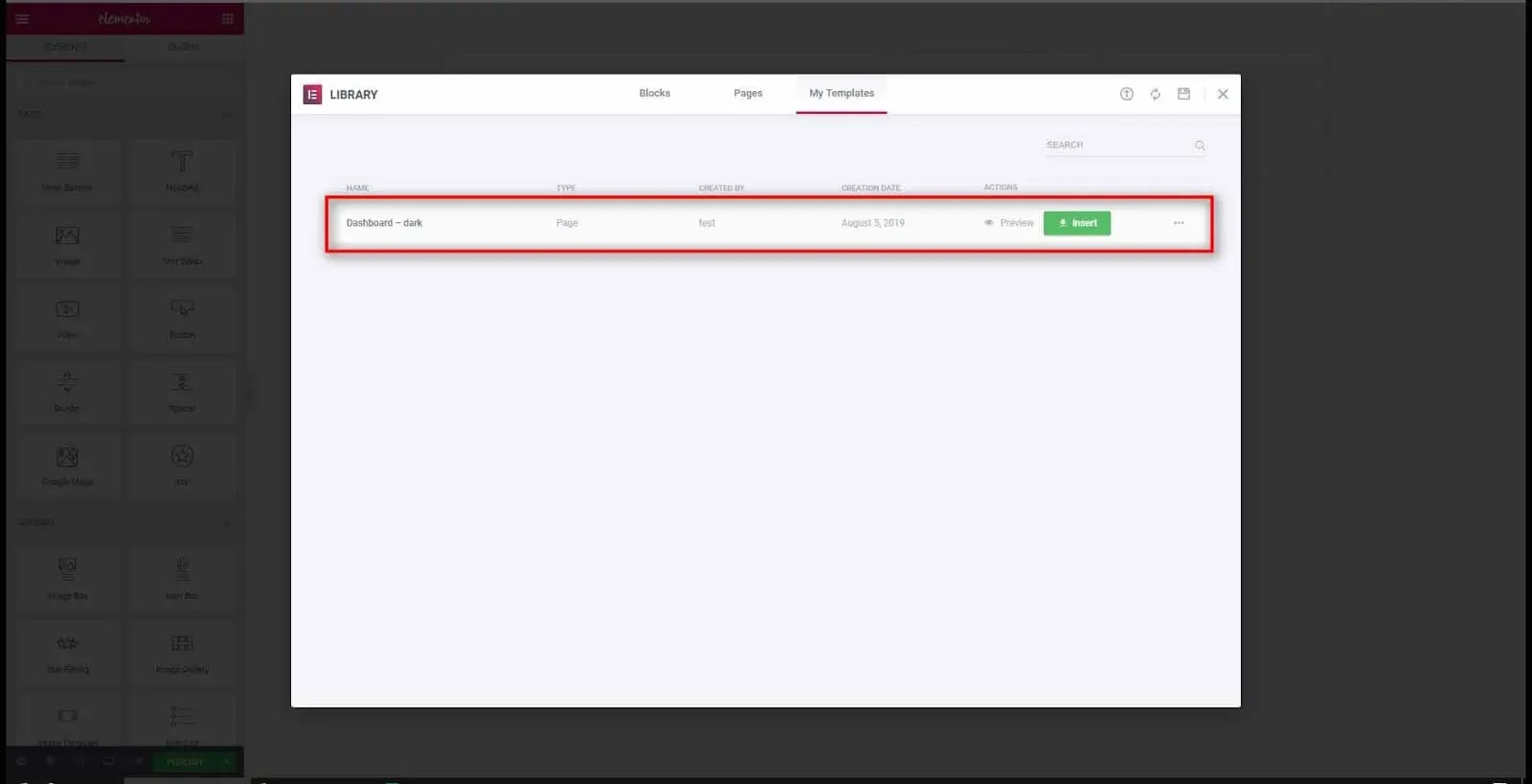
Insert Dashboard template
Insert Your upload template
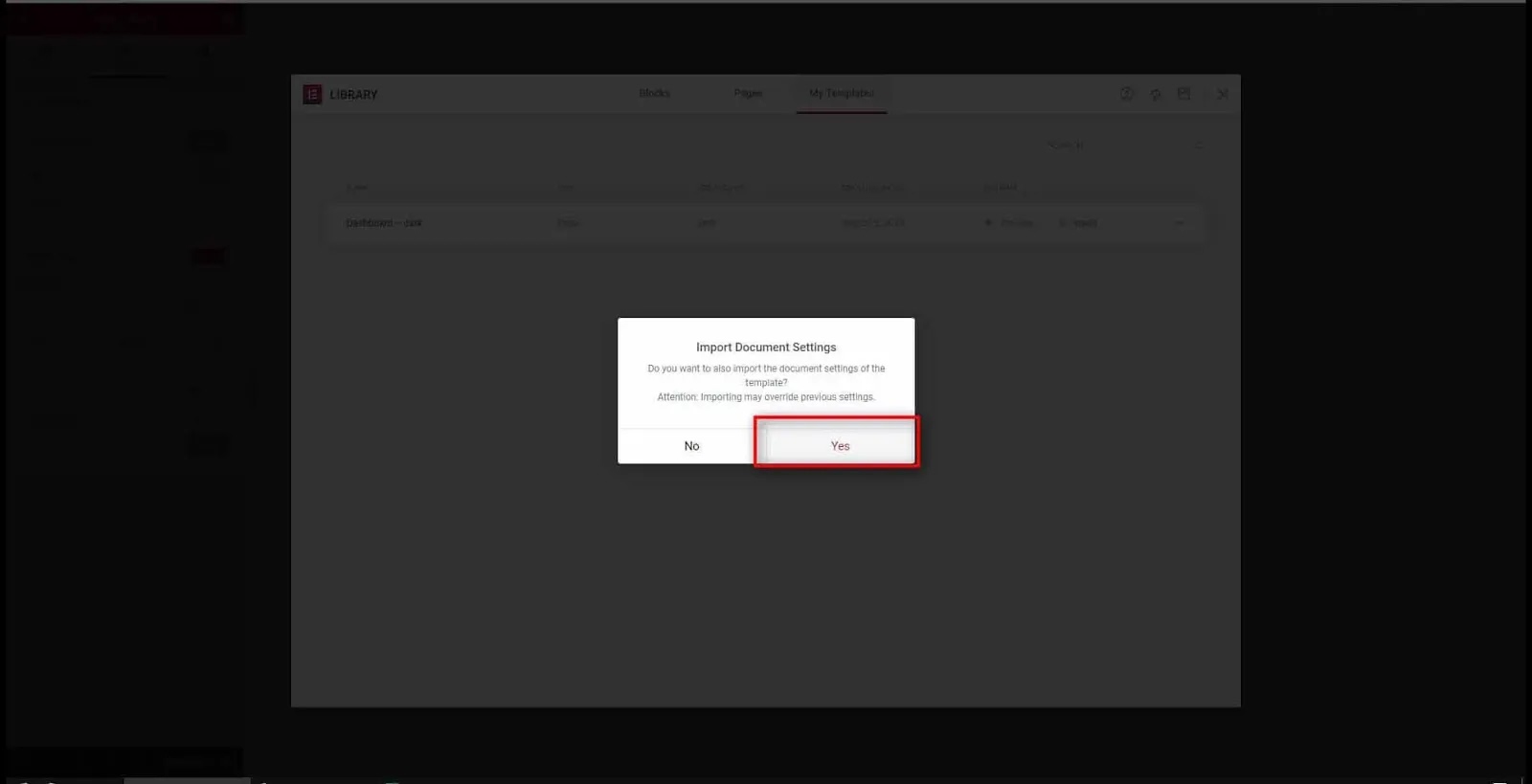
  • Be sure to choose “Yes” to insert the actual configuration of the page, for example, the background gradient that I originally added to the template…….
  • Well, we have a fully functional user dashboard that you can edit just the way you will need it.
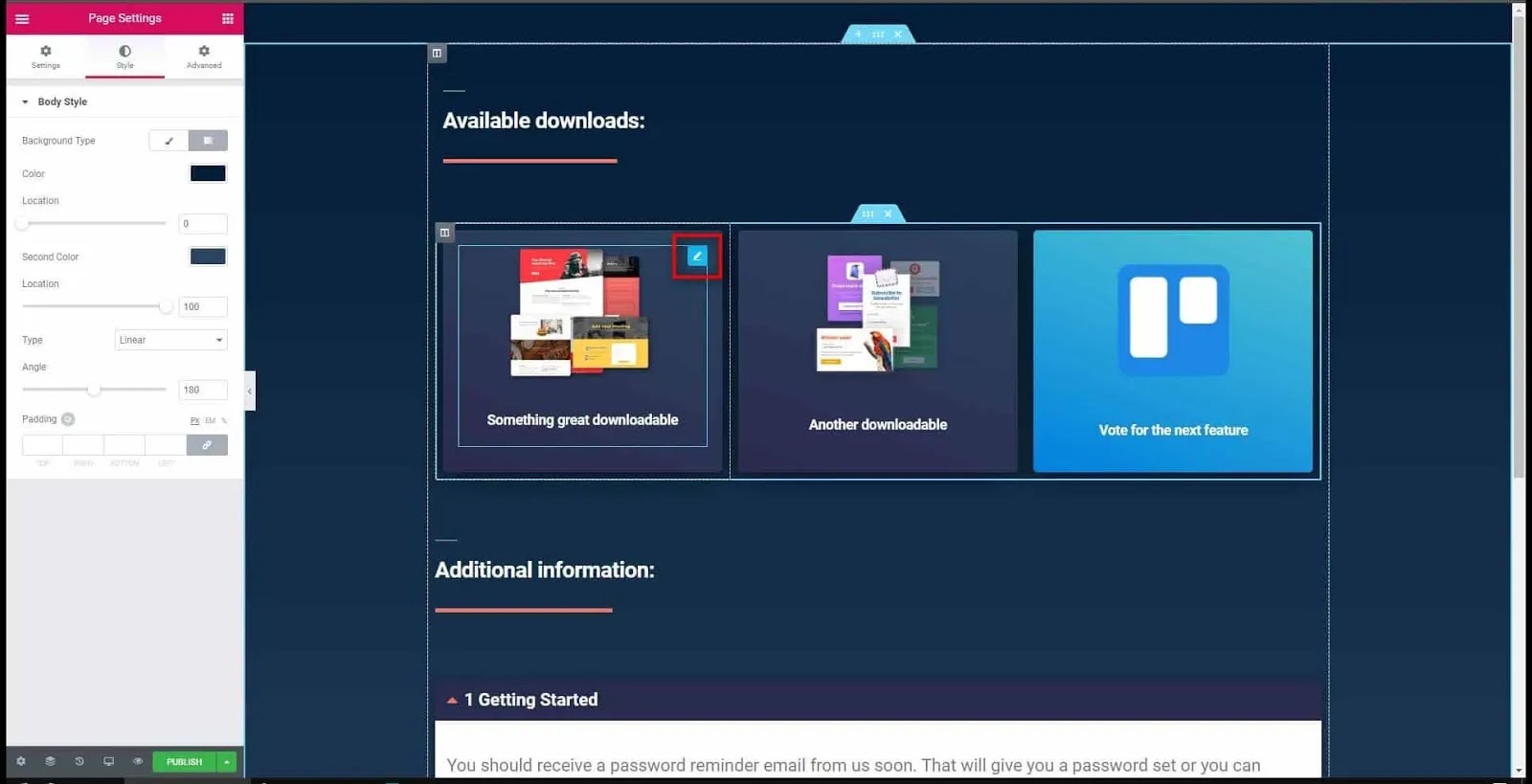
fully functional user dashboard
User Dashboard
  • From here on, when your customers log in or get logged in automatically with the fulfillment URL from TechnoVimal utilized in the ThriveCart product, they’re going to be greeted on this page if your settings are left blank for “Redirect after successful login (URL)”
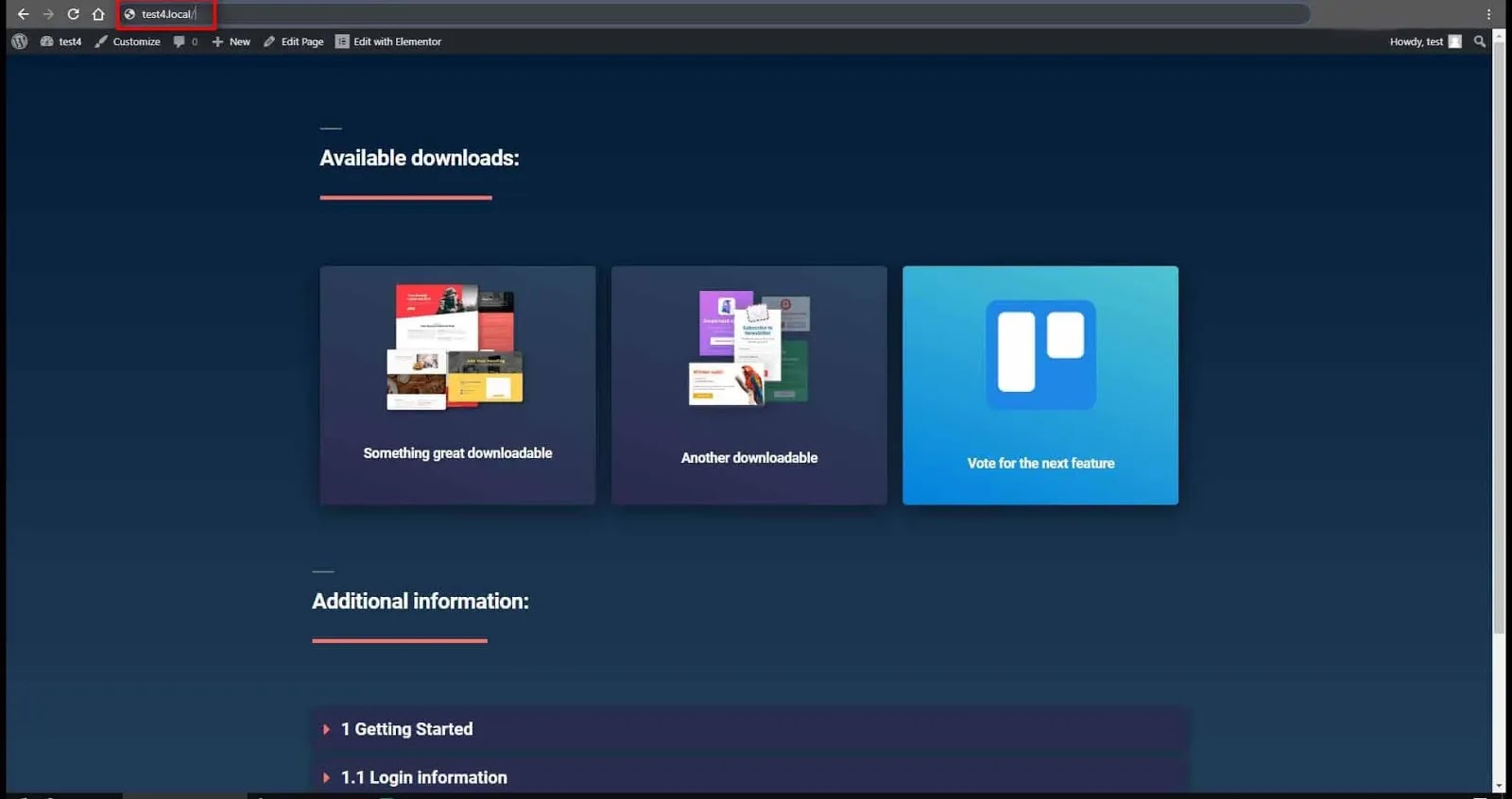
log in or get logged

Note –

👉 If you plan to update, you should not dismiss the dashboard. ❗

Final Verdict on Custom WordPress Dashboard

Well, WordPress and Elementor are widely known for their robustness and customization options. There is nothing concrete here, you can modify and mold everything that is right for you and your business.

In this continuation, you can also change the view of the WordPress back-end panel to facilitate the navigation of your personal or client evaluation. As a developer, the default WordPress dashboard may be familiar to you, but your customers may have difficulty operating it.

Nothing to worry about You can now govern the back-end of your site and create a custom WordPress panel to assess the value of your brand and customer satisfaction.

Thanks

HOPE YOU FIND THIS TUTORIAL USEFUL, HAVE AN AWESOME DAY!

You may also want to see: 

Best Hosting Deals

  • BlueHost Hosting Discount
  • A2 Hosting Discount
  • DreamHost Hosting Discount
  • GeneratePress Theme Discount
  • Mangools Toolkit Discount

If you liked this article, share it on the social networking site. You can also find us on Twitter, Facebook, and Instagram.
Grammarly Review: The Ultimate Writing Tool for Writers

0

Grammarly: Have you been struggling with your grammar, spelling, sentence structure but determined to bring out your ideas through writing? You are in the right place. I want to take you through the must-have writing tool for writers.

You may be the best writer out there, but small details like spelling mistakes can really bring down your book or anything else you write.

If your writing is full of spelling mistakes, grammatical errors, and poor sentence structure, you are least likely to attract readers. People will leave as fast as they came in and you don’t want that to happen.

This is why Grammarly is here to help you with the tidbits of your writing.

Grammar is a single-stop-shop writing tool that checks spelling,  grammar, sentence structure, and plagiarism on the fly.  It is an Inc. based in San Francisco. 500 is a company that uses AI-powered tools to help you communicate better in your writing.

I’ll be honest before I learn about this software, my writing got sucked. Do you know why? Because I didn’t have a second pair of eyes to fix my piece for a clear and easy understanding.

Grammarly Review: The Ultimate Writing Tool for Writers

Reasons Why You Should Choose Grammarly as your writing tool.

  • Grammar is free! Yes, you heard that right. Grammar offers its basic features like grammar and spelling checkers for free. You do not pay to access your most important features as a writer.
  • It is easy to use. All you need to do is download the Grammarly app or register an account with them and use it online.
  • Easily Available. You can add this awesome software to your browser and use it on any web page including social media sites. If you download Grammar, poor grammar will be a thing of the past.
  • Corrects mistakes automatically. When you install the grammar, it activates everywhere you type. It exposes incorrect sentences with a red line to give you real-time editing. When you hover over highlighted sentences, it gives you suggestions on what you need to do to make that particular sentence correct, clear, and concise.

Who Uses Grammarly Writing App?

I know you are asking yourself this question and wondering if you really need it. If you ask me, I will tell you that everyone needs Grammarly. If you want to write a really clear sentence and deliver your message without any hassle.

I’ve seen many people try to pass a message especially on social media and because their sentences didn’t come out clearly because of poor grammar and spelling mistakes, they end up being a laughing stock. Using Grammarly can help you avoid such pitfalls and write like a pro.

Who uses this Writing Tool?

  • Student. If you are a student then you know that it is important to write clear sentences in your essays. Grammar has been licensed by more than six hundred leading universities. It dramatically improves your writing on essays, dissertations, research, reports, and or college entrance papers.
  • Professional. If you are like me, Grammarly is one of the essential tools on your freelance writing checklist. I write for a living and that means providing quality work to my clients is an essential key. To add, other professions such as law, health, marketing, engineering, and journalism used grammar to improve their writing skills.
  • Job seekers, English learners, non-native speakers, and foreigners.  As a job seeker, you need to impress your potential employer and do what happens among others, sending in a well-written letter and resume. Grammar will help you write a resume that will inspire your potential employer to appoint you.
  • Equally, English learners can also use this powerful tool to learn the language faster. And if you want to speak like a native English speaker, Grammarly is your perfect match.

How To Get Grammarly Writing App.

Grammarly is as easy as ABC. It’s just a click away and you’ll have it on your device. Whatever device you are using does not matter. You can take it on your phone, your desktop, laptop, tablet.

All you have to do is download it and you are good to go. But before that let me show you the easiest and fastest way to get up and running in less than a minute.

Remember, you can still use grammar without registering for an account, but to unlock all the awesome features that you definitely need to open a free account, it’s better that you use premium grammar And get all means of writing and editing such as plagiarism. Testing equipment.

How to Create an Account with Grammarly App.

As I said above, creating a village account is very simple and easy. Let’s see how.

You should land on a beautiful page like the one below. Click Login on the top right corner.

Grammar App
  • They have three options to register. You can either use your Facebook account, Google account, or use your email as shown below.
You can either use your Facebook account, Google account, or use your email as shown below. grammarly

In less than a minute you will have a Grammarly account! Once you are in you you can start writing the best pieces you can ever imagine and communicate better.

  • On the dashboard, click Applications to see available software that you can include with grammar. have a look.
 Dashboard Grammarly account!

The current version of grammar can be used on  Microsoft Office, Windows, and Chrome.

I am currently using grammar for Chrome and I love it. Let me show you how to add Grammarly to your browser and say goodbye to grammar and spelling mistakes.

How to add Grammarly Writing Tool to Chrome as an Extension.

It is very simple.

Click on the apps on your dashboard and select Grammar for Chrome and you will be taken to the Chrome Web Store.

Add to Chrome as an extension and a green logo will appear on your search bar in the top right corner of your browser.

By the time you log in, grammar will be active on all web pages you visit.

Âť Top 5 Blog Writing Skills & Tips for Better Blog Posts

Âť Get almost 100% PageSpeed on Newspaper Theme

Final Verdict on Grammarly Writing Software.

After using Grammarly and seeing the weirdness of it, I would say that it will be found already. If you are a freelance writer like me then you should try Grammar and impress your customers.

over to you. How has Grammarly helped you in your writing? Tell me in the comments section.

Note:- This post may contain affiliate links. I only recommend things I have used and don’t worry they come at no cost to you. I will really appreciate it if you sign up using the links.

Hopefully, this tutorial was helpful. allow us to know within the comments below if you face any issues.😊

How to Redirect Non-www to www URLs

0

Redirecting non-www requests to the www version of your website’s universal resource locator is useful for SEO functions. Not solely can it assist you to avoid duplicate content on the Google index, however, it’ll additionally avoid the chance of split page rank and or split incoming links. during this article, we’ll learn the way to send non-www to www URLs mistreatment the .htaccess move into your public_html folder.

Editing .htaccess File

Step 1:

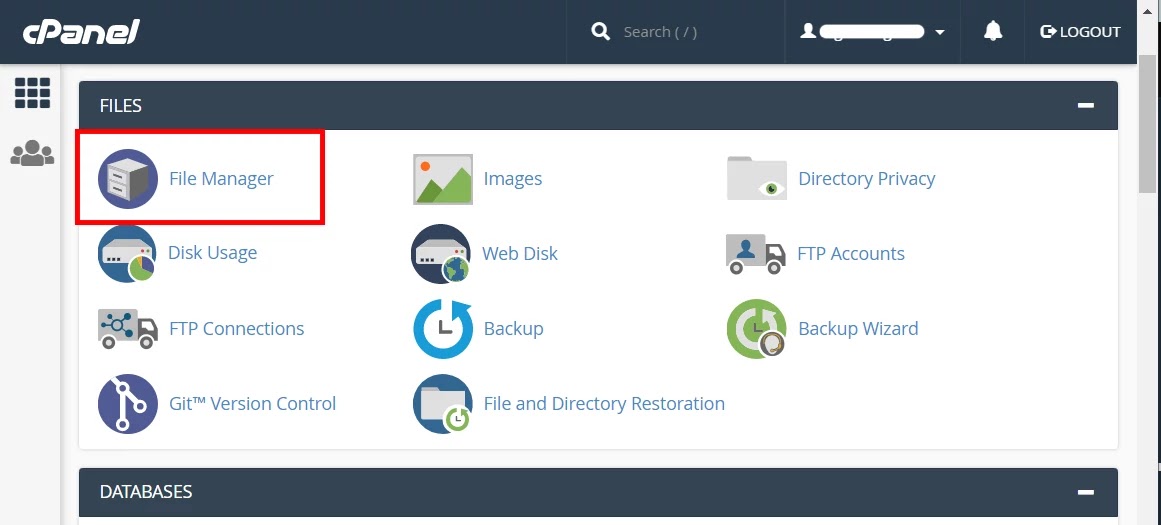
  • If you are using cPanel, login into your account, and choose the File Manager.
cPanel login file managar

Step 2:

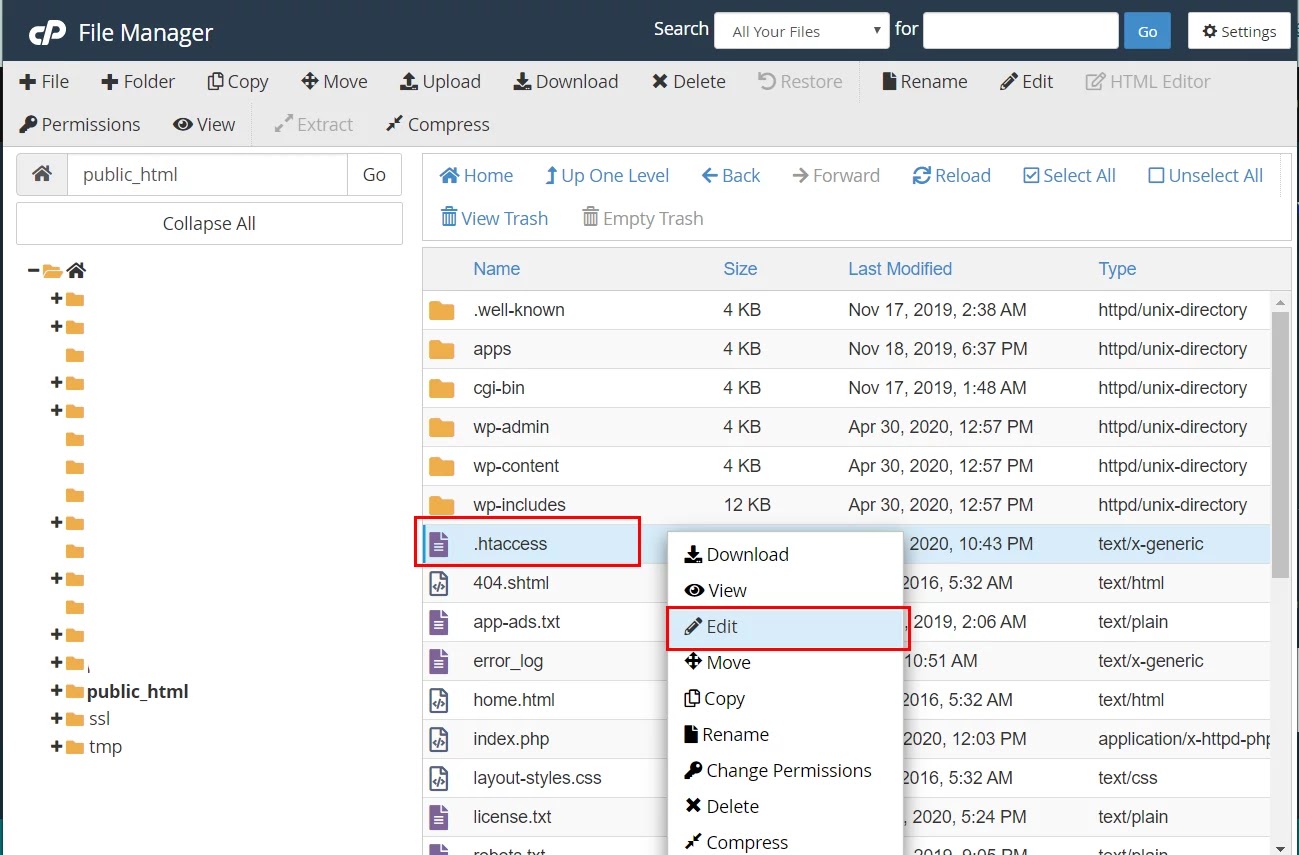
  • Navigate to the public_html directory, right-click on the .htaccess file and select Edit.
edit .htaccess file  in cPanel

Note- Sometimes, dotfiles (files their names start with a dot) because the .htaccess file is hidden from the manager. to form them visible, click the Settings button within the top right corner and check the Show Hidden Files (dotfiles) option from the Preferences tab.

Step 3:

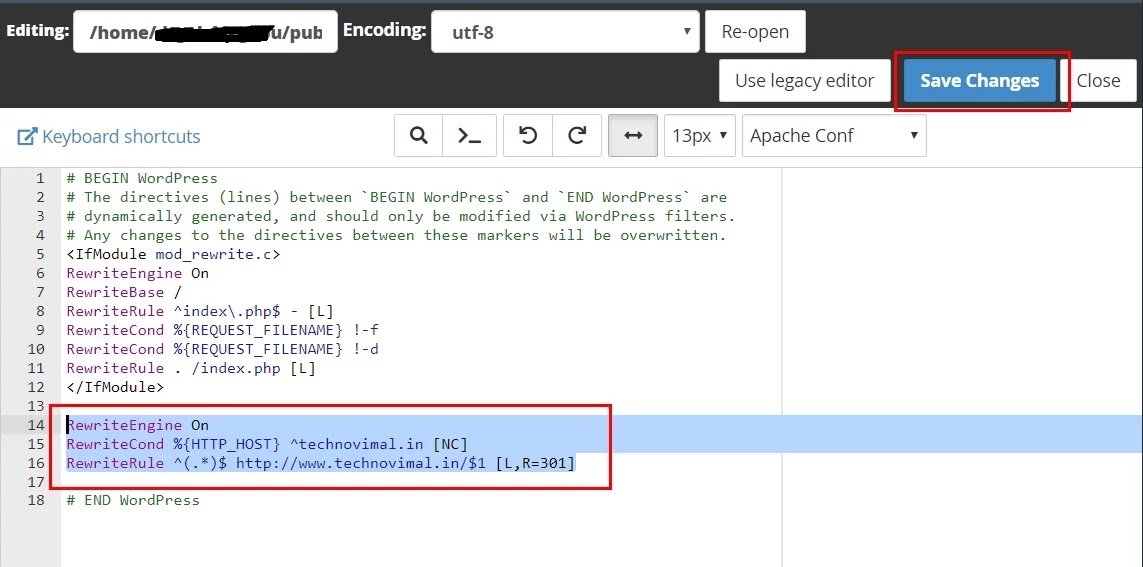
  • Insert the following lines under the Rewrite Engine On:

RewriteEngine On
RewriteCond %{HTTP_HOST} ^yourdomain.com [NC]
RewriteRule ^(.*)$ http://www.yourdomain.com/$1 [L,R=301]

Where yourdomain.com is your actual domain name.

Redirect Non-www to www URLs

Step 4:

  • Don’t forget to switch the code together with your actual name rather than yourdomain.com. Once you’re done don’t forget to save lots of the changes.

Congratulations, you’ve got successfully enabled a .htaccess file that will redirect all visitors from a non-www URL to the www version of your website! Wasn’t hard in the least, was it?

Redirect Non-www to www With HTTPS (.htaccess)

Most websites now run on HTTPS, so redirect straight to the secure www version. This avoids a second redirect from http to https:

RewriteEngine On
RewriteCond %{HTTP_HOST} ^yourdomain\.com [NC]
RewriteRule ^(.*)$ https://www.yourdomain.com/$1 [L,R=301]

Redirect Non-www to www on Nginx

If your server runs Nginx, add a separate server block for the non-www domain:

server {
    listen 80;
    listen 443 ssl;
    server_name yourdomain.com;
    return 301 https://www.yourdomain.com$request_uri;
}

Redirect With Cloudflare

If your domain uses Cloudflare, go to Rules → Redirect Rules and create a rule: when the hostname equals yourdomain.com, redirect dynamically to concat("https://www.yourdomain.com", http.request.uri.path) with status code 301 and Preserve query string turned on.

Update Your WordPress URLs

In WordPress, go to Settings → General and set both WordPress Address (URL) and Site Address (URL) to the www version, for example https://www.yourdomain.com. Then check the redirect by opening the non-www address in a private window.

Frequently Asked Questions

Is www or non-www better for SEO?

Neither ranks better. What matters is choosing one version and using it everywhere: the 301 redirect, your WordPress settings, the canonical tag and Google Search Console.

Should I use a 301 or 302 redirect?

Use a 301 (permanent) redirect. It tells search engines that the move is permanent and passes the ranking signals to the www version.

Conclusion

There you’ve got it! By finishing this tutorial, you’ve got learned the way to redirect non-www URLs to www. From now on, when someone accesses

From now on, when someone accesses http://yourdomain.com. The visitor will be redirected to http://www.yourdomain.com.

Hopefully, this tutorial was helpful. allow us to know within the comments below if you face any issues.

Get almost 100% PageSpeed on Newspaper Theme

0

The Newspaper theme is the popular premium theme that lets you write articles and blog posts with ease. The theme is developed by team tagDiv. You can download a free Newspaper X theme from here.

With the newspaper theme, you can increase the page load speed on your WordPress website. To do this, you must first test your website and take a look at Google’s recommendations.

Here, I am going to share some simple ideas that I learned while optimizing your blog.

How to Increase Page Loading Speed?

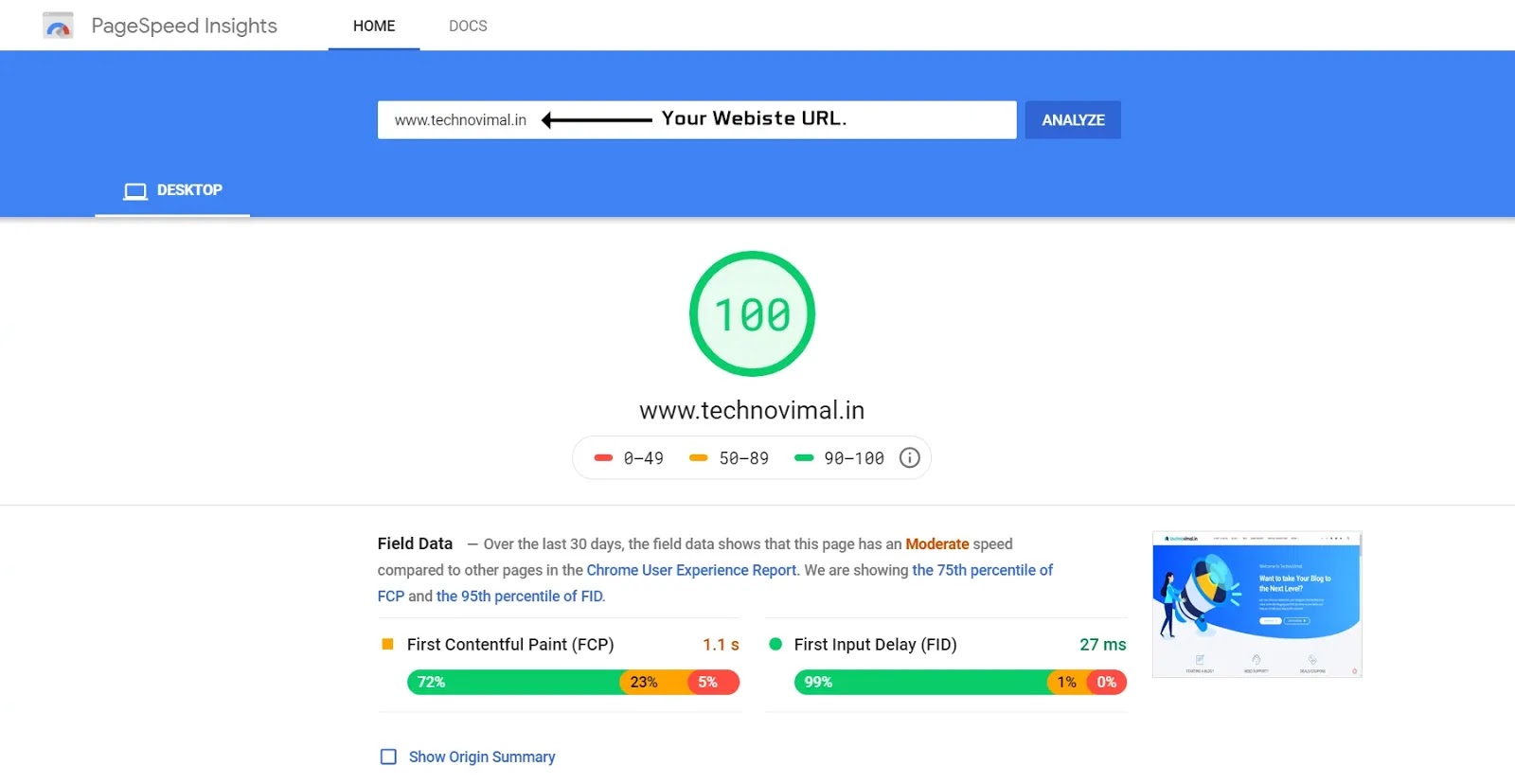
  • Test your page speed here.
Google Page Loading Speed  speed checker
Google PageSpeed Insights
  • Use a cache plugin (WP Super Cache)
  • Fix The admin-ajax.php Slow Problem
  • Set the Leverage Browser Caching
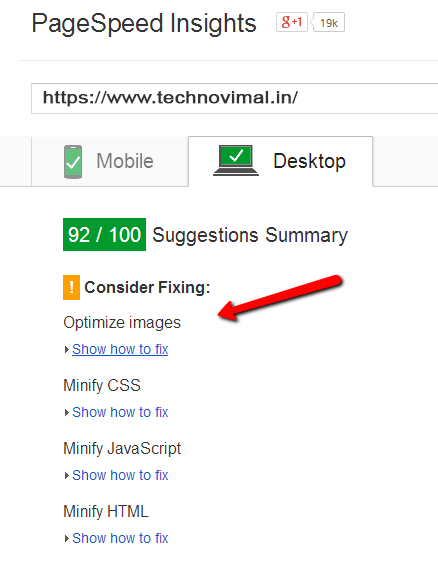
  • Optimize  your images
  • Enable the Gzip compression
  • Plugin Load Optimization (optional – advanced)

 The list of speed recommendations:

  • We recommend that you use WP Super Cache with your default settings.
  • If you have a lot of RAM on your server, you can also use the APC full page cache

Note-

Before you create any changes to your site, please backup the files where you plan to use the modifications. Let’s modify the .htaccess file. Start by saving a replica of the file on your hard-drive. If something goes wrong, you’ll use it to return to the previous state. Now, let’s start!

1. Use a cache plugin (WP Super Cache)

The WP Super Cache plugin is a cache plugin recommended by tagDiv. It serves static content for the visitor that improves the loading speed of the page.

2. Fix The admin-ajax.php Slow Problem

Obtaining good user experience also includes fast page speed, less server response time, and much more.

The first few seconds determine whether a customer stays on your page or competes with a competitor.

3. Enable Gzip Compression

This compresses the CSS and HTML, improves the page loading speed, and reduces bandwidth usage.

The setup is different from one server to a different, so you’ll need to look at your host instructions section to ascertain how you’ll enable it on your site.

The theme demo server is set like this:

<IfModule mod_deflate.c>
<filesMatch "\.(js|css|html|php)$">
SetOutputFilter DEFLATE
</filesMatch>
</IfModule>

4. Leverage Browser Caching  â€“ Add Expire Headers

This file will be effective when placed in any directory which is then loaded through Apache web server software. The file affects the entire directory and is placed in all files and subdirectories in the specified directory.

Note: Settings may vary depending on the resources you want to include.

You have to add the following code with you .htaccess file. Just copy and paste the following code-

# BEGIN Expire headers

<ifModule mod_expires.c>
ExpiresActive On
ExpiresDefault "access plus 5 seconds"
ExpiresByType image/x-icon "access plus 604800 seconds"
ExpiresByType image/jpeg "access plus 604800 seconds"
ExpiresByType image/png "access plus 604800 seconds"
ExpiresByType image/gif "access plus 604800 seconds"
ExpiresByType application/x-shockwave-flash "access plus 604800 seconds"
ExpiresByType text/css "access plus 604800 seconds"
ExpiresByType text/javascript "access plus 604800 seconds"
ExpiresByType application/javascript "access plus 604800 seconds"
ExpiresByType application/x-javascript "access plus 604800 seconds"
ExpiresByType application/x-font-woff "access plus 604800 seconds"
ExpiresByType application/x-font-svg "access plus 604800 seconds"
ExpiresByType image/svg+xml "access plus 604800 seconds"
</ifModule>

# END Expire headers

5. Optimize Images

Images are one of the most abundant resources on your pages and the bigger they are, the longer it will take to download, which will slow down the page load speed.

To reduce their size and increase the page load speed, you must compress and optimize them. There are many guides on how to customize images (using Photoshop or similar software).

Alternative:

Add the following code to the end of the functions.php. The code automatically compresses each thumbnail to 50%:

add_filter( 'jpeg_quality', create_function('', 'return 50;' ) );

When you add the necessary code to recreate the thumbs, you can use the Force Regenerate plugin for this.

PageSpeed Insights

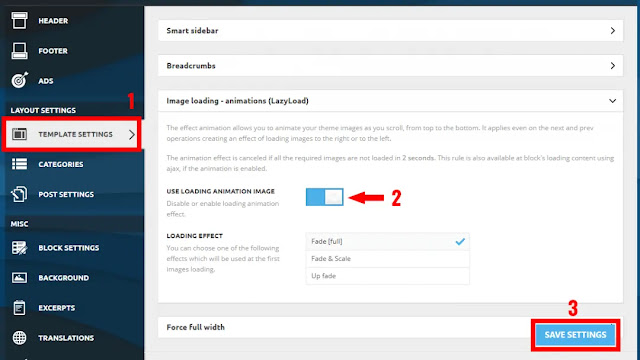
6. Image Loading – animation (Enable Lazy Load)

Effect animation allows you to animate your theme images as you scroll, from top to bottom. This also applies to the next and prevailing operations, creating the effect of loading images on the right or left.

If all the necessary images are not loaded in 2 seconds then the animation effect is canceled. If animation is enabled then this rule is also available on the loading content of blocks using ajax.

Image Loading - animation (Enable Lazy Load)
Enable Lazy Load

Remove Unnecessary Code – functions.php

We will make any changes to this file, so it’s best you set up the Newspaper child theme. More information.

Removing Emojis

If you’re not using Emojis on your site, you don’t need to load them on the backend.

To do so, put the following code in your theme’s functions.php file.

// Removing Emojis

add_action( 'init', 'disable_wp_emojicons' );
function disable_wp_emojicons() {
        remove_filter( 'comment_text_rss', 'wp_staticize_emoji' );
        remove_filter( 'wp_mail', 'wp_staticize_emoji_for_email' );
	remove_filter( 'the_content_feed', 'wp_staticize_emoji' );
	remove_action( 'admin_print_styles', 'print_emoji_styles' );
	remove_action( 'wp_head', 'print_emoji_detection_script', 7 );
	remove_action( 'admin_print_scripts', 'print_emoji_detection_script' );
	remove_action( 'wp_print_styles', 'print_emoji_styles' );
	
	
}

Removing Font Awesome

The Newspaper Theme also uses Font Awesome, but we can eliminate the clutter in Font Awesome. Put the following code in your theme’s functions.php file.

// Removing Font Awesome

add_filter( 'fontawesome_essentials', 'fontawesome_essentials' );
function fontawesome_essentials() {
	return true;
}

Removing Other Scripts

A Newspaper theme comes with a built-in script, so there is no need to use the built-in WordPress script. It is better to cancel registration by adding the following code at the end of your subject’s tasks. It will also reduce HTTP requests to the server.

// remove WP embed script

function stop_loading_wp_embed() {
	if (!is_admin()) {
		wp_deregister_script('wp-embed');
	}
}
add_action('init', 'stop_loading_wp_embed');

Remove Multi-Purpose Style

If you do not use the Multipurpose Plugins module, you can enable the following to remove the script that has been loaded for it.

// remove multi purpose style

add_action( 'wp_enqueue_scripts', 'remove_multi_purpose', 20 );
function remove_multi_purpose() {
	wp_dequeue_style( 'td-plugin-multi-purpose' );
}

Remove unnecessary Jetpack CSS

Remove Unnecessary Jet-pack CSS form your WordPress site to help reduce page size and speed uploading.

// remove jetpack css

add_filter( 'jetpack_implode_frontend_css', '__return_false' );

// remove jetpack scripts
function dequeue_devicepx() {
    wp_dequeue_script( 'devicepx' );
}
add_action( 'wp_enqueue_scripts', 'dequeue_devicepx' );

This function.php will help speed up your site by removing small things that delay editing.


Conclusion

View your website’s performance score on GTMetrix.com. I am sure you are very satisfied with the pace. If you are stuck somewhere, feel free to comment below.

Hey Wait!! — Don’t forget to share this tutorial on your social network. Thanks for reading😊

How to Auto Reduce Server Response Time

0

Reducing server response time should be a primary goal of website owners and SEO experts.

Obtaining good user experience also includes fast page speed, less server response time, and much more. The first few seconds determine whether a customer stays on your page or competes with a competitor. For example, many of them expect page speed under 2 seconds. Long response time creates frustration for the user. Therefore server response time must be reduced.

In this article, learn about how to reduce server response time tips.

What is Server Response Time?

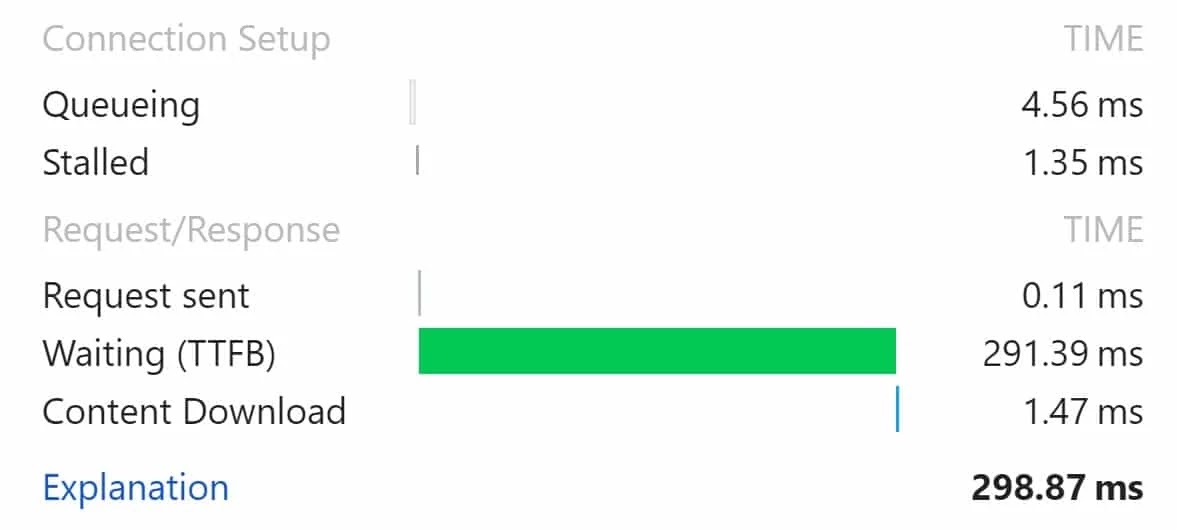
Server response time is the amount of time it takes for a web server to respond to a request from a browser. It is measured by TTFB (Time to First Byte). The TTFB is how many milliseconds to receive the first byte of the page after sending an HTTP request.

Server Response Time client and server communication

No matter how optimized the speed of your web pages. If your server response time is slow your pages will display more slowly.

Google says “You should reduce your server response time by 200milliseconds“.

Why is Server Response Time Important?

The result of a slow website is often harmful to the business. The loading time of your website greatly affects the user experience.

Waiting TTFB

Chart showing elements of a slow loading website TTFB796ms TTFB should be improved.
Research shows that more than 40% of web users leave a site if it takes 3 seconds to load. In addition, the longer it has to load the more severe it ranks on the Program Results Page (SERP).

Response Time Effect:

Improving program optimization and user experience in digital marketing. This is often an honest enough reason for you to see what your server’s response time is and how to increase it.

Primary Factors that Affect Server Response Time:

The primary reasons for a slow WordPress website are:

Web Hosting – When your web hosting server is not configured properly it can damage the speed of your website.

Page size – Mainly images that are not optimized for online.

Poor plugins – If you are employing a poorly coded plugin. It can significantly disrupt your website.

WordPress Configuration – If your WordPress site is not serving cached pages. It will overload your server causing your website to slow down or crash completely.

External Scripts – External scripts such as advertisements font loaders etc. It can also have a huge impact on the performance of your website.

Now that you have just come to know what your WordPress website. Take a look at how to speed up your WordPress website.

ALSO READ: 12 Tips to Write an Article as a Professional Writer

How to Improve Server Response Time:

There are basic methods. You will need to optimize a few things to make your site faster.

1). Upgrade Your Hosting Plan:

The first thing after buying a domain is to buy a web hosting plan from a web hosting provider. I know, at first, we go cheap and sign up for shared hosting. However, this method slows down your site later as your site grows in users and content.

ALSO READ: Best Free Web Hosting Providers

Therefore, upgrading your hosting plan to VPS would be an option to improve the server’s reaction time. Once you are doing this, you will immediately get a huge difference.

2). Image Optimization:

We optimize our images in two areas: our WordPress theme and uploaded content.

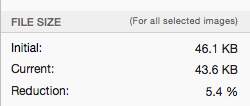
For our WordPress theme, we use Codekit to ensure that all images are compressed losslessly. This ensures that the file size is as small as possible, without loss of quality.

Image Optimization

We also educate all of our authors on the importance of saving images optimized for the web.

3). Optimize CSS and JS Files:

External files, JavaScript and CSS create a web page and affect how quickly it works. The practice of shrinking and shrinking scripts is a popular solution when it comes to files. This maintains a large amount of available data but does not allow the amount to compromise performance.

Distribute JS and CSS files as external or internal depending on their size and importance. Improve loading time by placing smaller files as part of an HTML file internally. Finally, make the cache easier by keeping obscure files external.

4). Keep WordPress Lightweight:

WordPress allows you to easily create beautiful websites. There are attractive themes and many plugins to customize it. However, be careful not to overload your subject as it may slow down the response time.

If you are using a WP template then try to stick to simple and Lightweight Theme ones and avoid adding too many plugins.

Use the website monitoring tool and check which plugins are slowing down your website. Remove unused plugins and disable those that use CPU resources.

5. Configure Caching:

Caching ensures fast delivery to visitors. Without caching a browser requests server assets every time a page is loaded instead of accessing them from a local or broker cache.

There are WordPress plugins that allow you to store files locally on a user’s computer. The files are then reused during future visits. This practice is called caching. Speeds up charging time and ensures a better user experience.

6. Use CDN:

CDN is an acronym for Content Delivery Network that primarily speeds up your website/blog. It provides web content to users based on their geographical location. This means significant performance improvements for site users.

7. Use Cache Plugins:

The cache plugin generates static files of your content and provides it to the user when the user accesses your page/post. This dramatically reduces server response time.

Conclusion

As you can see, a faster loading can improve website visitor engagement. The techniques we have discussed include many basic and intermediate improvements that you can implement to optimize your WordPress site.

We hope this article helped you speed up your site. You may also want to check out our article about SEO Friendly URL And Permalink Structure.

If you liked this article, please  Join Telegram Channel and subscribe to our YouTube channel for WordPress video tutorials. You can also find us on Instagram, Twitter, and Facebook.

10 Critical Things For Vetting Sites For Guest Posts

0

If you are looking for sites to write guest posts there are a  variety of things to consider.

Guest blogging can be a bit erratic: if done correctly, it has the potential to catapult your traffic.

If not, all your efforts may backfire.

There are a lot of prerequisites to keep in mind to find the most advantageous site. An established minimum DR or DA criterion and minimum RD is an important prerequisite although it may differ from one niche to another.

For example, you’re more likely to find high-DR and high-DR sites in fitness and fashion niches but you might fall short when it comes to niches like immigration or billiards.

At the top of your list should be sites that provide numerous dofollow links in the content of your guest posts.

Other prerequisites include sites that offer much more information in addition to links to the author’s home pages and no segregation of guest posts from the rest of the site.

By placing them in a separate group and making them increasingly difficult to discover through your site navigation the site can affect your traffic and your audience can take a big hit.

Here are 10 Key Fundamentals To Look For

1). Choose Sites with Traffic

The best practice for recognizing whether a website is rated by Google through access to the sites Search Console, and not having a manual penalty applied to it is adding organic traffic to the site.

We recommend running a potential guest destination site through Ahrefs. This link research tool checks your organic traffic numbers. Be sure to try it out before deciding to write for any site.

Rather there is a misconception about organic traffic. It is believed that more traffic is always better.

As we will understand through the example provided below this is not always true

Suppose there is a site that only publishes papers or research on topics that do not have an adequate amount of search volume.

Therefore it has the possibility of generating abundant organic traffic. Despite this, you could still get tons of quality links due to the nature of the content.

The site may not receive a lot of organic traffic despite being clean and contains multiple links.

If that’s the situation it would be perfectly fine for your guest post to be published on that site.

Alternatively, as a result of low headroom trading possibilities potentially weaker sites can use high-volume low-competition keywords and acquire more traffic with no hassle.

This tricks many people into believing that the website is really good.

2). Pick Sites without Major Traffic Drops

As revealed through link research tools like SEMRush and Ahrefs it is best to avoid sites that can often experience substantial traffic drops.

As a result of an algorithmic or manual penalty, it is recommended to stay away from such sites.

There is no written harm to these sites but it is best not to take risks.

3). Keep Away from Sites with Doubtful OBLs

Sites with dubious OBLs should be avoided. No matter how impressive your metrics are it is recommended to avoid sites that associate with adult sites gambling drug stores and other dubious sites.

Doubtful OBL

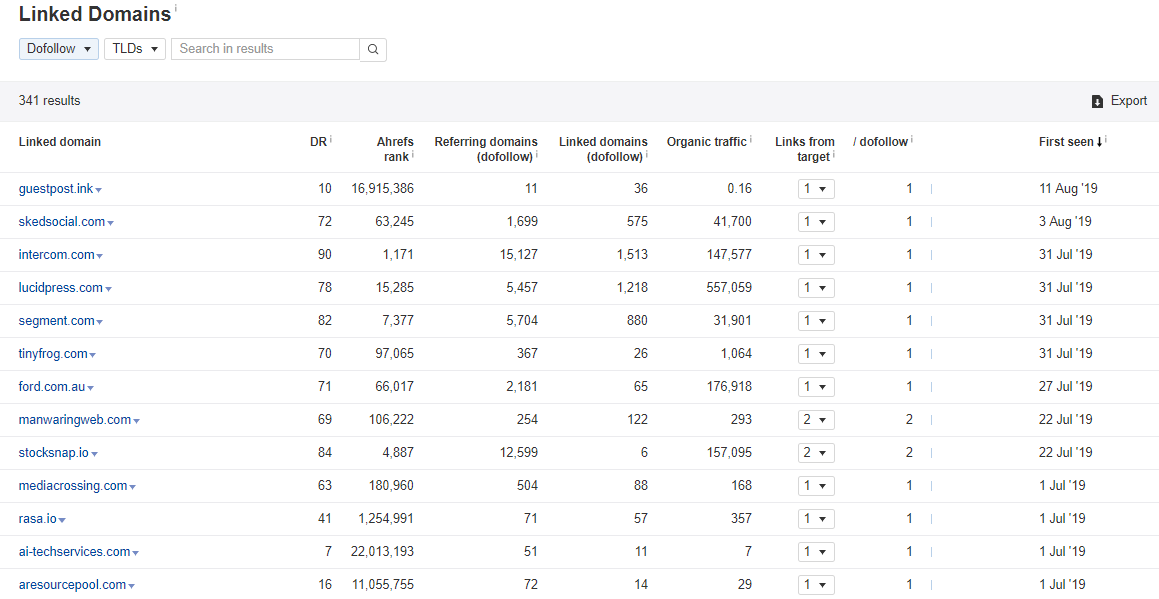
To get the latest dofollow linked domains go to Ahrefs Site Explorer.

Write the domain in the space provided and click on “Linked Domains” under “Outgoing Links”. Filter metrics by “Dofollow” and sort them by “first seen”.

You will have a list of the last dofollow-linked domains from the site you entered

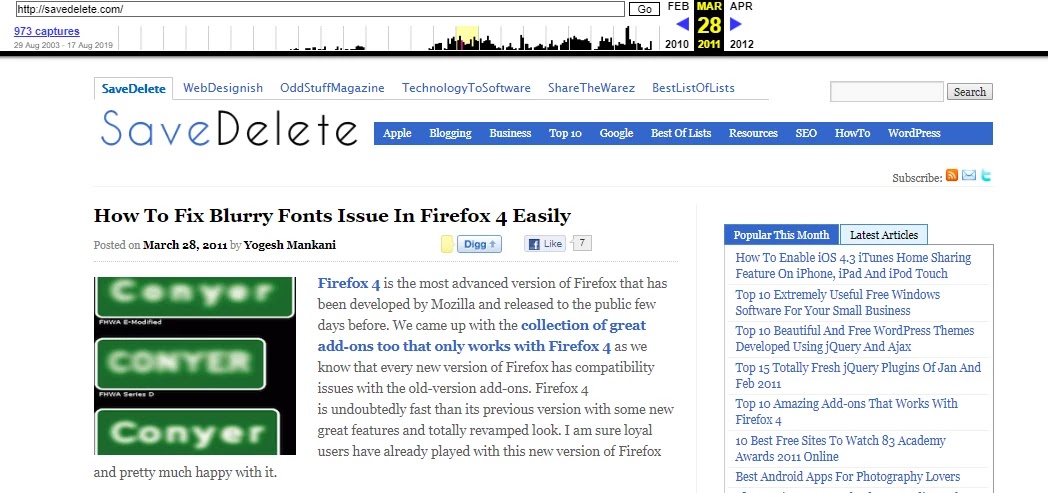
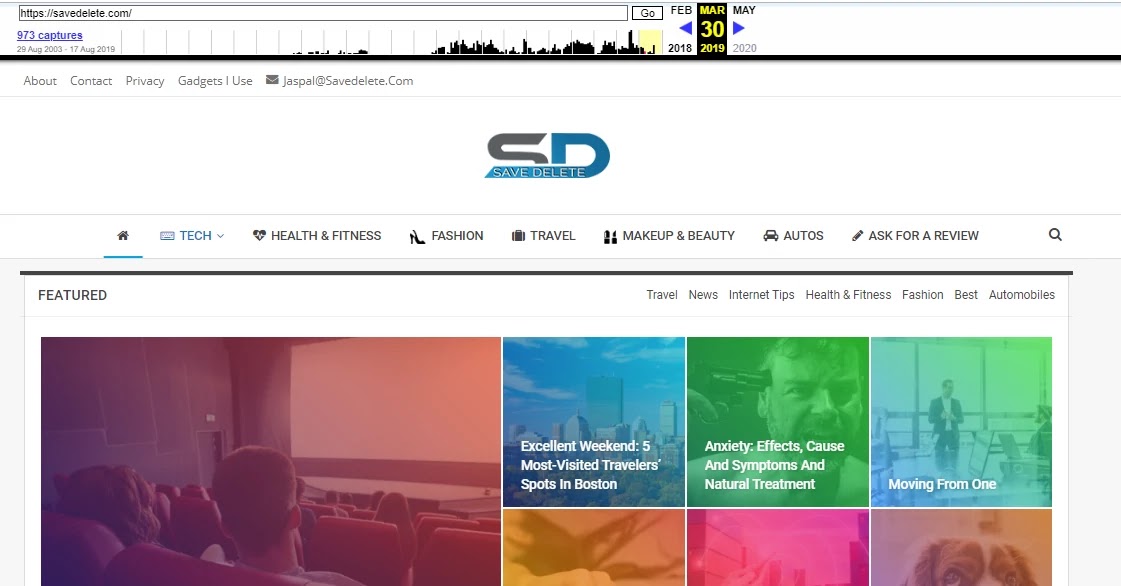
4). Avoid Sites without a Clean Wayback History

Several sites created to sell Guest posts are grouped into expired domains. New owners take advantage of the excellent expired domain metrics and convince potential buyers of the authenticity of the guest posts offered there.

THEN 👇👇

NOW 👇👇

This practice is no different than registering an expired domain and then reorganizing it according to a PBN site. Consequently, the links on these sites are more threatening than is common.

The simplest method to detect expired domains is through the Wayback Machine in the Web Archive.

All you need to do is put the domain there and review the first files present in the domain. With a little experience. You can easily tell if the domain was originally for some other purpose and is now being used to sell links

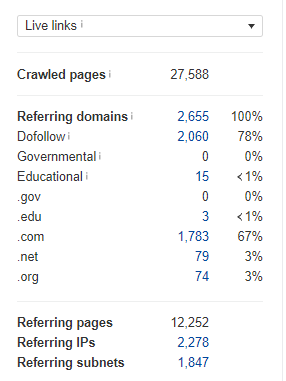
5). Analyze the Nature & DF/NF Ratio of Referring Domains

It can seem very impressive from the outside when multiple sites get hundreds or even thousands of DR. But the actual image comes to light when you take a close look at the site with a tool like Ahrefs.

dofollow -nofollow backlink relationship

Most of the time a lot of RDs are produced by bloggers themselves and are not followed up. They do this by leaving comments on other blogs and thus getting a lot of nofollow links that way.

Standard practice is to use the ‘name’ or ‘name @ blog’ anchors

relevance anchors

The first thing to look for on your preferred site. Is the percentage of RD that is followed.
It is recommended to avoid dofollow sites below 50 percent. Most authentic sites have more than 80 percent dofollow.

Another thing to keep in mind is to have a basic idea about the natural source and quality of the links provided.

To do so just check some of the links given at random.

6). Go for Sites with a Low Percentage of Guest Posts

Make sure most of the posts on the site in question are not guest posts scroll through the latest posts on the site and make sure about 80% or more of them are original posts.

Another thing to keep in mind is to determine that most posts diligently follow the main theme of the site.

Usually on mediocre sites like these common guest posts aren’t completely relevant to the main topics. The main topic that hosts the guest post is ignored.

Suppose the site in question is in the physical fitness niche and look at a number of posts that are not relevant to the niche and often combining a completely different niche along with physical fitness such as fitness and art fitness and music fitness and the outdoors among others that’s a big red flag.

7). Multi-Niche Check

Open the site and take a close look. If you think you are using a common cheap or even free theme or if you have a variety of useless menu links it is better to avoid such sites. It is recommended to stay away from sites that cover a large number of niches.

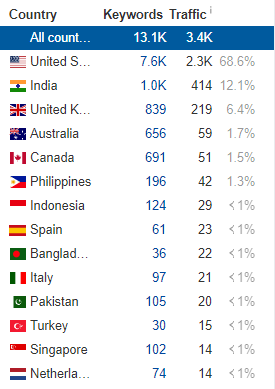
8). Majority Traffic Location

It is not typical to have a large number of links from sites whose main traffic region is India Bangladesh Philippines Sri Lanka among others and not from the target region of your website.

organic traffic location

English-speaking countries whose native language is not English have an infamous reputation when it comes to the world of paid links.

If you’re wondering how you’re going to calculate the percentage of traffic by country look no further than Ahrefs.

9). Sponsored Post Labeling

If you’re paying for guest posts it is recommended to stay away from sites. That makes no effort to hide the fact that you paid for the post and as it is a blatant violation of Google Webmaster guidelines to pay for links which are obvious.

It’s a bad idea. Watch out for sites that use labels like “Sponsored Post” or “Paid Collaboration”.

10). Attract Natural Backlinks

This is not entirely essential and whether or not you will use this as a filter depends entirely on the lowest quality limit you have assigned for your guest publishing campaign.

Check to see if enough posts on one site are going completely naturally to follow the backlinks. (They should get them on their own even though you don’t have a way of knowing which ones are purely organic and which ones were purchased through the scope).

Once again Ahrefs Site Explorer is the best and easiest way to do it. You should set it to “best for links on” pages. Setting the HTTP code to “200 OK will only show live and non-redirected pages and will organize the results by the number of referring domains.

backlinks naturales

As mentioned above this is not entirely necessary but guest posting on sites like these will ensure that your guest posts get some links (which can be considered level 2 links) and therefore more and more links will reach your link pages

The Takeaways:

It is clear from the points given that browsing sites is a much more crucial practice than searching for guest posting goals.

The entire guest posting process takes a considerable amount of time and money.

It is essential to ensure that none of this is wasted.

After browsing and compiling a list of carefully vetted goals be sure to provide the best high-quality content.

This is vital as you can generate a greater audience for your guest posts and increase the number of links directed to those guest posts which in turn will lead to an increase in the flow of links flowing to your site.

What is an SEO Friendly URL Structure in WordPress

0

Have you ever wondered what is the most SEO Friendly URL structure for SEO in WordPress? We often ask this question to new users. Because in the past the default WordPress URL structure was not compatible with SEO. However this has now changed. In this article, we will explain the WordPress SEO friendly URL and how you can optimize your permanent WordPress link.

You may also want to see:

What is an SEO Friendly URL?

SEO friendly URLs are URLs that are designed to meet the needs of users and searchers. In particular, URLs optimized for SEO are concise and keyword-rich.

Example of a SEO friendly URL:

https://technovimal.in/how-to-start-a-blog/

So what does a non-SEO compatible URL look like?

https://technovimal.in/?p=10467

By default, WordPress now uses URL post names, which is the most SEO-friendly URL structure.

So why do beginners still ask us for the best permanent link structure?

Because in the past, WordPress did not use beautiful URLs, also known as permanent links. The default value used to be the non-SEO compatible example we shared earlier.

This was changed to WordPress 4.2. If you installed WordPress recently, your site’s URLs are compatible with SEO.

You can easily verify your permalink settings in your WordPress administration area.

The Permalink Settings Page Explained

In WordPress, the link is called Permanent Link (abbreviation for permanent link). You are using the term cross-linking structure and URL structure to exchange.

You must first go to the Permanent Links Settings page in your WordPress administration area.

Simply click on the Settings link on the Administrator menu and then click on Permanent Links. This will take you to a page that looks like this:

SEO Friendly URL And Permalink Structure

As you can see, several options are available.

Field:
https://technovimal.in/?p=123

Day and name:
https://technovimal.in/2020/02/05/sample-post/

Month and name:
https://technovimal.in/ 2020/02/sample-post/

Numerical:
https://technovimal.in/archives/123

Job Title:
https://www.wpbeginner.com/sample-post/

Custom Structure:

Choose your own URL structure with available tags.
Let’s explain these options a bit and how useful they are for users and SEO.

The first option of a simple name used to be the default WordPress URL structure. This is not an SEO friendly option.

The day and name option are somewhat SEO friendly because it has a publication name. However with the date the URL becomes too long. But most importantly after some time, its content seems obsolete, even if you update it regularly. Similarly the month and name options also risk being dated.

However, if it is a news publication you want your URL to have dates to show the news and improve the user experience.

In our opinion, those two structures are only good for news sites. Business sites that always hope to create green content should avoid it.

The publication name option is the most SEO friendly because it is short and beautiful.

If you are running a large publication you can use a custom structure that can also be compatible with SEO.

In TechnoVimal, we use a custom permanent link structure that appends the category name with the name of the post in the URL. Because our site is large and has thousands of articles we like it very much. You will see that large posts follow a similar URL structure.

To use a custom URL structure, you must add special tags to the custom structure box. For example, we use:

/%Category%/%Postname% /

Notice how each label is wrapped between percent signs. Also, inspect the slashes before and after the label.

Custom URL Structure with Available Tags

For the best results, we recommend using the options mentioned above. You can copy the URL structure we use in WPBeginner or choose a publication name as your URL structure.

However there are many other combinations that you can create using tags. Here is a list of tags that you can use to create your own custom URL structure:

% Second% – second of the minute, for example 33

% Minutes% – minutes of hours, for example 43

% Hour% – the time of day, for example 15

% Day% – the day of the month, for example 28

% Month% – the month of the year, for example 05

% Year% – year of publication, four digits, for example 2016.

% Postname% – a disinfected version of the publication title (slug field in the publication panel/publication page). For example, if the title of your publication is This is a Great Post! This will become a great post on this URL.

% post_id%: the unique ID number of the post, for example, 423

% Category%: an accepted version of the category name (category new / slug area in the category editing panel). Nested sub-categories appear as nested directories in the URI.

% Author%: an abbreviated version of the author’s name.
After choosing your permanent link structure be sure to click on the Save Change button.

As soon as you press the Save Changes button, WordPress will automatically update your site’s .htaccess file and your site will immediately start using the new URL structure.

Warning:

If your site has been running for more than 6 months, do not change your permanent link structure.

You may also want to see: 

Âť Rank Math SEO Pro 2.18.0 – WordPress SEO Plugin Review

Âť How To Remove Date From Blogger Post URL – Make Blogger Permalink Format Like WordPress

Best Hosting Deals

  • BlueHost Hosting Discount
  • A2 Hosting Discount
  • DreamHost Hosting Discount
  • GeneratePress Theme Discount
  • Mangools Toolkit Discount

If you liked this article, share it on the social networking site. You can also find us on Twitter, Facebook, and Instagram.

How to use Soft Keys Home Back Button | Free Download

0

We know that there are several Android smartphones with non-working. Soft Keys Home Button and Back Button so we are going to show you how you can use your home button and back button with an android application.

In this case, you don’t have to root your android smartphone so let’s begin the simple three-minute process I want to remind you guys that we are providing direct download links.

How to Download Soft Keys Home Back Button :

Go to the menu and locate Google Play Store and tap once on it now go to the search bar and type back button and then search for the app “Soft Keys Pro – Home Back Button“

Home Back Button

That once on it install the app and the file size is only 3Mb and it takes only 10 seconds to install the application on your smartphone

How to use Soft Keys Home Back Button

Open the app and this is what you should be seeing on your screen settings. And accessibility is a feature that allows you to make changes to the controls. Tap on it once and it will take you straight to the accessibility settings now scroll down.

Step:1

  • Open the app, enable permissions if asked Click the ” Permissions |Accessibility” button Find ” Soft Keys pro ” and enable it.
How to use SoftKeys Home Back Button Step 1

Step:2

  • Set location, size …
How to use SoftKeys Home Back Button Step 2

🎨Key Features:

 • Auto-hide navigation bar
 • Easy to wipe up/down to show/hide navigation bar
 • Functions: Home, Back, Recent
 • Ability to Set vibrate on touch
 • Options to lock navigation bar
 • Ability to change navigation bar with background and button color
 • Ability to set navigation bar size with height
 • 2 Themes Available
 • Long press action for back, home, recent buttons

Final Sentence:

YOU CAN EVEN DRAG AND DROP THE Soft Keys BUTTONS ANYWHERE ON THE SCREEN DO YOU NEED HELP THEN COMMENT BELOW FOR ASSISTANCE.

Off-page SEO: The Ultimate Guide

0

Off-page SEO is the set of activities that are done outside your website to lift the ranking of your web page or website in the Search Engine Result Page (SERP).

Read also: On-page SEO: The Ultimate Guide

What is Off-Page SEO?

“Off-Page SEO” refers to all the activities that you and others do outside of your website to increase the ranking of a search engine page.

Although many people associate SEO outside the page with link building it goes beyond that. Many activities that do not result in a standard link on other sites are important for off-page optimization.

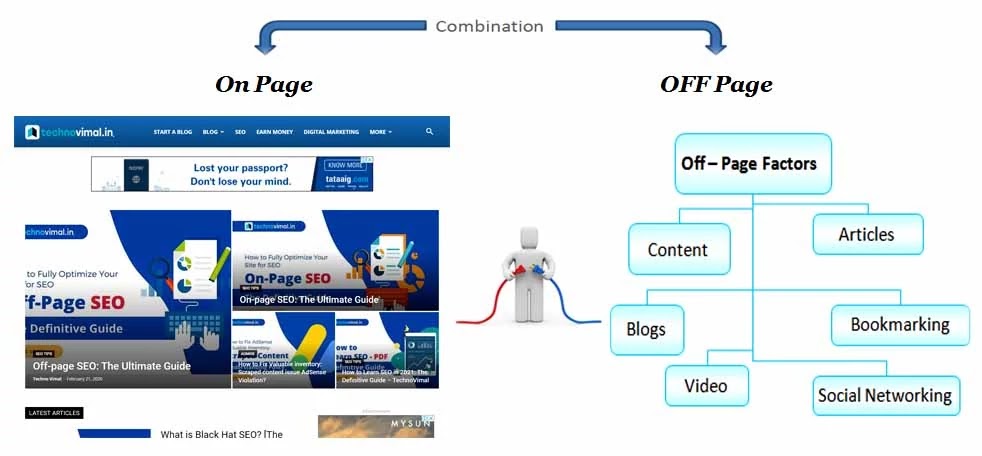
Search engine optimization on the page occurs within the site while SEO outside the page occurs outside the site. If you write a guest post for another blog or leave a comment you are promoting sites off the page.

On-page SEO vs. Off-page SEO

On-page SEO vs. Off-page SEO
  • On-page SEO is everything you do on your site and over which you have total control. On the other hand, off-page SEO, as the name implies, is completely off-site.
  • On-page SEO factors include meta title, meta description, keyword research, image optimization, internal links, external links, keyword optimization, page speed, canonical URLs, content optimization, schema data, and many pluses. On the other hand, off-page SEO factors refer to domains, backlinks, guest posts, creation of broken links, influence marketing, comments, reviews, and social media marketing.
  • The important difference between On-page SEO and Off-page SEO is that there is some possibility that On-page SEO can only survive; It does not require the support of any other SEO technique. But off-page SEO cannot survive alone. You need the correct SEO on the page to work.

Read also: What is Black Hat SEO? 

Benefits of Off-Page SEO

A website with the right Off-page SEO gives you a great many advantages:

  • A website can rank higher within the program result page (SERP).
  • It ensures that your website can get maximum organic traffic.
  • Off-page SEO also increases the domain authority of the web site.
  • Off-page SEO results in an increment within the referral domains.
  • Your site can establish an honest trust with Google, which is overall the foremost important factor once we count the advantages.
  • Regular and better growth of your website means your site can generate extra money.

Importance of Off-Page SEO

If the SEO on the page is the basic component for the classification of an Internet site, then the SEO outside the page is the backbone.

  • Google takes all SEO factors off the page when ranking a website.
  • The link ensures organic traffic. Experts recommend that backlinks can generate economic amounts of traffic for your website.
  • High traffic ensures a higher ranking, and there is no better option than off-page SEO to get traffic.
  • Off-page SEO is important to understand how the planet cares about your website.
  • Off-page SEO guarantees a better PageRank and authority on your site if removed properly.
  • Under SEO off the page, social networks are probably a proven one hundred percent way to attract a considerable number of viewers.

Why does off-page SEO matter?

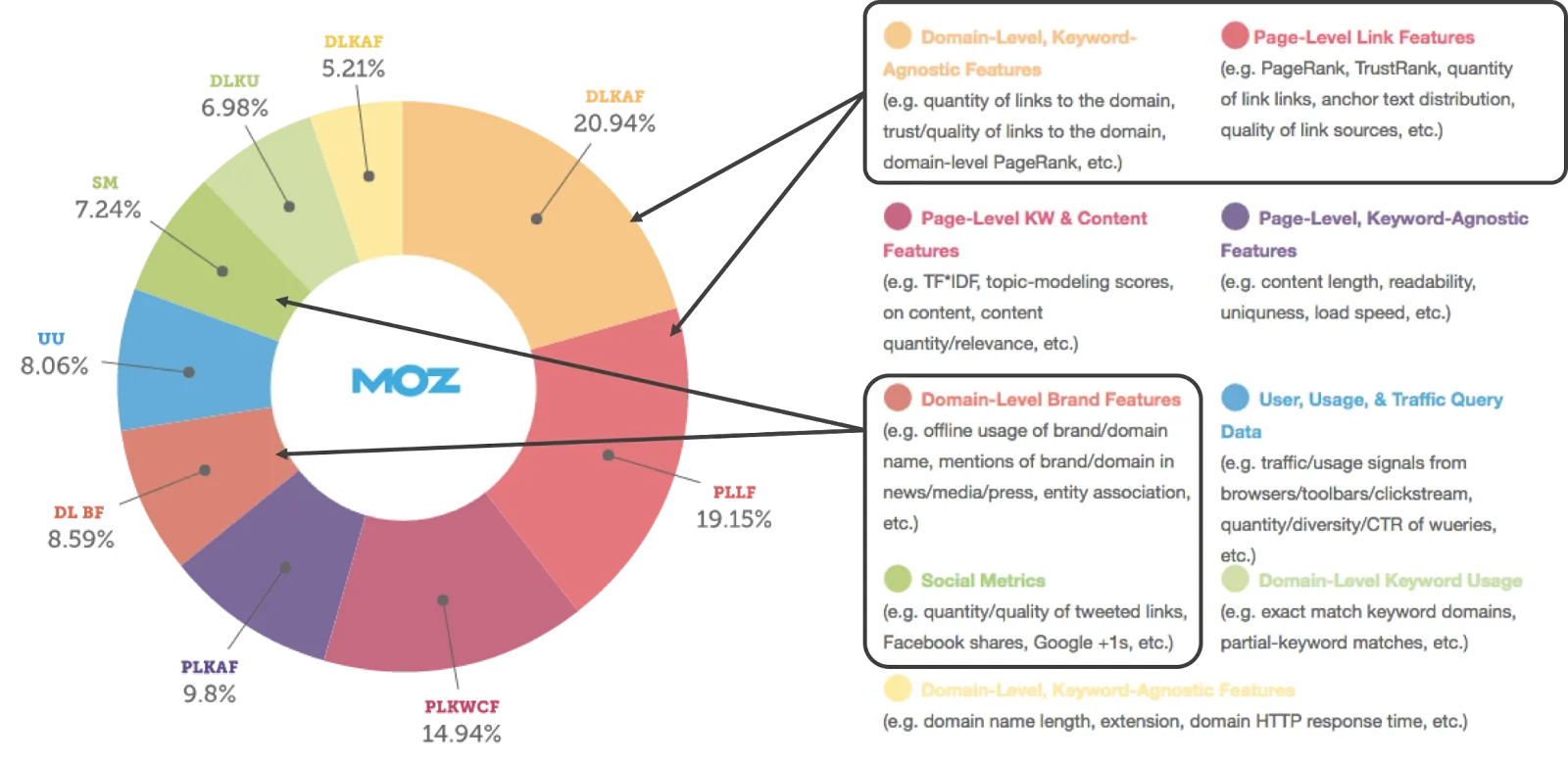
While search algorithms and ranking factors are constantly changing, the consensus within the SEO community is that the relevance, reliability, and authority of off-page SEO offered for a website still play an important role. In the ability to page rank.

While we do not know the full algorithm that Google uses to rank content, the data from our study of the search engine ranking factor shows that more than 50% of the weight of the factor in off-site SEO-related factors Classification is likely to occur.

Off-Page SEO Factors

You have to do off-page SEO in two ways, and both these ways are equally important.

  • Link Related Off-page SEO factors
  • Non-Link Related Off-page SEO factors

Link Related Off-page SEO Factors

Google’s search is based on the PageRank algorithm which focuses on the number of excellent backlinks to your website. Google’s PageRank algorithm has made it clear that good backlinks are highly needed pointing to your site.

Off the page are links related to SEO factors:

  1. Referring Domains
  2. Link Authority
  3. Dofollow vs. Nofollow Syntax: <a rel=”nofollow” href=www.example.com>
  4. Guest Posting (Guest Author)
  5. Broken Link Building
  6. Anchor Text Syntax: <a href=”http://www.example.com”>Enter your Anchor Text here</a>
  7. Relevance
  8. Traffic

Non-Link Related Off-page SEO Factors

The off-page SEO link factor is of great importance but there is no doubt that the off-page SEO factors not related to the link are equally important.

The off-page SEO factors without a link are:

  1.  Business Listing
  2.  Brand Mentions
  3. Commenting
  4.  Influencer Outreach
  5. Google My Business
  6.  Reviews
  7. Social Signals

Conclusion

Off-page SEO is nothing without On-page SEO. Though Off-page SEO seems harder than On-page SEO. The factors under Off-page SEO aren’t under your control so it’d take time to realize a specific result. Do share your views regarding this text. Was it informative? The comment box is all of you to share your queries.

Hopefully, this tutorial was helpful. allow us to know within the comments below if you face any issues.😊

Best Hosting Deals

  • BlueHost Hosting Discount
  • A2 Hosting Discount
  • DreamHost Hosting Discount
  • GeneratePress Theme Discount
  • Mangools Toolkit Discount

On-page SEO: The Ultimate Guide

0

On-page SEO refers to the optimization of sites by various practices like content optimization, keyword research, meta tags to rank higher within the program result page (SERP).

What is On-Page SEO?

SEO on the page (also known as SEO on the site) refers to the practice of optimizing sites to increase the ranking of programs on a website and gain organic traffic.

In addition to publishing relevant and high-quality content, SEO on the page involves customizing your title, HTML tags (title, goal, and header) and images. It also means guaranteeing a high level of experience, authority, and reliability on your website.

This takes into account several aspects of the website, which when added, will improve the visibility of your website in the search results.

Read: Off-page SEO: The Ultimate Guide

Why On-Page SEO Is Important

SEO on the page is important because it helps search engines understand your website and its content, as well as identify if it is relevant to a search engine query.

As search engines become more sophisticated, search engine results pages (SERPs) focus more on relevance and semantics.

Google, with its vast number of sophisticated algorithms is even better now:

  • Understand what users are really looking for when they type a query.
  • Providing search results that meet user objectives (informative, shopping, navigation).

Adaptation is essential with this development, and you can do this by ensuring both the content that is visible to users and only those elements on your web pages (such as text, images, video or audio) is visible in search engines (such as HTML tags, structured data): the latest best practices. Accordingly, they have been well adapted.

Also you should not just avoid SEO on the page because unlike off-page SEO with external signals (that are, backlinks) you have more control when optimizing content on the site.

If you follow the strategies on the page, you will see an increase in traffic and an increase in your search presence.

This guide will guide you through the most important elements of SEO on the page.

Paying close attention to these 10 areas will help you improve your content and authority and increase your rankings, traffic, and conversions.

15 Useful On-Page SEO Checklist:

1. Meta Title

Meta titles play an important role in website rankings. If your headline is satisfying, just bother people to click on it. Modern Google algorithm requires that the title be between 50 and 55 characters long. Contemporary Google settings show titles of 50-55 characters in length (space included), and the rest are hidden.

Syntax: <title>Your Title Here Like this.</title>

On-page SEO: Meta Title

2. Meta Description

Meta description tags are used to show an overview of their content for both users and search engines.

The meta description must be between 150 and 160 characters because the search engine only shows descriptions of up to 160 characters.

If your meta description is good, there is a possibility that your content will appear in the featured snippet of the search engine results page (SERP).

Optimizing meta description correctly can help improve:

  • Click-through rate (CTR).
  • Perception of the quality of the result.
  • Perception of what your website offers all change

Syntax: <Meta name=” description” content=” the description which you want to display”/>

the description which you want to display

3. Keyword Research

Keywords are an important part of SEO. Keep checking the foremost searched keywords using the simplest SEO tools and post content only on them. you’ll use Google Keyword Planner, Keyword Everywhere, Ubersuggests, AnswerThePublic.

Target the keywords that have an inquiry volume of 1000+ searches per month. you’ll target the keywords like Informative keywords (For example, SEO and Blogging), Transactional keywords (For example, keywords including ‘best’ and ‘top’ word), Location-Based keywords.

Always add the keyword in your title and meta description. The focused keyword should be present 5-6 or more times within the article, counting on the content length. Also, use the target keyword within the first 100 words of your content.

On-page SEO Google Keyword Planner,

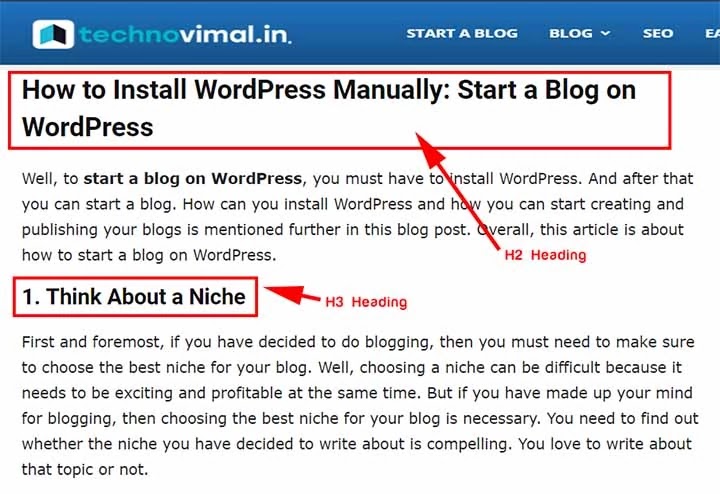
4. Heading Tags

Title tags are HTML elements (H1-H6) that are used to identify titles and subtitles of other types of content (for example, paragraph text) in their content.

Title tags are not as critical for the ranking of your site, as these provide an important function for your users and your SEO.

These may indirectly affect your classification:

  • Make your content easier to read and more enjoyable.
  • Provides rich keyword context for your search engine content
Heading Tags

5. User-Friendly URLs

Your priority should be the user because if you’ll satisfy the user, meaning you’ve got already met the wants of the program. Make use of SEO-friendly URLs and concentrate on the primary three to four words of it because shorter URLs rank far better.
Avoid using lengthy URLs like https://technovimal.in/what-is-blog-and-how-does-it-work-in-2020

Avoid using ugly URLs like https://technovimal.in/2019/03/11/what-is-blog-blogging-blogger/

Try using URLs as simple as https://technovimal.in/how-to-start-a-blog/

User-Friendly URLs

Conclusion

SEO on the page is the basics of SEO. This is more than fools if you do not optimize your website content and switch to other SEO media. As an SEO suggestion, always use the keyword in the first 100 words of your post. I hope you found this SEO guide on the information site.

Let me know in the comments if anything is not clear.