As we know that Microsoft has launched Windows 11 on 04 Oct 2021 and it has also said that Windows 10 users will get a Direct Update of Windows 11, with the help of which Windows 11 will start running on their computer. Do you know what is the System Requirements For Windows 11? There are some system requirements for Windows 11, if your computer fulfills these requirements then you can easily run Windows 11 on your computer.
Microsoft’s Windows Operating System is very popular and it has been bringing updates to its operating system from time to time. Windows 11 New Features are also amazing which makes it a better Operating System. In today’s article, we will tell you what are the requirements of your system to use Windows 11. If you want to know what is the System Requirements For Windows 11 then definitely read this article till the end.
windows 11 system requirements checker
Windows 11 system requirements
On this, I have told some configuration of a computer system which is very necessary to run Windows 11. If your Computer/Laptop fulfills these configurations then you can easily run Windows 11 on your Computer/Laptop. Let’s see Minimum System Requirements For Windows 11.
CPU: 1 Gigahertz (GHz) or faster with 2 or more cores on a compatible 64-bit processor or System on a Chip (SoC)
RAM: 4GB
Storage: 64GB or larger
System Firmware: UEFI, Secure Boot capable
TPM: Trusted Platform Module (TPM) version 2.0
Graphics Card: Compatible with DirectX 12 or later with WDDM 2.0 driver
Display: A greater than a 9-inch display of 720p or higher Resolution
Internet: Windows 11 Home edition requires internet connectivity
Microsoft account to complete device setup on first use.
Friends, to run Windows 11, it is necessary to have a TPM chip in your PC i.e. Personal Computer. If your computer is not enabled with a TPM chip, then you cannot get Windows 11 to run on your computer. Now the question arises in front of you that how do we check whether the computer has a TPM chip or not. For that, you do not need to panic because I am telling some simple steps on this, with the help of which you can easily find out whether your computer has a TPM chip or not.
Step1. First of all press the “Windows + R” Key, this will open Run Windows on your screen.
run commands
Step2. Type ‘tpm.msc’ in Run Windows and click OK or press Enter.
run commands
Step3. After this look at the status of your TPM, if the status is “TPM Ready for Use” then it means your computer has a TPM chip and if the error is written then your computer does not have a TPM chip.
tpm chip status
Now you will also be curious to know what the TPM Chip works. I would like to tell you for information that TPM Chip uses both Software and Hardware so that it can keep passwords and Encryption Keys safe. If there is any kind of error in your system, then the TPM chip helps to fix it. If we talk directly, TPM Chip keeps the Windows Operating System secure and protects it from attacks against the system.
If there is an error in the status of TPM Chip in your computer, then we have another method with the help of which we can find out the System Requirements For Windows 11. For that, you have to follow the steps given below and install the PC Health Check Application in your system. Let our know-how with the help of the PC Health Check Application we can know System Requirements For Windows 11.
Step2. After installing, open the PC Health Check Application.
PC Health Check Application
Step3. After that click on Check Now button
Step.4 After a short time this application will confirm whether your system is compatible with Windows 11 or not.
this pc can run windows 11
In this way, you can check what is the System Requirements For Windows 11. If you want to know about Windows 11 new features, then click on the link given below.
Friends, there is no doubt that Windows 11 is going to be a great operating system in the coming times. I hope that you must have liked the information given by me. If you still have any questions regarding System Requirements For Windows 11 then you can ask me by commenting. If you liked this article, then do share it with your friends.
In this blog post, I will tell you what is the difference between windows 10 and windows 11? I will give you this information.
Microsoft was updating windows 10 for years but now windows 10 is going to stop because windows 11 is a new operating system Windows 11 is the latest operating system of Microsoft which was introduced for common users on 04 October 2021. This is an operating system after Windows 10. Since the announcement of Windows 11, people have started moving towards Windows 11. Windows 11 is a Safe and Single Platform Operating System. That is, this one operating system can run with many devices. You can use it from Computer Laptop to Mobile Phone, Tablet, Gaming Device, Internet of Things.
Windows 11 is coming by the end of this year. To know what is the main difference between Windows 11 and Windows 10, you will have to read these steps completely.
This is the minimum requirement in your system to run windows 11 and windows 10 in your system
Difference between minimum requirements of Windows 11 and Windows 10:–
Requirements
Windows 11
Windows 10
Processor
2 or more cores on a 64-bit processor or system-on-a-chip (soc)
1 GHz or faster processor/soc
RAM
4 GB RAM
1 GB RAM for 32-bit / 2 GB RAM for 64-bit
storage
64 gb or more
16 gb for 32-bit / 20 gb for 64-bit
system firmware
UEFI, Secure Boot Enabled
N/A
TPM
Trusted Platform Module ( TPM ) version 2.0
N/A
graphic card
DirectX 12 Compatible Graphic Card / WDDM 2.x
Directx 9 compatible graphics card / WDDM 1.x
display
9 inches with HD resolution ( 720p )
800×600 Display
internet
Windows 11 requires internet
no internet required for windows 10
How to upgrade Windows 10 to 11?
Just like windows, 10 was upgraded for free for windows 8.1 and windows 7 users, similarly windows 11 will be available for free for windows 10 users.
The minimum requirements of Windows 11 are much higher than that of Windows 10 as Windows 11 will only run on a 64-bit PC and to run Windows 11 your PC must have TPM version 2.0 and UEFI Secure Boot enabled.
You can find out whether your pc can run Windows 11 or not by downloading Microsoft’s pc health check-up app. If the tool says that your pc cannot run windows 11 then you can set your bios.
You can run an insider preview of Windows 11 by installing the windows insider program on your pc. Right now there are some bugs in Windows 11 that can corrupt the data of your pc.
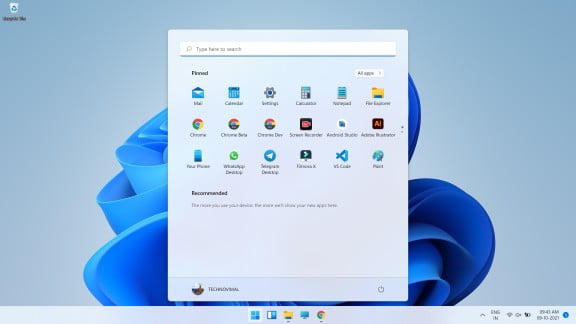
The biggest difference between Windows 11 and Windows 10 is the start menu and the taskbar. In windows 11, the start menu and taskbar have been brought to the center of the screen from the left side. If you want, you can move the start menu and taskbar back to the left.
The start menu and taskbar make windows 11 similar to Mac OS and Chrome OS. If you click on the start menu in windows 11, then you will see a list of apps and you will get to see the option of recommended.
The tiles which used to be in windows 10 have been removed from Windows 11. Many changes have been made in the taskbar in Windows 11 as compared to windows 10. The Cortona function and timeline have been removed in Windows 11.
In Windows 11, you will get to see the option of the search bar, snap layout, Microsoft team, message box, and widgets in the taskbar. You cannot pin the taskbar to the right and left sides of the screen. In windows 11, the taskbar will always be at the bottom of the screen. . You will not be able to customize the taskbar even with the help of apps.
In Windows 11, new features have been given for multi-tasking as compared to windows 10. Snap layout is designed for multi-tasking.
Windows 10 enables you to view multiple windows at once but there is a lot of possibility of things going wrong in it but this will not happen in windows 11. You can run multiple windows simultaneously using the snap layout in windows 11.
You can open windows of different sizes by using maximize button, you will not find it in windows 10.
Using Microsoft Teams
After the release of Windows 10, Microsoft launched the messaging app Teams two years later in 2017 and in Windows 10 this app became the alternative app.
In Windows 11, the Microsoft team has been given a place in the taskbar. It will play a huge role in Windows 11. You can make video and voice call with your friends, family members using Microsoft Team in Windows 11.
If your friends or relatives do not have Microsoft Teams installed, then you can communicate or talk to them through message.
Android Apps Support
Android Apps Support
A big change has been made from Windows 10 to Windows 11, which is that of android apps, you can now run android apps in windows 11.
Now Microsoft store will let you download android apps from the Amazon AppStore. Microsoft Store for Windows 11 has been redesigned to help you find apps and movies
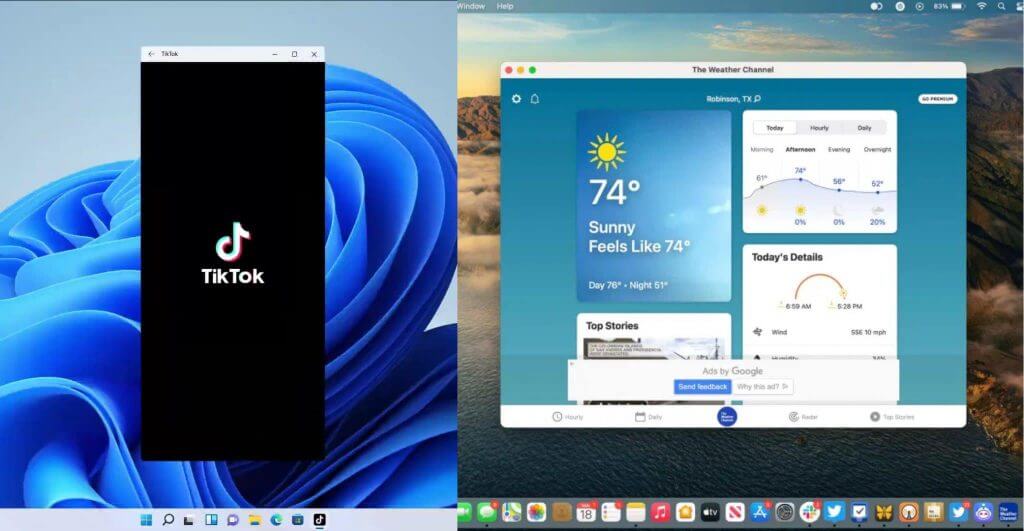
You will be able to record and post Tik Tok videos in Windows 11 directly from your Windows device. For Windows 11, Microsoft has introduced native apps including Disney, Zoom, Canva, and Visual Studio in the Microsoft Store.
Better Gaming Features
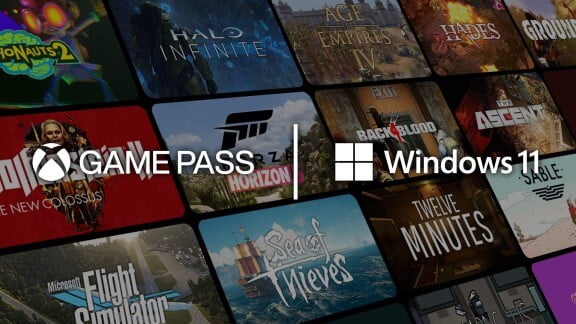
Xbox game
You will get to see better gaming facilities in Windows 11 than Windows 10. If you are a pc gamer then you will want to install windows 11.
You will be able to download more than 1000 games in high quality from the Xbox game pass in windows 11 and you will be given a subscription to the Xbox game pass.
In Windows 11, you have been given the feature of Auto HDR which will update auto light in gaming. Auto HDR will help ancient games look better. Games will be uploaded to Xbox every month.
One of the main differences between Windows 10 and Windows 11 is that widgets have been launched in the taskbar of Windows 11, which you will not see in Windows 10. In widgets, you can get information about news, weather, on this day, calendar, etc. at a glance.
Xbox tech to improve gaming
Windows 11 will get certain features found in Xbox consoles, like Auto HDR and DirectStorage, to improve gaming on your Windows PC. This marks another move toward integrating PCs and Xbox consoles for Microsoft.
Windows 11 will be Available in Different Versions
Windows 11 is not just an operating system but it also has different types. These variants are designed keeping your needs in mind.
Windows 11 Home
Windows 10 is designed keeping in mind the general users. All its features can be used by every user. It can be used on computers, laptops, tablets. In this, the Windows Start Button has been added to the desktop like Windows 7. And safe and simple Microsoft Edge has been made to browse the Internet.
Windows 11 Pro
The advanced type of Windows 11 is Windows 11 Pro. It is designed to meet the needs of small businesses. You can use it on Laptop, PC, and Tablet. Windows Pro has some advanced features that make small businesses more secure, faster, and more efficient. Device and app management are more efficient in this edition. Apart from this, it also guarantees to keep your data safe. It also has the support of cloud technology.
Windows 11 Enterprise
Windows 11 Enterprise has been developed to meet the needs of medium and large businesses. It provides powerful and advanced capabilities to protect the confidential data of devices and apps from modern threats. In this, you get advanced features and you can access them immediately when the update comes.
Windows 11 Education
A big use of computer is also done in education and its need is different from the need of others. To meet these needs of the education sector, Microsoft has made available Windows 11 Education Version. It is mainly designed to meet the needs of school staff, administrative officers, teachers, and students.
Windows 11 Mobile
Mobile is used more than computers in the world. Windows 11 Mobile for smartphones and small Tablets is designed to use. Windows believes that the experience of Windows 11 on both devices and mobiles should remain the same for the user. That is, the way you use it on a computer, you can use it on mobile as well.
The concept of the Internet of Things has also become true in our world. Electronic devices are now turning into smart devices. For this Windows 11 has launched Windows 11 IoT Core Edition. It will be used in Wearable Devices, POS Machines, Robots, ATMs, etc.
Windows 11 price
The price of Windows 10 directly depends on your requirement. The kind of Windows 10 you want will be priced the same. The price of different variants of Windows 10 according to their website is as follows.
The price of Windows 11 Home is Rs 9299.
The price of Windows 11 Pro is Rs 14,799.
The price of Windows 11 Pro for Workstation is Rs 22,799.
Where to buy Windows 11?
Many people do the work of getting Windows 10 from their familiar hardware or computer repairer. But keep in mind that there is also a risk of getting Pirated Window from here. If you want to buy a genuine Windows 11, then buy it directly by going to its Website Shop Windows. From here you can buy it online. After this, if you want, get it installed by someone you know. If you know how to install then you can do it yourself but if you don’t know then don’t risk installing it. Get it installed only by an expert.
Conclusion
Windows 11 brings many improvements, and the most notable is a complete user interface redesign, which is coming as a major upgrade from Windows 10.
The Start menu has been streamlined and feels less cluttered than before. Rounded corners look great on windows, and the same goes for other user interface elements.
Multitasking has been improved, and you can now easily switch between Snap layouts and better organize open windows.
Probably the biggest changes are native support for Android apps and an overhaul of the Microsoft Store which will become the centralized hub for all application downloads.
Finally, gaming improvements like DirectStorage, AutoHDR, and Xbox Game Pass for PC will take gaming on your PC to a whole new level.
The latest OS is a big step forward with great features and a more streamlined user interface, so there’s no reason not to enjoy it.
Are you excited about Windows 11 and are you going to switch or do you plan to stay on Windows 10? Let us know in the comments section below.
Windows 11 New Features: Windows 11 is the king of the personal computer world. All desktop computer users are familiar with its name. This operating system has worked to bring back the diminishing branch of Microsoft and Bill Gates.
Windows 11 has become the word of discussion after Microsoft announced the closure of Windows 7. And from enterprise users to personal computer users have also been forced to think about Windows 11.
Therefore, the first question that comes to the mind of a common user is that what is this Windows 11?
After this, what are the best features of Windows 11 OS and why is Windows 11 better than other Windows operating systems? Moving on to these questions.
Understanding your compulsion, we are giving complete information about using it while introducing Windows 11 in this guide. This Windows 11 User Guide has been divided into the following sections for the convenience of study.
What is Windows 11?
Windows 11 is the latest version of the Windows operating system developed by Microsoft for personal computers, which was introduced for general users on 04 Oct 2021. Win X OS is the successor of Windows 8. And there is a single platform for all Windows devices.
Microsoft’s Windows operating system is the lifeblood of personal computers. And it is used a lot in computers present all over the world.
Since the announcement of the closure of Windows 7, the demand for Windows 11 operating system has increased. It has started replacing Windows 8.
Microsoft wanted to create an ecosystem for all its devices and software. For which it needed a single, secure and fast platform.
It has fulfilled this need by developing Windows 8. And launched Windows 11 instead of the Windows 9 version. Which does a similar job for computers to mobile phones, tablets, gaming devices (Xbox one), and Internet of Things devices.
You don’t need a separate operating system for each device. One operating system works smoothly on all devices. Windows 11 handles issues like screen size, screen type, hardware compatibility, etc.
Developer
Microsoft
Written in
C, C++, C#, Assembly Language
OS Family
Microsoft Windows
Released to Manufacturing
October 5, 2021
General Availability
October 5, 2021
Latest Release
10.0.22000.194 (October 4, 2021)
Latest Preview
10.0.22471.1000 (October 4, 2021)
Marketing Target
Personal Computing, Tablets
Available in
110 Languages
Update Method
Windows Update Microsoft Store
Platforms
x86-64, ARM64
Kernel Type
Hybrid (Windows NT kernel)
Userland
Native API Windows API .NET Framework Universal Windows Platform Windows Subsystem for Linux Windows Subsystem for Android
Center Taskbar and Start Menu | Windows 11 vs macOS
Correcting its mistake, this time Microsoft has added back its trademark Start button in Windows 11. The loss of removing this button in Windows 8 and Microsoft could not muster the courage to face criticism from users this time.
Therefore, in Windows 11, users have developed a more stylish and easy Start button than the Start button present in Windows 7. Now users will have the real feel of running Windows.
2. Animations, Blurring and Rounded Corners Windows 11
Rounded Corners for Windows 11 vs macOS
Windows 11 rounded corners and design effects won’t slow down your PC
3. Widgets Section
Widgets Section Windows 11 vs macOS
Microsoft is bringing widgets like Windows Vista Gadgets to the desktop. This will allow users to view Microsoft News Feed on their desktop and receive daily updates on weather and traffic.
4. Ability to Run Smartphone Apps
Windows 11 android apps macOS iPhone apps
Microsoft showcased Android apps, including TikTok, coming to Windows 11 via the Amazon Appstore. “Windows customers will be able to search for Android apps in the Microsoft Store and access them through the Amazon Appstore,” Microsoft said in a blog post.
5. Different Backgrounds for Different Desktops
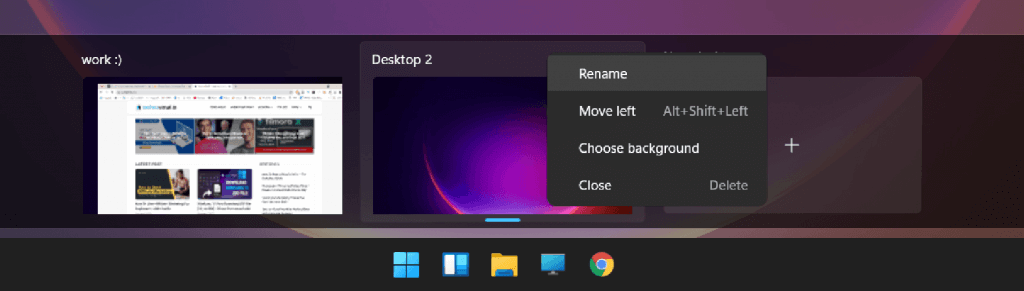
Windows 11’s virtual desktops are a less valuable power-user feature, giving you a way to group Windows into their own spaces for more powerful multitasking. Now, Microsoft is adding custom desktop backgrounds, allowing you to give each desktop a unique wallpaper.
Windows 11 will get some features like Auto HDR and Direct Storage in the Xbox console to make gaming better on your Windows PC.
7. Microsoft Teams Integration
Teams are getting a facelift and are pinned to the Windows 11 taskbar, making it easier to access (and a bit more like Apple’s FaceTime). You’ll be able to access Teams from Windows, Mac, Android, or iOS.
8. A new, more Mac-like interface.
Windows 11 Mac-like interface
8. New Windows Store
New Windows Store
Microsoft is introducing a new App Store for Windows 11 and Windows 10. It has been redesigned to help users find and install their favorite apps, games, movies, etc.
Several desktop apps are now available in the Store, including Adobe Creative Cloud, Microsoft Teams, TikTok, Notepad, and Paint.
9. Tablet Mode
It is a dream to make Windows 11 universal. So that the same type of user experience is available on all devices. Therefore, the Windows 11 Tablet Mod feature has been made available for touch screen devices.
You can enjoy touch screen windows by activating this mode in your tablet computer or touch screen support laptop.
11. Windows 11 Continuum
To convert a mobile device into a computer, this time a new feature named Windows Continuum Application has been given in Windows.
Through this app, Windows 11 Mobiles can be connected to the computer and taken as a computer. This feature is very helpful for users doing office work on mobile.
12. Integrated Search
The search tool was also provided in previous versions of Windows. But, this time it has been introduced with the power of the web.
This means that you will be able to explore the web with Windows with the same search tool. In which you will be helped by Microsoft’s new and powerful Edge browser.
13. Microsoft Edge
Gone are the days of Internet Explorer web browsers. Microsoft has decided to give him retirement. Therefore, a brand new, faster, and more secure web browser has been provided with Windows 11.
The name of this web browser is – Edge browser.
The Edge browser was initially made available for Windows 11 devices. However, its new avatar has been made available for free for Windows Phone and Android devices along with previous versions of Windows (Windows 7, Windows 8).
14. Cortana Voice Assistant
As soon as you say “Hello Google” a personal assistant is activated to help you on Android devices. Which you know by the name of Google Assistant.
Similarly, a voice assistant called “ Siri ” is already present in iPhones and Apple devices.
To fill this game, a voice assistant named “ Cortana ” has also been given in Windows. Who is always ready to serve you.
You can control everything from knowing the weather to the web, device, and cloud.
Along with this, the remainder of your work is also ready to remind Cortana. You will not feel alone when you talk with Cortana.
15. Universal OS
Microsoft wants to develop a single but universal platform for all its devices. Windows 11 is the first strong step towards this.
From personal computers to gaming devices (Xbox) are also being controlled from this operating system. Also, small devices like mobile phones and tablets are not untouched.
Now the devices differ but Windows 11 is one. You will get the same user experience across all devices.
16. Universal App Store
Universal App Store has been created to give power to a single platform. From where users can download the app for their Windows 11 devices.
Windows Store is provided built-in on all devices. Which also has the facility to access through the website. The apps present in this app store are compatible with all devices.
17. Live Tiles Views
Windows’ familiar Start menu has been replaced with Live Tiles. It was first given in Windows 8. And also placed in Windows 11.
The Live Tiles Start menu gives a different feel to the Windows operating system on touch-screen devices. There is no problem when switching devices.
18. Action Center
Action Center is given on the right side of the Start menu. It’s not just a notification area. If you want, you can control your computer completely.
19. Multiple Desktop
If you work with multiple programs. Then the virtual desktop features of Windows 11 can prove to be very useful for you.
You can slide programs of the same type onto different desktops by opening multiple desktops. This feature proves to be very effective when multi-screen is available.
20. Windows Hello
The way to password protect a Windows user account is complete. That’s why Windows Hello has been introduced for users to log user accounts more securely and smartly.
Windows Hello is a biometric lock. Which uses the biometric information of the users i.e. fingerprints, iris, face, etc.
Like previous versions of the Windows operating system, many different variants of Windows 11 have also been developed. Which is sufficient to meet the specific needs of the users.
If, you have any version of Windows 7, Windows 8, Windows 8 for Mobile, Windows 8.1, Windows 10. So you will get the Windows 11 version of these versions at a lower cost.
Do you know?
In the launching year of Windows 11, users are being offered to upgrade it free of cost. Which was valid for a whole year.
There are currently 7 versions of Windows 11. Which are being told below.
#1 Windows 11 Home
Windows 11 Home has been developed keeping in mind the desktop users. Hence, all its features are consumer-centric. Which, can be used on personal computers, laptops, tablets, and 2-in-1s devices.
The Windows Start Button has been added to the desktop as in Windows 7 (Windows 8 does not have a Start button). In addition, the Microsoft Edge browser is designed to be a very fast, secure, and simple to use web browser.
Whose powerful features are providing users with a better internet experience than Internet Explorer?
#2 Windows 11 Pro
This version built on top of Windows 11 has been introduced to meet the needs of small businesses. Which is available for Desktops, Tablets PCs, and 2-in-1s.
Some additional features have been added to Windows 11 Pro. So that small businesses can run their business more securely, faster, and more efficiently.
Device and apps management is more efficient in this edition. And gives the ability to handle them remotely. In addition, the security of additional security-sensitive business data is guaranteed.
Windows Update for the Business facility has also been introduced with the support of cloud technology. Which allows them to reduce costs, control updates, and have quick access to new updates for security.
#3 Windows 11 Enterprise
Windows 11 Enterprise Edition has been developed to meet the needs of medium and large businesses. Which provides more powerful and advanced capabilities to protect against modern threats on devices, apps, and company confidential data.
Windows 11 Enterprise Edition is made available as a Volume License. So that they can get instant access to new and advanced features. Along with this, access to Windows Update for Business and Long Term Servicing Branch is also given.
#4 Windows 11 Education
The field of education has also not been left unfinished. Therefore, Windows 11 Education Edition has also been made available to meet its different and specific needs.
Windows 11 Education is developed for Schools, Colleges, Universities. So that the needs of the school staff, administrative officers, teachers, and students can be met.
The special feature of this edition is that school and student users of Windows 11 Home and Windows 11 Pro have also been given the facility to upgrade to Windows 11 Education Edition. Which they can upgrade to Academic Volume License.
#5 Windows 11 Mobile
Windows 11 Mobile is developed for small, mobile, and touch screen devices. That is, it can be accessed on smartphones and small tablet devices.
Microsoft’s idea behind launching this edition is to provide the computer experience on smaller devices.
Therefore, powerful and new features like Continuum for Phone along with Universal App Store are available in Windows 11 Mobile. With the help of which you can use a Windows 11 Mobile as a computer with a big screen.
People who use their Windows Mobile for office work. A touch version of Microsoft Office has also been given for those users.
#6 Windows 11 Mobile Enterprise
People who use mobile phones and small devices like tablets for office work. Windows 11 Mobile Enterprise Edition is a great mobile operating system for them.
The ability to adapt to business needs with strong security is a key feature of Windows 11 Mobile Enterprise Edition. Which comes with Volume Licenses.
#7 Windows 11 IoT Core
The Internet of Things is now becoming a reality. Electronic devices are now turning into smart devices. Therefore, Windows 11 Internet of Things Edition has been launched to establish its foothold in this brand new market.
This version can be used for wearables devices, posh machines, robots, bunking products like ATMs, etc.
Note:- The only license that can be purchased is Windows 11 Baseline Editions. All other editions are made available under the Volume License.
Common FAQs About Windows 11
Question #1 – Tell us About the Technical Features of Windows 11?
Answer:–Windows 11 Technical Info.
Developer:- Microsoft Inc., Programming Languages:– C, C++, C# Launch:– 04 Oct 2021 Available Languages:– Above 110 Platform:– 32-bit, 64-bit License:– Proprietary Type Devices:– PC, Mobile, Tablets, IoTs
Question #2 – What are the minimum requirements for Windows 11?
Answer:–Windows 11 Minimum Hardware Requirements PC
Processor – 1 GHz (Gigahertz) or Faster CPU RAM – 1 GB (Gigabyte) for 32-bit or 2 GB for 64-bit Hard Disk Space – 16 GB for 32 bit or 20 GB for 64-bit Graphics Card – DirectX 9 or Later with Windows Display Driver Model 1.0 Display – 800×600
All of the above is a basic requirement of Windows 11. Windows 11 OS will not run perfectly on computers with features less than this specification. And you have to buy a new computer. Therefore, before buying Windows 11, definitely keep in mind the Minimum Requirements.
Question #3 – What are the minimum requirements for Windows 11 Moblie Devices?
Answer:–Windows 11 Minimum Hardware Requirements for Mobile Devices
Processor – 1 GHz (Gigahertz) or Faster CPU RAM – 1 GB (Gigabyte) Hard Disk Space – 8 GB Graphics Card – DirectX 9 or Later with Windows Display Driver Model 1.0 Display – 720p Screen Resolution with 32 bits color pixels
Question # 4 – Is Windows 11 a Free or Paid Operating System?
Answer:– Windows 11 is a pad operating system. To use which you will need to purchase the appropriate Windows license.
Question #5 – What is the cost of Windows 11 in India?
Answer:– The price of Windows 11 depends on your need. That is, which edition of Windows do you want to buy. I am assuming that you are a simple computer user who needs Windows for your personal use. That’s why I am telling you the price of Windows 11 below for its basic edition. The price of the volume license is not being given.
Windows Home Approx. ₹ 10,000/- Windows Pro Approx. ₹ 15,000/- Windows Pro for Workstations Approx. ₹ 22,000/-
Pay Attention This price list has been taken from Microsoft’s website. and the cost of 1 computer license. Before buying Windows 11, you must check its latest price.
Question #6 – How much does Windows 11 Mobile cost?
Answer:– Windows 11 Mobile is not sold separately. It comes pre-installed on Windows Mobile phones. For this, you have to buy Windows Phone only.
Question #7 – Where can I buy Windows 11?
Answer– You have many options to buy Windows 11.
Microsoft Store:- The first and most trusted place is the Microsoft Store. From there you can buy a license for Windows 11 Home or Windows 11 Pro by creating a Microsoft account.
Online Store:– If you do not want to buy Windows 11 from Microsoft Store. So you can buy from other online shopping portals. In which the first name comes from Amazon Store. After this Flipkart is also present.
Question #8 – How to do Windows 11 Free Upgrade?
Answer– Windows 11 Free Upgrade has expired. This offer was given only in the launch year. After this, you will have to pay for Windows 11.
Question #9 – What is the difference between Windows 11 and Windows 10?
Answer:– Windows 11 is the latest version of Microsoft Windows. Which is available from personal computers to mobile phones. And Windows 10 is an older Windows version. Which Microsoft has decided to close. And in turn, Windows 11 is developed.
Question #10 – Why is Windows 11 operating system better than Windows 10?
Answer:– Improved Solution: Windows 11 New, Best Quality, Strong Defense, A Modern Technology with Dum Support. The potential to transform and digitize the environment has been fulfilled. The system is placed in the system according to the Windows 10 systems. Its features are not enough to meet the needs of users and new devices. Therefore, windows 11 is better. We should upgrade ourselves with time. Otherwise, time leaves us behind.
Question #11 – Can I install Windows 11 on my Old Computer?
Answer – If your old computer meets the minimum hardware requirements of Windows 11. Then you can easily install Windows 11. not otherwise. I have mentioned above the hardware requirements of Windows 11. Match it with your computer specifications.
Conclusion
In this article, I have given you complete information about Windows 11 operating system. You have to know the answers to questions like what is Windows 11, features of Windows 11 and why is Windows 11 better.
Also, how to install Windows 11, Windows 11 Price, How to Upgrade Windows 11 and Windows 11 Hardware Requirements.
I hope you like Introduction to Windows 11 and find it useful for you. Do share this information with your friends.
Not able to earn enough money through your website that you made with so many expectations? Probably, you have not heard about Affiliate Marketing. Do you know that you get paid just by promoting a product? Yes, it’s true.
Although, there are hundreds of ways for earning money online like make money through Referrals, Google AdSense, AdMob, GPT sites, PTC sites, Captcha solver, Writing jobs, Affiliate Marketing, Website flipping, Domain trading, etc. Affiliate marketing is considered one of the best ways to earn money online, without too much hard work.
Every website has its own definition of Affiliate Marketing. It is an online performance-based marketing technique in which the person is rewarded if someone purchases something through the affiliate link present on his/her website or blog. Product owners increase the sale of their product by permitting others to place a link on their website or blog is called affiliate links for promotion. Affiliate marketers are those people who promote specific products or websites, for which they are paid.
What is Affiliate Marketing?
If you have a website or a blog of your own then this is the best opportunity for you to earn money. Basically, Affiliate Marketing means bringing traffic from other websites. Consider the example of Amazon for a better understanding. If you have a website or a blog of your own, you can earn money by placing affiliate links in it. If your blog or website is popular and has enough traffic, Signup with an Amazon associate or Flipkart. After you log in to your associate account you will get a link for promoting the products on your blog and if any visitor visits that affiliate link and goes to the site like Amazon from that link and buys something, you will be paid approximately 4% to 12% of the product amount. This is called affiliate marketing.
The cost of purchasing a product from the affiliate links remains the same, it doesn’t vary. Though the sale of product owners increases but they are not able to make much money, the reason is behind that they have to pay a percentage of the profit to the Affiliate marketers.
1. How to Create an Affiliate Marketing Website for Beginners
The best way to earn money through affiliate marketing is by placing links on your website. The advantage of a website is that it’s free to operate. You can place the affiliate links on your website after it manages to gains traffic. Follow the steps given below to create a website:
Choose a Niche:– Niche is a kind of field, industry, or plot of the website. For example, if your website name is TechnoVimal then anyone can easily understand that this is related to vacation, tour, and travels. So its niche will be travel, adventure, tour, etc. You can choose a niche of your website or blog on the basis of your interest, passion, and complete information about the topic whose niche you are deciding.
Consider a Domain Name:– Think of a domain name that is related to your niche. It should be easy to remember and eye-catchy for the reader like EasyJunky that belongs to food-related posts. Don’t select a complex name that becomes difficult for the reader to remember. Follow the rule ‘KISS’, ‘Keep it Short and Simple.’
Purchase a domain name– Make a list of at least 10 domain names related to the considered domain name, because it is difficult to get a domain according to your wish in the first attempt. Search for domain names in various domains selling websites like GoDaddy, Bluehost, Namecheap, and check whether the name that you have requested is available or not. If you get a domain name available of your choice, purchase it.
Purchase a Web Hosting for Your Website:– You need a web hosting plan for storing the contents or pages of your website. You can purchase a web hosting plan from top reputed and reliable web hosting companies such as Bluehost.com, GoDaddy.com, Namecheap.com, and iPage.com.
Update Daily:– Don’t forget that you have created a website, else it will lose its traffic and losing traffic means losing the medium of earning. Keep uploading content daily. Content should be unique and rich in information. Without daily content, no one will come to know about your website nor it will gain a good rank.
Gather Traffic:– Without traffic there is no use of placing affiliate links on your website. If no traffic will be there then who will click on the links? Advertise your website, share links of your website on various social networking sites, emails, and text messages. Gather as much traffic as you can.
Do SEO of Your Website:– Either appoint someone for SEO of your website or learn Search Engine Optimization. SEO increases the Domain Authority (DA), Page Authority (PA), Page Ranking (PR), and of course, it increases traffic on the website.
2. Promotion of Products if you Don’t Have a Website of Your own:
What will you do if you don’t have a website? It’s not compulsory that you need to have a website to start Affiliate Marketing. You can promote the product on social media.
Create an attractive advertisement if you don’t have a website of your own:– You can create an attractive advertisement of any product and place it on a social networking site like Facebook, with the affiliate link. You can also place the link on other’s websites if they allow you to do so. If any person clicks on this ad and purchases the product, you get paid.
Write Quality Content:– Though you have gathered traffic on your website. But the need is to gather traffic for this affiliate program. To do so, you can write beautiful and eye-catchy content or description for that product. Tell the people about its uses, it will attract them and their attraction will fetch you money.
Create a Group:– You can create a WhatsApp group, Facebook group, an email group, or a group on any social networking site. Keep posting about various products, their benefits, and important information. Display it in such a way that they don’t consider it as spam and will approach it.
3. Promoting on Other Website
You can also request the owner of some other website to place your affiliate link on their website. You have to convince them by promising to give them a share of what you will get. Otherwise, no one would want to place your affiliate link when they are already earning from theirs.
Add a payment method
You will have to set up a payment system for sending and receiving money from these sites when someone purchases from your affiliate link. Most of the sites pay through PayPal. PayPal is the most famous and reputed international payment site and app that offers to send and receiving money safely. Also, your old transactions can help you keep track of your profits and losses.
How to be an Affiliate Marketer?
Firstly, register into a site that offers affiliate marketing. For example, Amazon, Flipkart, eBay, Bluehost, etc. has an affiliate program that allows affiliate marketers to earn money every time a customer shop.
Read the comments of the visitors, take a survey of your visitors and existing customers. This will help you in knowing their choice of product.
Select a niche in which you are specialized or with which you can work comfortably.
Search for those products that are somehow related to your website and to your niche can attract the visitors of your site.
Once your request to be an affiliate associate is accepted by the site on which you registered, log in to your account.
Now, look for affiliate links at the bottom of the homepage.
Share this link.
How does this Affiliate Program Work?
When your request to be an affiliate marketer is accepted, you receive a unique URL for the product that you have to promote. A part of this URL includes your affiliate ID. Share this link on social networking sites, emails, text messages and the best method is to place this affiliate link on your website or blog. When any visitor or anyone clicks on this link and purchases something, this link is recorded by an affiliate software, and it automatically informs the site that the product is purchased via your affiliate link, as it contains your unique affiliate ID also. You are paid for every click at the end of the month or after every sale the affiliate is paid, it depends on the company and its terms and condition.
affiliate marketing earnings
Why should I be an Affiliate Marketer?
Here the question that might be coming to your mind is why to enter this business of Affiliate Marketing. I ask why you should not? You should indulge in this business because it’s a headache-free job. Affiliate Marketers don’t need to worry about the product and its shipping, you just have to place a link. You neither have to make any investment, nor you have to work under someone. You just have to sit at home and work from there. Affiliate Marketers can even take it as a part-time job and earn a few more bucks. The only job that you are required to do is giving your time to increase traffic on your website.
Which company is best for Affiliate marketing?
There are a number of websites that offer Affiliate Marketing for increasing the sales of their product. Some of them are:-
It’s never too late to start. Build a website, socialize yourself and earn money through Affiliate Marketing.
Dear readers, I hope that I was able to answer all your questions. Still, if you have any doubts you can ask in the comments. I will be glad to help you.
Windows 11 Free Download:- Microsoft company has made it’s latest Windows 11 available for the official update. Users all over the world can download Microsoft’s new operating system to their computer or laptop. Not everyone will get the Windows 11 update immediately. For this, users will have to wait till the update option comes on their system. Let us tell you that the customers with Windows 10 will get the update of Windows 11 for free. After the new WINDOWS 11, laptops from companies like Acer, Asus, Dell, HP, and Lenovo will now come into the market with Windows 11.
Let us tell you here that if your device will not support it then you will not be able to download it. If you want to download Windows 11 on the old device, then for that you have to install it manually through Windows 11 ISO file. But with this, you will not get automatic updates.
Now the update is being started, you can also check whether the update is available for your device or not. For this, you have to go to the option of Windows Update by going to Settings.
To download, first, you have to go to the software download page of Windows 11 by going to your PC’s browser. After this, you have to download Windows 11 Installation Assistant. Once downloaded, run it and follow the instruction. With this, you will be able to download Windows 11 on your PC.
With the invention of laptops and computers, some software was also created so that the system could work well. Windows in any PC or laptop need as much as the breath of the body. It is not possible to do any work on a laptop or PC without Windows. After the invention of Windows, Microsoft company released several updates related to it one after the other. In today’s time windows, 11 iso download made by Microsoft is being made available in 32 bit and 64 bit.
You don’t have to wait any longer to Windows 11 Free Download ISO 32/64 Bit. We are going to provide you with its download link soon. We will provide you with every news related to Windows 11 ISO file 32/64 Bit through our article. You can access it soon through the link given by us. After Windows 7, 8, 10, now a lot of searches are being done on the internet for Windows 11 ISO download 32 bit.
Windows 11 release date
Microsoft launched Windows 11 on October 5 as a free upgrade, though some people were able to install it a day early on October 4.
As perfect as 11.11 *would* be, we just couldn't wait any longer to make #Windows11 available. Get it October 5th, and read all about it now.
Windows 11 Free Download ISO File Complete Setup Guide
To update Windows 11 ISO Microsoft, you will soon be given complete details of its setup. On updating Windows 10 to Windows 11 released by Microsoft company, your PC and computer will automatically update OS Android apps, new design, start menu, performance improvements, multitasking, and many more features. According to the information we have received, the links for Windows 11 Upgrade 2021 can be released next week.
Till now, the company has to bear a lot of expenses in making and upgrading any software. Microsoft has also spent a lot of money in creating the ISO file of Windows 11. To cover this cost, you may have to pay some fee to update 32bit and 64bit Windows 11 on your PC or laptop. Windows 11 ISO File Leaked According to the news, users using Microsoft company Win 7, 8, 10 will be able to download Windows 11 32 and 64-bit full versions on their PC or laptop.
Now you can improve your system by downloading Windows 11 ISO 32 Bit on your laptop or PC. We have provided you with complete information about this through this article. Windows 11 information was leaked through social media on 17 June 2021. Since then users using Windows 7 to 10 have been trying to download it.
If you are also searching for Windows 11 Free Download iso 32 bit, then let us tell you that you will be able to download it only after the official announcement. The information regarding the release date of Microsoft Windows 11 ISO File 32 and 64 bit will be updated soon. The release date is being discussed in India right now. Microsoft had called a press meeting on June 24 at 10 am regarding the release date of Windows 11, but Windows 11 ISO information was leaked on social media shortly before the meeting.
The computer world was revolutionized with the release of Windows 10 on 25 July 2015. Everyone had become crazy about Windows 10. On June 24, 2021, Microsoft decided to launch Win 11 Lite version after Windows 10. Windows 10 users can download this new Windows 11 Free Download ISO 64 Bit for free. For this, they just have to update their Windows 10 with the new features of Windows 11. Only after that, you can use this Windows.
Let us tell you that users using Windows 10 will not have to pay any additional fees for Windows 11 to any website. Windows 10 users will now be able to upgrade to Windows 11 for free. What will it cost for those using Windows 7 and Windows 8? No information has been released regarding this yet. For the Update guide from 10 to 11, you can read other information by clicking on this link Win 11 Download Links.
Many users still started searching for Windows 11 Free Download 32/64 bit ISO files. Let us tell you that this version of Windows is yet to be released. On June 24, some announcements will be made regarding the release of Windows 11. After Win 11 is released and available for download, it will be available only on Microsoft’s official portal.
The Win11 ISO file will be provided to users for free (preliminary prediction) and users will not have to pay for the new version. We recommend that you upgrade your OS to Win11 as soon as it becomes available. Because, after a certain time limit, Microsoft can even pay it. Windows 11 ISO file bot will be available for 32 and 64 bit operating systems. You have to download the ISO file of the version according to your OS.
To download and install Windows 11 on 64 bit OS, you need to follow the steps given below.
First of all download the Windows 11 ISO file from the link given above .
Now take a USB drive (with at least 16 GB space) and make it bootable.
You can make this pendrive bootable using Rufus.
Launch Rufus and select the Windows 11 ISO file you just downloaded.
Don’t make changes to any other fields and keep all of them as defaults and then click on the Start button at the bottom .
After that, Windows 11 will be flashed in your USB drive.
Plug this USB drive into the system where you want to install Windows 11.
Now restart your laptop/ PC and keep pressing the Boot Key .
Select the USB drive as the primary from the boot device options.
After pressing the Enter button, the Windows 11 installation process will begin. Now choose your language, time and keyboard input method and click on Install button.
Since you do not have a product key , click on the option “I don’t have a product key” .
Now select the Windows 11 version you want to install. After which, Windows 11 on 64 Bit OS will be successfully installed on your laptop and PC.
Windows 11 System Requirements
Spec
Requirement
Processor
1GHz or faster on-chip compatible 64-bit processor or system with 2 or more cores
RAM
4GB
Storage
64GB or larger storage device
System firmware
UEFI, Secure Boot capable
TPM
Trusted Platform Module (TPM) Version 2.0
Graphics card
Compatible with DirectX 12 or later with WDDM 2.0 driver
Display
HD (720p) displays over 9 inches diagonally, 8 bits per color channel
Internet connection and Microsoft account
For Windows 11 Home Edition: Internet connectivity; Microsoft account to complete device setup on first use. For all Windows 11 versions: Internet access to download and use updates and certain features; Microsoft account for some features
windows11 pc health checker
Features of Windows 11
The update to Windows 11 saw many changes, in which the design, interface and Start menu have been quite different from the previous update. There will be some minor changes in the Windows start sound. With Windows 11, you will also not get to see live titles with Hi Cortana with the Welcome Screen in the new Windows. With the design of Windows 11, Microsoft plans to compete with macOS and Chrome OS.
Conclusion
So, this guide is about how to download and install Windows 11 ISO files on a PC. I hope this article helped you! Please share this with your friends also. If you have any doubt related to this then let us know in the comment box below.
If you’ve been reading the news regularly, you might know that Microsoft is about to announce the next version of Windows called Windows 11 on June 24. But, yesterday, a final version of Windows 11 was leaked on the Chinese forum website.
The leaked screenshots that have surfaced on China’s Baidu website reveal a lot about Microsoft’s upcoming operating system. Soon after the screenshots, Windows 11 ISO files were also dumped online, allowing thousands of enthusiasts to try out the upcoming operating system.
The leaked ISO image of Windows 11 build number 21996 confirms the device’s moniker and reveals several features and new user interface elements. Some patient enthusiasts have already installed the new operating system on their hardware.
Features of Windows 11 Operating System
As mentioned above, the final version of Windows 11 build number 21996 has been leaked on a Chinese forum website. Many users have already installed the new operating system on their computers, while some have tried it out in a virtual environment.
Please note that the leaked Windows 11 ISO file shows that the upcoming operating system is not much different from Windows 10 in terms of design. There are only minor changes to the UI such as rounded corners, colorful icons and new wallpapers.
Windows 11 actually looks very clean, and it is very similar to Windows 10X. Another feature that the leaked ISO revealed was a web-focused taskbar, slide-out widgets for weather, news and news content.
Another notable feature of Windows 11 is the new boot logo and the Start menu logo, which have been redesigned. Also, the white theme of Windows 10 has been changed to a bluish shade in Windows 11.
Please note that the features have been extracted from the leaked ISO file on the Chinese website. So, one can guess the features of Windows 11 before trying the official stable build.
Windows 11 Official Release Date:
Right now, there is no set date for the release of Windows 11. However, multiple sources claim that Microsoft is about to announce Windows 11 at the June 24 event. The event is scheduled for June 24 at 11 a.m. ET/8 p.m. PT.
However, please note that the software giant has said that Windows 10 will be the final version of its operating system, but now there are plenty of indications that the company has changed its mind.
Windows 11 Download ISO file
Since the Windows 11 ISO file was already leaked, users want to download it before the official release. Thanks to Twitter user, @ADeltaXForce, for making ISO files for Windows 11 available to everyone.
Below, we have shared the download link for the latest Windows 11 ISO files. You can download it on your PC from Mega Drive or Google Drive link. Let’s move on to the Windows 11 ISO download.
Although Windows 11 looks like a more refined version of Windows 10, it is still in its early development stage. Also, there is no guarantee that the leaked ISO files were genuine or not.
Although Windows 11 looks like a more refined version of Windows 10, it is still in its early development stage. Also, there is no guarantee that the leaked ISO files were genuine or not.
Installing Windows 11 on Virtual Machine
It is recommended to install Windows 11 build 21996 in VirtualBox software first. For that, you need to download the latest VM VirtualBox software and in the settings, select Windows 10 – 64bit version.
This trick will install Windows 11 on most computers in a virtual sandbox. Also, please be aware that you may face hardware or software issues due to driver incompatibility.
So, install Windows 11 at your own risk, and don’t expect any help as this is not an official stable build.
Install Windows 11 Using Rufus
Well, you can also use a USB thumb drive to install Windows 11 in any system. However, you will need at least 16GB of storage space to create bootable media.
You can use Rufus to create a bootable USB for Windows 11. After installing Rufus, follow some simple steps below:-
First launch Rufus and click on the ‘Select‘ button. Next, choose the Windows 11 ISO file that you can download.
Next, follow the on-screen instructions to flash Windows 11 on the USB drive via Rufus.
Once done, restart your computer and when your PC boots up press the Boot key.
From boot option choose USB pen drive where you have flashed Windows 11 build.
Once done, you will see Windows 11 installed. The setup process is the same as we install Windows 10.
After installation, your PC will restart. After restart Windows 11 OOBE setup screen will appear. You need to follow the on-screen instructions to complete the installation.
This much only! You have done This is how you can install Windows 11 through Rufus.
So, this guide is about how to download and install Windows 11 ISO files on PC. I hope this article helped you! Please share this with your friends also. If you have any doubt related to this then let us know in the comment box below.
Free Netflix Premium Accounts:- Hello friends! You are once again very welcome to our blog. Today we are present in front of you with a new topic. Today’s title is Netflix. Nowadays, maximum people know about this app.
Although it has not been launched in India in a very short time it has made a special place for itself in the hearts of many Indians. Many people do not have a cable connection and are completely dependent on Netflix for their entertainment.
Today’s article is for such fans of Netflix. In today’s post, you are going to talk in full detail about how you can use it for free, as well as learn how to use a Free Netflix Premium Accounts Emails & Password.
So if you people do not know about Netflix properly and want to know complete details about it, then you guys read this post of ours carefully. So let’s first know what Netflix is all about.
You might know that Netflix is an online streaming service. With Netflix, you can watch all kinds of different shows on your laptop and mobile. If you go a little deeper and talk, then understand that with Netflix, you can get different types of award-winning tv shows, movies, documentaries, serials, etc. You can watch on your mobile, laptop, or your smart TV, etc.
Talk about it, Netflix was started in August 1997. At that time it was started by only two shows. Those two serials were entrepreneurs — Marc Randolph, Reed Hastings. In India, its service came much later. But it was first started in Scotts Valley and California. Its popularity increased over time and today Netflix is dominant in about 190 countries and has more than 200 million paid subscribers.
How to Play Netflix?
After knowing what Netflix is, it is also very important for us to know how Netflix is used. So let’s know friends. To play Netflix, first, you have to download the Netflix app from the play store. After that have to install.
After installing you have to create your account on it. To create an account, a mobile number, email id, etc. will be required. Just fill in the details which are being asked correctly and activate your account. That’s just the process, friends and after that, you can run Netflix without worry.
Although this is a paid service, there are some ways by which you can get Netflix’s service for free. So let’s know which way is that-
Friends, you must know that Netflix offers its customers a free trial for 1 month. So you guys can also enjoy this free trial and enjoy Netflix service for 1 month for free.
You simply have to download the Netflix app as it is downloaded. After that, you have to activate the free trial plan by creating your account in it. To date, many people have enjoyed this free trial and are still taking it. Believe me, every customer is forced to activate the paid plan of Netflix after using the 1-month free trial. Because Netflix’s service is so much fun. So you guys can also try one monthly free trial and see it once.
Using Free Netflix Premium Accounts Trial Multiple Times
Above you have learned that we can consume Netflix for free by activating its free trial plan for one month. But do you know that by activating this free plan multiple times, you can use Netflix again and again for free? Yes, friends, it sounds a bit strange to hear this thing, but you guys can try this method too.
But before proceeding further, keep some things in mind. For example, the things you have used once to create a Netflix account, do not use those things again. And after logging out from the previous account, fresh number, email id, etc. Create a second account using And from that new account activate the free trial plan again for one month and start consuming. There is nothing wrong with this, friends and many people are trying this method. So you guys must also try once.
Payment Plan to Share Your Friend Circle
Well, we cannot call this method a completely free method, but yes, your cost may seem very low or even negligible. So friends, what you have to do is that you have to buy the paid plan of Netflix and after that share that plan with your friends.
Now the more people you entertain with that plan, the more the amount paid to buy will also be shared. If you share this plan with your family and a few selected friends, then all the people will give a little money and your share will also get a very small amount. Or it may also happen that you do not have to pay any amount. Now no one will stay on Netflix for the whole day, will they not?
Everyone has their work and different time for entertainment. So if sharing is done by managing the timetable in this way, then it will be very economical or almost free for you. So this is also a great way to enjoy Netflix for free.
Use a Netflix Gift Card to Pay for Your Netflix Subscription Plan
If you use gift cards instead of money while making payments while buying Netflix’s subscription plan, then you can consume Netflix at almost free cost. But now the question arises that from where the gift card will come from. So there are many ways for this guy. Suppose a friend gave you a gift card as a gift, then you can use that gift card to buy Netflix’s subscription plan.
But at all times someone or the other cannot give you a gift card as a gift, right? So for this, you can take the help of e-commerce websites like Amazon, etc. Many gift cards are available on these websites only and this method will be especially beneficial for those people who are more fond of online shopping. Whenever we do shopping for a good amount, we get a gift card.
Apart from this, there are many ways to get a gift card. Many times it happens that we even get the gift card and it also becomes invalid lying like this. Because we don’t even know how to use it. So now you people have come to know how to use the gift card, then you guys pay with a gift card and take advantage of Netflix service for free.
Many such offers keep coming and going which are available with your cable operator or from whom you buy mobile etc. For this, you should contact your cable operator or mobile seller and ask them if there is any offer now through which you can get a Netflix subscription for free.
Sometimes it can happen that by buying a company’s mobile, you get a Netflix subscription for free. So if you need a mobile then you can buy that mobile and get a Netflix subscription for free.
Similarly, your cable operator also has many offers running from time to time and you can take advantage of these offers by staying in touch with them and enjoy Netflix for free.
Conclusion
So this is a short article on how to get a Free Netflix Premium Accounts in 2021. By reading the entire post, you know that there are many ways to grab it and above we have discussed 6 possible ways. Just above the above steps, you need to find at least one Netflix account. Also, if you have any tricks to get a free Netflix subscription, then you must share it with our readers by commenting below.
In the end, we would say that if you guys found this article “Free Netflix Premium Accounts” helpful and liked it, then definitely like and share it with your friends as much as possible. If you still have any query then do ask us in the comment section. Thank you!
Best Windows 10 Themes: Windows 10 has become very popular now. Every new laptop has Windows 10 installed. But do you know that most of the users do not even change the background of their PC desktop?
If you’re not sure, just take a look at some people’s laptops the next time you’re at a coffee shop or airport.
When there are so many themes available for Windows 10, why not make your PC more interesting with one total theme? So today we are giving a list of the 10 Best Windows 10 Themes for your desktop.
Best Windows 10 Themes provide a quick way to customize your PC, including desktop backgrounds, pictures, menu colors, and sometimes even unique system sounds.
Make your Windows 10 PC look like Mac OS X with this cool theme that will give you the best Mac desktop-like experience that you can use in your Windows. Its app drawer and much more are similar to Mac OS X.
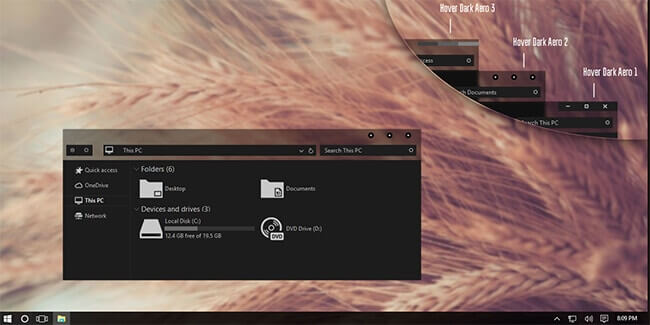
Admittedly, there is not much difference between a dark theme and a black theme. However, Hover Dark Aero Theme uses more black and less gray than other themes.
Before using this theme, you will need to have UXThemePatcher for Windows 10 installed. Get the DeviantArt theme once you have it installed on your PC.
Once downloaded, move the contents of this theme folder to %windir%/Resources/Themes. You can apply this theme in your system from the Settings app.
This Cool Theme Completely Gives Your Windows UI Look And Gives You The Experience Of Using Ubuntu Operating System On Your Windows 10. One of the best themes for Windows 10, most of the features of this software can be customized, like color themes, keyboard shortcuts. Ubuntu Skin Pack refreshes your Windows interface with some great appearances.
Another beautiful, clear, and simple theme with clouds and a blue sky in the background. It provides a total interface that looks similar to that of any cloud service. This theme is borderless as there is no border defining the sides and edges of the line drawn by the ruler. It changes the overall look and feel of your operating system.
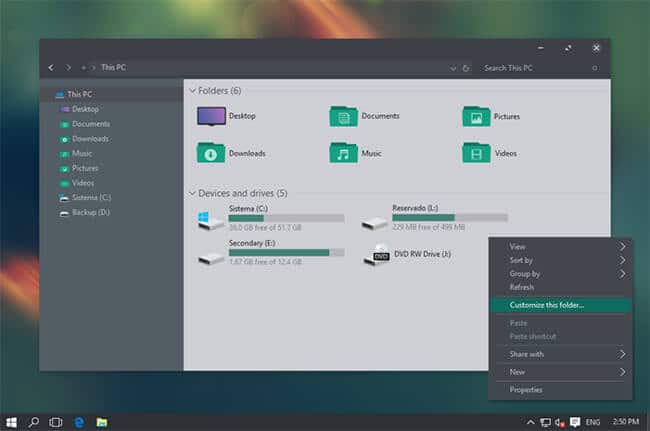
Ades Dark Theme is one of the most osm Windows 10 dark themes. It is not completely dark but a mixture of gray and some light black or soft colors. But still, it is good to get rid of eye strain and is pleasant to the eyes. The theme has a mix of soft blue, green, and gray color combinations in different parts of the screen
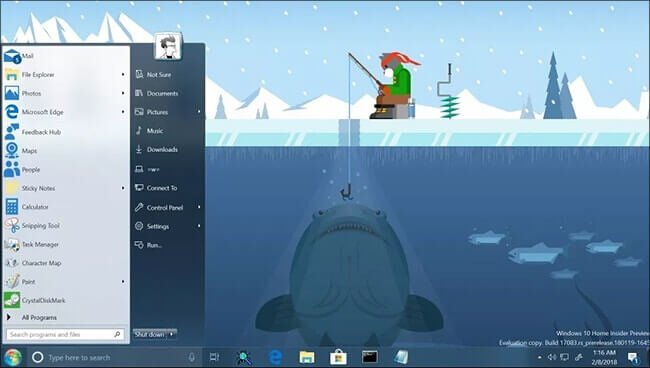
Our next best Windows 10 theme is StartIsBack. If you are missing the look of Windows 7, then this theme is the best for you. StartIsBack is the theme that can give you a chance to enjoy the look of Windows 7 in Windows 10. This is a great theme. You must try it once.
It is one of the top and best themes that has a minimalist look but will look great when used on your Windows 10 computer. There are sixteen versions of this theme, including 8 versions of the Fantastic Light theme and 8 versions of the Fantastic Dark theme.
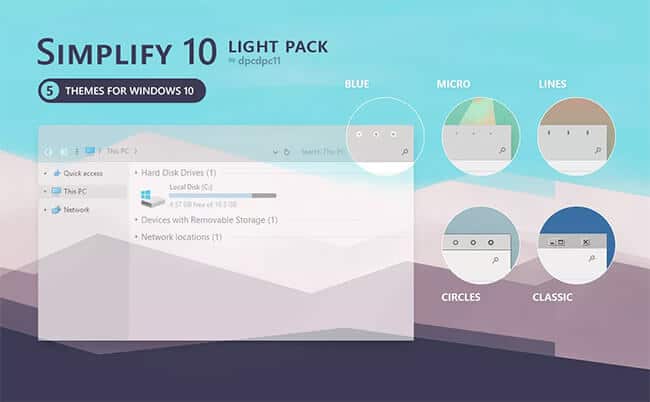
Simplify 10 Light is a pack of Windows 10 themes. It flattens the Windows interface as much as possible, relying on subtle variations in gray and white to separate the different parts of the UI. It also customizes the window control buttons, which may or may not be to your liking.
Although its name is Void this theme is the perfect dark theme for Windows 10. This is the perfect dark look with coral red, gray, and black color combinations. All windows look very beautiful and clean.
There are a lot of themes available on the internet for Windows 10. We have collected top-rated themes from various websites.
How to Install Windows 10 Theme?
We have shared the direct links of Windows 10 themes in this article. The download page will tell you how to install the theme.
Are these themes safe to use?
In short, the answer is – yes!. Thousands of users were using these themes at this time. Still, to be on the safe side, be sure to use a reliable security suite.
So above are the Best Windows 10 Themes in 2021. Get the theme and make your PC more fashionable than your expectations. I hope you like these cool themes.
Please share them with your friends, and also leave a comment about your favorite.
Hello friends, all of you who have read this blog of ours, then those people should know that to earn money online, good money can be earned by uploading videos on YouTube. But for this, it is most important that you get a good number of views on your YouTube channel.
For this you need to grow your youtube channel, so today you guys will learn how to grow your youtube channel or tips to grow your youtube channel.
I have been working on some of my YouTube channels for many years, on which I have got good growth. So today I am going to share some secrets of the same with you.
If you want to succeed on YouTube by working hard, you have to read this article thoroughly, I have shared some secret tips to grow your YouTube channel, after knowing it well, you can start your own YouTube channel. can also be developed.
You all must be well aware that YouTube is the best platform to earn money by making videos, millions of people will earn money from here, if you can also make such videos that people will like to watch then YouTube can change your life too.
If you people do not know about earning money from YouTube then you can know by clicking on this link.
I have a YouTube channel named Satish’s Videos, this channel has more than 6 lakh 65 thousand subscribers and recently I have got a lot of growth on this channel.
Nowadays many people are making videos on YouTube to earn money YouTube, but very few of them are successful on YouTube.
You are going to know some such things, after which you will also be able to grow your channel. So let’s know these things without wasting time.
Here are 10 Effective Ways You Can Grow Your YouTube Channel.
If you also follow all these things on your YouTube channel, then your YouTube channel will increase, you just have to do good work on YouTube.
1. Title & Thumbnail
After uploading a video on the YouTube channel, we have to put the title and thumbnail of that video, so many of you make a mistake here that you write the title of the video and upload it anyway.
You should not do this because when a user searches for a video or sees your video on the home screen, he clicks on your video only after seeing the title or thumbnail of your video.
You should write the title of the video in such a way that whatever main keyword you have taken comes in the title of that video.
Since your main keyword is “make money online”, you can title the video “How to make money online?” can write. I hope you guys have understood well what I am trying to explain to you.
If you use bold text while creating a thumbnail, then the thumbnail can become better and you have to make this thumbnail such that whenever someone sees that photo, he/she thinks I should watch this video.
The best Canva and Pixellab apps for creating thumbnails, you’ll find both on the Google Play Store.
2. Video Trailer
If you want to make your video viral on YouTube or want to get more and more views on your video, then for that you have to make some such videos that people watch your video for a long time.
You select the most viewed video on your channel and go to its analytics and check it, in which you will see that video is getting very good watch-time, that’s why that video is getting good views.
To bring good watch time on video, you can use video trailer I.E. When you edit your video, at the same time you have to choose some such things from your video, to know that people must watch the video till the last.
Like some people make a video to tell their YouTube earnings and in that video, they tell about their earnings at the beginning of the video, but they say that if you want to know this, then you must watch the video till the end. See.
So in the same way, you can also put any highlighted part of your video at the beginning of the video, this will increase the watch time on your video.
3. Collaboration
Collaboration is also a great way to grow a YouTube channel, in that you find a few YouTube creators similar to the theme of your own channel, then you make videos with them.
By doing this, the audience of other YouTube creators also comes to your channel and your audience also goes to their channel, by doing this you both benefit.
But keep in mind that, let’s say you have a gaming channel and you collaborate with a YouTube creator who makes a dance video, you will get very little profit, instead you just collaborate with a gaming channel. We do. If you do this then you will benefit more from it.
Now some people will say that now we have a new channel, so who would like to cooperate with us, you don’t need to ask for cooperation on any big YouTube channel, first of all, ask for cooperation only on the 2000S 5000 Subscribers channel. By doing this you can also grow your YouTube channel by collaborating with other channels.
You guys must be well aware that if you are getting good watch time on your video, then good views are sure to come on your video, but now the question comes that what should we do in our videos so that people can watch our videos. be able to see Video. Watch for as long as possible.
There are a Few Things You Can do in Your Videos for this.
Ask a question in your video (and ask your viewers to answer this question by writing me in the comments section).
If you have made a video in which everyone may have a different opinion, then let your viewers know what you think about it, you tell us in the comments.
At the end of the video you can ask your viewers that they would like to watch the next video on this topic, this way you will also get the topic of the next video and that video is sure to get views.
And as everyone does, you have to tell your video to like share subscribe and comment, many people don’t know the meaning, they like to watch your video but they think that if we subscribe their channel If we do, then maybe we have to pay some money, some people do not subscribe to the channel due to some reason.
So these are some of the things that you use while making your videos then you can start getting the same viewing time on my videos as on my videos.
5. Provide Value
There was a time when you used to make any kind of video on YouTube, then that video would easily get a lot of views, but now the situation is such that if you do not make good videos then it is very difficult to get views on it. your youtube channel.
To make good videos, you can make some such videos, after watching which people get to learn something from that video or if you are making an entertainment-related video then it can entertain the people watching the video.
You don’t make videos like other people watching them, by doing this you will put a lot of videos, so maybe one or two of those videos will come good days if you want to make some kind of video after watching it People subscribe to my channel.
You can solve people’s problems through videos on your YouTube, that is, suppose someone’s computer is facing any problem, then you can make a video by fixing that problem. So if anyone else is having the same problem with their computer, I can learn by watching your video.
Or you can also tell people many ways to earn money, how much money you can earn every month by working in this way, people mostly like to watch such type of videos.
If you have started a new YouTube channel and are in such a situation, you want to group your channel very quickly when you need to know about keyword research.
There are different ways to get views on YouTube, one of them is search results, that is, people are watching your video by searching on YouTube.
That is, if someone wants to watch a video related to earning money online, then he has searched on YouTube “earn money online”, then in this way your video is seen, then its traffic source comes from the search result of YouTube.
To do keyword research, you can download a Google Chrome extension named Vidiq to your computer or laptop.
And the best thing is that from here you can do keyword research, that is, before making a video, find some low-competition keywords related to that topic.
Then you write the same Keywords Title 10 and the description of your video, by doing this your video will start appearing in the search results of YouTube when someone searches your keyword, your video will rank and from there you will get a lot of views.
vidiq keyword search
Conclusion
The last thing from my side is that I have seen that people put 5 to 10 videos on their youtube channel and think that the views will come if you guys use these methods and upload 30 to 40 videos then you will get good results are to be seen.
And with this, if you want to be successful on YouTube, then you have to upload videos regularly. By uploading regular videos here I do not mean that you upload videos daily.
You can also upload two to four videos in 1 week, it depends on the topic of your video, what kind of video you make, that is fine.
To get similar information related to YouTube or blog, you stay connected to this blog, I am going to share more such things with you in the future.
So if you liked this article of ours, then do share it.
Binance Coin (BNB) Cryptocurrency:- By the way, most of the coins in the cryptocurrency market are built on Ethereum. They do not have their platform nor their blockchain. But others have their blockchain and crypto exchange platforms. And one such coin is Binance Coin.
If you also want to get information about Binance Coin and you are not getting information about Binance Coin. So you’ve come to the right place.
In today’s article, I will give you information about Binance Coin. You will find answers to questions like what is Binance Coin, its uses, history of Binance Coin, future of Binance Coin, etc. today in this article. So without wasting any more time let’s start with our first question, what is Binance Coin?
Binance coin is a decentralized crypto coin that is built on top of the Ethereum blockchain. It is an ERC-20 token as it is built on top of the Ethereum blockchain. This coin is launched by the Binance crypto exchange. And most of it is also used on Binance’s cryptocurrency exchange.
Binance is the largest cryptocurrency exchange in the world. It became the world’s largest cryptocurrency exchange when it clocked over 1.2 million transactions per second in 2018.
In this way tether (USDT) did the job of making a splash in this hot market of cryptocurrency and due to its stable price, the market was dominated by the buyers.
Tether Price Today, BNB to USD live, Marketcap and Chart
What did Binance Coin start at?
Binance Coin was launched by the Binance cryptocurrency exchange in July 2017. This is an ICO coin. The full form of ICO is Initial Coin Offering. This means that when a coin start mail is launched, it is already distributed among some people.
Binance Coin is divided into the following:-
Developers are given 40% of the coins.
10% coins are given to the investor.
And 50% of the coins have been sold.
When Binance was launched, Binance crypto exchange has buy-back its coins every quarter till now. Buy-Back means that Binance buys back its coins from the people to whom it sold its coins. Buy-Back is called. After buying back the coin, Binance burns those coins. Or you can say that it burns. This goes to create a coin shortfall. Due to which this coin will become even more valuable. such as bitcoin.
Binance Coin was listed on the coin market website on 26 July 2017. When this coin was listed on the coin market website, it was priced at ₹6.7. In its initial period, this coin also did not perform very well.
The first surge in this coin came on 25 May 2019. When its price became ₹ 2431. And the biggest jump-started when its price started increasing from ₹ 2817 on the day of 21 January 2021. And reached ₹ 51228 in May 2021. But after touching its All-Time-High, its price started happening again. And haven’t seen any other big jump in it so far.
»What is Tether Cryptocurrency?
Who is the founder of Binance?
Changpeng Zhao is the founder and CEO of Binance and also the father of Binance Coin. He launched Binance Coin in July 2017.
How Much is Binance Coin?
The maximum supply of Binance Coin is 170 million Binance Coin. Of which 50% of the coins were divided between the developer and the investor at the time of the coin’s launch. Of this, 40% of the coins were given to the developer and 10% to the coin investor. At the time of the launch of Binance Coin, its maximum supply was 200 million Binance Coin. But in every quarter, Binance burns its coins by buying back. So that he can create a shortage of this coin. Due to which these coins will become even more valuable.
The total supply of Binance Coin at the time of writing this article is 169 million Binance Coin. And its circulating supply is 153 Million Binance Coins.
To buy any cryptocurrency whether Binance or Dogecoin, a cryptocurrency exchange is needed. So first you have to register on any cryptocurrency exchange. India’s best and largest crypto exchange is WazirX. It is a part of Binance itself. If you want, you can also register on WazirX by clicking here.
Step 1: After registering, you can use payment options like UPI, bank transfer, etc. to deposit money in your account.
Step 2: After depositing money, go to the search box and search BNB. Click on the first coin.
Step 3: Now you can buy as many Binance Coins as you want according to your budget.
ℹ️ Disclaimer
The information provided on this website is for educational and entertainment purposes only. The information provided on this website does not constitute investment advice, financial advice, or trading advice. TechnoVimal does not recommend buying any cryptocurrencies. Crypto markets are highly volatile and crypto investing is risky. Readers should do their research on cryptocurrencies and consult their financial advisors before making any crypto investment.
Conclusion
Today you learned that the Binance coin is an ERC-20 token that is built on the Ethereum blockchain. Also, you know the history of Binance coin, who created Binance coin, Binance coin price, how much is Binance coin, and how to buy Binance Coin, etc.
I hope that after reading this article today, all the questions you may have about Binance Coin are over. But if it is not so and you still have any questions related to Binance Coin then you can ask them to us through a comment below. You will get the answer to every question in the comment below.
Before going to the end, do tell in the comment that how did you like this article, and if some improvement is needed in it, then you can also tell in the comment below.