Home Blog Page 2

How to Start a Blog: The Definitive Guide

0

How To Start A Blog on WordPress: Blogging is the process of sharing information, knowledge, ideas, and opinions through blogs. Most of us aspire to become successful bloggers. But we find it challenging to choose the right platforms to start it. Let me tell you there is no other platform better than WordPress.org to start a blog.

Now you must be wondering why I stated that WordPress.org is the best blogging platform. And how you can use WordPress to create and publish your blogs. The answers to all these questions of yours are in this article. This article also highlights money-making ideas through blogging.

WordPress is a free platform and allows everyone to start a blog. If you are someone who wants to share your ideas and thinking with millions of people through blogging. Then you can get it done by creating and publishing blogs through WordPress.

» 33 Best WordPress Plugins That A Blogger Should Know?

» How to Learn SEO: The Definitive Guide

To be precise WordPress is a content-managed system (CMS). Where bloggers of every part of the world can create the best and impressive blogs. WordPress provides a variety of free WordPress themes and WordPress plugins. No matter what the niche of your blog is, you can create and publish your blog through WordPress.

How to Install WordPress Manually: Start a Blog on WordPress

Well, to start a blog on WordPress, you must have to install WordPress. And after that, you can start a blog. How can you install WordPress and how you can start creating and publishing your blogs are mentioned further in this blog post. Overall, this article is about how to start a blog on WordPress.

Reading time: 14 min 54 sec

1. Think About a Niche

First and foremost, if you have decided to do blogging, then you must need to make sure to choose the best niche for your blog. Well, choosing a niche can be difficult because it needs to be exciting and profitable at the same time. But if you have made up your mind for blogging, then choosing the best niche for your blog is necessary. You need to find out whether the niche you have decided to write about is compelling. You love to write about that topic or not.

Plus, you need to find out what is the market value of that niche, whether this niche can help you to get rich or not. Also, you need to find out about the competition. Whether your niche competes or not, choosing a niche about which you love talking can be profitable because you would enjoy creating that kind of blog. People who love foods share their experiences with food. They share information about recipes, as well. If you are someone who has an extreme interest in food, then food blogging is perfect for you.

Similarly, if you are interested in a fashion event, you love being stylish and talking about makeup, hairstyle, and clothes, then you can choose fashion blogging. Remember, you need to select the blogging niche of your choice, but that niche must have some market value, or else your hard work goes in vain. Suppose you choose a niche that is not very popular, but you are interested in writing about that niche, then you may not be able to earn enough money. Hence, choosing the best niche for your blog is a must.

To find great information about choosing the best niche, you can take the help of Google or YouTube. Plus, you can ask other bloggers who do have experience in blogging. After choosing the best niche, go ahead to select the blogging platform.

Choosing the best niche is not so difficult if you know the market and the competition.

2. Choose a Blogging Platform

Now that you have decided to make a blog and chosen the best niche for it. You must be wondering how can you choose the best blogging platform.

Here is the list of few popular blogging platforms:

WordPress.org: WordPress.org is a viral blogging platform that started in 2003. It is a free and secure blogging platform and provides users with fabulous themes and the best WordPress plugins. The prime benefit of WordPress.org is that it allows users to make their content SEO-friendly. In other words, it helps people to monetize blogs or websites.

There are 3000 different and colorful themes and 54,481 plugins available on WordPress. And the most important thing is that it gives you control over every aspect of your website, unlike a few other platforms. Last but not least, it is free. It means you can get 3000 WordPress themes and 54,481 WordPress plugins for free. However, if you need some more items, then you may have to join the membership. It is the latest version of WordPress, and many people across the world are using it. If you want to start a blog, then you should try it for sure. It is a handy platform.

WordPress.com: Most of you may get confused about the difference between WordPress.com and WordPress.org. Let me tell you both of them are different, and neither of them asks you to pay. WordPress.org is an advanced platform, while WordPress.com only provides the necessary services for blog hosting that too free of cost.

If you are someone who doesn’t want to spend enough money but to start a blog, then this can be the perfect platform for you. It is the best hosting service and is offered by Automattic.

It is also fundamental and easy to use. Plus, it doesn’t ask you to pay. But it provides the WordPress.com domain only. WordPress.com is not as good as WordPress.org. WordPress.org is very popular, and most people use it.

Blogger (Blogspot): It is also a free blogging platform provided to users by Google. Well, just like the above two platforms, it is quick, savvy, and easy to use. The main advantage provided by the Blogger (Also known as Blogspot) is that it is a secure platform. However, you get only a few blogging tools, and you can’t get so many themes as well. It doesn’t get updated frequently.

Plus, the design option is minimal. Another disadvantage of the blogger platform is that it gives all the right to google to block or suspend your site anytime. If you want to start a blog, then you can use this secured platform for sure.

Tumblr: Another prevalent platform is Tumblr. However, Tumblr is far different than these types of platforms. Tumblr is also a bit like social media platform and is known to be a microblogging platform. It is also free but provides only a few features, unlike WordPress and other platforms. Tumblr is also a fantastic platform, and you can use it as well.

Why is WordPress.org the Best Blogging Platform?

WordPress.org is known to be the best blogging platform because it provides a large number of themes and plugins. It consists of around 54 thousand plugins and more than 3000 themes that drive people towards WordPress. Most of all, WordPress is free and SEO-friendly. And you can customize WordPress the way you want.

Moreover, it is easy to use, and you should use WordPress for blogging. After choosing the best blogging platform, you have to choose a domain name. Remember, you need to keep all the things in mind while selecting a domain name because these things make your domain name enjoyable.

3. Choose a Domain Name

Choosing the correct name for a domain can be a bit difficult for those who do not know domain names. Bloggers need to keep in mind that the domain name they are going to choose for the blog or website should be easy to type and must consist of a keyword. There are various other things as well that one needs to keep in mind while choosing a domain name.

Here is the list of things about which you need to consider before choosing a domain name:

  1. Few words: The domain name that you have decided to choose for your website/blog must be short and should consist of a few words only. People find your domain easily readable if it consists of only a few words. Long domain names are not right.
  2. Accessible to type: One must not find it difficult to type the domain name you have chosen for your website. It should be short and straightforward.
  3. Keywords: The domain name you have chosen for your website must include at least one keyword in it.
  4. Avoid numbers and symbols: You also need to make sure to add known numbers and symbols to your domain. The use of hyphen and other symbols like exclamation marks should be avoided.
  5. Memorable: Your domain name should be easily remembered, and that’s why it suggested that you should choose short domain names that are easily memorable.
  6. Domain extension: While choosing a domain name, you need to do proper research and add appropriate domain extension. We recommend the .com extension because it represents a global audience.

For example, you can choose co. for company, and .info for information. Similarly, you can choose .com, .net, .org, .biz, for technical, non-commercial, and business organizations respectively.

That’s all. After choosing a domain name, you have to install WordPress.

4. Choose a Web Hosting

Now that you have selected a domain name for your blog and now it’s time to choose the best web hosting company. You can choose any web hosting service, but we recommend Bluehost for all new bloggers because of many reasons.

  1. Bluehost offers a free domain name for the first year, and I’m sure no one else does this.
  2. They offer a free SSL certificate to secure your blog (e.g., https://www.yoursite.com).
  3. Bluehost offers a one-click auto-installer (Softaculous) for installing WordPress quickly. I have mentioned step by step process on how to install WordPress automatically through Softaculous below (Point 5).
  4. They provide 24×7 customer support via Call and Chat.
  5. Bluehost offers a 99.9% uptime guarantee.
  6. They offer free business emails.
  7. They have hosted more than 2 million blogs and websites worldwide.
  8. Bluehost offers a 30 days money-back guarantee if you are not satisfied with their service.

That’s why we also hosted our blog in Bluehost.

Here is the step by step guide on how to choose and register your domain with Bluehost:

Step 1: Click here on Bluehost to get a special discount for getting the cheap Bluehost web hosting service. Now, click on the “Get Started.”
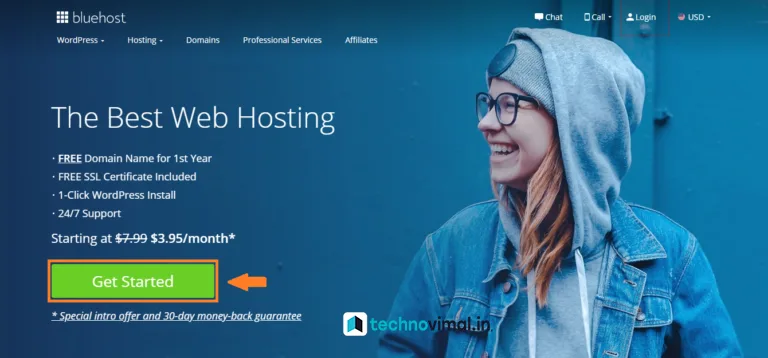
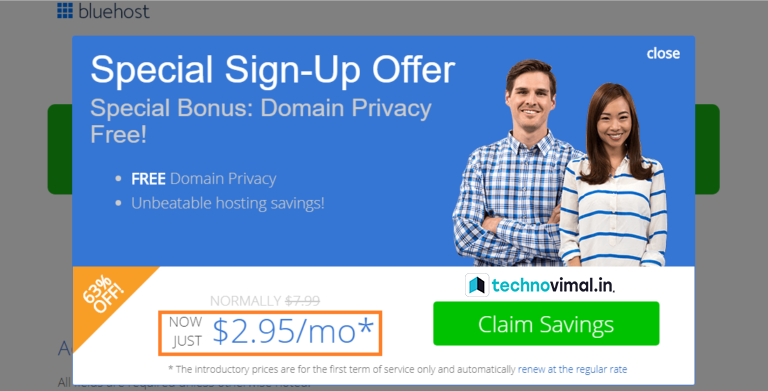
 How To Start A Blog? Click here on the Bluehost Home page
Bluehost
Bluehost 63% Off!
Bluehost 63% Off!

Step 2: And then, choose the hosting plan according to your need and convenience. I recommend selecting a Basic Plan for new bloggers. Click on the “Select” icon to choose a plan.

BlueHost Hosting Discount

Step 3: Enter a domain name for your blog (e.g., yoursitename.com in the screenshot) and click on the “Next” icon to go ahead with the registration process.

BlueHost Domain Discount

Step 4: After choosing the domain name, fill up account information and payment details, and click on the “Submit” icon to complete your hosting registration.

Account Information

Congratulations! You have successfully registered your domain and hosting with Blueshot.

5. Install & Setup WordPress

WordPress can be installed manually or automatically with the help of popular auto-installers such as Softaculous, Fantastico, APS, and Installatron. Many web hosting companies (such as Bluehost, Siteground, Hostgator, and many others) offer a one-click auto-installer. And if a web hosting company doesn’t offer a one-click auto-installer, then trust me, it is not a good web hosting company. That’s why we always recommend a reputed web hosting company like Bluehost.

=> Automatically WordPress Installation process:

Here is the Step by Step Guide to automatically Install WordPress:

Step 1: Log into your cPanel by entering your Username and Password.

Log into your cPanel

Step 2: Search for a one-click auto-installer such as ‘Softaculous’ and then click on it.

cPanel Dashboard

Step 3: After that, click on the “WordPress” icon.

WordPress install in Cpanal
WordPress install in Cpanel

Step 4: Now, you can see a WordPress window. Click on the “Install Now” option.

Install Now
Install Now

Step 5: Now fill up the required details such as Choose Protocol, Choose Domain, Site Name, Site Description, and few others, and then Click on the “Install” button.

Choose Protocol, Choose Domain,

Congratulations! You have successfully installed WordPress.

=> Manually WordPress Installation process:

A few of you may find it challenging to install WordPress manually. Therefore, I have explained here how you can install WordPress manually.

Here is the Step by Step Guide to manually Install WordPress:

Step 1: First and foremost, you need to download the latest version of WordPress (https://wordpress.org/download/) from WordPress.org, on your system.

Step 2: After that, you have to upload your WordPress account to your web hosting server. You get three options for uploading you can cheaply choose any of them to upload.

Step 3: After uploading your WordPress account to your web hosting server, you need to create a “MySQL Database and User.”

To create it, you have to follow the given steps:

1. Log in to the cPanel (https://store.cpanel.net/my/).

Login Cpanel
Login Cpanel

2. And then, click on the MySQL Database Wizard icon.

MySQL Database Wizard

3. Enter a Database Name and Click on the Next Step.

Database Name 

4. Enter a Database Username and Click on Create User.

Database Username

5. You have successfully created a MySQL user. And now, Add the user to the database and click on the ALL PRIVILEGES button to give privileges to the user. Further, click on the Next Step.

Add user to the database

6. Complete the Task by making proper notes of the database, password, and username.

Complete the Task

Step 4: Now, Go to the Root Directory inside your cPanel (e.g.,/home/username/public_html/) and find or search the “wp-config-sample.php” file where is WordPress installed.

wp-config-sample.php

Step 5: After that, you can run the installation of the WordPress file (WordPress-5.7.2.zip) that you have downloaded earlier (Step 1) from WordPress.org (https://wordpress.org/download/).

  1. Download and then unzip the WordPress file (wordpress-5.7.2.zip) on your system.
  2. Upload all the unzip files on the root directory (e.g., https://yoursite.com) or the desired location of your web server.
  3. Enter the URL of your website in a web browser for running the WordPress installation script.

That’s all. Now the WordPress should be installed correctly.

Step 6: Now, you need to complete the installation by filling in the URL, Username, Password, Site Information, and some more.

Wow, congratulations! You have installed WordPress successfully.

6. Setup Your Blog

Here is the step by step guide that you need to follow to set up your blog:

Step 1: Log in to your WordPress account.

 Login WordPress account
Login to your WordPress account.

Step 2 (Install a WordPress Theme): Go to the “Appearance” option and then click on the “Themes” icon. Now click on the “Add New” and install a WordPress theme for your blog. There are thousands of free WordPress themes available. If you need a premium WordPress theme, you can buy and install it from here.

Install a WordPress Theme

Step 3 (Install WordPress Plugins): Go to the “Plugins” option and then click on “Add New” and install all the necessary plugins. Make sure to install only a limited number of plugins that are needed. For your help, here is the list of 51 Best Free WordPress Plugins.

Install WordPress Plugins

Step 4 (Setup WordPress Settings): Go to “Settings,” and you can see the option of General, Writing, Reading, Permalinks, and many others. From there, you can fulfill all the necessary details, including your Site Title, Tagline, Site Address, Permalinks, and few other details.

Setup WordPress Permalink Settings

Step 5 (Create Your Menu): Go to the “Appearance” option and then click on the “Menus” icon. Now click on the “Create a new menu” and give a “Menu Name” (e.g., Main Menu in the screenshot). Now add pages, posts, or custom links to the menu.

Create Your Menu

7. Write and Publish a Post

After choosing the niche, first of all, you have to decide the topic on which you are going to write. And after that, you need to follow the following steps:

Step 1: Go to your WordPress dashboard.

Step 2: Click on the “Posts” icon and then click on the “Add New’ button.

Step 3: Fulfill all the things, including Title, Permalinks (URL address), Description, and other required details.

Write and Publish a Post

Step 4: Write your post (Content).

Step 5: On the upper right-hand side, you can see the option to “Publish.” You need to click on that, and that’s all. You have successfully published your first post.

8. Promote Your Blog

After writing and publishing their comes the part of promoting. You must be wondering how you can improve your blog post. Let me tell you that it is straightforward. Because only creating a blog post and waiting for the readers to come to your blog and read on their own is not possible.

You can promote your blogs through social media platforms. Social Media Marketing is an excellent means of driving traffic to your blog. You can make use of social media platforms like Facebook, Twitter, and Linkedin. Plus, you also need to make sure that apart from getting new readers, your old readers should be visiting your blog regularly. And to help you with this, social media platforms can be useful.

You can also make use of email marketing to get tons of old readers coming back to your blog. Email marketing is also beneficial and is a way of sending emails to the large number of subscribers you already have on your blog. In those emails, you can add links about the new blog post, and people come to see your blog. It is an excellent and helpful method.

Remember, getting a large number of visitors to your blog is not possible if you want it to happen overnight. It requires a lot of hard work and patience. You can also increase the number of visitors to your blog by commenting on other people’s blog posts if you post a comment on someone else’s blog stating that people should visit your blog for particular knowledge and piece of information. Then some people may visit your blog, and thus you get good traffic.

Plus, if you want to get more traffic to your blog, then try to publish more extended content. Because people realize that your blog contains complete and accurate information, then they visit your blog instead of any other blog.

» 5+ Best Programming Languages to Learn

» Top 5 Blog Writing Skills & Tips for Better Blog Posts

9. Make Money with Your Blog

After promoting your blog, you realize that you can make money from your blog. How? Here is the list of methods that help you earn a lot of money from blogging.

  1. CPC and CPM Ads: Let me tell you CPC ads and CPM ads are the most common way to earn money through blogging. If you monetize your blog with these ads, you can surely make a lot of money. In CPC ads, you can earn money every time someone clicks on the ad. While in CPM ads, there is a fixed amount for advertisement.
  2. Selling of Private Ads: You can easily make money by selling private ads if you have managed to get much traffic on your website. Then advertisers can come directly to you and can ask you to place their ad on your website. In return for that ad, they can pay you a considerable amount of money. Selling private ads is very beneficial for bloggers, and they can sell ads in the form of links, buttons, and banners.
  3. Add Affiliate Links: Affiliate marketing is widespread when it comes to blogging. Bloggers place the affiliate links in their blogs. You can try this method as well. But remember, the affiliate links need to be relevant, or else no visitors can buy using those links. Now that you have set up a blog. You must be thinking about how you can add the affiliate links. Let me tell you affiliate links are the links provided to bloggers and other business owners through which the blogger gets 2% to 15% and sometimes more value of the product they are trying to sell every time someone purchases using that link. It is just like a commission to increase sales of a product.
  4. Sell Digital Products: Selling digital products has also become very common in today’s times. Here is the list of digital items that can sell through blogs:

You can sell many other digital products on your blogs. Each time someone buys from your blog, you get paid.

  1. Use your blog as a content marketing tool: Those who are business owners and want to sell products and services, then you can use their blogs as a content marketing tool. You can quickly sell physical products and services on your blogs and earn money. And you can use it as content marketing tools that drive traffic to your business. Most website owners who want to sell products use blogs to attract customers. It is an excellent method and helps them in revenues.
  2. Sell Membership: Another essential method to make money online is to sell membership. But remember, you need to create super unique content for membership, or else people don’t choose to get a membership. It should have something valuable which triggers the need for purchasing a membership. Its content can’t be the same as the typical content of your blog.
  3. Share the Infographics: Infographics are very common in today’s times. You can also use your blogs to share infographics, which in turn, help you earn money.
  4. Build Credibility: Blogging can also help you build credibility for your business. And it provides you with many money-making opportunities.
  • Related: How to Make Money from Blogging or Blog?

For example, you start a food blog. Various people start reading your food blogs, and your blog becomes popular. Then you can be recognized as a popular figure in the food industry.

As soon as you get the authority, people can approach you. You might get invited to speak at a particular event.

To start blogging on WordPress is secure, and perhaps this is the reason WordPress is still the most popular platform for blogging. All you need to do the WordPress setup and start writing a blog post. You can easily create a blog, publish it, and promote it. Bloggers do earn much money, and even you can receive if you are someone who wants to make money through blogging. I hope that I have mentioned above all the principles applied to make money online, and of course, the best option is to start a blog. And if you think I’ve missed any principle, then do let me know in the comment section.

You may also want to see: 

If you liked this article, share it on the social networking site. You can also find us on Twitter, Facebook, and Instagram.

5+ Best Programming Languages to Learn

0

Top 5 Programming Languages ​​of the future. Learn new programming languages ​​which are among the highest paying languages today.

What is a programming language?

Popular Programming Languages

A programming language is a synthetic language, which identifies the way that it computes any number of different languages. Programming languages ​​are used solely with computers. But different machines jointly use programming language. We are able to use programming languages ​​together to write programs, properly employ specific algorithms, or as a method of human communication.

There is currently a square measure of about two,500 programming languages. Some programming languages ​​are Pascal, Basic, Swift, C, C++, Java, Javascript, Python, Lisp, etc.

These class measures are otherwise classified on a completely different basis. For example an understood language (such as BASIC) and a compiled language (such as C++).

Programming languages can be divided into Tree different levels:

Looking at the amount of human understanding of the language, programming languages ​​can be divided into 3 classes.

  1. Machine Language – It is easy to know the machine, but it is almost not possible to know the human directly.
  2. Programming Language – It is often regenerated into machine language by enablers. It is also understood by humans, although it is completely different for different microprocessors or microcontrollers.
  3. High-Level Programming Language – It is accessible to humans. Its vocabulary resembles that of ordinary English. It is compiled and born again in machine language. Example – Basic, C, C++, Java, etc.

Despite the recent rifts on the App Store, iOS remains a huge platform for development, making it a good place to start. Apple also has a virtual Apple Camp for kids to learn to code using Swift.

Top 5 Programming Languages to Learn

1. SWIFT

Among the Top 5 Programming Languages, ​​Swift (SWIFT) has many different options to make your code a lot more expressive

  • Generics that are powerful and easy to use
  • Protocol extensions that make it even easier to write generic code
  • First-class functions and a lightweight closure syntax
  • Fast and concise iteration over a range or collection
  • Tuples and multiple return values
  • Structures supporting methods, extensions, and protocols
  • Enums can have payloads and support pattern matching
  • Functional programming patterns, e.g., Map and Filter

2. Java

Java is generally used for back-end development. However, it is also commonly used for robot development. While it is harder to locate than many others on this list. Its wide usage and flexibility make it a solid choice if you want to get into apps or back-end development.

Java is often used to build large enterprise-class applications. Java works well in a company environment. Or if you are building a very large-scale system. Although it is used for small tasks, it is less suitable for that.

Java doesn’t really have full types. Although traditionally speaking. Java was formerly designated as OAK by an organization United Nations Agency. OAK resulted in the ownership of OAK Technologies. Apparently, they wanted to change their name due to the confusion of the people. They chose about fifteen titles and finalized 3 names that square measure Java, Polymer, and Silk. Ultimately, Java was chosen.

But having the above mentioned, Java is jokingly abbreviated as “Just Another Virtual Accelerator” by programmers.

3. JavaScript

JavaScript can be a text-based artificial language that is used both client-side and server-side that enables you to make sites interactive. Whereas markup languages ​​and CSS are the square measure languages ​​that provide structure and elegance to sites, JavaScript provides the interactive parts of sites that let the user interact. JavaScript is often accustomed to building the front-end of ASP.NET applications (just as important as the back-end tools that power those apps).

For example, it is commonly employed in ansible net parts. So, if you click a button on an Internet site to launch some sort, JavaScript is most likely what will happen next. JavaScript is the most loved cryptography language on this list, and one of the easiest to figure out. Common samples of JavaScript you might use on a daily basis include the search box on Amazon, a news recap video embedded on The Big Apple Times, or refreshing your Twitter feed.

4. Python

It was developed by Guido van Rossum and released in 1991.

What is Python used for?

Python is an all-purpose secret writing language. Python is an easy-to-learn, powerful top programming language, which means that a hypertext mark-up language, not like CSS and Javascript, is used for Internet development as well as alternative varieties of programming and computer code development. Including backside development, computer code development, knowledge science, and scriptwriting among other optional things.

Python A language that is closer to a nonhuman language (such as English) is known as a high-level language.

Some of the Benefits of Programming Languages in Python include:

  • Presence of third-party modules:…
  • Extensive support library:
  • open source and community development
  • Ease of learning and support available
  • User-friendly data structures
  • productivity and speed

5. PHP

What is PHP and why is it used?

PHP is also a server-side scripting language among the top 5 programming languages. Which is embedded in the Hyper-Text Markup language. This dynamic content, database, session following. Even using PHP is accustomed to building an entire e-commerce site. It integrates with a variety of comprehensive databases as well as MySQL, PostgreSQL, Oracle, Sybase, Informix, and Microsoft SQL Server. PHP is available for both beginners and experienced developers for website development. PHP is a language. It is easily learned in just two to three weeks and after that, you can develop your blog.

Read More:

What is Solana Crypto and How Does It Work?

0

What is Solana Coin?: Today we are going to talk about a coin with Blockchain technology that has contributed to a great extent to the Scalability of Blockchain? Today we are going to talk about Solana (SOL). SOLANA is a cryptocurrency similar to Bitcoin and Ethereum. Solana’s name is being heard a lot in the market these days. Let us tell you that the price of Solana is $ 156.6 current. Solana is an open-source blockchain platform.

What is Solana Coin?

Solana Coin Logo
Solana Coin Logo

Solana is a highly functional open source project that banks on the permissionless nature of blockchain technology to provide decentralized finance (Defi) solutions. While the idea and preliminary work on the project began in 2017, Solana was officially launched in March 2020 by the Solana Foundation with headquarters in Geneva, Switzerland.

The Solana protocol is designed to facilitate decentralized app (dApp) creation. It aims to improve scalability by introducing a Proof-of-History (PoH) consensus combined with the underlying Proof-of-Stake (PoS) consensus of the blockchain.

» What is Bitcoin?

History Of Solana Coin (SOL)

If we talk about the history of Solana, then it was brought to the market in 2017. The price of this coin was not very special at the time of launch. When the Solana was launched on 11 April 2020, it was again priced at ₹59. It is said that from April 11 to June 26, 2020, nothing special was seen inside it. But after June 26, fluctuations in its prices started appearing suddenly. Experts believe that it was the same day and since then its prices have seen a steady jump.

» What is Binance Coin?

Who Invented Solana Coin

Solana Coin was discovered by Anatoly Yakovenko. Anatoly Yakovenko worked for Qualcomm company from December 2003 to July 2016. He left Qualcomm in 2016 and briefly worked as a programming engineer at Dropbox. Anatoly Yakovenko was also engaged in creating Solana, working with Dropbox.

Total Number Of Solana Coin

» What is Holo Cryptocurrency?

According to the Coin Market Cap website, the total supply of Solana is 501, 827, 855. It is said that the maximum supply of Solana has not been mentioned but its circulating supply is 286,294,943.91 SOL.

Solana Price Today, SOL to USD live, Marketcap and Chart

Solana to USD Chart
Solana to USD Chart

» What is Tether?

How To Buy Solana Coin

If you want to know about Solana, then there are many applications available for investing in cryptocurrency in India. You can buy Solana using any application. So let us give you some important information related to it.

  • coinswitch kuber
  • CoinDCX
  • Bianance
  • Cex.io
  • Coinbase

How To Buy Solana Coin on CoinDCX

Although there are many platforms to buy cryptocurrencies in India, the biggest platform among them is WazirX. But Solana Coin is not listed here yet. Because of which you cannot buy Solana Coin from WazirX. But if you want to buy Solana coin then you can buy this coin from CoinDCX. Which is a cryptocurrency exchange platform.

To buy Solana Coin, first create your account on CoinDCX. You can also create an account on CoinDCX by visiting the link given here. By creating an account with this link, you will get free bitcoins up to ₹ 500. After creating the account, complete the KYC there. It takes a maximum of 5 to 6 minutes to complete KYC.

After KYC is completed, you put money in your account and go to the search box and search Solana or SOL. After that, you can buy as many Solana coins as you want.

» What Is Cardano?

Note:- The information provided on this website is for educational and entertainment purposes only. The information provided on this website does not constitute investment advice, financial advice, or trading advice. Hindi Tech World does not recommend buying any cryptocurrencies. Crypto markets are highly volatile and crypto investing is risky. Readers should do their research on cryptocurrencies and consult their financial advisors before making any crypto investment.

Future of Solana Coin

Let us tell you that the current price of Solana is $156.28 which is 2.12% higher than the price 24 hours ago. Grayscale has added Solana to its investment fund. Grayscale is the largest crypto investment fund globally and brings in a lot of institutional investors from all over the world. The company is mainly popular for its bitcoin fund. Solana’s inclusion in the Grayscale Investment Fund reflects the growing investor confidence in Solana. That is if so many big losses are investing in Solana, then an even further increase in its price can be seen.

» What is Litecoin?

» What is Cosmos (ATOM)? The Internet of Blockchains

Conclusion

Today in this article you have got information about what is Solana, the History of the Solana coin, etc.

I hope all your questions related to Solana Coin are cleared. But if it is not so and still you have any query related to the Solana coin then you can ask us through the comment below. We will definitely answer your every question in the comment below.

Read More:-

150+ Guest Posting Sites List for SEO

0

If you want to know the technique of finding the Best Guest Posting Sites then you are on the right article. Yes, if you want to know the Full Guide to Find Guest Post Sites, then keep reading this article till the end.

Before getting into the list of guest posting sites and the techniques to find them, let me give you a small overview which you will read further.

After Google’s Core Algorithm Update, only one Ranking Factor helps in SEO. And that is the Ranking Factor of SEO, Guest Post, by which we can greatly improve the ranking of our site. But finding the right guest posting site is difficult as people start using PBN and expired domain websites.

» How To Increase Website Traffic

We cannot rank our site in search engines through PBN and spam links. People spend a lot of time finding Guest Posting Sites. And when he researches in search of a guest posting site, then as soon as he gets a site first. They examine the metrics of that site such as domain authority and page authority, traffic, and other factors that make a blog site good and bad.

150+ Guest Posting Sites List for SEO

Free Guest Posting Sites List

Bloggers always need quality content. If we provide them with good and quality content, they will accept and publish our content for those visitors. Finally, we will also be able to do guest posts. we will get backlinks as well as some traffic from that site.

Good sites always look professional and reliable, PBN sites on the other hand have no social media links and don’t see any traffic or anything important.

So in this article, we will teach you how you can find the best and relevant guest posting sites for your website. But first, we have to know about the benefits of Guest Post. Guest posting is one of the best marketing strategies. That’s why you can spend your time on guest posting.

» High-Quality Backlinks Strategy

What are the Benefits of Guest Blogging?

Let us know about some of the best benefits of guest posting, which will increase your website traffic from 0 to 1000 per day.

  • With Guest Posting, you can bring Quality Traffic to your site.
  • Guest posting improves your domain and search engine authority.
  • Guest posting increases your online presence.
  • Guest posting helps in developing your authority.
  • Guest posting builds your portfolio and credibility.
  • Improves writing.
  • Improved awareness of your brand and exposure.
  • You can increase your subscriber.
  • Guest posting lets you know what other bloggers think about you in your area.
  • It helps to create your social media profile.
  • One of the biggest benefits of guest posting on other sites is that it builds your exposure as well as helps you build your brand.

» How to Start a Blog in Easy Steps

How to Find Guest Blogging Sites and Easy Keyword

Guest post search query is one of the best techniques to find blogging sites. I also use this technique for guest blogging, which pro bloggers recommend. Now we will learn how to find Guest Posting Sites using Strings.

Use keywords in strings to get an accurate answer to any topic, it will give you better results, says Brian Dean, founder of Backlink.

  • “Submit blog post”
  • “Contribute to our site”
  • “Guest column”
  • “Submit Content”
  • “Submit Your Content”
  • “Submit Post”
  • “This post was written by”
  • “Courtesy of Guest Post”
  • “Guest Posting Guidelines”
  • “Suggest a post”
  • “Submit an Article”
  • “Contributor Guidelines”
  • “Contributing Writer”
  • “Submit News”
  • “Become a guest blogger”
  • “Guest Blogger”
  • “Guest post wanted”
  • “Looking For Guest Positions”
  • “guest post wanted”
  • “guest wanted poster”
  • “Accepting Guest Posts”
  • “Wanted by the author”
  • “Wanted Articles”
  • “Become a writer”
  • “Be a Guest Writer”
  • “Become a contributor”
  • “Submit Guest Post”
  • “Submit an Article”

How do competitors do backlink analysis?

I am also using this backlink analysis technique to find guest posting sites. For this, you can also buy Backlink Analysis [Majestic] Tools.

Find your top competitor and do backlink analysis. With the help of this process, you will get the list of Top Blog Sites where your competitor has submitted Guest Post. You can send them a guest post and even persuade them to do guest posting.

Find Guest Posting Sites from Social Media and Facebook Search?

As you know Facebook is also a very good platform to find guest posting sites. Digital marketers, bloggers, and SEO experts are connected with the help of Facebook guest posting groups. And here we share Quality Guest Posting Sites.

Some bloggers and SEO experts may even ask you to pay for guest posting on their blogs.

List of Sites Accepting Guest Posts

You don’t need to search other sites for guest posting. When other bloggers have already added a list of free guest posting sites to their blog. one more thing!

You can also find out Guest Posting Sites by researching the comment section of this type of post. Let us now know some more tricks to find Guest Posting Sites.

Which niche is best for blog?

Before you can submit Guest Post. Find out if the site where you are submitting your guest post has similar content to your site.

Along with this, the site for which you are creating content, then take special care of what kind of content and images the site owner likes, etc.

Check Quality of Guest Posting Sites

Whenever you find a site, be sure to check the quality of that site. See if this site is good for your guest posting or not.

Apart from this, also check the following points:-

  • Engaged Audience.
  • Online Authority.
  • Organic Traffic.
  • Percentage of Relevant Content.

Some Sites Using Broad Matrix

The best blogging sites share the target audience and have a huge amount of traffic.

When you post on a site with heavy traffic, you increase your chances of reaching a larger group of loyal readers.

» What SEO Complete Guide

Compare Hindi Guest Post Sites

The site on which you submit your Guest Post. Do you compare those sites to whether that website can give you facilities like traffic or backlink?

Topic Should be Relevant

First of all, here it is confirmed that the site on which you are going to guest post.

It is relevant or not. Don’t post if it’s not relevant. Because Google boosts our ranking by guest posting on the respective site.

How to Build Connections with Influential Bloggers

If you are in the SEO and Digital Marketing Niche then you need to make connections with bloggers because it will help in promoting our website.

Let’s say you have 500 bloggers on your contact.

If you need guest posts from all contact bloggers then posting will help you because they will trust you.

They will help you whenever you ask them to post something.

At the same time, you can also provide some offers to them so that the chances of yes increase.

In this way, if you already have some Blogger Connections, then the time taken to find your Guest Post Sites will be saved.

Short Case Study or Tip

For my sites and clients, I will start guest posting but initially, I can’t find the best sites before some research as I mentioned in the above guide.

I will prepare a small pitch for a guest post in which I have mentioned “Amazon or Flipkart offers for the guest post”

» Keyword Research Kaise Kare.

I have to suggest that offer to bloggers and if bloggers agreed with my offer and agreed to publish my article on my blog then it is a good thing.

For Exp:-

  • You can give $5 instead of Guest Post.
  • Can give Amazon Gift Card.
  • Can provide WordPress Theme or Plugins.
  • You can give any of your premium services for free.
  • Premium courses can be provided for free etc.

Top 10 Guest Posting Websites List

Recently added 101% Hindi Guest Post Acceptable Websites are given below:-

Blog NameDALangEmail ID
Alltoptoday.com18HiNutanpaik18@gmail.com
Hubbydigital.com13HiShekhawat.production.house@gmail.com
Techconnection.in16HiComing soon…
Threequbes.com14Hivk000265@gmail.com
Blog4hindi.com16HiAdmin@blog4hindi.com
Minidea.co.in21HiComing soon…
Mydreamblog.in10HiComing soon…
Digitaljaypal.in9HiDigitaljaypal@gmail.com
Newblogger.in7HiSanketgarad8055@gmail.com
Hindiduniyaa.com5HiEr.akhlesh@gmail.com
Jarurigyan.com12HiContact@jarurigyan.com
Technicalsamaj.in10HiRaghuvanshi2324@gmail.com
Ajanabha.com18Hiinfo@ajanabha.com
Anassiddiki.com8HiAnassiddikiblog@gmail.com
Sarkarialert.net22HiTeamsarkarialert@gmail.com
Gethindi.net11HiSkmgdd@gmail.com
Hindisafar.net10HiChavada.sudhir@gmail.com
Hindispike.com7HiAmitkmr988@gmail.com
Merihindi.net14HiSakshilashkar07@gmail.com
Pasandhai.in7HiPraveenbarfa714@gmail.com
Blog Name DA Lang Email ID
Suci.in20EngShaktimakvana12345@gmail.com
iamurteacher.com57Engvickykmr.rw@gmail.com
Miska.co.in43EngAbhinavpuri007007@gmail.com
Elitecocoa.com22EngTannusaini4766@gmail.com
Myvu.com52Eng
Myventurepad.com46Eng
Mindstick.com46Eng
Infobeat.com41Eng
Postling.com49Eng
Jcount.com42Eng
Meldium.com43Eng
Locationary.com45Eng
Techmaish.com43Eng
Readwrite.com87Eng
Bloggingmile.com33EngSukriti.bloggingmile@gmail.com

Free Guest Posting Sites To Submit Website Guest Post

Blog NameDA
Problogger.com77
Copyblogger.com79
Searchenginejournal.com91
99techpost.com35
Marketingprofs.com74
Socialmediaexaminer.com77
Mashable.com93
Business2community.com86
Shoutmeloud.com75
Bloggerspassion.com48
Mytechranker.com20
Bloggingtriggers.com33
Bloggingden.com28
Tech4uonline.com18
Gutann.com11
Anantvijaysoni.in12
Harshknowledge.com14
Onlinetushar.com13
themindfeed.net13
Wonderkrish.com11
Sitepoint.com87
Slashdot.org91
Readwrite.com87
Techwalls.com61
Venturebeat.com92
Manning.com67
Techlila.com42
Makingdifferent.com45
Netans.com38
Technobite.in25
Codespeedy.com30
Techarx.com26
Techcolite.com25
Techiebouncer.com21
Bestgadgetbestbudget.com14
Gadgetheadline.com14
Emadsblog.com10
Linuxconcept.com16
Busyblogies.com14
Tekknowgyan.com9
guest posting websites

Free Content Posting Sites for Business Blogs

Blog NameDA
Boardingarea.com82
Matadornetwork.com82
Hostelbookers.com70
Travelsupermarket.com66
Theplanetd.com66
Goabroad.com64
Foxnomad.com65
Globalgrasshopper.com58
Heatheronhertravels.com53
Edreams.com63
Travtasy.com37
Nomadicfoot.com28
Shalzmojo.in25
Digitalsumit.com24
Tripsandbooks.com19
Thebackpackergroup.com4
Desitravelers.com16
Everycornerofworld.com14
Himalayan-gypsy.in16
Travellingsands.com10

Web Design & Development Blogs List for Guest Posts.

Blog NameDA
Smashingmagazine.com90
Inhabitat.com88
Hongkiat.com86
Webdesignerdepot.com85
Webdesignledger.com79
Thisiscolossal.com79
Speckyboy.com71
Vandelaydesign.com60
Indesignsecrets.com53
Catswhocode.com49

Jobs & Education Blogs List for Guest Posts

Blog NameDA
Educationbhaskar.com25
Hindimepadhe.com22
Englishsummary.com59
Pulsephase.in17
Educationhint.com15
Erexams.com15
Bharatyojna.in10
Shubhresult.in8
Narbariya.com7

» Rank Math SEO Pro 2.18.0 – WordPress SEO Plugin Review

» How to Redirect Non-www to www URLs

Conclusion

Guys! This was an article related to Guest Blogging, in which you learned how to find sites for guest blogging.

And we also shared some sites for guest blogging with you, so that you can submit your blog/article on those sites, as a result, you can improve the ranking of your blog. If you have missed any of the above points, then you can once again look upwards.

Well Friends, if you liked this article, then definitely share it on your Blogger Friends & Social Media too.

Read Also:–

What Is Holo (HOT) Coin and How Does It Work?

0

Holo (HOT) Coin:- Friends Holochain is an open-source framework with the help of which peer-to-peer applications are created. These applications are more secure, reliable, and faster than other applications. Where large applications use a server to send and fetch any data. Applications built into the same Holochain directly connect two devices by establishing a secure connection without using a server.

Maybe friends, what I have told you above about Holochain and after listening to these things, you will like to know more about Holochain and Holo Coin.

So in today’s article, I am going to tell you about Holochain and Holo Coin. Today you will get all the information related to Holo Coin in this article. Like what is a holo coin, who made a holo coin, what is the history of the holo coin, how much is a holo coin, what is the cost of a holo coin, and how to buy the holo coin in India, etc.

» What is Cryptocurrency?

So friends, if you also want to get all the information about Holochain and Holo Coin then read this article till the end. Now without wasting much time let’s start with our first question that what is Holo Coin?

What is Holo (HOT) Coin?

HoloChain is a platform that provides decentralized hosting to apps that are built on HoloChain only. Tokens are used to pay for hosting on this platform, which is known as Holo coin. To put this in simple language, Holo Coin is used to make payments for decentralized hosting on top of the HoloChain platform.

History of Holo Coin

holo crypto coin

Holo Coin was launched on Tuesday, 1st May 2018. The coin was priced at ₹0.049 at the time of its launch. In the early days of Holo Coin, its price was nothing special. In 2018, its price was in the range of ₹ 0.049 to ₹ 0.105. With the beginning of 2019, small jumps started coming in the coin. And the first big jump in this coin was seen on 29 May 2019 when its price reached ₹ 0.165.

Talking about its second big jump, there came on 22 February 2021 when its price reached ₹ 0.249  and after that its price went on increasing and it reached its all-time high on 5 April 2021 at the price of ₹ 2. Touched. But after the all-time high is selected, as with all coins, it also happened and its price started falling.

» What is Bitcoin?

Who owns Holo coin?

Holo Coin was created by Arthur Brock and Eric Harris-Braun. Before creating this coin, both of them were contract coders. Even before making Holochain, both of them had a lot of experience in the field of coding.

Total number of Holochain

According to the Coin Market Cap website, the maximum supply of Holo Coin has not been told, but if we talk about its total supply, then it is 177,619,433,541 HOT. The circulating supply of Holo Coin is 172.79 billion HOT.

» What is Binance Coin?

Differences Between Holo, Bitcoin, Dogecoin, Ethereum and Litecoin

HoloLitecoinBitcoinDogecoinEthereum
FounderArthur BrockCharlie LeeSatoshi NakamotoBilly Markus, Jackson PalmerVitalik Buterin Gavin Wood
Release DateApril 201807 OCT 201109 JAN 2008December 6, 201330 July 2015
Release Method Genesis Block Mined Genesis Block MinedGenesis Block MinedGenesis Block Mined Genesis Block Mined
Total Coin Supply56 Million84 Million21 Million5 billion13 Million
Blockchain Protocol Proof Of Work Proof Of WorkProof Of WorkProof Of Work Proof Of Work
Usage ⓘ Digital Money (Silver)Digital Money (Gold)Digital Money (Silver) Digital Money (Silver)
Privacy Yes YesYes Yes Yes
Trackable Yes YesYes Yes Yes
Cryptocurrency Used ⓘ LitoshiSatoshiⓘⓘ
Cryptocurrency SymbolHOTLTC, ŁBTC, XBT, ₿DOGE, XDG, ÐETC
Transaction Fee ⓘ 0.001 LTC AverageBy load on BlockChainⓘⓘ
Algorithm Scrypt ScryptSHA- 256Scrypt, C++Ethash, C++, Go
Block Time At least 10 Mins 2.5 MinsAt least 10 Mins1 minute At least 10 Mins
Mining ⓘ GPU Script-ASIC MinersASIC Minersⓘⓘ
Followed by Scaled Yes YesYes Yes Yes

To get more information about bitcoin, you must read the article written by us, what is bitcoin.

» What is Tether?

Holo Price Today, HOT to USD live, Marketcap and Chart

According to the Coin Market Cap website, the price of Holo Coin is ₹0.8046 which is up by 6.77% in the last 24 hours. Talking about its trading volume, it is ₹16,275,170,693 and it has increased by 23% in the last 24 hours. The market cap of Holo Coin has increased to ₹139,078,529,921 in the last 24 hours.

» What Is Cardano?

How to Buy Holochain (HOT) Cryptocurrency Using CoinDCX

India’s largest and best cryptocurrency exchange is WazirX. It is a part of the world’s largest cryptocurrency exchange Binance. If you want to buy holochain then follow the steps given below.

Step 1: First of all, create your account on WazirX. You can directly create a new account by clicking here. If you have an account with a cryptocurrency exchange other than WazirX, such as CoinDCX or any other, you can use that as well.

Step 2: Now complete your KYC. It takes a maximum of 5 to 6 minutes to complete the KYC.

Step 3: Now after you complete the KYC, deposit money in your account using UPI or whatever payment method you use.

Step 4: After depositing the money, go to the search box and search “HOT” by going there. At the top, you will see the Holo Coin.

Now you can buy as many coins as you want.

» What is Litecoin?

The future of HOT Coin & Holochain

Many big websites and intelligent traders say that the price of Holo Coin can go up to Rs 70. But it’s going to take a long time. So if you want to invest money in crypto for the long term then Holo Coin can be a good investment.

Overview of Holo Coin

Name Holo Coin (HOT)
Price₹0.8107
Volume ₹16,483,534,987
Market Cap ₹140,090,218,208
Fully Diluted Market Cap₹145,061,573,489
Total Supply 177,619,433,541
Circulating Supply172.79B HOT
Maximum Supply——–
NOTE:- The information provided on this website is for educational purposes only. The information provided on this website does not constitute investment advice, financial advice or trading advice. TechnoVimal does not recommend buying any cryptocurrencies. Crypto markets are highly volatile and crypto investing is risky. Readers should do their research on cryptocurrencies and consult their financial advisor before making any crypto investment.

» What is Cosmos (ATOM)? The Internet of Blockchains

» What is Solana Crypto and How Does It Work?

Conclusion

In today’s article, you have got all the information about Holo Coin. You know today what is the holo coin, who made it, what has been its history, how many are it, what is its price, what can be its future, etc.

I hope that after reading this article all the questions you may have in your mind related to Holo Coin will be cleared. But if it is not so and you still have any questions related to Holo Coin left in your mind, then you can ask them through the comment below. We will answer every question in the comment below.

If you think that this article needs some improvement, then you can also tell us in the comment below, your views are very valuable for us.

Read More:-

What are the Windows 11 Minimum System Requirements?

0

As we know that Microsoft has launched Windows 11 on 04 Oct 2021 and it has also said that Windows 10 users will get a Direct Update of Windows 11, with the help of which Windows 11 will start running on their computer. Do you know what is the System Requirements For Windows 11? There are some system requirements for Windows 11, if your computer fulfills these requirements then you can easily run Windows 11 on your computer.

» Windows 11 Free Download ISO file

Microsoft’s Windows Operating System is very popular and it has been bringing updates to its operating system from time to time. Windows 11 New Features are also amazing which makes it a better Operating System. In today’s article, we will tell you what are the requirements of your system to use Windows 11. If you want to know what is the System Requirements For Windows 11 then definitely read this article till the end.

windows 11 system requirements checker

Windows 11 system requirements

On this, I have told some configuration of a computer system which is very necessary to run Windows 11. If your Computer/Laptop fulfills these configurations then you can easily run Windows 11 on your Computer/Laptop. Let’s see Minimum System Requirements For Windows 11.

  • CPU: 1 Gigahertz (GHz) or faster with 2 or more cores on a compatible 64-bit processor or System on a Chip (SoC)
  • RAM: 4GB
  • Storage: 64GB or larger
  • System Firmware: UEFI, Secure Boot capable
  • TPM: Trusted Platform Module (TPM) version 2.0
  • Graphics Card: Compatible with DirectX 12 or later with WDDM 2.0 driver
  • Display: A greater than a 9-inch display of 720p or higher Resolution
  • Internet: Windows 11 Home edition requires internet connectivity
  • Microsoft account to complete device setup on first use.

» 20 Best Windows 11 New Features

How to know if PC has TPM 2.0 for Windows 11?

Friends, to run Windows 11, it is necessary to have a TPM chip in your PC i.e. Personal Computer. If your computer is not enabled with a TPM chip, then you cannot get Windows 11 to run on your computer. Now the question arises in front of you that how do we check whether the computer has a TPM chip or not. For that, you do not need to panic because I am telling some simple steps on this, with the help of which you can easily find out whether your computer has a TPM chip or not.

Step1.  First of all press the “Windows + R” Key, this will open Run Windows on your screen.

run commands in windows 10 you should memorize
run commands

Step2.  Type ‘tpm.msc’ in Run Windows and click OK or press Enter.

run commands in tpm.msc windows 10
run commands

Step3.  After this look at the status of your TPM, if the status is “TPM Ready for Use” then it means your computer has a TPM chip and if the error is written then your computer does not have a TPM chip.

tpm chip status
tpm chip status

Now you will also be curious to know what the TPM Chip works. I would like to tell you for information that TPM Chip uses both Software and Hardware so that it can keep passwords and Encryption Keys safe. If there is any kind of error in your system, then the TPM chip helps to fix it. If we talk directly, TPM Chip keeps the Windows Operating System secure and protects it from attacks against the system.

» Windows 11 Themes Download

Windows 11 System Requirements Checker Tool

If there is an error in the status of TPM Chip in your computer, then we have another method with the help of which we can find out the System Requirements For Windows 11. For that, you have to follow the steps given below and install the PC Health Check Application in your system. Let our know-how with the help of the PC Health Check Application we can know System Requirements For Windows 11.

Step1.  Download, open, and install the PC Health Check Application on your system.

Step2.  After installing, open the PC Health Check Application.

PC Health Check Application

Step3.  After that   click on Check Now button

Step.4  After a short time this application will confirm whether your system is compatible with Windows 11 or not.

this pc can run windows 11

In this way, you can check what is the System Requirements For Windows 11. If you want to know about Windows 11 new features, then click on the link given below.

» Windows 11 Download ISO 32/64 Bit

» How to Enable Dark Mode in Windows 11

Conclusion

Friends, there is no doubt that Windows 11 is going to be a great operating system in the coming times. I hope that you must have liked the information given by me. If you still have any questions regarding System Requirements For Windows 11 then you can ask me by commenting. If you liked this article, then do share it with your friends.

Windows 11 vs Windows 10: Differences You Need to Know

0

In this blog post, I will tell you what is the difference between windows 10 and windows 11? I will give you this information.

Microsoft was updating windows 10 for years but now windows 10 is going to stop because windows 11 is a new operating system Windows 11 is the latest operating system of Microsoft which was introduced for common users on 04 October 2021. This is an operating system after Windows 10. Since the announcement of Windows 11, people have started moving towards Windows 11. Windows 11 is a Safe and Single Platform Operating System. That is, this one operating system can run with many devices. You can use it from Computer Laptop to Mobile Phone, Tablet, Gaming Device, Internet of Things.

» Windows 11 Free Download ISO file

Windows 11 vs Windows 10: Differences You Need to Know

How Windows 11 is Different from Windows 10

 Windows 11 is coming by the end of this year. To know what is the main difference between Windows 11 and Windows 10, you will have to read these steps completely.

» 20 Best Windows 11 New Features

Minimum system requirements 

This is the minimum requirement in your system to run windows 11 and windows 10 in your system 

Difference between minimum requirements of Windows 11 and Windows 10:–

Requirements  Windows 11 Windows 10 
Processor 2 or more cores on a 64-bit processor or system-on-a-chip (soc)1 GHz or faster processor/soc 
RAM 4 GB RAM 1 GB RAM for 32-bit / 2 GB RAM for 64-bit
storage 64 gb or more 16 gb for 32-bit / 20 gb for 64-bit 
system firmware UEFI, Secure Boot Enabled N/A
TPM Trusted Platform Module ( TPM ) version 2.0 N/A
graphic card DirectX 12 Compatible Graphic Card / WDDM 2.x Directx 9 compatible graphics card / WDDM 1.x 
display 9 inches with HD resolution ( 720p ) 800×600 Display 
internet Windows 11 requires internet no internet required for windows 10 

How to upgrade Windows 10 to 11?

Just like windows, 10 was upgraded for free for windows 8.1 and windows 7 users, similarly windows 11 will be available for free for windows 10 users.

The minimum requirements of Windows 11 are much higher than that of Windows 10 as Windows 11 will only run on a 64-bit PC and to run Windows 11 your PC must have TPM version 2.0 and UEFI Secure Boot enabled. 

 You can find out whether your pc can run Windows 11 or not by downloading Microsoft’s pc health check-up app. If the tool says that your pc cannot run windows 11 then you can set your bios.

You can run an insider preview of Windows 11 by installing the windows insider program on your pc. Right now there are some bugs in Windows 11 that can corrupt the data of your pc.

» Best Free VPN for Netflix Mobile & PC

 New Start Menu and Taskbar 

Windows 11 New Start Menu and Taskbar 

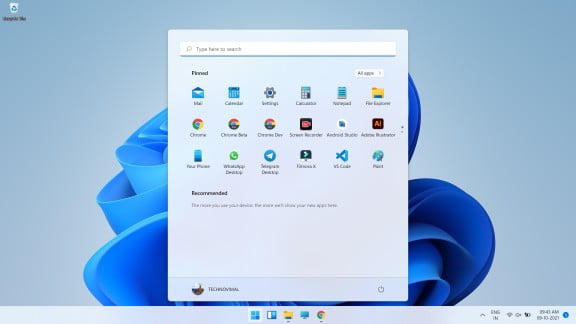
The biggest difference between Windows 11 and Windows 10 is the start menu and the taskbar. In windows 11, the start menu and taskbar have been brought to the center of the screen from the left side. If you want, you can move the start menu and taskbar back to the left. 

The start menu and taskbar make windows 11 similar to Mac OS and Chrome OS. If you click on the start menu in windows 11, then you will see a list of apps and you will get to see the option of recommended.

The tiles which used to be in windows 10 have been removed from Windows 11. Many changes have been made in the taskbar in Windows 11 as compared to windows 10. The Cortona function and timeline have been removed in Windows 11.

In Windows 11, you will get to see the option of the search bar, snap layout, Microsoft team, message box, and widgets in the taskbar. You cannot pin the taskbar to the right and left sides of the screen. In windows 11, the taskbar will always be at the bottom of the screen. . You will not be able to customize the taskbar even with the help of apps.

Snap Layouts Multi-Tasking

Windows 11 Snap Layouts Multi-Tasking

In Windows 11, new features have been given for multi-tasking as compared to windows 10. Snap layout is designed for multi-tasking. 

Windows 10 enables you to view multiple windows at once but there is a lot of possibility of things going wrong in it but this will not happen in windows 11. You can run multiple windows simultaneously using the snap layout in windows 11.

You can open windows of different sizes by using maximize button, you will not find it in windows 10.

Using Microsoft Teams 

Windows Using Microsoft Teams 

After the release of Windows 10, Microsoft launched the messaging app Teams two years later in 2017 and in Windows 10 this app became the alternative app.

In Windows 11, the Microsoft team has been given a place in the taskbar. It will play a huge role in Windows 11. You can make video and voice call with your friends, family members using Microsoft Team in Windows 11.

 If your friends or relatives do not have Microsoft Teams installed, then you can communicate or talk to them through message.

Android Apps Support  

Android Apps Support  

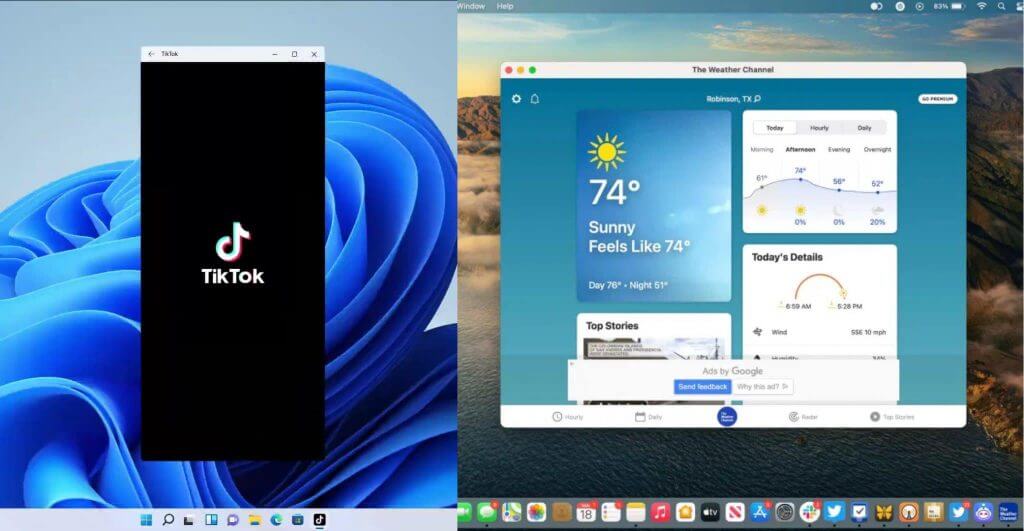
A big change has been made from Windows 10 to Windows 11, which is that of android apps, you can now run android apps in windows 11.

Now Microsoft store will let you download android apps from the Amazon AppStore. Microsoft Store for Windows 11 has been redesigned to help you find apps and movies 

You will be able to record and post Tik Tok videos in Windows 11 directly from your Windows device. For Windows 11, Microsoft has introduced native apps including Disney, Zoom, Canva, and Visual Studio in the Microsoft Store. 

 Better Gaming Features  

Windows 11 Better Gaming Features  
Xbox game

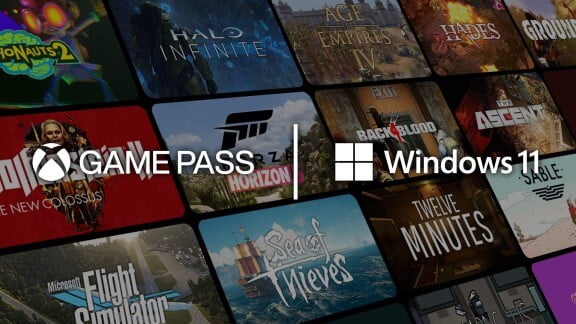
You will get to see better gaming facilities in Windows 11 than Windows 10. If you are a pc gamer then you will want to install windows 11.

You will be able to download more than 1000 games in high quality from the Xbox game pass in windows 11 and you will be given a subscription to the Xbox game pass.

 In Windows 11, you have been given the feature of Auto HDR which will update auto light in gaming. Auto HDR will help ancient games look better. Games will be uploaded to Xbox every month.

» Windows 11 Themes Download

Widgets 

 One of the main differences between Windows 10 and Windows 11 is that widgets have been launched in the taskbar of Windows 11, which you will not see in Windows 10. In widgets, you can get information about news, weather, on this day, calendar, etc. at a glance.

Xbox tech to improve gaming

Xbox tech to improve gaming

Windows 11 will get certain features found in Xbox consoles, like Auto HDR and DirectStorage, to improve gaming on your Windows PC. This marks another move toward integrating PCs and Xbox consoles for Microsoft. 

Windows 11 will be Available in Different Versions

Windows 11 is not just an operating system but it also has different types. These variants are designed keeping your needs in mind.

Windows 11 Home

Windows 10 is designed keeping in mind the general users. All its features can be used by every user. It can be used on computers, laptops, tablets. In this, the Windows Start Button has been added to the desktop like Windows 7. And safe and simple Microsoft Edge has been made to browse the Internet.

Windows 11 Pro

The advanced type of Windows 11 is Windows 11 Pro. It is designed to meet the needs of small businesses. You can use it on Laptop, PC, and Tablet. Windows Pro has some advanced features that make small businesses more secure, faster, and more efficient. Device and app management are more efficient in this edition. Apart from this, it also guarantees to keep your data safe. It also has the support of cloud technology.

Windows 11 Enterprise

Windows 11 Enterprise has been developed to meet the needs of medium and large businesses. It provides powerful and advanced capabilities to protect the confidential data of devices and apps from modern threats. In this, you get advanced features and you can access them immediately when the update comes.

Windows 11 Education

A big use of computer is also done in education and its need is different from the need of others. To meet these needs of the education sector, Microsoft has made available Windows 11 Education Version. It is mainly designed to meet the needs of school staff, administrative officers, teachers, and students.

Windows 11 Mobile

Mobile is used more than computers in the world. Windows 11 Mobile for smartphones and small  Tablets is designed to use. Windows believes that the experience of Windows 11 on both devices and mobiles should remain the same for the user. That is, the way you use it on a computer, you can use it on mobile as well.

» Top 10 Best Android Games

Windows 11 IoT Core

The concept of the Internet of Things has also become true in our world. Electronic devices are now turning into smart devices. For this Windows 11 has launched Windows 11 IoT Core Edition. It will be used in Wearable Devices, POS Machines, Robots, ATMs, etc.

Windows 11 price

The price of Windows 10 directly depends on your requirement. The kind of Windows 10 you want will be priced the same. The price of different variants of Windows 10 according to their website is as follows.

The price of Windows 11 Home is Rs 9299.

The price of Windows 11 Pro is Rs 14,799.

The price of Windows 11 Pro for Workstation is Rs 22,799.

Where to buy Windows 11?

Many people do the work of getting Windows 10 from their familiar hardware or computer repairer. But keep in mind that there is also a risk of getting Pirated Window from here. If you want to buy a genuine Windows 11, then buy it directly by going to its Website  Shop Windows. From here you can buy it online. After this, if you want, get it installed by someone you know. If you know how to install then you can do it yourself but if you don’t know then don’t risk installing it. Get it installed only by an expert.

Conclusion

Windows 11 brings many improvements, and the most notable is a complete user interface redesign, which is coming as a major upgrade from Windows 10.

The Start menu has been streamlined and feels less cluttered than before. Rounded corners look great on windows, and the same goes for other user interface elements.

Multitasking has been improved, and you can now easily switch between Snap layouts and better organize open windows.

Probably the biggest changes are native support for Android apps and an overhaul of the Microsoft Store which will become the centralized hub for all application downloads.

Finally, gaming improvements like DirectStorage, AutoHDR, and Xbox Game Pass for PC will take gaming on your PC to a whole new level.

The latest OS is a big step forward with great features and a more streamlined user interface, so there’s no reason not to enjoy it.

Are you excited about Windows 11 and are you going to switch or do you plan to stay on Windows 10? Let us know in the comments section below.

MORE INSIDE TECHNOVIMAL.IN

20 Best Windows 11 New Features: You Should Check Out

0

Windows 11 New Features: Windows 11 is the king of the personal computer world. All desktop computer users are familiar with its name. This operating system has worked to bring back the diminishing branch of Microsoft and Bill Gates.

Windows 11 has become the word of discussion after Microsoft announced the closure of Windows 7. And from enterprise users to personal computer users have also been forced to think about Windows 11.

Therefore, the first question that comes to the mind of a common user is that what is this Windows 11?

After this, what are the best features of Windows 11 OS and why is Windows 11 better than other Windows operating systems? Moving on to these questions.

Understanding your compulsion, we are giving complete information about using it while introducing Windows 11 in this guide. This Windows 11 User Guide has been divided into the following sections for the convenience of study.

20 Best Windows 11 New Features: You Should Check Out

What is Windows 11?

Windows 11 is the latest version of the Windows operating system developed by Microsoft for personal computers, which was introduced for general users on 04 Oct 2021. Win X OS is the successor of Windows 8. And there is a single platform for all Windows devices.

Microsoft’s Windows operating system is the lifeblood of personal computers. And it is used a lot in computers present all over the world. 

Since the announcement of the closure of Windows 7, the demand for Windows 11 operating system has increased. It has started replacing Windows 8.

Microsoft wanted to create an ecosystem for all its devices and software. For which it needed a single, secure and fast platform.

It has fulfilled this need by developing Windows 8. And launched Windows 11 instead of the Windows 9 version. Which does a similar job for computers to mobile phones, tablets, gaming devices (Xbox one), and Internet of Things devices.

You don’t need a separate operating system for each device. One operating system works smoothly on all devices. Windows 11 handles issues like screen size, screen type, hardware compatibility, etc.  

DeveloperMicrosoft
Written inC, C++, C#, Assembly Language
OS FamilyMicrosoft Windows
Released to
Manufacturing
October 5, 2021
General
Availability
October 5, 2021
Latest Release10.0.22000.194 (October 4, 2021)
Latest Preview10.0.22471.1000 (October 4, 2021)
Marketing TargetPersonal Computing, Tablets
Available in110 Languages
Update MethodWindows Update Microsoft Store
Platformsx86-64, ARM64
Kernel TypeHybrid (Windows NT kernel)
UserlandNative API
Windows API
.NET Framework
Universal Windows Platform
Windows Subsystem for Linux
Windows Subsystem for Android
Default
User Interface
Windows shell
Preceded byWindows 10 (2015)
Official Websitemicrosoft.com/windows/windows-11
Windows 11 FreeDownload

20 New Features Included in Windows 11

1. Start Menu

Center Taskbar and Start Menu | Windows 11 vs macOS

Correcting its mistake, this time Microsoft has added back its trademark Start button in Windows 11. The loss of removing this button in Windows 8 and Microsoft could not muster the courage to face criticism from users this time.

Therefore, in Windows 11, users have developed a more stylish and easy Start button than the Start button present in Windows 7. Now users will have the real feel of running Windows.

» Windows 10 Themes Download

2. Animations, Blurring and Rounded Corners Windows 11

Rounded Corners for Windows 11 vs macOS

Windows 11 rounded corners and design effects won’t slow down your PC

3. Widgets Section

 Widgets Section Windows 11 vs macOS
Widgets Section Windows 11 vs macOS

Microsoft is bringing widgets like Windows Vista Gadgets to the desktop. This will allow users to view Microsoft News Feed on their desktop and receive daily updates on weather and traffic.

4. Ability to Run Smartphone Apps

windows 11 android apps macOS iPhone apps
Windows 11 android apps macOS iPhone apps

Microsoft showcased Android apps, including TikTok, coming to Windows 11 via the Amazon Appstore. “Windows customers will be able to search for Android apps in the Microsoft Store and access them through the Amazon Appstore,” Microsoft said in a blog post.

5. Different Backgrounds for Different Desktops

Different Backgrounds for Different Desktops windows 11

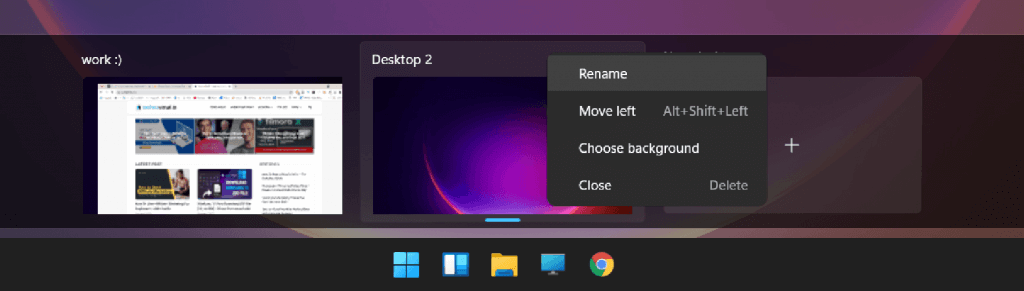
Windows 11’s virtual desktops are a less valuable power-user feature, giving you a way to group Windows into their own spaces for more powerful multitasking. Now, Microsoft is adding custom desktop backgrounds, allowing you to give each desktop a unique wallpaper.

» Windows 10 Themes Download

6. Xbox tech for better gaming. 

Windows 11 will get some features like Auto HDR and Direct Storage in the Xbox console to make gaming better on your Windows PC.

7. Microsoft Teams Integration

Teams are getting a facelift and are pinned to the Windows 11 taskbar, making it easier to access (and a bit more like Apple’s FaceTime). You’ll be able to access Teams from Windows, Mac, Android, or iOS.

8. A new, more Mac-like interface. 

Windows 11 Mac-like interface

8. New Windows Store

New Windows Store
New Windows Store

Microsoft is introducing a new App Store for Windows 11 and Windows 10. It has been redesigned to help users find and install their favorite apps, games, movies, etc.

Several desktop apps are now available in the Store, including Adobe Creative Cloud, Microsoft Teams, TikTok, Notepad, and Paint.

9. Tablet Mode

It is a dream to make Windows 11 universal. So that the same type of user experience is available on all devices. Therefore, the Windows 11 Tablet Mod feature has been made available for touch screen devices.

You can enjoy touch screen windows by activating this mode in your tablet computer or touch screen support laptop.

11. Windows 11 Continuum

To convert a mobile device into a computer, this time a new feature named Windows Continuum Application has been given in Windows.

Through this app, Windows 11 Mobiles can be connected to the computer and taken as a computer. This feature is very helpful for users doing office work on mobile.

12. Integrated Search

The search tool was also provided in previous versions of Windows. But, this time it has been introduced with the power of the web.

This means that you will be able to explore the web with Windows with the same search tool. In which you will be helped by Microsoft’s new and powerful Edge browser.

13. Microsoft Edge

Gone are the days of Internet Explorer web browsers. Microsoft has decided to give him retirement. Therefore, a brand new, faster, and more secure web browser has been provided with Windows 11.

The name of this web browser is –  Edge browser.

The Edge browser was initially made available for Windows 11 devices. However, its new avatar has been made available for free for Windows Phone and Android devices along with previous versions of Windows (Windows 7, Windows 8).

14. Cortana Voice Assistant

As soon as you say “Hello Google” a personal assistant is activated to help you on Android devices. Which you know by the name of Google Assistant.

Similarly, a voice assistant called “ Siri ” is already present in iPhones and Apple devices.

To fill this game, a voice assistant named “ Cortana ” has also been given in Windows. Who is always ready to serve you.

You can control everything from knowing the weather to the web, device, and cloud.

Along with this, the remainder of your work is also ready to remind Cortana. You will not feel alone when you talk with Cortana.

15. Universal OS

Microsoft wants to develop a single but universal platform for all its devices. Windows 11 is the first strong step towards this.

From personal computers to gaming devices (Xbox) are also being controlled from this operating system. Also, small devices like mobile phones and tablets are not untouched.

Now the devices differ but Windows 11 is one. You will get the same user experience across all devices.

16. Universal App Store

Universal App Store has been created to give power to a single platform. From where users can download the app for their Windows 11 devices.

Windows Store is provided built-in on all devices. Which also has the facility to access through the website. The apps present in this app store are compatible with all devices.

17. Live Tiles Views

Windows’ familiar Start menu has been replaced with Live Tiles. It was first given in Windows 8. And also placed in Windows 11.

The Live Tiles Start menu gives a different feel to the Windows operating system on touch-screen devices. There is no problem when switching devices.

18. Action Center

Action Center is given on the right side of the Start menu. It’s not just a notification area. If you want, you can control your computer completely.

19. Multiple Desktop

If you work with multiple programs. Then the virtual desktop features of Windows 11 can prove to be very useful for you.

You can slide programs of the same type onto different desktops by opening multiple desktops. This feature proves to be very effective when multi-screen is available.

20. Windows Hello

The way to password protect a Windows user account is complete. That’s why Windows Hello has been introduced for users to log user accounts more securely and smartly.

Windows Hello is a biometric lock. Which uses the biometric information of the users i.e. fingerprints, iris, face, etc.

» Top 10 Best Android Games

Windows 11 Free Download ISO file

Download Link

Windows 11 All Editions Info

Like previous versions of the Windows operating system, many different variants of Windows 11 have also been developed. Which is sufficient to meet the specific needs of the users.

If, you have any version of Windows 7, Windows 8, Windows 8 for Mobile, Windows 8.1, Windows 10. So you will get the Windows 11 version of these versions at a lower cost.

Do you know?

In the launching year of Windows 11, users are being offered to upgrade it free of cost. Which was valid for a whole year.

There are currently 7 versions of Windows 11. Which are being told below.

#1 Windows 11 Home

Windows 11 Home has been developed keeping in mind the desktop users. Hence, all its features are consumer-centric. Which, can be used on personal computers, laptops, tablets, and 2-in-1s devices.

The Windows Start Button has been added to the desktop as in Windows 7 (Windows 8 does not have a Start button). In addition, the Microsoft Edge browser is designed to be a very fast, secure, and simple to use web browser.

Whose powerful features are providing users with a better internet experience than Internet Explorer?

#2 Windows 11 Pro

This version built on top of Windows 11 has been introduced to meet the needs of small businesses. Which is available for Desktops, Tablets PCs, and 2-in-1s.

Some additional features have been added to Windows 11 Pro. So that small businesses can run their business more securely, faster, and more efficiently.

Device and apps management is more efficient in this edition. And gives the ability to handle them remotely. In addition, the security of additional security-sensitive business data is guaranteed.

Windows Update for the Business facility has also been introduced with the support of cloud technology. Which allows them to reduce costs, control updates, and have quick access to new updates for security.

#3 Windows 11 Enterprise

Windows 11 Enterprise Edition has been developed to meet the needs of medium and large businesses. Which provides more powerful and advanced capabilities to protect against modern threats on devices, apps, and company confidential data.

Windows 11 Enterprise Edition is made available as a Volume License. So that they can get instant access to new and advanced features. Along with this, access to Windows Update for Business and Long Term Servicing Branch is also given.

#4 Windows 11 Education

The field of education has also not been left unfinished. Therefore, Windows 11 Education Edition has also been made available to meet its different and specific needs.

Windows 11 Education is developed for Schools, Colleges, Universities. So that the needs of the school staff, administrative officers, teachers, and students can be met.

The special feature of this edition is that school and student users of Windows 11 Home and Windows 11 Pro have also been given the facility to upgrade to Windows 11 Education Edition. Which they can upgrade to Academic Volume License.

#5 Windows 11 Mobile

Windows 11 Mobile is developed for small, mobile, and touch screen devices. That is, it can be accessed on smartphones and small tablet devices.

Microsoft’s idea behind launching this edition is to provide the computer experience on smaller devices.

Therefore, powerful and new features like Continuum for Phone along with Universal App Store are available in Windows 11 Mobile. With the help of which you can use a Windows 11 Mobile as a computer with a big screen.

People who use their Windows Mobile for office work. A touch version of Microsoft Office has also been given for those users.

#6 Windows 11 Mobile Enterprise

People who use mobile phones and small devices like tablets for office work. Windows 11 Mobile Enterprise Edition is a great mobile operating system for them.

The ability to adapt to business needs with strong security is a key feature of Windows 11 Mobile Enterprise Edition. Which comes with Volume Licenses.

#7 Windows 11 IoT Core

The Internet of Things is now becoming a reality. Electronic devices are now turning into smart devices. Therefore, Windows 11 Internet of Things Edition has been launched to establish its foothold in this brand new market.

This version can be used for wearables devices, posh machines, robots, bunking products like ATMs, etc.

Note:- The only license that can be purchased is Windows 11 Baseline Editions. All other editions are made available under the Volume License.

Common FAQs About Windows 11

Question #1 – Tell us About the Technical Features of Windows 11?

Answer:– Windows 11 Technical Info.

Developer:- Microsoft Inc.,
Programming Languages:– C, C++, C#
Launch:– 04 Oct 2021
Available Languages:– Above 110
Platform:– 32-bit, 64-bit
License:– Proprietary Type
Devices:– PC, Mobile, Tablets, IoTs

Question #2 – What are the minimum requirements for Windows 11?

Answer:– Windows 11 Minimum Hardware Requirements PC

Processor – 1 GHz (Gigahertz) or Faster CPU
RAM – 1 GB (Gigabyte) for 32-bit or 2 GB for 64-bit
Hard Disk Space – 16 GB for 32 bit or 20 GB for 64-bit
Graphics Card – DirectX 9 or Later with Windows Display Driver Model 1.0
Display – 800×600

All of the above is a basic requirement of Windows 11. Windows 11 OS will not run perfectly on computers with features less than this specification. And you have to buy a new computer.
Therefore, before buying Windows 11, definitely keep in mind the Minimum Requirements.

Question #3 – What are the minimum requirements for Windows 11 Moblie Devices?

Answer:– Windows 11 Minimum Hardware Requirements for Mobile Devices

Processor – 1 GHz (Gigahertz) or Faster CPU
RAM – 1 GB (Gigabyte) 
Hard Disk Space – 8 GB
Graphics Card – DirectX 9 or Later with Windows Display Driver Model 1.0
Display – 720p Screen Resolution with 32 bits color pixels

Question # 4 – Is Windows 11 a Free or Paid Operating System?

Answer:– Windows 11 is a pad operating system. To use which you will need to purchase the appropriate Windows license.

Question #5 – What is the cost of Windows 11 in India?

Answer:– The price of Windows 11 depends on your need. That is, which edition of Windows do you want to buy.
I am assuming that you are a simple computer user who needs Windows for your personal use. That’s why I am telling you the price of Windows 11 below for its basic edition. The price of the volume license is not being given.

Windows Home Approx. ₹ 10,000/-
Windows Pro Approx. ₹ 15,000/-
Windows Pro for Workstations Approx. ₹ 22,000/-

Pay Attention
This price list has been taken from Microsoft’s website. and the cost of 1 computer license. Before buying Windows 11, you must check its latest price.

Question #6 – How much does Windows 11 Mobile cost?

Answer:– Windows 11 Mobile is not sold separately. It comes pre-installed on Windows Mobile phones. For this, you have to buy Windows Phone only.

Question #7 – Where can I buy Windows 11?

Answer– You have many options to buy Windows 11.

Microsoft Store:- The first and most trusted place is the Microsoft Store. From there you can buy a license for Windows 11 Home or Windows 11 Pro by creating a Microsoft account.

Online Store:– If you do not want to buy Windows 11 from Microsoft Store. So you can buy from other online shopping portals. In which the first name comes from Amazon Store. After this Flipkart is also present.

Question #8 – How to do Windows 11 Free Upgrade?

Answer– Windows 11 Free Upgrade has expired. This offer was given only in the launch year. After this, you will have to pay for Windows 11.

Question #9 – What is the difference between Windows 11 and Windows 10?

Answer:– Windows 11 is the latest version of Microsoft Windows. Which is available from personal computers to mobile phones. And Windows 10 is an older Windows version. Which Microsoft has decided to close. And in turn, Windows 11 is developed.

Question #10 – Why is Windows 11 operating system better than Windows 10?

Answer:– Improved Solution: Windows 11 New, Best Quality, Strong Defense, A Modern Technology with Dum Support. The potential to transform and digitize the environment has been fulfilled.
The system is placed in the system according to the Windows 10 systems. Its features are not enough to meet the needs of users and new devices. Therefore, windows 11 is better.
We should upgrade ourselves with time. Otherwise, time leaves us behind.

Question #11 – Can I install Windows 11 on my Old Computer?

Answer – If your old computer meets the minimum hardware requirements of Windows 11. Then you can easily install Windows 11. not otherwise.
I have mentioned above the hardware requirements of Windows 11. Match it with your computer specifications.

» How to Enable Dark Mode in Windows 11

Conclusion

In this article, I have given you complete information about Windows 11 operating system. You have to know the answers to questions like what is Windows 11, features of Windows 11 and why is Windows 11 better.

Also, how to install Windows 11, Windows 11 Price, How to Upgrade Windows 11 and Windows 11 Hardware Requirements.

I hope you like Introduction to Windows 11 and find it useful for you. Do share this information with your friends.

MORE INSIDE TECHNOVIMAL.IN

How to Start Affiliate Marketing for Beginners: Complete Guide

0

Not able to earn enough money through your website that you made with so many expectations? Probably, you have not heard about Affiliate Marketing. Do you know that you get paid just by promoting a product? Yes, it’s true.

Although, there are hundreds of ways for earning money online like make money through Referrals, Google AdSense, AdMob, GPT sites, PTC sites, Captcha solver, Writing jobs, Affiliate Marketing, Website flipping, Domain trading, etc. Affiliate marketing is considered one of the best ways to earn money online, without too much hard work.

Every website has its own definition of Affiliate Marketing. It is an online performance-based marketing technique in which the person is rewarded if someone purchases something through the affiliate link present on his/her website or blog. Product owners increase the sale of their product by permitting others to place a link on their website or blog is called affiliate links for promotion. Affiliate marketers are those people who promote specific products or websites, for which they are paid.

How to Start Affiliate Marketing for Beginners: Complete Guide

What is Affiliate Marketing?

If you have a website or a blog of your own then this is the best opportunity for you to earn money. Basically, Affiliate Marketing means bringing traffic from other websites.  Consider the example of Amazon for a better understanding. If you have a website or a blog of your own, you can earn money by placing affiliate links in it. If your blog or website is popular and has enough traffic, Signup with an Amazon associate or Flipkart. After you log in to your associate account you will get a link for promoting the products on your blog and if any visitor visits that affiliate link and goes to the site like Amazon from that link and buys something, you will be paid approximately 4% to 12% of the product amount. This is called affiliate marketing.

The cost of purchasing a product from the affiliate links remains the same, it doesn’t vary. Though the sale of product owners increases but they are not able to make much money, the reason is behind that they have to pay a percentage of the profit to the Affiliate marketers.

» Choose Best Affiliate Products

How does Affiliate Marketing Work?

1. How to Create an Affiliate Marketing Website for Beginners

The best way to earn money through affiliate marketing is by placing links on your website. The advantage of a website is that it’s free to operate. You can place the affiliate links on your website after it manages to gains traffic. Follow the steps given below to create a website:

» How To Start A Blog

  • Choose a Niche:– Niche is a kind of field, industry, or plot of the website. For example, if your website name is TechnoVimal then anyone can easily understand that this is related to vacation, tour, and travels. So its niche will be travel, adventure, tour, etc. You can choose a niche of your website or blog on the basis of your interest, passion, and complete information about the topic whose niche you are deciding.
  • Consider a Domain Name:– Think of a domain name that is related to your niche. It should be easy to remember and eye-catchy for the reader like EasyJunky that belongs to food-related posts. Don’t select a complex name that becomes difficult for the reader to remember. Follow the rule ‘KISS’, ‘Keep it Short and Simple.’
  • Purchase a domain name– Make a list of at least 10 domain names related to the considered domain name, because it is difficult to get a domain according to your wish in the first attempt. Search for domain names in various domains selling websites like GoDaddy, Bluehost, Namecheap, and check whether the name that you have requested is available or not. If you get a domain name available of your choice, purchase it.
  • Purchase a Web Hosting for Your Website:– You need a web hosting plan for storing the contents or pages of your website. You can purchase a web hosting plan from top reputed and reliable web hosting companies such as Bluehost.com, GoDaddy.com, Namecheap.com, and iPage.com.

» How to Buy Best Hosting Plan

  • Update Daily:– Don’t forget that you have created a website, else it will lose its traffic and losing traffic means losing the medium of earning. Keep uploading content daily. Content should be unique and rich in information. Without daily content, no one will come to know about your website nor it will gain a good rank.
  • Gather Traffic:– Without traffic there is no use of placing affiliate links on your website. If no traffic will be there then who will click on the links? Advertise your website, share links of your website on various social networking sites, emails, and text messages. Gather as much traffic as you can.
  • Do SEO of Your Website:– Either appoint someone for SEO of your website or learn Search Engine Optimization. SEO increases the Domain Authority (DA), Page Authority (PA), Page Ranking (PR), and of course, it increases traffic on the website.

2. Promotion of Products if you Don’t Have a Website of Your own:

What will you do if you don’t have a website? It’s not compulsory that you need to have a website to start Affiliate Marketing. You can promote the product on social media.

  • Create an attractive advertisement if you don’t have a website of your own:– You can create an attractive advertisement of any product and place it on a social networking site like Facebook, with the affiliate link. You can also place the link on other’s websites if they allow you to do so. If any person clicks on this ad and purchases the product, you get paid.
  • Write Quality Content:– Though you have gathered traffic on your website. But the need is to gather traffic for this affiliate program. To do so, you can write beautiful and eye-catchy content or description for that product. Tell the people about its uses, it will attract them and their attraction will fetch you money.
  • Create a Group:– You can create a WhatsApp group, Facebook group, an email group, or a group on any social networking site. Keep posting about various products, their benefits, and important information. Display it in such a way that they don’t consider it as spam and will approach it.

3. Promoting on Other Website

You can also request the owner of some other website to place your affiliate link on their website. You have to convince them by promising to give them a share of what you will get. Otherwise, no one would want to place your affiliate link when they are already earning from theirs.

Add a payment method

You will have to set up a payment system for sending and receiving money from these sites when someone purchases from your affiliate link. Most of the sites pay through PayPal. PayPal is the most famous and reputed international payment site and app that offers to send and receiving money safely. Also, your old transactions can help you keep track of your profits and losses.

How to be an Affiliate Marketer?

  • Firstly, register into a site that offers affiliate marketing. For example, Amazon, Flipkart, eBay, Bluehost, etc. has an affiliate program that allows affiliate marketers to earn money every time a customer shop.
  • Read the comments of the visitors, take a survey of your visitors and existing customers. This will help you in knowing their choice of product.
  • Select a niche in which you are specialized or with which you can work comfortably.
  • Search for those products that are somehow related to your website and to your niche can attract the visitors of your site.
  • Once your request to be an affiliate associate is accepted by the site on which you registered, log in to your account.
  • Now, look for affiliate links at the bottom of the homepage.
  • Share this link.

How does this Affiliate Program Work?

When your request to be an affiliate marketer is accepted, you receive a unique URL for the product that you have to promote. A part of this URL includes your affiliate ID. Share this link on social networking sites, emails, text messages and the best method is to place this affiliate link on your website or blog. When any visitor or anyone clicks on this link and purchases something, this link is recorded by an affiliate software, and it automatically informs the site that the product is purchased via your affiliate link, as it contains your unique affiliate ID also. You are paid for every click at the end of the month or after every sale the affiliate is paid, it depends on the company and its terms and condition.

affiliate marketing earnings

Why should I be an Affiliate Marketer?

Here the question that might be coming to your mind is why to enter this business of Affiliate Marketing. I ask why you should not? You should indulge in this business because it’s a headache-free job. Affiliate Marketers don’t need to worry about the product and its shipping, you just have to place a link. You neither have to make any investment, nor you have to work under someone. You just have to sit at home and work from there. Affiliate Marketers can even take it as a part-time job and earn a few more bucks. The only job that you are required to do is giving your time to increase traffic on your website.

» 5+ Best Programming Languages to Learn

Which company is best for Affiliate marketing?

There are a number of websites that offer Affiliate Marketing for increasing the sales of their product. Some of them are:-

  • Amazon associates
  • eBay Affiliate Program
  • Shopify Affiliate Program
  • Flipkart Affiliate Program
  • Bluehost Affiliate Program
  • Clickbank Affiliate Program
  • Rakuten Marketing Affiliate
  • ConvertKit Affiliate Program
  • Shareasale Affiliate Program
  • MaxBountry Affiliate Program

It’s never too late to start. Build a website, socialize yourself and earn money through Affiliate Marketing.

Dear readers, I hope that I was able to answer all your questions. Still, if you have any doubts you can ask in the comments. I will be glad to help you.

Read also:

Windows 11 ISO Download: Official 64-Bit Direct Link

0

Want to download the Windows 11 ISO file? You can get it for free, straight from Microsoft, in a few minutes. In this guide, you will learn the official ways to download Windows 11, how to make a bootable USB drive, and how to install Windows 11 from the ISO file.

Quick answer: open Microsoft’s official Windows 11 download page, scroll to Download Windows 11 Disk Image (ISO), choose your edition and language, and click 64-bit Download.

Is There a 32-Bit Version of Windows 11?

No. Windows 11 is only available as a 64-bit operating system. Microsoft does not make a 32-bit version, so any website offering a “Windows 11 32-bit ISO” is sharing an unofficial and possibly unsafe file. If your PC has a 32-bit processor, it cannot run Windows 11.

Microsoft offers two ISO files: one for normal x64 PCs (Intel and AMD processors) and a separate one for Arm-based PCs. Most people need the x64 version.

Check Your PC Before You Download

Your PC needs to meet the minimum system requirements to install Windows 11:

  • Processor: 1 GHz or faster, 64-bit, with 2 or more cores, on the list of supported CPUs
  • RAM: 4 GB or more
  • Storage: 64 GB or more
  • Firmware: UEFI with Secure Boot
  • Security chip: TPM version 2.0
  • Graphics: DirectX 12 compatible with a WDDM 2.0 driver
  • Display: 720p, larger than 9 inches

You can check your PC with Microsoft’s free PC Health Check app. Read the full details in Windows 11 Minimum System Requirements.

3 Official Ways to Download Windows 11

All three options are on Microsoft’s official Windows 11 download page. Pick the one that fits what you want to do:

1. Windows 11 Installation Assistant (upgrade this PC)

This is the easiest way to upgrade a Windows 10 PC to Windows 11. Download the assistant, run it, and it downloads and installs Windows 11 for you. Your files and apps stay in place.

2. Create Windows 11 Installation Media (bootable USB)

Use the Media Creation Tool to make a bootable USB drive. This is the best option for a clean install or for installing Windows 11 on another PC. You need a blank USB drive of at least 8 GB.

3. Download Windows 11 Disk Image (ISO)

Download the ISO file if you want to install Windows 11 in a virtual machine, make a bootable USB with another tool, or keep a copy for later.

How to Download the Windows 11 ISO File

  1. Open Microsoft’s official Windows 11 download page.
  2. Scroll down to Download Windows 11 Disk Image (ISO) for x64 devices.
  3. Select Windows 11 (multi-edition ISO for x64 devices) and click Download Now.
  4. Choose your product language and click Confirm. Use the same language as your current Windows if you are upgrading.
  5. Click 64-bit Download. The file is about 5 to 7 GB, so use a fast and stable internet connection.

The download link is valid for 24 hours. If it expires, simply go back to the page and create a new link.

How to Make a Bootable USB From the ISO

The simplest way is the Media Creation Tool from option 2 above. If you already downloaded the ISO, you can also use the free tool Rufus:

  1. Plug in a USB drive of 8 GB or more. Everything on it will be erased.
  2. Open Rufus and select your USB drive under Device.
  3. Click Select and choose the Windows 11 ISO file.
  4. Keep the partition scheme as GPT and click Start.

How to Install Windows 11 From the ISO File

Upgrade from inside Windows 10

  1. Right-click the ISO file and choose Mount. It opens like a DVD drive.
  2. Double-click setup.exe.
  3. Choose whether to keep your files and apps, then follow the steps on the screen.

Clean install from a USB drive

  1. Back up your important files first. A clean install erases the drive you install to.
  2. Plug in the bootable USB and restart your PC.
  3. Open the boot menu (usually F12, F11, F9 or Esc, depending on the brand) and choose the USB drive.
  4. Follow the setup steps, choose the drive to install to, and complete the setup.

After installing, keep Windows 11 up to date. See How to Update Windows 11 Step by Step.

Frequently Asked Questions

Is Windows 11 free?

Upgrading is free for PCs that run a genuine, activated copy of Windows 10 and meet the system requirements. For a brand-new PC without Windows, you need a Windows 11 license key.

Is it safe to download the Windows 11 ISO from other websites?

No. Always download it from Microsoft’s official page. ISO files from other sites can be modified and may contain malware.

Can I install Windows 11 without TPM 2.0?

Microsoft does not support it. Workarounds exist, but your PC may stop getting updates and may not be stable. It is better to check whether TPM is simply turned off in your BIOS settings, as many PCs have it but keep it disabled.

How do I upgrade from Windows 10 to Windows 11?

The easiest way is the Installation Assistant or Windows Update. Read How to Upgrade Windows 10, 8, 7 to Windows 11 for Free for all the steps.

Conclusion

Downloading Windows 11 is free and simple when you use Microsoft’s official page. Use the Installation Assistant to upgrade, the Media Creation Tool to make a bootable USB, or the ISO file for a virtual machine or a manual install. If you have any questions, ask in the comments below.