Home Blog Page 4

Amazon Affiliate Program: How to Get Started and Make Money

0

Friends in this Blog article, will tell you the Amazon Affiliate Marketing from Paise earned How? (How to Make Money From Amazon Affiliate?) If you are searching in Google how to earn money online sitting at home. So through this blog post, we are going to give you complete information in simple language. After reading this post you will be able to learn how to earn money on Amazon?

Amazon is the most popular e-commerce website in the world. Where all such Items Sell is done. Like- Mobile, TV, Washing Machine, etc. And apart from this, all types of household items are sold online.

If you do not have any job or are thinking of doing any online business then you are not thinking wrong. Because of the way we are seeing it, the craze of online shopping has increased a lot in the last few years. And it will increase even more in the coming years. Looking at the time, you have to start an online business. Otherwise, we will be left behind in the race of the world. Amazon can be the best option to start an online business.

In today’s time, we have seen that many small traders are doing online business by becoming Amazon Seller. And earning millions of rupees from Amazon. So looking at the time, you should also not delay. And grow your small business with Amazon. Or you want to earn money by joining Amazon Affiliate Marketing. So let’s know.

» How to Start Affiliate Marketing

How to Earn Money from Amazon

Millions of people are joining Amazon and earning money online sitting at home. You can also start online with Amazon sitting at home and earn money. This website allows us to earn money in two ways. The first way is that you can earn money by becoming a seller. And another way you can earn money is by joining Amazon Affiliate Marketing Program.

If you have some money then you can start an online business by becoming an Amazon Seller. For which you have to register on Amazon Seller Account. And if you do not have any money at all, then you can do Amazon Affiliate Marketing. For which you have to join the Amazon Affiliate Program.

How to Become an Amazon Affiliate

To earn money from Amazon, you have to create an account on Amazon Affiliate. For which you do not need to pay any money. Nor do you need any kind of documents. You just have to give some important information.

» How to Earn Money on YouTube

What are the requirements for Amazon affiliate?

  1. Computer/ Laptop/ Mobile
  2. Internet Connection
  3. Email ID
  4. Mobile Number
  5. Bank Account Details
  6. Blog Website

How to Create Amazon Affiliate Account?

As I told you earlier that to earn money from Amazon Affiliate, you have to create an account. To create an account, you click on the Amazon Affiliate Program link. And follow the steps given below.

Step 1- Open Amazon Affiliate Page

Open https://affiliate-program.amazon.in on mobile or computer. Or open it by clicking on the direct given link.

Step 2- Join Now For Free

After opening the above link, you will get the option of Join Now For Free on the upper right side. Click on it. If you are not from India, then select your country by clicking on the location icon given above.
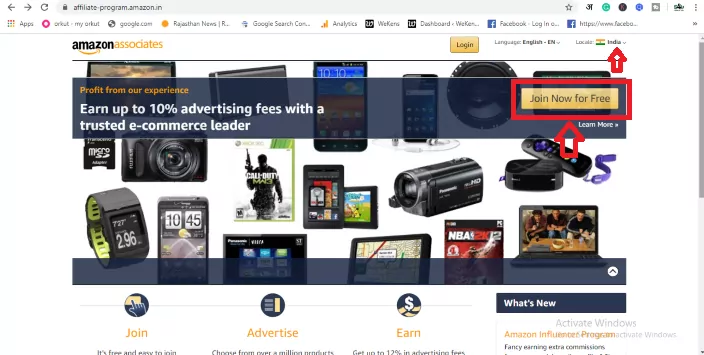
Amazon Affiliate Account - join now free
how to make money from amazon affiliate – join now for free

Step 3- Create Your Amazon Account

The login page will open in front of you. If you already have an account then you can log in with your Email ID and Password. And to create a new account, click on the option Create Your Amazon Account given on the right side below it.
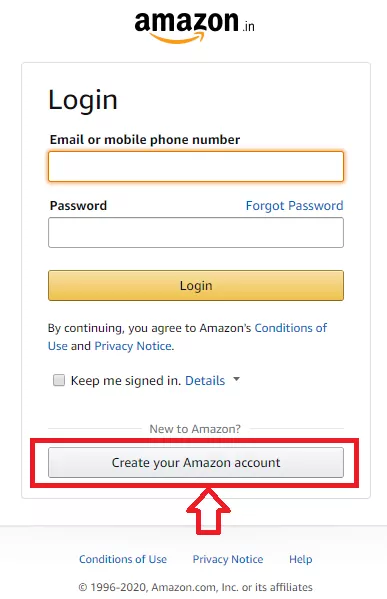
Create Your Amazon Affiliate Account

Step 4- Fill Your Account Details

After this, you have to fill in personal information in front of you. like-

  1. Your Name – Enter your full name here.
  2. Email – Enter your Email ID.
  3. Password – Enter your password here. Keeping the security in mind, enter Password Strong.
  4. Password Again – Confirm by re-entering your entered password.
  5. Create Your Amazon Account – Make sure that the information you have given is correct. After that tap on Create Your Amazon Account .
Amazon Affiliate Account Create

Step 5- Basic Details

A new page will open in front of you in which you have to fill in your basic details. like-

Amazon Affiliate Basic Information
  1. Payee Name – Enter the same name as you have in your bank account.
  2. Address Lines -1,2,3 – Fill your address here.
  3. City – Enter the name of your city.
  4. State – Enter the name of your state.
  5. Postal Code – Enter your Area Pin code.
  6. Country – Enter the name of your country.
  7. Phone Number – Enter your mobile number.
  8. Who is the main Contact for this Account? Here you are getting to see two options.
    1. The payee listed above – Select this option if you are creating an account for yourself.
    2. Someone else. I need to enter their information – If you are creating Amazon Affiliate Account for any other person then select this option. And fill all the details of that person.
  9. For US tax purpose, are you a US person? Here you are giving two options ‘NO’ or ‘YES’. If you live in the US then select the option of Yes. If you are from any other country then you select the option of NO.

After filling in all the information on this page, you have to click on the option of Next.

Step 6 – Fill Your Website / Mobile App link

A new page has been opened in front of you in which we have to enter the link of that website or mobile app. On which we will sell Amazon’s product. If you have a website then enter its link and if it is mobile then enter its link.

How to make money with Amazon affiliate
how to make money from an amazon affiliate
  1. Enter Your Website – In this box you have to enter the link of your website. If you have more than one website then you can also add them here.
  2. Enter Your Mobile App URL – If you have any mobile app then add its link here. More than one mobile app link can be added.

Step 7- Profile Information for Amazon Affiliate

A profile page will open in front of you in which you have to fill in information for Amazon Affiliate.

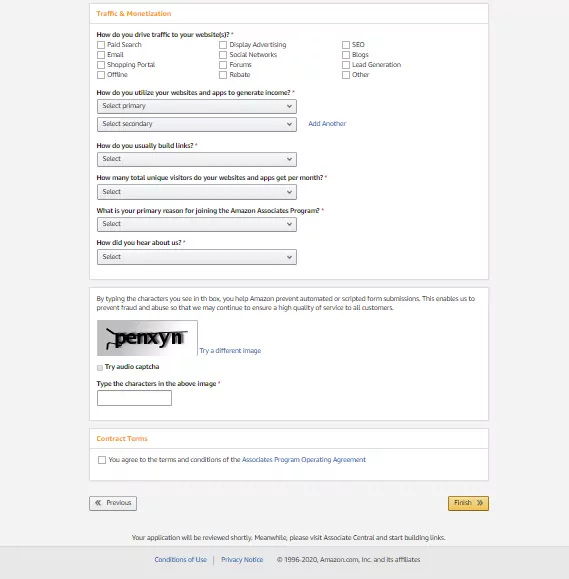
amazon affiliate marketing account kaise banaye
amazon affiliate marketing account
Amazon Affiliate Marketing Se Paise Kaise Kamaye
  1. What is your preferred Associate Store ID – Enter your preferred User name here. User name will be your Store ID.
  2. Your Website and Mobile App list – Here you will see your website and mobile app. Let it be like that.
  3. What are your websites or mobiles apps About? Here you have to write a short description about your website and mobile app. Like what is your website about. And what do you see on your website?
  4. Which of the following Topics Best Describe your Website or Android App? Here you have to select your website topic. And also the secondary topic can also be selected.
  5. What Types of Amazon Items do you intend to list on your websites or mobile apps? – Select all those items here. Which is to be sold through Amazon Affiliate Marketing. Have to do
  6. What type are your websites or mobile apps? Here the type of your website has been asked. Like you are a blogger, select Blog. By which Amazon can give you the advertisement in HTML code to add to the blog.
  7. How do you drive traffic to your website? Here you have to tell what is the main traffic source of your website. Accordingly, you have to select any one option given below.
  8. How do you utilize your website and apps to generate income? – In this it is to be told how you make income from blog . You can choose Display in the first option and Widgets in the second option.
  9. How do you usually build links? How do you create a link, for which you choose the HTML editor.
  10. How many total unique visitors do your websites and apps get per month? You have to tell Monthly Traffic of your website and mobile apps. Like if they come from 501 to 5001, then they can choose like this or if they come more than that then they can also choose.
  11. What is your primary reason for joining the Amazon Associates Program? In this , the reason for joining Amazon Affiliate is to be given. In this you choose Monetize my site.
  12. How do you hear about us? – Here you select the Online Search option.
  13. Captcha Type – Type the words visible in the image in the box below. After that click on Contact Terms and click on Finish .
  14. Congrats…… Your Amazon Affiliate Joining process has been completed. You will get your Unique Associates ID here.
  15. In the lower side, you will be asked for Payment Information and Tax Information, which you fill. If you do not want to fill now, then you can go with the Later option.

Have applied for your Amazon Affiliate Account. A mail will come from Amazon on your email ID 24 in which it will be told whether your account has been approved or not.

Once your account is approved, you can how to make money from amazon affiliates? For which see below.

How to Make Money With the Amazon Affiliate Program

After your Amazon Affiliate Account is approved. When it comes to how to make money from amazon affiliates? For this, you have to follow some easy steps. You have to select that item. The item you want to sell on Website and Mobile Apps. After selecting the item, you have to create an Amazon Affiliate link. And to put an Affiliate link on your website. So that any user will buy the product by clicking on that link. So Amazon will give you commission instead. The commission of every product is different. Some more, some less. Try to affiliate the same product whose commission is very good. Follow the steps given below.

  1. To create Amazon Affiliate Product Link, first login to Amazon Affiliate account.
  2. Search the item in the search bar for the product you want to sell. Select that product.
  3. After the product page is opened, you will see the option of Site Strip at the top. Here the option of Text, Image and Text + Banner will appear next to Get Link.
  4. Decide how you want to display ads on the website. Like if you want to put a text link, then click on the text. After clicking, you will see a link below. which you copy. And share your website or mobile apps. In this way you can create the code of Banner, Text + Banner. This is your choice. If you buy any goods by clicking on the link you are sharing, then you will earn. You can also share this link on your social media account.

Hope you how to create Amazon Affiliate Account? Must have been learned and must have learned to make Affiliate Link of any product as well. Now you can easily earn money from Amazon Affiliate Marketing.

Conclusion

I hope I have given you how to make money from amazon affiliates? Full information is given about. And I hope Amazon Affiliate Se Paise Kaise Kamaye? You must have understood well.

Friends, how was our post on how to make money from amazon affiliate – Online Affiliate Marketing. Do tell us by commenting in the comment box. Apart from this, if you have any questions in your mind then you can ask in the comment box. I will try my best to answer your questions.

Read also:

» How to Make Money from Blogging or Blog?

» How To Start A Blog

How to Buy a Bluehost Hosting Plan (Step by Step)

0

Do you want to buy hosting from Bluehost? Bluehost provides many types of hosting services for its user like Linux hosting, windows hosting, WordPress hosting but most of the users in India use Linux hosting to create a blog or website.

This is a very popular company. Which provides many types of good hosting for your blog. But if you are making a new blog then you should first take the Basic hosting plan. When you buy any hosting plan from Bluehost, you are given a free domain along with it. 

Today in this article I will tell you how to buy hosting from Bluehost.

Things to Consider Before Buying Bluehost Hosting

Whenever you go to its website to buy hosting from Bluehost, then you see 4 hosting plans like a Basic plan, Plus plan, Choice Plus, and Pro plan.

If you are creating a new blog then the Plus plan will be the best for you. Because in this plan you get unlimited disk space, free SSL, free domain, and unlimited bandwidth. And the best part is that the cost of this plan is also very less.

» How To Start A Blog

Here below is the step on how to buy hosting from Bluehost.

How to Buy Hosting from Bluehost

1. First of all you have to go to the Bluehost website and click on Get Started.

Bluehost hosting India Home page

2. Now you will be shown three hosting plans:

Bluehost hosting India best plan
  • Basic plan: After taking this hosting plan, you can host only one website. And in this you are provided with 50 GB storage, free ssl, unlimited bandwidth.
  • Plus plan: In this hosting plan you can host more than one website. And in this plan you get unlimited disk space, free ssl, free domain and unlimited bandwidth.
  • Choice Plus: Apart from the plus plan, you also get the facility of domain privacy and side backup.

3. As soon as you select a plan a popup window will open. Where you can register a new domain for free. If you already have a domain, then you write the domain name and click on the Next button.

Bluehost hosting India best plan

4. Now a new page will open where you have to fill in your name, address, country, pin code, mobile number, email correctly. Then select your hosting time like 1, 2, 6 months, or 1 year, after that you can uncheck the option “Site Backup Pro” and “Sitelock Security” below, so that you can save money while buying hosting.

Bluehost hosting create account
Bluehost hosting upi

6. Add payment information on the next page.

Bluehost hosting payment option

9. After that a Confirm link will come to your email. You log in to the account by clicking on the confirm link, after that you will go to the hosting cPanel.

Congratulations…! You have purchased hosting from Bluehost.

Bluehost Benefits

Whenever you buy hosting from Bluehost, you are given a free domain Bluehost. Apart from this, many other free services are provided such as:

Unlimited Disk Space – Unlimited Disk Space is given in all plans except the basic plan in Bluehost.

SSL Certificate – If you buy any hosting plan from Bluehost, then you are given an SSL certificate for free.

Free Domain – By purchasing any plan from Bluehost, a free domain name is given along with it. Due to which the money of the domain is saved while creating a blog.

24*7 Support – Bluehost gives 24*7 support to its users. Meaning if any kind of problem comes in your site then the Bluehost agent stays online for 24 hours to fix it.

Unlimited Bandwidth – If you buy any plan from Bluehost, then you are given Unlimited Bandwidth. It is a type of hosting memory.

Backup – When you buy hosting from Bluehost, you are given the option of backup. This means that in the future, if your site crashes or gets hacked, then you can restore your website using the backup option.

Conclusion:

If you want to buy good hosting for your blog at a low price, then Bluehost will be the best option for you. We hope that today’s article helped us in buying hosting from Bluehost. If you liked our article, then definitely share it with your friends on Facebook, Whatsapp. Thank you

Read also:

» How to Make Money from Blogging or Blog?

»  How to Start Affiliate Marketing?

660+ List of High DA Sites To Get DoFollow Backlinks!

0
660+ List of High DA Sites To Get DoFollow Backlinks!

Are you looking for high-domain authority sites to get Dofollow backlinks? Backlinks are one of Google’s oldest ranking factors, but they must be from quality sites.

Gone are the days when a large number of backlinks are used to rank top on the search engine result page. This strategy no longer works and search engines prefer quality backlinks rather than quantity.

So, whenever you are trying to get backlinks, make sure that they are from high-domain authority sites and websites related to your niche.

What is a Backlinks?

Backlinks are incoming links to a webpage. Suppose a link of your site is on my site when visitors click on that link, then you will get a backlink from my site. Backlinks can make a big difference in your website traffic and ranking.

Benefits of High Domain Authority Sites for Backlinks

  • Domain authority is increased.
  • Boosts quality traffic and referral traffic.
  • The website has a fast index in the search engine.
  • Increases your website SEO and search ranking.
  • Helps to build relationships with other bloggers.
  • Alexa Rank improves Traffic Statistics.

How to Submit Website on High DA Backlinks Sites

  • First, go to the website where you want to create backlinks.
  • Next, fill in your username, e-mail id, name, DOB, social media details, and a website link.
  • In some website, you may not find any section to add website URL, in which case you can provide your website link in your bio section.
  • After filling your details click on submit button.
  • And all…

» What Are Backlinks and How to Get More Backlinks?

High Quality Backlinks Free List

Before submitting your site, it is important to check the DA, PA, and Alexa of the websites where you want to build backlinks.

Below I have prepared a list of 650+ best free high DA, PA, PR profile creation websites:

  1. https://forums.adobe.com
  2. https://www.linkedin.com
  3. https://www.mediafire.com
  4. https://vimeo.com
  5. https://addons.mozilla.org/en-US/firefox
  6. http://profile.hatena.ne.jp
  7. https://github.com
  8. https://account.box.com/login
  9. https://forum.parallels.com
  10. https://sedo.com
  11. https://themeforest.net
  12. https://www.addthis.com
  13. https://www.box.com
  14. https://archive.org
  15. https://www.aol.com
  16. https://www.ibm.com
  17. https://www.instructables.com
  18. https://www.dailymotion.com
  19. https://www.pinterest.com
  20. https://www.scribd.com
  21. https://medium.com
  22. https://myspace.com
  23. https://www.ted.com
  24. https://www.slideshare.net
  25. https://www.wix.com
  26. https://soundcloud.com
  27. https://www.trustpilot.com
  28. https://www.bloglovin.com
  29. https://disqus.com
  30. https://www.goodreads.com
  31. https://www.4shared.com
  32. https://twitter.com
  33. https://issuu.com
  34. https://en.gravatar.com
  35. https://sourceforge.net
  36. https://www.change.org
  37. http://www.angelfire.lycos.com
  38. https://www.quora.com
  39. https://www.rottentomatoes.com
  40. https://www.theverge.com
  41. https://www.twitch.tv
  42. https://www.weebly.com
  43. https://www.academia.edu
  44. https://www.kickstarter.com
  45. https://www.buzzfeed.com
  46. https://stackoverflow.com
  47. https://www.wikihow.com
  48. https://dribbble.com
  49. https://forums.lenovo.com
  50. https://imgur.com
  51. https://kinja.com
  52. https://www.coursera.org
  53. https://www.crunchyroll.com
  54. https://www.etsy.com
  55. https://www.flickr.com
  56. https://www.fool.com
  57. https://www.livejournal.com
  58. https://www.prestashop.com/forums
  59. https://www.scoop.it
  60. https://www.symantec.com
  61. https://www.xfinity.com
  62. https://www.xing.com
  63. https://evernote.com
  64. https://www.answers.com
  65. https://www.discogs.com
  66. https://www.wattpad.com
  67. https://about.me
  68. https://www.behance.net
  69. https://us.community.sony.com
  70. https://ask.fm
  71. https://www.dreamstime.com
  72. https://www.last.fm
  73. https://www.liveinternet.ru
  74. https://www.strikingly.com
  75. https://audioboom.com
  76. https://www.frontiersin.org
  77. https://3dwarehouse.sketchup.com
  78. https://www.sbnation.com
  79. https://moz.com
  80. https://www.diigo.com
  81. https://seekingalpha.com
  82. https://www.minds.com
  83. https://www.indiegogo.com
  84. http://forums.seattletimes.com/forums/
  85. https://us.blastingnews.com
  86. https://www.crunchbase.com
  87. https://www.rediff.com
  88. https://www.technologyreview.com
  89. https://knowyourmeme.com
  90. https://www.fiverr.com
  91. https://www.reddit.com
  92. https://www.afternic.com
  93. https://www.mixcloud.com
  94. https://trello.com
  95. https://www.tumblr.com
  96. https://www.phpbb.com/community
  97. https://www.smashwords.com
  98. https://marketplace.apartmenttherapy.com
  99. https://www.vocabulary.com
  100. https://forums.soompi.com
  101. http://www.imagevenue.com
  102. https://www.sitepoint.com
  103. https://slack.com
  104. https://hubpages.com
  105. https://www.reverbnation.com
  106. https://flipboard.com
  107. https://www.bleacherreport.com
  108. https://www.salesforce.com
  109. https://www.boredpanda.com
  110. https://bbs.boingboing.net
  111. http://us.viadeo.com/en
  112. https://cheezburger.com
  113. https://myanimelist.net
  114. https://www.dpreview.com
  115. https://www.metacafe.com
  116. https://www.plurk.com
  117. https://www.simplesite.com
  118. https://www.fanfiction.net
  119. https://www.instapaper.com
  120. https://www.redbubble.com
  121. http://slsl.lithium.com/
  122. https://forum.flightradar24.com
  123. https://web.500px.com
  124. https://www.blogtalkradio.com/
  125. http://connect.lulu.com/en
  126. https://www.arduino.cc
  127. https://www.openstreetmap.org
  128. https://armorgames.com
  129. https://www.podbean.com
  130. https://www.qualtrics.com
  131. https://500px.com
  132. https://www.spreaker.com
  133. https://id.arduino.cc
  134. https://gitlab.com
  135. https://www.zoho.com/sites
  136. https://www.producthunt.com
  137. https://www.zillow.com
  138. http://www.geocities.ws
  139. https://angel.co
  140. https://forum.support.xerox.com
  141. https://www.tvfanatic.com
  142. https://www.pbase.com
  143. http://www.fanpop.com
  144. http://www.authorstream.com
  145. https://play.eslgaming.com
  146. https://www.ranker.com
  147. https://pbase.com
  148. https://forum.unity.com
  149. https://www.tasteofhome.com
  150. https://reason.com
  151. https://www.yumpu.com
  152. https://www.sarkaribhaiya.com
  153. https://www.biggerpockets.com
  154. https://www.kongregate.com
  155. https://www.typepad.com
  156. https://www.codecademy.com
  157. https://www.deviantart.com
  158. https://www.viki.com
  159. https://moodle.org
  160. https://podomatic.com
  161. https://qiita.com/
  162. https://sketchfab.com/
  163. https://www.opentable.com
  164. https://www.podomatic.com
  165. https://codecanyon.net
  166. https://telegra.ph
  167. https://coub.com
  168. https://www.threadless.com
  169. https://magento.com
  170. https://www.liveleak.com
  171. https://community.windy.com
  172. https://www.tor.com
  173. http://www.cruzroja.es
  174. https://fancy.com
  175. https://www.mywot.com
  176. https://superuser.com
  177. https://www.thinglink.com
  178. https://lookbook.nu
  179. https://calendly.com
  180. https://www.fodors.com
  181. https://xoops.ec-cube.net
  182. https://www.trepup.com
  183. https://huntingnet.com
  184. https://www.huntingnet.com/forum
  185. https://siftery.com
  186. https://followus.com
  187. https://www.completelynovel.com
  188. https://www.plerb.com
  189. http://www.plerb.com
  190. https://tengaged.com
  191. http://www.adlandpro.com
  192. https://worldcosplay.net
  193. https://audiojungle.net
  194. https://forum.audacityteam.org
  195. https://www.speakingtree.in
  196. https://yourstory.com
  197. http://cs.astronomy.com
  198. https://partners.magento.com
  199. https://piktochart.com
  200. https://mix.com
  201. https://www.gta5-mods.com
  202. https://www.dailykos.com
  203. https://www.nairaland.com
  204. https://speakerdeck.com
  205. https://forums.envato.com
  206. https://peatix.com
  207. https://www.chronicle.com
  208. https://neocities.org
  209. http://www.magcloud.com/
  210. https://8tracks.com
  211. https://www.kiva.org
  212. https://www.codeproject.com
  213. https://www.psu.com/forums
  214. https://www.colourlovers.com
  215. https://www.magcloud.com
  216. https://hearthis.at
  217. https://www.manta.com
  218. https://lockerdome.com
  219. https://www.fotki.com
  220. https://www.metal-archives.com
  221. https://tictail.com
  222. http://www.mobypicture.com
  223. https://stocktwits.com
  224. https://weheartit.com
  225. https://miarroba.com
  226. https://rhizome.org
  227. https://www.screencast.com
  228. https://carbonmade.com
  229. https://ello.co
  230. https://nofilmschool.com
  231. https://visual.ly
  232. https://www.socialmediatoday.com
  233. https://www.librarything.com
  234. https://musicbrainz.org
  235. https://www.alltrails.com
  236. https://keepcalms.com
  237. https://bloggingqna.cgsociety.org
  238. https://n4g.com
  239. https://www.mindmeister.com
  240. https://community.linksys.com
  241. https://devpost.com
  242. https://www.queerty.com
  243. https://edublogs.org
  244. https://www.tripit.com
  245. https://wanelo.com
  246. https://my.desktopnexus.com
  247. https://www.sandiegoreader.com
  248. https://www.tripit.com/web
  249. https://www.couchsurfing.com
  250. http://peacockroom.wayne.edu
  251. http://fliphtml5.com
  252. https://www.aeriagames.com
  253. https://www.apsense.com
  254. https://forums.iis.net
  255. https://www.tripadvisor.in
  256. https://www.mendeley.com
  257. http://www.infobarrel.com
  258. https://webflow.com
  259. https://www.fark.com
  260. https://www.ecwid.com/forums
  261. https://rewire.news
  262. https://www.bookcrossing.com
  263. https://twitcasting.tv
  264. https://www.artfire.com
  265. https://www.adsoftheworld.com
  266. https://intensedebate.com
  267. https://graphicriver.net
  268. https://www.justlanded.com
  269. https://www.steinberg.net/forums
  270. https://www.intensedebate.com
  271. https://www.domestika.org
  272. https://creativemornings.com
  273. https://www.fimfiction.net
  274. https://www.tomtop.com
  275. https://debats.bordeaux.fr
  276. https://www.bitchute.com
  277. https://git.laquadrature.net
  278. https://forums.cat.com
  279. https://orcid.org
  280. https://www.buzzsprout.com
  281. https://muckrack.com
  282. https://gust.com
  283. http://id.kaywa.com
  284. https://www.videomaker.com
  285. https://www.scirra.com
  286. https://www.tetongravity.com
  287. https://flattr.com
  288. https://express.yudu.com
  289. http://www.ipernity.com
  290. https://www.noodle.com
  291. http://www.basenotes.net
  292. https://chirb.it
  293. https://community.endnote.com
  294. https://godotengine.org/qa
  295. https://www.slideserve.com
  296. https://www.starnow.com
  297. https://www.hrzone.com
  298. https://forum.elster.de
  299. https://godotengine.org
  300. https://steepster.com
  301. https://www.youmagine.com
  302. https://forum.jbonamassa.com
  303. https://www.blackhatworld.com
  304. https://archello.com
  305. https://www.bigsoccer.com/
  306. http://www.spoke.com/
  307. https://www.flicks.co.nz
  308. https://www.inkshares.com
  309. https://fontlibrary.org
  310. http://www.bakespace.com
  311. https://talent.hubstaff.com
  312. https://www.lightstalking.com
  313. http://www.authorsden.com
  314. http://www.communitywalk.com
  315. https://forums.prosportsdaily.com
  316. https://trackandfieldnews.com
  317. https://www.hr.com
  318. http://metalstorm.net
  319. https://marketplace.whmcs.com
  320. https://letstalkbitcoin.com
  321. https://www.bloggen.be
  322. http://www.bitsdujour.com
  323. https://recruitingblogs.com
  324. https://www.artwanted.com
  325. https://www.powershow.com
  326. https://www.screenskills.com
  327. https://www.snupps.com
  328. https://www.bluemaumau.org
  329. http://booklikes.com
  330. https://www.girlscene.nl
  331. https://www.bitsdujour.com
  332. https://www.hackerearth.com
  333. http://www.divephotoguide.com
  334. https://leetcode.com
  335. https://catchthemes.com
  336. https://forum.cloudme.com
  337. https://photopeach.com
  338. https://share.bizsugar.com
  339. https://www.writerscafe.org
  340. https://startupxplore.com
  341. https://www.elocal.com
  342. https://www.sitepronews.com
  343. http://23hq.com
  344. http://www.imfaceplate.com
  345. https://photodune.net
  346. https://www.charitychoice.co.uk
  347. http://ttlink.com
  348. http://www.webestools.com
  349. http://sf-lol-love4ever.xobor.de
  350. http://www.23hq.com
  351. https://www.mac-forums.com
  352. https://ibuildapp.com
  353. https://www.bountysource.com
  354. http://kbforum.dragondoor.com
  355. https://listography.com
  356. https://www.theloop.com.au
  357. https://slides.com
  358. https://onmogul.com
  359. https://www.symbaloo.com
  360. https://activerain.com
  361. https://cycling74.com
  362. https://www.idealist.org/en
  363. https://itsmyurls.com
  364. http://www.dead.net/
  365. https://easel.ly
  366. https://www.thetoptens.com
  367. https://www.archilovers.com
  368. https://forum.vpngate.net
  369. https://amara.org
  370. https://www.toolbox.com
  371. http://www.cplusplus.com
  372. https://answerbag.com
  373. https://brandyourself.com
  374. https://grabcad.com
  375. https://visualhunt.com
  376. https://www.gapyear.com
  377. https://gifyu.com
  378. https://pro.ideafit.com
  379. https://www.freelancersunion.org
  380. https://greasyfork.org/en
  381. https://network.changemakers.com
  382. https://ckeditor.com
  383. https://www.debate.org
  384. https://debates.coches.net
  385. https://clyp.it
  386. https://www.mightycause.com
  387. http://www.freedomworks.org/
  388. https://www.insanelymac.com/forum
  389. https://aboutus.com
  390. http://www.cafepedagogique.net/Pages/Accueil.aspx
  391. https://www.interweave.com
  392. https://www.fxcm.com
  393. https://publiclab.org
  394. https://www.anobii.com
  395. https://mootools.net/forge
  396. https://forum.ndemiccreations.com
  397. https://www.warriorforum.com
  398. https://growthhackers.com
  399. https://forum.instaforex.com
  400. https://imageevent.com
  401. https://asknature.org
  402. https://www.crowdspring.com
  403. http://www.folkd.com/
  404. https://www.quibblo.com
  405. https://challenges.openideo.com
  406. https://blip.fm
  407. https://forums.databricks.com
  408. https://www.seedandspark.com
  409. https://www.accountingweb.com
  410. https://www.burdastyle.com
  411. https://www.imcreator.com
  412. https://www.delphiforums.com
  413. https://www.feedspot.com
  414. https://www.myvidster.com
  415. https://www.edocr.com
  416. https://remote.com
  417. https://repl.it
  418. https://git.elc.cs.yonsei.ac.kr
  419. https://www.forexfactory.com
  420. http://groupspaces.com/
  421. https://dropshots.com
  422. https://www.filmsforaction.org
  423. http://www.abstractfonts.com/
  424. https://knowem.com
  425. https://pregame.com
  426. https://scout.org
  427. https://www.bark.com
  428. https://www.scout.org
  429. https://yourlisten.com
  430. https://www.torgi.gov.ru/forum
  431. https://astronomerswithoutborders.org
  432. http://www.thebaynet.com/
  433. https://www.askmehelpdesk.com
  434. https://mahara.phil.hhu.de
  435. https://logopond.com
  436. https://www.classifiedads.com
  437. www.good-tutorials.com
  438. https://triberr.com
  439. https://seositecheckup.com
  440. http://www.supportduweb.com/
  441. http://www.ronpaulforums.com/
  442. https://www.twine.fm
  443. https://xoops.ec-cube.net
  444. https://www.trepup.com
  445. https://huntingnet.com
  446. https://www.huntingnet.com/forum
  447. https://siftery.com
  448. https://followus.com
  449. https://www.completelynovel.com
  450. https://www.plerb.com
  451. http://www.plerb.com/
  452. https://tengaged.com
  453. http://www.adlandpro.com/
  454. https://www.icheckmovies.com
  455. http://wrightchat.savewright.org/
  456. https://forum.unilang.org
  457. https://photoshopcreative.co.uk
  458. https://www.chordie.com
  459. http://forum.yealink.com/
  460. https://www.storeboard.com
  461. https://aprelium.com/forum
  462. https://scandasia.com
  463. https://www.pagelines.com
  464. https://lambgoat.com
  465. https://www.meraevents.com
  466. http://prsync.com/
  467. https://artician.net
  468. https://chatroll.com
  469. https://www.erfworld.com
  470. https://www.visajourney.com/forums
  471. https://www.icyte.com
  472. https://republic.co
  473. https://zeef.com
  474. http://www.acapela.tv/
  475. https://gitx.lighthouseapp.com
  476. https://www.convo.com
  477. https://schoolofeverything.com
  478. https://uid.me/
  479. https://community.zoiper.com
  480. https://www.bagtheweb.com
  481. https://www.site123.com
  482. https://froont.com
  483. https://www.vbprofiles.com
  484. https://euro-math-soc.eu
  485. https://a.pr-cy.ru
  486. http://boldomatic.com/
  487. https://www.appfutura.com
  488. https://www.designrush.com
  489. http://forum.pj64-emu.com/
  490. https://jazz.net
  491. https://www.startus.cc
  492. http://imgfave.com/
  493. http://p4in.esportsify.com/
  494. https://pixelation.org
  495. https://uberant.com
  496. https://credly.com
  497. https://www.funadvice.com
  498. https://www.themehorse.com
  499. https://www.espguitars.com
  500. https://www.referralkey.com
  501. https://skyrock.com
  502. https://chirbit.com
  503. https://www.wishlistr.com
  504. http://knsz.prz.edu.pl/
  505. https://www.mapleprimes.com
  506. https://try.tibbr.com
  507. http://www.lawlink.com/
  508. https://www.clickindia.com
  509. https://www.question2answer.org/qa
  510. https://citysquares.com
  511. https://www.webstarts.com
  512. http://sett.com/
  513. https://www.ispionage.com
  514. https://www.pentaxuser.com
  515. https://brooklynne.net
  516. https://www.question2answer.org
  517. https://twinoid.com
  518. https://craft.co
  519. https://mx3.ch
  520. https://field-engineer.canny.io
  521. https://www.sitebuilder.com
  522. https://www.tuugo.us
  523. https://enetget.com
  524. https://tess.elixir-europe.org
  525. https://pop.wi.pb.edu.pl
  526. https://dnslookup.fr
  527. https://bibliocrunch.com
  528. http://forum-feminin.xooit.org/
  529. http://hawkee.com/
  530. https://forums.formz.com
  531. http://ebusinesspages.com/
  532. https://anotepad.com
  533. https://choralnet.org
  534. https://www.zumvu.com
  535. https://www.websitebuilder.com
  536. https://nationaldb.org
  537. https://www.xbiz.net
  538. http://nibblebit.com/
  539. http://mollysonic.forumcrea.com/
  540. http://maroclogiciels.forumcrea.com/
  541. https://www.multifamilybiz.com
  542. https://www.techsite.io
  543. http://www.softcity.com/
  544. https://www.bookmax.net
  545. https://managewp.org
  546. https://www.maxforlive.com
  547. http://lingr.com/
  548. https://jigsy.com
  549. https://www.houzz.in
  550. http://www.lawschooldiscussion.org/
  551. https://forum.alwaysdata.com
  552. https://addwish.com
  553. https://www.eccie.net
  554. http://www.blogger.ba/
  555. https://www.rehashclothes.com
  556. https://www.thenewsfunnel.com
  557. https://bitsdaq.com
  558. http://www.localbd.com.au/
  559. http://www.sportclubplatz.com/jforum/forums/list.page
  560. https://v4.phpfox.com
  561. http://prlog.ru/
  562. http://czechtribe.com/
  563. https://www.propellerheads.com
  564. https://forum.kvinneguiden.no
  565. https://www.koombea.com
  566. https://www.arto.com
  567. https://www.smartguy.com
  568. http://www.tupalo.co/
  569. http://www.loopdesk.com/
  570. http://forum.chatovod.com/
  571. http://forums.qrecall.com/forums/list.page
  572. https://forum.netcup.de
  573. http://follr.com/
  574. https://www.chemicalforums.com
  575. https://www.seotoaster.com
  576. https://writeupcafe.com
  577. https://digg.wikitechguru.com
  578. https://biolinguistics.eu/index.php
  579. https://seo.wikitechguru.com
  580. http://contactup.io/
  581. https://ironsightgame.com
  582. http://p-tweets.com/
  583. http://www.pcporadenstvi.cz/
  584. http://zoomgroups.net/
  585. https://www.brijj.com
  586. https://subrion.org
  587. https://forum.avscripts.net
  588. http://mxsponsor.com/
  589. https://www.qutee.com
  590. http://ironsightgame.com/forum/wcf/index.php
  591. http://forums.spry.com/
  592. http://mehfeel.net/mehfeel/
  593. https://forum.iezvu.com/phpBB3/memberlist.php
  594. https://www.freeadstime.org
  595. https://www.bitrix24.net
  596. http://www.godry.co.uk/
  597. https://www.freeescortsite.com
  598. http://akchebbi.leforum.cc/profile.php
  599. https://www.avoindata.fi
  600. https://painterfactory.com
  601. http://www.musicrush.com/
  602. https://www.bombstat.com
  603. http://co.uk-www.com/
  604. http://bbs.fytxonline.com/
  605. https://www.samenhuizen.be
  606. https://completed.com
  607. https://www.pitnit.com
  608. https://blackdtools.com
  609. https://priti-nag.tribe.so
  610. http://mixwebup.com/
  611. http://mcdonaldauto.ning.com/
  612. http://neikasworld.ning.com/
  613. https://www.escortdirectory.com
  614. https://www.cheaperseeker.com
  615. https://www.edudip-next.com
  616. https://listango.com
  617. http://www.articlesbd.com/
  618. http://pintrovrt.com/
  619. https://www.linqto.me
  620. http://mootin.com/
  621. https://www.mioola.com
  622. https://www.websitevalue.co.uk
  623. https://www.dealerbaba.com
  624. https://app.g2link.com
  625. http://pl.alestat.com/
  626. http://submitx.com/
  627. https://riyasingh7555.wiziqxt.com
  628. https://www.kippee.com
  629. https://web.trustexchange.com
  630. http://millionairex3.ning.com/
  631. https://linkorado.com
  632. https://wiforum.org/login
  633. https://www.blogbookmark.com
  634. https://pfbuzz.com/domain
  635. https://www.business-startpage.com
  636. http://6ladies.com/
  637. http://webcred.it/
  638. http://bravesites.com/
  639. http://www.arcadebooster.com/
  640. https://67547.activeboard.com
  641. http://forum.50webs.com/
  642. http://www.fionadates.com/
  643. https://forums.otterhub.org
  644. http://www.carolisayazakuser.com/surveyforum/
  645. http://www.finest4.com/
  646. https://www.prorank.co
  647. https://master-land.net
  648. https://macro.market
  649. https://bizcyclone.com
  650. https://bestnba2k16coins.activeboard.com
  651. https://www.zoosexnet.com
  652. https://digitalmonster.org
  653. http://bbs.kingory.eu/
  654. http://gostartups.in/
  655. https://world-business-zone.com
  656. http://www.wondex.com/
  657. https://www.keager.com
  658. http://queenofdating.net/
  659. https://www.mytradezone.com
  660. https://www.serenacentral.com
  661. https://intelplanet.com

Now you have a list of sites to create do-follow backlinks. All websites are valuable to increase domain authority and website traffic. All you need to do is build backlinks.

A small request, if this article has been helpful for you, do not forget to share it!

How to Install and Setup WP Super Cache for Beginners

0

WP Super Cache: Looking for a great WordPress caching plugin to speed up your website? We’ve got three words for you – WP Super Cache. In this article, we will highlight the best features of this WordPress caching plugin. And learn how to set it up on your website.

One of the best parts of WP Super Cache is garbage collection. In short your cache directory actually fills up over time and can slow down your site. Therefore WP Super Cache completes an automated garbage collection process on a regular basis cleans up old files and optimizes your site.

» How to Auto Reduce Server Response Time

How to Install and Configure WP Super Cache:

Step 1

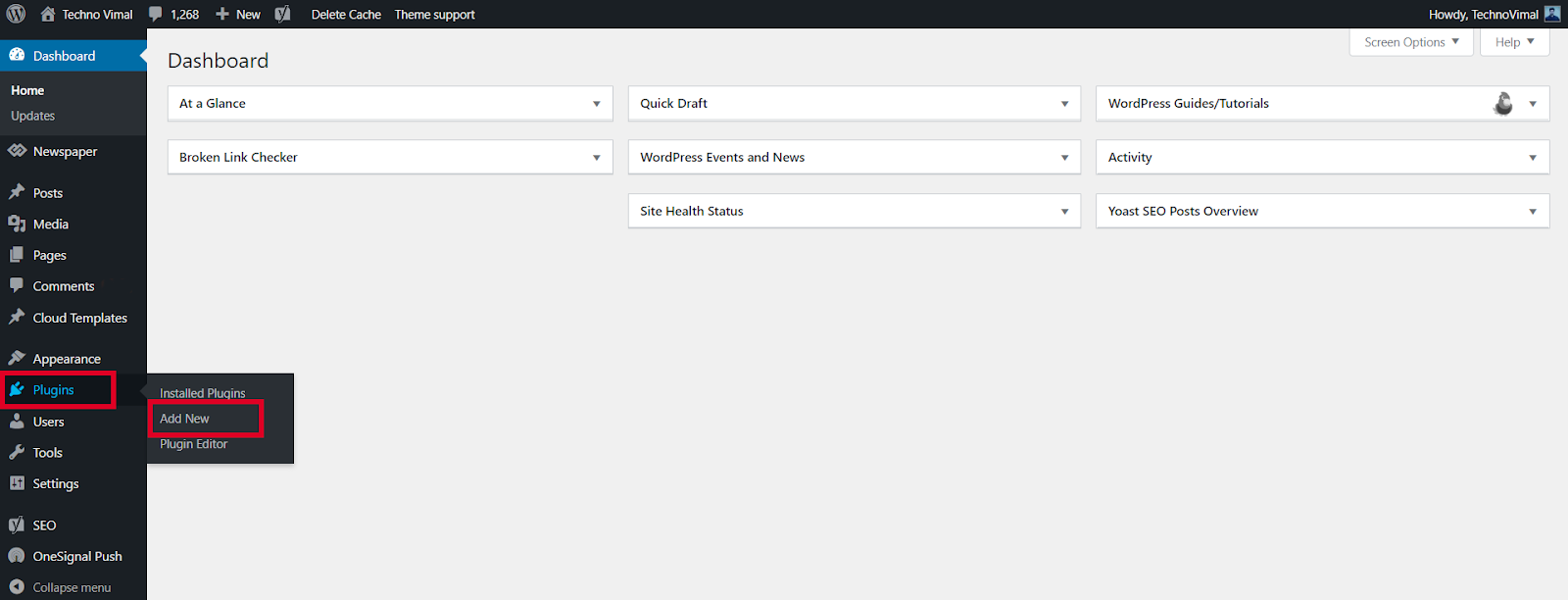
  • Get to your Admin Panel, go to Plugins and click Add New.
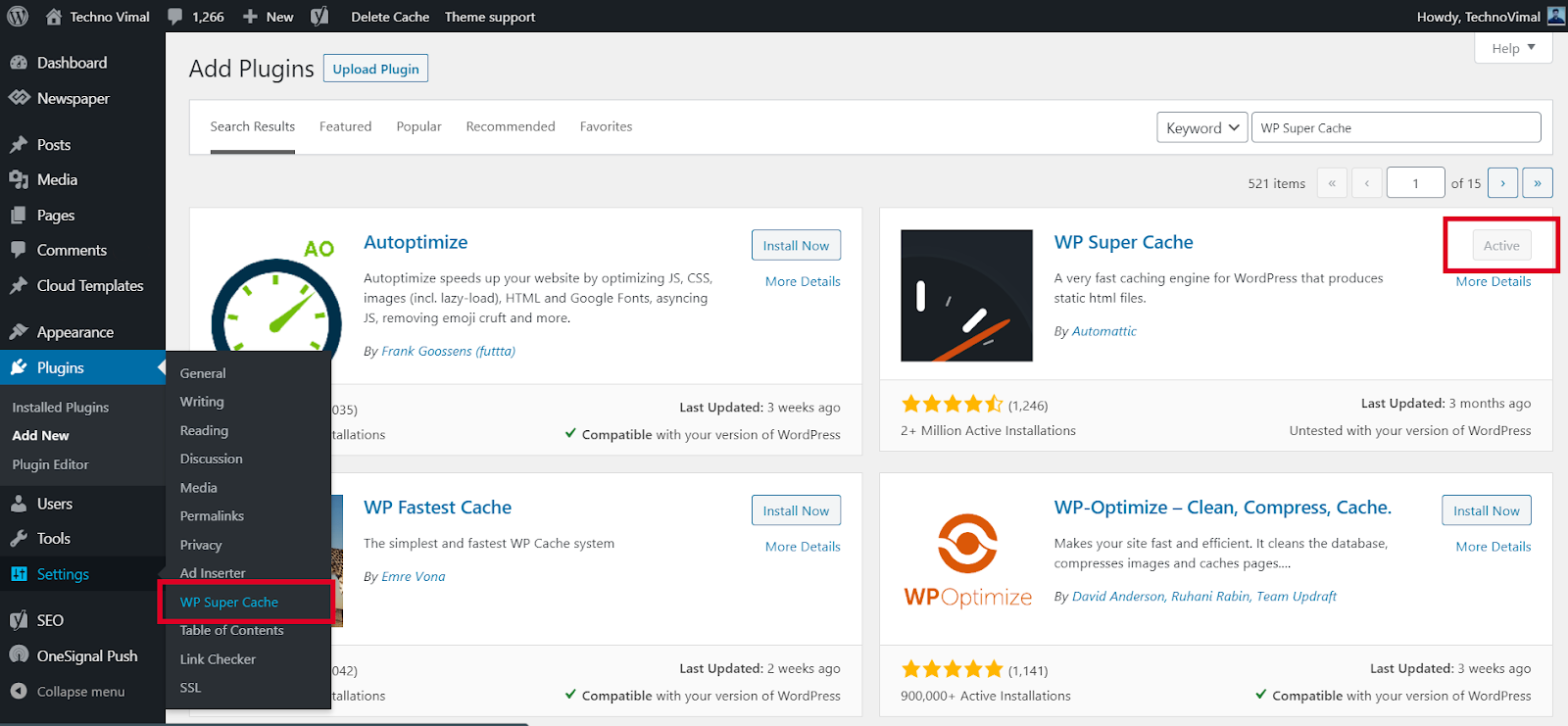
Search for the WP Super Cache plugin and click Install Now

Step 2

  • Search for the WP Super Cache plugin and click Install Now.
  • Click the Activate button to Activate the plugin.
Search for the WP Super Cache plugin and click Install Now

»  10+ “Best” Free Lightweight WordPress Themes

Step 3

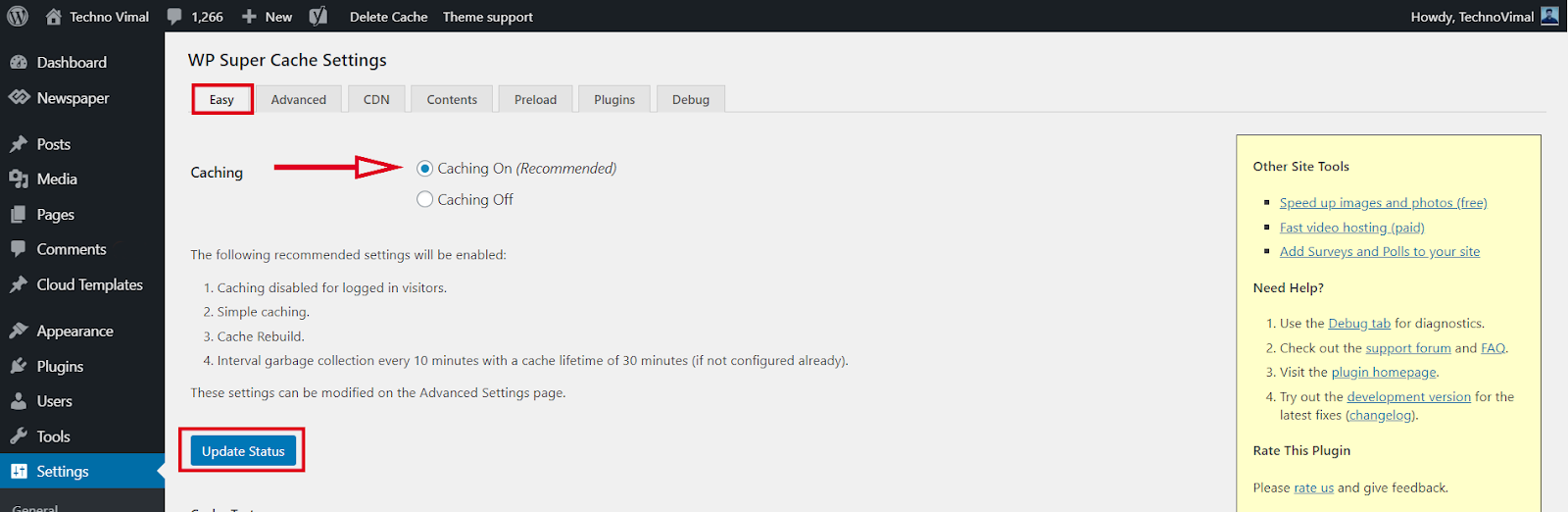
  • From the WordPress admin dashboard, go to Settings->WP Super Cache.
  • Enable web caching by selecting the Caching On option under the Easy tab. Then press the Update Status button.
Search for the WP Super Cache plugin and click Install Now

WP Super Cache Advanced Set up:

WP Super Cache is a powerful plugin and comes with many Advanced Options. These options can further improve the performance of your site.

Step 4

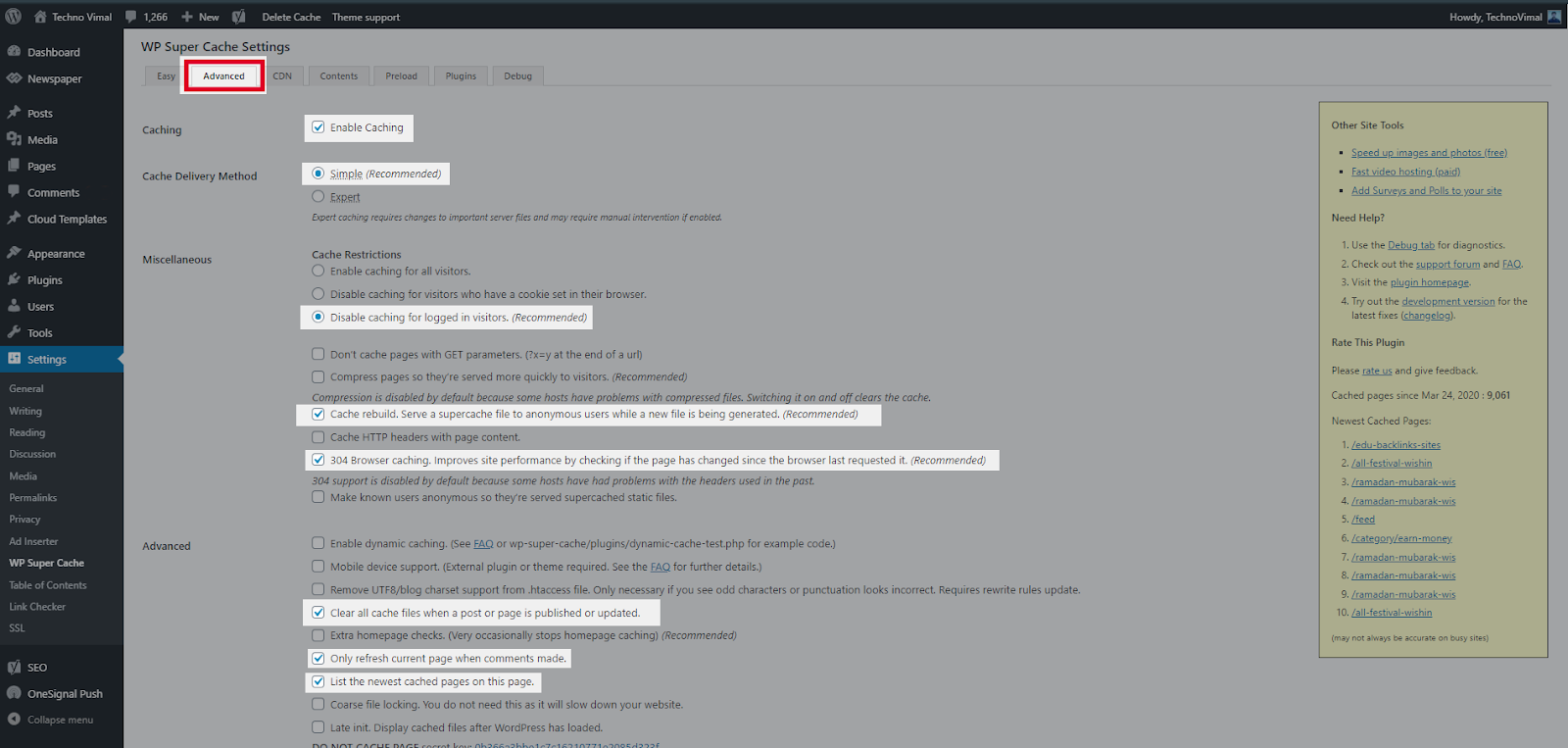
  • If you want to configure more settings. Go to the Advanced Tab. There are several recommended settings there, such as disabling caching for registered visitors and enabling page compression. Explore those options and select the ones that suit you best.
Search for the WP Super Cache plugin and click Install Now

Hit Update Status once you’re done. Your website will now be loading much faster.

Step 5

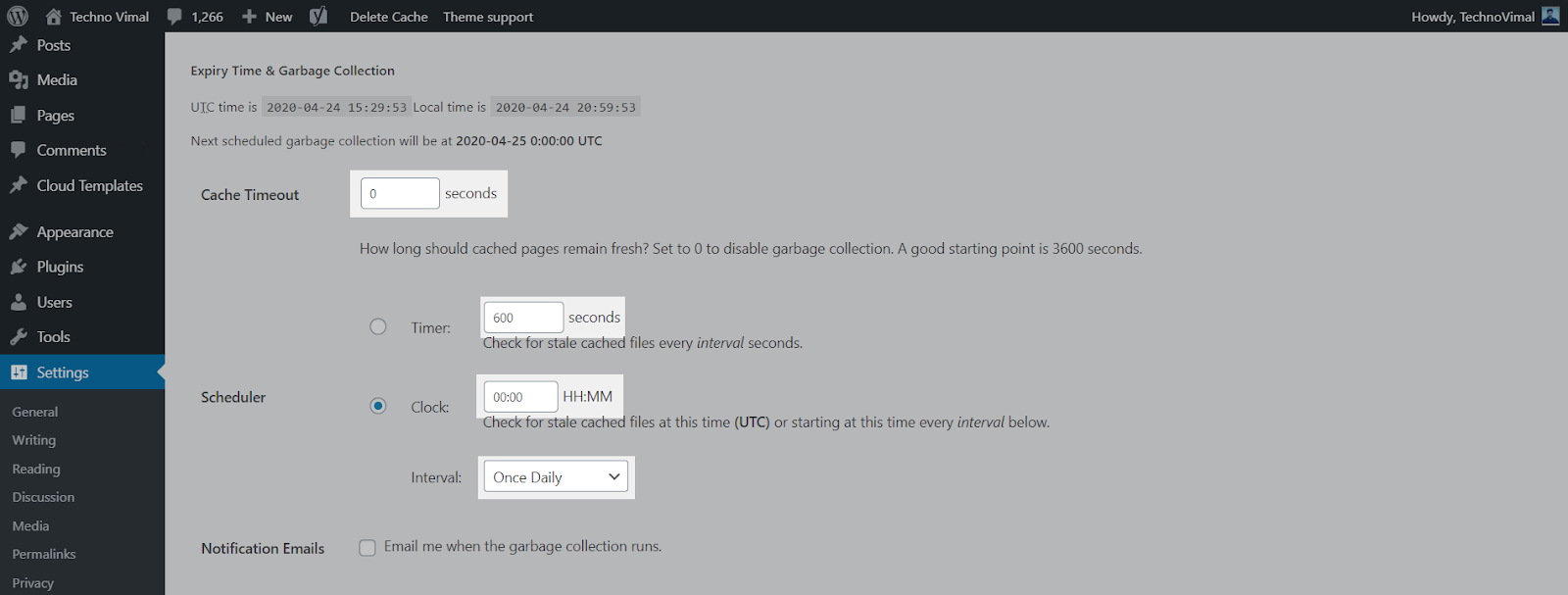
  • To resolve information about garbage collection, scroll to the Expiration Time and Garbage Collection section on the Advance Settings page and set a time and frequency for garbage collection of cached files on your server.
Search for the WP Super Cache plugin and click Install Now

Step 6

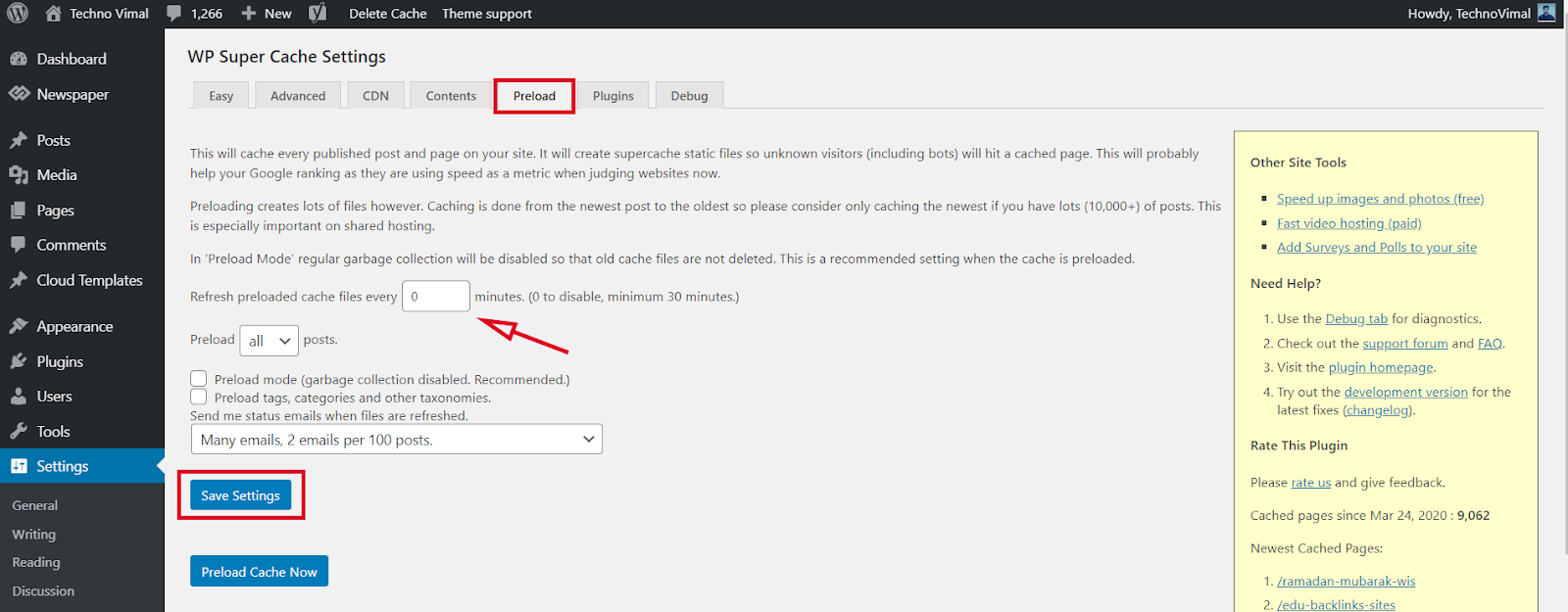
  • This will cache every published post and page on your site. This super cache will create static files so that unknown visitors (including bots) will hit the cached page. This will probably help your Google rankings because they are now using speed as a metric when looking at websites.
Search for the WP Super Cache plugin and click Install Now

» Grammarly Review: The Ultimate Writing Tool for Writers

» Get almost 100% PageSpeed on Newspaper Theme

Recommended WP Super Cache Settings

  • Caching On (Easy tab): turns on page caching.
  • Compress pages so they are served more quickly to visitors (Advanced tab): reduces page size.
  • Don’t cache pages for known users: logged-in users always see the latest version.
  • Cache rebuild: serves the old cached page while a new one is being created.
  • Delivery method: Simple: the easiest choice for most sites and works on most hosts.

How to Clear the WP Super Cache

Go to Settings → WP Super Cache → Easy and click Delete Cache. You can also use the Delete Cache link in the WordPress admin bar. Clear the cache after changing your theme, menus or widgets, so visitors see the update.

WP Super Cache vs LiteSpeed Cache

If your hosting runs on a LiteSpeed web server, use the free LiteSpeed Cache plugin instead. It caches at the server level and is usually faster there. On Apache or Nginx hosting, WP Super Cache is a simple and reliable choice. Do not run two caching plugins at the same time.

Frequently Asked Questions

Is WP Super Cache free?

Yes. WP Super Cache is a free plugin made by Automattic, the company behind WordPress.com.

Why is my site not updating after I made changes?

You are probably seeing a cached page. Clear the cache from the plugin settings, then reload the page.

Conclusion

Now that the WP Super Cache plugin is fully installed and configured on your customized website, you should start seeing improvements to your site’s load time.

For other feedback and questions, please leave a comment below.😊

Read More:-

10 Best Free Apps to Compress Videos on Android

0

With every passing day, smartphones are becoming more powerful. Smartphones these days have capable cameras, powerful processors, etc. With such processing power and powerful cameras, we can’t resist recording more and more videos.

Recording videos on a smartphone is easy, but having too many videos can cause storage issues. A single 30-minute video file can take up to about 2GB of space on your device. So, why not compress the video to save some extra space?

As of now, there are a lot of apps available on the Play Store which claim to reduce the file size of video files. Video compressor apps can reduce the file size of any recorded or downloaded video without compromising on quality.

Top 10 Free Android Apps for Compressing Video Without Losing Quality

By compressing videos, you can share high-quality videos on social media platforms that were not possible earlier due to size limit issues. So, let’s see.

» Best Video Editing Software Free For Computer

1. Video Maker

video maker

Well, if you are searching for a YouTube video editing app for Android, then Video Maker can be the best option for you. It is a complete video editing app with a video compressor.

Guess what? The app supports multi-layer editing and lots of useful video editing options. You can also add video filters, transition effects with the help of this app.

2. Resize Video

resize video

It is at least newer than all the others listed in the article. Resize Video Compress the video by resizing the video resolution. It also has a complete video editor which can be used to trim, merge, cut videos.

When it comes to filing type compatibility, Resize Video support almost all major video file formats.

3. Video Compress

video compression

This is one of the best and simple video compressor app available on the Play Store. The app compress video files and save them to your smartphone.

The good thing about the app is that it offers you multiple modes of video compression, and it supports almost all major video file formats.

4. Video & Movie Compressor

Video & Movie Compressor

If you are looking for an Android app to reduce video size without losing quality, Video & Movie Compressor can be the best option for you. With this app, you can compress full-length movies, television shows, and series.

After compressing a video, you can also directly share the video on social media platforms from this app.

5. Video Compressor Panda

video compressor panda

As we all know that large video files are a big problem for every mobile user. Panda Video Compressor solves that problem for you.

With this app, you can compress videos and send them to others via email and text. It also lets you upload/share your videos on social networking platforms.

6. Video Compressor

video compressor

As the name of the app says, Video Compressor is an Android app that can compress and convert almost any video format. It provides multiple modes to compress the video by reducing the resolution, bitrate, etc.

7. Smart Video Compressor and resizer

Smart video compressor and resizer

Although not famous, Smart Video Compressor & Resizer is still a worthy video compressor app for Android. The tool is straightforward to use, and it is known to feature lossless video compression.

The app also lets you set the quality of the video and the speed of the compression process. Apart from this, you also get a video resizer to set the video dimensions.

8. Video & Image Compressor

Video & Image Compressor

With this app, you can compress both images and videos. The app is free to use, and it supports most of the popular video and image file formats.

What’s more interesting is that it supports batch video and image compression. It also includes a resizer, optimizer, and image cropper.

9. Video Dieter 2

video dieter 2

Well, Video Dieter 2 is a video compressor app available for Android devices. The app lets you store all your videos in smaller file sizes.

Apart from video compression, Video Dieter 2 also provides you a video editor with basic video editing features.

» 5 Best Free Video Editing Apps for Android Without Watermark

10. Videocompact

videocompact

Well, Videocompact is one of the best free video compressor and converter apps available for Android smartphones. With this app, you can convert or compress video.

Apart from this, the Android app also lets you crop, cut, and trim video clips. Overall, it is one of the best video compressor you can use today.

So, these are the best video compressor apps for Android. I hope this article helped you! Please share this with your friends also. Also, if you know of any other such apps, do let us know in the comment box below.

Try An Other:

Best Free VPN for Mobile & PC

0

There are hundreds of VPN Service Providers (VSPs) in the market today. And every VPN service provider describes itself better. It even claims 100% Data Security and Online Safety. But what is the truth? You will know this in this article. In this article, you will know what is a good VPN? What are its characteristics? And what are the things to keep in mind while choosing a VPN? Also, which are the top-10 VPN in the world? And what are their characteristics?

If you think that by turning on a long password and 2-Step Authentication, now your account is completely secure. And no one can hack it, so this is your biggest mistake. Because the Internet is a place where nothing is secure. Meaning, your data can be stolen anytime, anywhere.

Even big companies like Google and Facebook, which spend crores of rupees on security every year. When their data is stolen, then what is your chessboard and mine? Because our data is like an open book, which anyone can read.

Perhaps you are wondering why I have used the word ‘open book’? So it is because we are tracked every moment on the Internet. That is, our every online activity is monitored. Like who are we? where are you sitting? What are you doing? Which device are you using? Which Apps are you using? Which Websites Are You Visiting? What are you downloading? etcetera etcetera. Records of all these activities are kept. Now you tell yourself whether our data is an open book or not? Your answer will be ‘yes.

What is a VPN?

Now the question is how to keep this book closed? That is, how to keep your data private? So the answer is VPN. Because VPN actual Location and Identity hides. So that no one can recognize you who you are? Where have you come from? And what are you doing? That is, you remain completely anonymous (unknown) on the Internet.

But the problem is that there are hundreds of VPN available in the market at the moment. And everyone calls themselves Best and No.1. So whom to trust? And on whom not? So there are some parameters for this! With the help of which you can decide for yourself which VPN is right for you. So let’s look at some important parameters.

1. Priority

First of all, decide why and for what you need a VPN? That is, what is your priority? If you want to watch Web Series and Movies on OTT Platforms. If High Speed is your biggest priority. At the same time, Anonymity for a Journalist and Encryption for a Spy will be the biggest priority. Similarly, you also have to decide your priority according to your need. So that you can choose the right VPN.

2. Device Compatibility

As you all know that Android, iOS, Windows, Linux, and Mac are the 5 largest operating systems in the market at the moment. And most devices run on these operating systems. But not every VPN needs to support all operating systems. That is why it is very important to pay attention to devise compatibility while buying a VPN.

If you use an Android Phone as well as Windows Tablet and Macbook Pro. So you need a VPN that supports Android, Windows, and Mac, all three. But if you don’t take care of this. And choose a VPN that does not support Mac OS. So obviously you will have to repent. That is why it is very important to pay attention to devise compatibility. Because it is an important factor.

3. Servers & Locations

If you think that the Virtual Private Network (VPN) has as many Servers and Locations will, he will be just as good. So it’s just your illusion. Because having more servers and locations does not mean that its service is also good. Along with the number of servers, geographical diversity is also very important. 

If a VPN has 25000 Servers. But the Locations are only 20. And even those 20 locations are not your favorite locations. So would you buy it? Obviously will not buy it. Because you will have to face problems again and again. That’s why the number of servers and locations is not important. The important thing is the VPN you are choosing. Does it cover your favorite locations or not?

4. Payment Plans

It is very important to consider 3 things in payment plans. First Price, Second Plans, and Third Money Back Guarantee. If you talk about the price, then for this you should check the price of a different VPN. And they should be compared with other VPN to see which VPN is giving great features at a low price. And he is giving a Money Back Guarantee or not?

I would like to tell you that most of the VPN gives 30 to 45 days Money Back Guarantee. Which is very important. Because if you do not like the service, you can get your money back. Apart from this, a payment plan is also an important factor. Which is very important to pay attention to. If a VPN is offering you Monthly Plan as well as a Yearly Plan, then it is better. Because if the money is less, you can also buy a 1-month subscription.

5. Data Sharing

Most VPN you Data have no information about. That is, what do they do with your data? And with whom do you share it? You are not given any information in this regard. That is why the choice of VPN should be done very carefully. Because data is very important. And I have said many times that the most valuable thing of the 21st century, if anything, is our data. That is why one should avoid choosing a VPN that does not have transparency about data.

» 10 Best Free Apps to Compress Videos on Android

List of Top 10 Best VPN Service

Every VPN has some of the other features. As someone is known for his speed. So for some security. Some are known for Encryption and some for Unblocking Blocked Websites. Similarly, everyone has their characteristics. Here we are going to talk about such Top-10 VPN, which are the best VPN at the moment.

1. Express VPN

Available ForAndroid, iOS, Windows, Mac, Linux
Countries102
Locations160
Servers3000+
Max. Device Support5
Money-Back Guarantee30 Days

Express VPN has been everyone’s favorite VPN for quite some time now. And this is the reason why it is also in the first position in our list of Top-10 VPN. Express VPN is known for its unmatched security, high speed, and reliable service. If we talk about restrictions, then it can also tear apart The Great Firewall of China.

You can use Express VPN on almost every device. Can even be used in Routers, Game Consoles, and Smart TVs. There are also browser extensions available for Google Chrome, Edge, and Mozilla Firefox.

Main Features :-

  • Superfast Speed
  • Fast Connection
  • Unlimited Bandwidth
  • VPN Split Tunneling
  • Defeat ISP Throttling
  • Bitcoin Payment
  • P2P Support
  • Kill Switch
  • DNS Leak Protection
  • No Logs Policy

Express VPN Netflix, Hotstar, Hulu is, Youtube, BBC iPlayer and with all the popular video streaming sites such as Amazon Prime Videos-even Geographically Blocked Website with can easily Unblock. I would like to tell you that ExpressVPN does not keep records of any of your online activities. Because Express VPN believes in the No Logs Policy.

2. Nord VPN

Available ForAndroid, iOS, Windows, Mac, Linux
Countries59
Locations80+
Servers5400+
Max. Device Support6
Money-Back Guarantee30 Days

Perhaps you have already heard a lot about Nord VPN. Because the name of Nord VPN is heard again and again from Youtube to TV Ads. Although all this is part of a promotion. But that doesn’t mean Nord VPN isn’t a good VPN. It comes at number two in our list of Top-10 VPN.

Nord VPN is known for its excellent security and data privacy. The big thing about it is that Panama is registered (Panama), where Fourteen Eyes Surveillance such organizations also shows no tame. That is, Nord VPN cannot be pressured to share data. That’s why Nord VPN does not store any of your Confidential Data. It gives you great security and privacy.

Main Features :-

  • Great Performance
  • Fast Connection
  • Proxy Extensions
  • Smart DNS
  • Kill Switch
  • DNS Leak Protection
  • Strict No Logs Policy

If we talk about Restrictions, then Nord VPN is an expert in this matter. It can also easily bypass The Great Firewall of China. It can also easily unblock Geographically Blocked Websites from streaming sites like Netflix, Youtube, Hulu, iPlayer, and Amazon Prime Videos.

3. SurfShark

Available ForAndroid, iOS, Windows, Mac, Linux
Countries63
Locations100+
Servers1700+
Max. Device SupportUnlimited
Money-Back Guarantee30 Days

The biggest feature of Surfshark is that it supports Unlimited Devices. That is, you can connect any number of devices to it. If you have many devices in your home or office. And you want to have only one VPN for everyone. Then Surfshark can be a great option for you. Because it provides you the best service at a low cost.

Surfshark uses AES-256 encryption with IKEv2, OpenVPN, WireGuard, and Shadowsocks VPN protocols. Which plays an important role in the security of your data. Apart from this, the CleanWeb feature not only blocks Ads and Trackers. Rather, it also protects from malware.

Main Features :-

  • Unlimited Device Support
  • Fast Connection
  • Ad Blocker
  • CleanWeb
  • Unlimited Bandwidth
  • Kill Switch
  • DNS Leak Protection
  • Logging Policy

Although Surfshark supports the Strict No Logs Policy. But despite this, if you create your account on Surfshark. So your Email ID and Billing Information are stored. You can read Surfshark’s Privacy Policy for detailed information.

» 20 Best Video Editing Software Free 

4. Cyber ​​Ghost

Available ForAndroid, iOS, Windows, Mac, Linux
Countries90
Locations112
Servers7100+
Max. Device Support7
Money-Back Guarantee45 Days

Wherever it comes to Top-10 VPN, CyberGhost comes up there. It is a simple and easy-to-use VPN, which is known for its excellent security and Massive Server Coverage. Although the number of servers is not as important to us as the security. That’s why we talk about security.

CyberGhost takes full care of the privacy and security of its users. It does not store any data of its users. That is, supports Zero Logging Policy. Also blocks Ads and Trackers. And uses DNS and IP Leak Protection, Automatic Kill Switch, and AES-256 Encryption for better security.

Main Features :-

  • High Speed
  • Fast Connection
  • Torrents Support
  • Ad Blocker
  • Automated HTTPS Redirection
  • Unlimited Bandwidth
  • Kill Switch
  • DNS Leak Protection
  • No Logs Policy

CyberGhost is available for Android, iOS, Windows, Mac, and Linux as well as Browsers, Game Consoles, and Smart TVs. Talking about Unblocking, it can easily Unblock Popular Video Streaming Sites as well as Geo-Restricted Websites. But if you live in China, this is not for you. Because it cannot break The Great Firewall of China.

5. IP Vanish

Available ForAndroid, iOS, Windows, Mac, Linux
Countries55
Locations75+
Servers1500+
Max. Device SupportUnlimited
Money-Back Guarantee30 Days

IP Vanish is known for its excellent security and unlimited device support. It is a fast and secure VPN, which covers more than 75 locations in 55 countries. Although IP Vanish is a very good VPN in terms of security. But there are some such features, which are not seen in IP Vanish. Such as Ad Blocker. Although Ad Blocker is a fairly common feature. And can be seen almost in VPN. But it is not in IP Vanish.

Well, IP Vanish is quite rich in terms of features. And always appears in the list of Top-10 VPN. But when it comes to Data Logs, its Privacy Policy seems a bit confusing. Because according to IP Vanish it supports Zero Logs Policy. But when you look at the Privacy Policy of IP Vanish. So it turns out that the user’s email ID and payment methods are logged.

Main Features :-

  • Unlimited Device Support
  • Excellent Speed
  • Fast Connection
  • Defeat ISP Throttling
  • Unlimited Bandwidth
  • Unlimited P2P Support
  • DNS Leak Protection
  • Anonymous Torrenting

IP Vanish provides you with 250 GB of Encrypted SugarSync Storage, in which you can store your files. Although IP Vanish is not that good in terms of Unblocking. It can unblock Youtube, Netflix, iPlayer, and Hulu. But not The Great Firewall of China. That is why it is not suitable for China at all.

6. Proton VPN

Available ForAndroid, iOS, Windows, Mac, Linux
Countries50
Locations50+
Servers1000+
Max. Device Support5
Money-Back Guarantee30 Days

Proton VPN is known for its unique features. Although it is a new VPN, it is quite ahead in terms of privacy, anonymity, and security. And that is why it has been included in our list of Top-10 VPN. Although Proton VPN is a Paid VPN. But it also has a free version, which is much more than a free VPN. Because it has many such advanced features, which are not seen in any free VPN.

Now you must be thinking that if there is a free version then there will be a limit of speed and bandwidth in it. Also, there will be the risk of data. But let me tell you that it is nothing like that. You get Unlimited Bandwidth and Superfast Speed even in Free Version. Also, no record of your data and connection is kept. Nor do you get to see ads.

Main Features :-

  • Unique Features
  • Different Look
  • Excellent Speed
  • Fast Connection
  • Solid Encryption
  • Unlimited Bandwidth
  • Tor Network Support
  • Perfect Forward Secrecy
  • Bitcoin Payment
  • P2P Support
  • Kill Switch
  • DNS & IP Leak Protection
  • No Log Policy

If we talk about security and privacy, then Proton VPN seems to be quite ahead in this matter. It is a Swiss Based VPN, which is free from the control of Fourteen Eyes Surveillance. With the help of Proton VPN, you can send and order your data traffic through the Tor network. Not only this, but you can also easily access .onion websites.

ProtonVPN uses AES-256 encryption with IKEv2 and OpenVPN protocols. Also provides DNS & IP Leak Protection and Unlimited P2P Support. I would like to tell you that Proton VPN is strictly against Internet Censorship and Surveillance Systems. And that’s why it is banned in China.

7. Private Internet Access

Available ForAndroid, iOS, Windows, Mac, Linux
Countries74
Locations95+
Servers13500+
Max. Device Support10
Money-Back Guarantee30 Days

Excellent internet speed, great security, and over 13,500 servers. This is the identity of Private Internet Access. This is a Privacy Centric VPN, which always appears in the list of Top-10 VPN. However, PIA (Private Internet Access) keeps a log of your email address, payment, and locations. But at the same time, it also gives the facility to make payments through Gift Cards. That is, you can pay anonymously.

Security features of PIA include features like P2P Support, Malware Protection, WiFi Protection, and SOCKS5 Proxy. Apart from this, it also provides a Camera and Microphone Protection. Also blocks Ads and Trackers. And provides great internet speed with unlimited bandwidth. And the good thing is that it supports 10 devices simultaneously. 

Main Features :-

  • Good Speed
  • Easy To Use
  • Defeat ISP Throttling
  • Unlimited Bandwidth
  • P2P Support
  • Kill Switch
  • DNS Leak Protection
  • Camera & Microphone Protection

Private Internet Access is available for Android, iOS, Windows, Mac, and Linux as well as browsers. Talking about unblocking, it can easily unblock Netflix, Youtube, and Hulu as well as Geo-restricted sites. But when it comes to China, it seems to be standing behind. 

8. Hotspot Shield

Available ForAndroid, iOS, Windows, Mac, Linux
Countries82
Locations115+
Servers3200+
Max. Device Support5
Money-Back Guarantee45 Days

Hotspot Shield is known for its superfast speed. It is almost twice as fast as other VPN. That is why it is very much liked by Gamers and Streamers. Although it is at number eight in our list of Top-10 VPN. But it is far ahead in terms of speed. If the list of Fastest VPNs is made, then it will come first in it. But our list is based on the overall performance.

Well, Hotspot Shield is a very simple and easy-to-use VPN, which can be set up in one click. Although it also has a free version. But with limited features, only 500 MB of data is available for the day. Also, ads are seen, so differently. That’s why Paid Version is much better than Free Version. Because there is no restriction on it.

Main Features :-

  • Fastest Speed
  • Fast Connection
  • VPN Split Tunneling
  • Defeat ISP Throttling
  • Unlimited Bandwidth
  • P2P Support
  • Torrents Support
  • DNS Leak Protection

Although Hotspot Shield is a well-known name in the VPN industry. And always appears in the list of Top-10 VPN. But when it comes to privacy, it is faced with its aggressive logging policy. Not only this, it is a US-based VPN, which comes under the control of Five Eyes Surveillance. That’s why Hotspot Shield is not as reliable as Nord VPN in terms of data privacy.

9. Private VPN

Available ForAndroid, iOS, Windows, Mac
Countries60
Locations60+
Servers150+
Max. Device Support6
Money-Back Guarantee30 Days

PrivateVPN is an All in One VPN, which is known for its Privacy, Security, Anonymity, and Fast Speed. It is a simple and easy-to-use VPN, which can be set up in one click. Although Private VPN does not have any servers yet. But it is continuously expanding its server network. And is growing very fast.

Talking about privacy, PrivateVPN supports Zero Data Logging Policy. That is, no-log of any of your data is kept. But if you create your account on Private VPN. So a log of your Email ID and Password is kept. And this is the only information that is logged. This has been mentioned in the Privacy Policy of Private VPN.

Main Features :-

  • High Speed
  • Fast Connection
  • VPN Split Tunneling
  • Defeat ISP Throttling
  • Unlimited Bandwidth
  • P2P SupportKill Switch
  • Port Forwarding
  • IPv6 DNS Leak Protection
  • Zero Data Logging Policy

Private VPN is a very good option when it comes to streaming. It can easily unblock Netflix, Amazon, iPlayer, and Hulu as well as Geo-restricted sites. Also provides good speed, so that you can stream HD content without buffering. Apart from this, it is not very expensive in terms of price. That is Value for Money VPN.

10. Vypr VPN

Available ForAndroid, iOS, Windows, Mac
Countries64
Locations70+
Servers700+
Max. Device Support5
Money-Back Guarantee30 Days

Viper VPN is a Swiss-based VPN, which is known for its security. Although it is not a perfect VPN. But it is much better in terms of security and encryption. It uses WireGuard, IKEv2, IPSec, and OpenVPN as well as its Chameleon Protocol. Which helps to circumvent Internet Censorship.

Main Features :-

  • Average Speed
  • Defeat ISP Throttling
  • Unlimited Bandwidth
  • P2P Support
  • Torrents Support
  • Kill Switch
  • Public WiFi Protection
  • IP Leak Protection
  • No Log Policy

If Speed speaks of, so Vypr VPN is not much better in this case. Although some servers are very fast, but not all. Most servers are quite average in this regard. Talking about Unblocking, it can easily unblock Geo-Restricted Websites. Also, it works well in China too. Overall, this is a very good option for privacy and security.

The best VPN right now

Now the question is, which is the best VPN among these top-10 VPN? So it depends on what is your priority? So what is your biggest need? If you are a Hardcore Gamer or Streamer. So it is obvious that you need Superfast Speed. And for this Hotspot Shield is the best option. Because with its help you can stream HD content without buffering.

But right there if you want to bypass The Great Firewall of China. So you should choose Express VPN or Nord VPN. Because they are experts in this matter. That is to say, which VPN is perfect according to your need. That is the best VPN for you. Now you can decide for yourself which one of this top-10 VPN is best for you.

Conclusion

A good VPN has features like Security, Privacy, Anonymity, Encryption, and High Speed. Additionally Restrictions to Bypass and Censorship ability to circumvent. Because this is the main job of a VPN. That is why all these things have been taken care of in our list of Top-10 VPN.

In this article, you learned about the Top-10 VPN and its features. Also, go into detail about the shortcomings and features of each VPN. Hope this list of Top-10 VPN will prove to be very helpful for you. If you liked this article then like and share it. And subscribe to techsavvy.com for the more informative information. So that whenever we publish a new article! you get its notification.

Try An Other:

What is Cryptocurrency and How Cryptocurrency Actually Works

0
What is Cryptocurrency and How Cryptocurrency Actually Works

There was a time when there was no currency in the world. Only goods were exchanged for goods. But after that notes and coins came into existence. And the way of doing business changed completely. Today these notes and coins are our main currency. But apart from this, there is also a currency, which is completely digital. It is called Cryptocurrency. But the question is, what is this cryptocurrency after all? And how does it work? Also, What are its advantages and disadvantages? Let us know in detail.

Cryptocurrency

Today you have every country’s Currency (currency ‘s). Like India has Rupee, America has Dollar, Saudi Arabia has Rial. Similarly, other countries also have their own currency. But the question is, what is currency? So the answer is such a money system, Which is recognized by a country and used as a medium of money by the people there. Also, which has any value, it is called currency. That is in exchange for which any item or service can be bought it is currency.

For Example:- You can buy fruits with 50 rupees note. That’s why it is currency. But you cannot buy anything with the old Rs 500 note. Because neither it is recognized by the government nor does it have any value. That’s why it’s not a currency. Currency is usually printed on pieces of paper or metal (coins). That is why it is called Physical Currency. That is, it is possible to touch it and carry it around in the purse. But this is not the case with Cryptocurrency. 

What is Cryptocurrency?

What is Cryptocurrency and How Cryptocurrency Actually Works

Cryptocurrency is a digital currency, which is managed by a decentralized system. In this, each transaction is verified by Digital Signature. And with the help of cryptography, its record is kept. In other words, cryptocurrency is a virtual currency based on Blockchain Technology, which is Secured by Cryptography. It is almost impossible to copy.

In fact, cryptocurrency is a  peer-to-peer cash system built on a computer algorithm. That is, it does not exist physically. It stays online only in the form of Digits. And its biggest feature is that it is completely Decentralized. That is, there is no control of any country or government on it. That is why it was initially termed illegal. But later given the popularity of Bitcoin, many countries made it legal. But many countries are still against it.

Why Does Cryptocurrency Have Value?

However, cryptocurrency is not printed in the form of notes and coins. But still, it has its own value. That is, you can buy goods with Cryptocurrency. can trade. And you can also invest. But you can’t keep it in your safe. Nor can it be kept in the bank’s locker. Because it stays online in the form of Digits. That is why it is also called Digital Money, Virtual Money, and Electronic Money.

If we talk about Cryptocurrency Value, then its value is much more than Physical Currencies. And the value of some top cryptocurrencies is thousands of times more than the dollar. But there is also a truth that this value does not remain constant. That is, the cryptocurrency market fluctuates very fast. Due to which its prices change several times a day.

How Does Cryptocurrency Work?

Cryptocurrency actually works through Blockchain. That is, a record of transactions is kept in it. Also, it is monitored by Powerful Computers, which is called  Cryptocurrency Mining. And by whom it is Mining, they Miners called (Miners).

When a transaction (in Cryptocurrency Transaction is). So his information is recorded in the Blockchain. That is, it is kept in a block. And the work of security and encryption of this block is done by the miners. For this, they solve a  cryptographic puzzle and find the proper hash (a code) for the block.

When a miner secures the block by finding the right hash. Then it is added to the Blockchain. And it is verified by other nodes (Computers) present in the network. This process is called Consensus.

If the block is confirmed to be secure in Consensus. And it is found to be correct. So the miner who secures it is given crypto coins. This is actually a reward, which is called  Proof of Work.

Live Cryptocurrency Chart

» Learn more: What is Bitcoin.

Cryptocurrency Market Crash

Kriptokrensi market, that is the place where  Cryptocurrencies of purchase and  Trading are. It is also known by names like Cryptocurrency Exchange, Digital Currency Exchange (DCE), Coin Market, and Crypto Market. Here you can buy, sell and invest in any Cryptocurrency. Such as Monero, Ethereum, Bitcoin, Redcoin, Litecoin, Voicecoin, etc.

Cryptocurrency exchanges usually accept payment by credit card, wire transfer, and other digital means. Here you can convert Fiat Money (paper currency) to Cryptocurrency and Cryptocurrency to Fiat Money.

If we talk about Top Cryptocurrency Exchanges, then the following websites are prominent in this list:-

CryptocurrencyMarket Capitalization
Bitcoin$849.5 billion
Ethereum$357.5 billion
Binance Coin$67.1 billion
Tether$64.1 billion
Cardano$63.7 billion
XRP$51.2 billion
Dogecoin$38.1 billion
USD Coin$27.5 billion
Polkadot$23.6 billion
Solana$22.5 billion
Data current as of Sep. 10, 2021.

These are just a few of the Cryptocurrency Markets that count. About whom close people know. And also use. Because these are quite popular and reliable markets. But apart from these, there are also hundreds of Cryptocurrency Markets. About which you can search on Google. And you can get a list of all the cryptocurrency markets.

Cryptocurrency Market In India

If we talk about Indian Cryptocurrency Markets, then CoinSwitch, CoinDCX, WazirX, and Unocoin are the most popular Cryptocurrency Exchanges in India. With the help of which you can buy hundreds of Crypto Coins from Bitcoin to Ethereum, XRP, YFI, YFII, Doge, and Tron. And you can pay INR. India  WazirX is the most popular and trusted Cryptocurrency Exchange.

Top 10 Cryptocurrencies

On hearing the name of the cryptocurrency, only one name comes to mining Bitcoin. But Bitcoin is not the only cryptocurrency in this world. Apart from this, there are thousands of Cryptocurrencies. Which most people don’t know about. Well, come on! Know about some popular Cryptocurrencies.

» Bitcoin (BTC – ₿)

Bitcoin is the world’s first cryptocurrency, which has become so successful. It was created by Satoshi Nakamoto in 2009. Although there have been many attempts in the past regarding Digital Currencies. But could not succeed. Even Bitcoin had to struggle a lot in the beginning. But today it is the most expensive digital currency in the world. And the bitcoin price is touching the sky at the moment.

» Tether (USDT)

Tether was launched in July 2014 under the name Real coin. But on 20 November 2014, its name was changed to Tether. Since then it has been known as Tether. It is also known as Stablecoin. Because it was always designed to cost $1.00.

» Ethereum (ETH)

It is a decentralized open-source blockchain. Which is the second largest Cryptocurrency in the world by Cornmarket Cap. It was launched in 2015. Ethereum is the most actively used Blockchain Network in the world. It is also known as Ether.

» Litecoin (LTC)

Litecoin is a peer-to-peer cryptocurrency. Which is based on an open-source cryptographical platform. It started in October 2011. Litecoin uses Scrypt instead of SHA-256 (Secure Hash Algorithm) in its Proof of Work algorithm. It also conducts transactions four times faster than Bitcoin.

» Currency (XMR)

Monero is a Decentralized Open-source Cryptocurrency. Which basically focuses on Privacy and Decentralization. It is quite famous for its security features. But it is mostly used to buy illegal things on the Dark Web. That is, it is the most popular cryptocurrency of the Dark Web. It was launched in 2014.

» NameCoin (NMC – ℕ)

Namecoin is basically based on Bitcoin. And it uses the proof-of-work algorithm. Namecoin can store data in its Blockchain Transaction Database. Its biggest feature is its censorship-resistant Domain Name, which is .bit. Although it is a top-level domain like .com and .net. But ICANN (Internet Corporation For Assigned Names And Numbers) has no control over it.

» BitTorrent (BTT)

BitTorrent Cryptocurrency was created by the Tron Foundation. It is a peer-to-peer file-sharing protocol. Which is based on Blockchain Technology. Its basic purpose is to facilitate file transfer between untrusting process participants. With its help, users can earn BitTorrent Token (BTT). And convert them into fiat money.

» Ripple (XRP)

Ripple is a Real-time Gross Settlement System and  Blockchain Network. It was founded in 2012 by the American company Ripple Labs Inc. was created by. Along with cryptocurrency, it is also a Cryptocurrency Exchange.

» Cosmos (ATOM)

Cosmos is a network of Blockchain Networks. That is the Network of Blockchain Networks. It is also called the Internet of Blockchains. Because it works to connect Blockchain Networks and establish communication between them. Basically, the purpose of Cosmos is to help in Communication, Data Sharing, and Transactions between Blockchains. And for this, Cosmos has a long-range of products and tools.

» Peercoin (PPC) 

Peercoin is also known as PP Coin, P2P Coin, PPC, and Peer to Peer Coin. It is a peer-to-peer cryptocurrency. Which is based on the Bitcoin Framework. But its energy efficiency is 100 times more than bitcoin. Also, Peercoin is the first such cryptocurrency. Which uses the combination of Proof of Work and  Proof of Stack. Peercoin was launched in 2012.

Advantages of Cryptocurrency

When it comes to the use of Cryptocurrency, the question that definitely arises in the mind is why? Why use cryptocurrency after all? Why use cryptocurrency? After all, what are its benefits? So I would like to tell you that there are many benefits of cryptocurrencies. As if:-

  • Cryptocurrency is a digital currency. There is very little scope for Fraud in this.
  • Buying, selling and investing in cryptocurrencies is very easy. Because there are many Digital Wallets  available for this.
  • No bank is needed for cryptocurrency.
  • Cryptocurrency is a very good option for investment. Because its prices go up fast.
  • Cryptocurrencies are not controlled by any state or government.
  • Cryptocurrency is a Secure Currency.

Disadvantages of Cryptocurrency

Everything has two sides. There are some advantages and there are also some disadvantages. The exact same thing applies to cryptocurrencies. That is, Cryptocurrency also has some disadvantages. Let us know about the disadvantages of cryptocurrencies:-

  • The biggest disadvantage of cryptocurrency is that it is not controlled by any authority. That is, no one can control its prices. That is why its prices fluctuate unexpectedly.
  • The second disadvantage is that it is a digital currency. That’s why it can be hacked. And this has already happened with Ethereum.
  • The third biggest disadvantage is – Use in Illegal Activities. That is, cryptocurrencies can be used to buy Illegal Weapons, Drugs and Stolen Credit/Debit Cards.
  • Also Cryptocurrencies have no physical existence. That is, it does not have notes and coins.

Is Investing in Cryptocurrency Legal?

Although many countries have legalized Cryptocurrency. But it is still completely banned in many countries. In such a situation, the question arises that is Cryptocurrency legal in India? The answer is – Yes. Actually, Cryptocurrency is now completely legal in India. And you can buy and sell any Cryptocurrency.

Hope you know what Cryptocurrency is through this article? How does it work? What are the Top Cryptocurrencies? And important information related to the legalization of cryptocurrencies will be found. If you liked this article then like and share it. And subscribe to techsavvy.com for more such articles. So that whenever we publish a new article, you will get the information about it.

What is Bitcoin and How Does it Work?

0

In this guide, you will get detailed information about bitcoin, What is bitcoin. Who invented bitcoin? What is bitcoin mining and what are the advantages and disadvantages of bitcoin.

What is Bitcoin?

Bitcoin is a digital currency. Which has been a topic of discussion all over the world due to its rate for some time now. Everyone wants to know about bitcoin and wants to buy bitcoin. Nowadays everyone wants to buy bitcoin.

The reason for this is that by buying bitcoin, he becomes rich in a short time due to the increasing price of bitcoin. Every day Bitcoin is touching a new high in the stock market. Due to which individuals who already have this digital currency. They were making a good profit.

Bitcoin is not the currency of any country. It is a digital currency that also requires a digital wallet to keep it.

Bitcoin was started by Japanese man Satoshi Nakamoto. Bitcoin was launched on 9 January 2009. In the early days, the price of bitcoin was very low. So that anyone could buy it easily.

But as soon as people started to know about it, its price skyrocketed. Right now the price of 1 bitcoin is so high that it is beyond the reach of the people.

Right now it is very expensive to buy 1 bitcoin, people buy Satoshi, the smallest unit of this currency. The units of bitcoin are millibitcoin and satoshi. 1 millibitcoin is 1 thousandth of a bitcoin. Whereas satoshi is the 100 millionth part of bitcoin. The Satoshi unit is named after the creator of this currency, Satoshi Nakamoto.

By buying and holding bitcoins, it is bound to increase over time. Ever since this currency was launched, new records of height are being made. There is still a lot of opportunities for this currency to go up. This currency has become very famous all over the world.

Some countries have recognized Bitcoin. The first country to officially recognize this currency is El Salvador. The parliament there has recognized this currency by passing the bill. While there are some countries that have declared the currency invalid and some countries are also like this. I am still in doubt.

He is keeping his eye on bitcoin. Of which India is also one. Many countries have called this currency the currency of the future because it is very easy to use. With its help, any digital payment can be made very easily and due to its unique ID, the risk of its theft is also very less.

With the recognition of this digital currency, we will get to see the purchase and sale of goods through it in the future.

Advantages And Disadvantages Of Bitcoins

Talking about the benefits of this currency will eliminate the necessity of dealing with currency. Due to which digital payment can be done easily all over the world. Payment with bitcoin is very easy and very fast.

This currency also has some disadvantages like this currency is not being controlled by any particular body. Due to which many people of the world consider it to be fake and also warn the people of their country to be aware of it.

They believe that after some time the illusion of people investing in this currency will be broken and this currency will be completely finished in some time. Apart from this, bitcoin is a very volatile currency.

Due to this, its price becomes very low or very high in a short time. Due to which it is like an alarm bell for the people who invest in it. If a person invests in this currency, then within some time after investing, if its price decreases, then that person may suffer a lot of loss.

But due to being very volatile, people have taken bitcoin in a positive way and have started trading in it, they want to earn a lot of profit from it.

What is the Best Way to Buy Bitcoins?

The way to buy bitcoin is that you can buy it against any currency. There are many apps available in the market to buy it. who provide bitcoins. You can buy it as an investment.

Another way to buy it is that you can buy it from another such person. Who already has the digital currency of bitcoin. You can take bitcoin payment from any of your services. By which you will also get bitcoin currency.

The third way to buy bitcoin is that you can buy it with the help of bitcoin mining. Many people are providing bitcoin mining services and apps. From where you can get bitcoins by mining bitcoins. In bitcoin mining, you get satoshi, the smallest unit of bitcoin.

You have to do some work in bitcoin mining. In return for that work, you are given bitcoin.

Before buying Bitcoin, you should understand the risk. If the price of bitcoin increases after you buy bitcoin then you will profit and if the price of bitcoin decreases after you buy bitcoin then you will lose.

Bitcoin Price Live Today

A daily roundup of news and information about Bitcoin, Ethereum, Dogecoin, and more, this page has everything you need to know about cryptocurrency. 

Bitcoin Price in India

Right now the price of 1 Bitcoin in India is Rs 34,48,399.12 If we talk about 1 dollar, then 1 bitcoin is equal to 47,235.40 dollars. The price of bitcoin keeps on increasing. The price of bitcoin is likely to increase even more in the future.

The reason for the increase in the price of bitcoin is that as of 01 Sep 2021, 18,660,000 have arrived in the market. This currency can also be made in a limited amount like any other currency. It can only be made in a maximum quantity of 21,000,000.

That is why the demand of people to take bitcoin is high and the supply is limited, due to which its price is increasing. Bitcoin was first released in 2009.

Conclusion

Friends, we hope that you must have liked the complete information related to What is Bitcoin given by us above. You can share this with your friends. Those who do not know about this currency. If you have any questions related to bitcoin then you can ask us by commenting.

If you liked “What is Bitcoin and How Does it Work?” then share this post with your friends.

How To Increase Website Traffic For Free Without SEO

0

In this post, I have told you How to Increase Website Traffic, so if your blog is new and traffic is not coming on it, then you will find this post very useful.

To earn money from blogging, it is very important to have traffic on your blog. The more traffic you have on your blog, the more you will be able to earn from your blog. In such a situation, it is necessary for a new blogger to know that How to Increase Website Traffic.

The biggest problem of any new blogger is that traffic does not come to his blogs. So that he can’t even earn money. It takes time to bring traffic to the blog. It is not that you created a blog, wrote content on it, and started getting good traffic in a month.

Bringing traffic is not a big problem, the problem is how you will increase website traffic to your blog over time. And in this way after a few months, a lot of traffic will come to your blog.

What Are the Different Types of Web Traffic?

Traffic comes to any blog in many ways. We can divide all the incoming traffic into 6 types of sources.

1. Organic

The traffic coming from Google or any other search engine is called organic search traffic. SEO is needed to bring traffic from search engines.

2. Direct

The traffic that comes directly to your website without any medium is direct traffic. If someone comes to your site only by typing the domain in the browser, then it is direct traffic.

3. Social

The traffic coming from any social media (such as Facebook, Twitter, Instagram, YouTube) is called social traffic.

4. Referral

If someone comes to your site using the link present on any other site then it is called referral traffic.

5. Ads

If you run an ad campaign from google ads or bing ads or Facebook ads and if traffic comes from it then it is called traffic coming from ads.

6. Direct

If you send an email for the promotion of your site and if the traffic comes from those emails then it is called traffic coming from email.

So now we know how to bring many types of traffic to the website or blog.

How To Increase Website Traffic

So today I will give you some tips. I can say that you will be aware of most of these tips but you will not know how to use tips. So I will tell you the tips and I will also tell you how to use those tips.

How to Increase Website Traffic, So these are some tips to increase traffic on the blog.

1. Search Engine Optimization(SEO)

SEO is the best way to drive traffic to your blog. SEO is the only way by which you can bring a lot of traffic to the blog.

Google is the world’s largest search engine and in SEO, the main target of everyone is Google. Because 86.86 percent of searches in all search engines in the world are in Google and the rest are bing, yahoo, Yandex, and others.

Optimizing your blog or its pages in such a way that that page ranks in the search engine on the target keyword, is called SEO i.e. Search Engine Optimization. The traffic ahead of search engines is called organic traffic.

It takes less time to do SEO of any site but it takes more time to get the result of SEO if your site is new.

To bring traffic to the blog from Google, you have to do SEO. In SEO, you have to write SEO-friendly articles or content on your blog.

Many things are done inside SEO. To know more about SEO, you read this: What SEO Complete Guide

Having organic traffic generates more sales on affiliate blogs and more CPC on Adsense blogs.

It takes more time to bring traffic to any new blog from SEO, due to which google sandbox. Google does not trust any new site. So google monitors that site and at this time google keeps the site in the sandbox. At the time of sandbox, google does not give good rankings to that site, no matter how well SEO is done.

When Google feels that now it can trust that site, then it starts giving rankings to the site on keywords. And traffic starts coming to the site. The sandbox time can range from 1 month to 6 months. So at this time you keep writing good content on your site and create backlinks.

2. How to Drive Website Traffic Through Social Media

You can use social media to drive traffic to a blog. You can create a social media account for your blog and share new posts on it and get a little traffic.

The traffic that comes to the site from social media is social traffic.

If your blog does not have followers on social media accounts and there is little expectation of traffic from them, then you will find many groups on Facebook where people question and answer, then give the URL of your post as an answer in the comments. can.

Apart from this, if you want to bring traffic from the images of your sites, then you can use Pinterest. Apart from this, you can also try to bring traffic from Twitter, Youtube, etc. Even if someone else shares your content, you will get traffic.

3. How do I drive traffic on Quora

Quora is the best way to bring traffic to any new site. Quora is a forum where people ask questions and knowledgeable people answer those questions.

On Quora, you have to create your profile and add related topics of your blog’s niche to your profile so that people ask questions related to that thing.

If someone asks you a question and you have already answered the question in any of your posts, then you should answer the question and also give a link to your post along with the answer.

Don’t give full details in your answer. You give some information in the answer and give a link for the rest of the information so that people will come to your blog to get complete information.

You will get visitors to your new blog from Quora. If traffic comes to your blog then it will be a positive signal for Google and it will give your site rankings quickly.

Like Quora, you can also use Reddit. There is a difference between Reddit and Quora. Quora is only for questions and answers, whereas you can post on Reddit. You can share anything by posting on Reddit. Hindi and Indian public are negligible on Reddit, so if you target India from your site then Reddit will not be useful for you.

4. Target Long Tail Keywords

It is good on any new blog that you target long-tail keywords. If you target Short Tail Keywords on your blog then it is very difficult to rank your blog on Short Tail Keywords.

If you do not know much about keywords and research, then you read this post: Keyword Research Kaise Kare.

You can rank on a long tail keyword very quickly and easily compared to a short tail keyword. This will definitely bring traffic to your blog.

5. Internal Linking

Internal linking means to give the link of the page of your own domain i.e. site to any other page of your own site.

Simple language When you link any of your posts to any other post, it is called internal linking.

By doing internal linking properly, you can multiply the traffic of your blog. You can do internal linking to send visitors to any of your posts to your other pages. You link the right post at the right place. You link a similar post of your blog i.e. of the same category.

6. Update Old Content

If there is such content on your blog which is old and on which traffic does not come, then you can update such content.

If you made mistakes while writing the post, you missed something important in the post, the old data is written in the title of your post, there are broken links in your post, then you can rectify those things.

You can add new information to your content. This will make your content new and it will be more likely to rank on Google.

7. Create High-Quality Backlinks

Backlinks not only help in off-page SEO but also brings traffic to your blog. People make backlinks so that the authority of their domain increases so that the site ranks in Google. For more information about backlinks click here.

If you create backlinks then you will benefit from SEO as well as traffic will also come to your blog. You can create backlinks from guest posting. Apart from this, you can create a backlink by commenting.

You can also make a nofollow backlink from Wikipedia. Medium is a very good site where you can write a post and link your post to that post and get a nofollow backlink.

It does not matter whether the backlink is dofollow or nofollow. If you have created a backlink in the right place, then traffic will definitely come to your blog.

Read also:

Conclusion

I have given you some tips, by following which you can increase website traffic on your blog. Google is the best way to bring traffic to the blog. You should focus the most on Google and for this, it becomes necessary that you learn SEO and do SEO of your blog.

If you liked “How to Increase Website Traffic” then share this post with your blogger friends.

20 Best Free Video Editing Software for Windows

0

If you are a YouTuber or video editor, you may know the importance of a proper Best Video Editing Software Free. Good video editing software can help you to present your business, products in a better way.

These days, video platforms were on the rise. Just browse the feeds of Instagram, Facebook, YouTube, etc., you will find that everyone is promoting their business products through videos.

However, the real problem is that there are hundreds of video editing programs available for desktop operating systems. Having such a huge number of options often confuses users, and they choose the wrong video editing program.

List of 20 Best Video Editing Software Free for Windows

So, if you are not able to decide which video editing software to use, then you have landed on the right webpage. In this article, we have listed some of the best video editing software for Windows. let’s look at it.

1. Filmora Video Editor

Filmora Video Editor

You can use Filmora Video Editor to express your creativity and amaze with the beautiful results. There are many features available, and you can easily apply simple effects to your videos using Filmora Video Editor.

In addition, there are over a hundred unique visual effects. You can directly share your created video on social media.

2. AVS Video Editor

AVS Video Editor

It is one of the best tools for your Windows which is known among many users for editing their videos. Using this tool, you can trim, cut, split, merge, rotate and mix videos with AVS Video Editor.

Choose between 300 innovative video effects and transitions. Insert menus, audio, text comments, and subtitles. Stabilize video camera unstable recording, and much more that you will know after using this tool.

3. Sony Vegas Movie Studio

VideoPad

It is also a great video editing tool that allows you to edit videos easily. Sony Movie Studio (formerly Sony Vegas Movie Studio) is a consumer-based non-linear video editing software designed for the PC.

It has all the features you need for video editing. From basic video editing to advanced editing tools, Sony Vegas Movie Studio gives you everything you need to meet your editing needs.

4. Adobe Premiere Pro

Adobe Premiere Pro

It is one of the best on the list which provides a lot of features that you need to edit videos like a professional.

The fastest and most efficient nonlinear video editor is now the first to offer an intuitive, dedicated Lumetri Color panel for manipulating color and lighting, plus a Morph Cut transition that lets you create the most seamless talking-head scenes imaginable. Let’s make it quick.

5. Apower Edit

Apower Edit

ApowerEdit from Apowersoft is another great video editor that you can use to create a great video for YouTube. It provides you with a lot of professional tools that can give a new touch to your videos. Features of ApowerEdit include transition effects, text styles, overlays, background colors, and more.

6. FFmpeg

FFmpeg

It is not just a video editing tool but a collection of free software that can record, stream and convert digital audio and video.

FFmpeg is a leading multimedia framework capable of decode, encode, transcode, mux, demux, stream, filter, and play anything created by humans and machines.

7. Videopad

VideoPad

VideoPad is a fully featured video editor to create professional-quality videos in minutes. In addition, VideoPad has over 50 visual and transition effects to add a professional touch to your movies. The best part is that it lets you upload your edited video directly to YouTube.

8. Avid Media Composer First

 Avid Media Composer First

Avid Media Composer First is one of the best video editing tools on your computer. The best part about Avid Media Composer First is that it comes free, and it offers almost all the features needed to become the best video editing tool.

You’ll get to use a number of professional tools, which may seem complicated at first, but will become easy and fun over time.

9. Adobe After Effects

 Adobe After Effects

Well, Adobe After Effects is one of the best video editing tools you can use for motion graphics and visual effects. Adobe After Effects is heavily used by YouTubers and is known for its visual effects.

Video editing tools can help you add motion graphics, animations, special effects, visual effects to your videos. Another great thing about Adobe After Effects is that it is available for Windows and macOS.

10. Avidemux

Avidemux

Avidemux is a free video editor designed for simple cutting, filtering, and encoding tasks. It supports multiple file types, including AVI, DVD compatible MPEG files, MP4, and ASF, using various codecs.

Tasks can be automated using projects, job queues, and powerful scripting capabilities.

11. Movies

Movies

There are many programs for editing .avi files, but some formats – such as .wmv, .flv, .rm and .mpg – are not as well prepared for editing. Therefore, Movie aims to solve this by allowing you to edit these formats in one program through a simple graphical user interface.

The system lets you copy, paste and fine-tune the selections. It also supports joining and splitting video/movie files.

12. ivsedits

ivsedits

ivsEdits is a free video editing software that has the same professional editing tools as ivsEdits with some limitations. It has a simple user interface. So, if you are looking for an easy-to-use free video editor, ivsEdits will be of great benefit to you.

It has remarkable video effects, multi-camera editing, real-time video I/O, hardware integration, etc.

13. Lightworks

lwks

This video editor has support for OS X, Linux, and Microsoft Windows. In addition, it has some powerful features like dedicated and strong support for background I/O. This video editor also has a dedicated keyboard to enhance the video editing experience.

14. VSDC Free Video Editor

VSDC Free Video Editor

Video Editor aims to edit video files and create videos of any complexity, incorporating various visual and audio effects.

The program offers rich functionality, yet has a simple and intuitive interface, allowing you to create videos with minimal effort.

15. weVideo

weVideo

WeVideo is a powerful and best professional video editing software. It has advanced video editing features with a simple interface.

You don’t have to be a professional to make great movies. You can save video projects to your hard drive or access them from anywhere with cloud video storage.

16. Shotcut

 Shotcut

If you are looking for a professional video editing suite at no cost, Shotcut is for you. The best thing about Shotcut is that it supports almost every audio and video format. Plus, with Shotcut, you can dress up most aspects of your video with powerful filters.

17. Hitfilm Express

 Hitfilm Express

Hitfilm Express is one of the best video editing tools you can have on your Windows 10 computer. Video editing looks simple, but it has some advanced editing options.

You can use audio and video filters, layers and masking, chroma-keying, and more with Hitfilm Express.

18. Pinnacle Studio

Pinnacle Studio

If you are looking for a flexible and creative video editor for your Windows 10 computer, then Pinnacle Studio might be the best option for you.

The best part about Pinnacle Studio is that it provides users with everything they need to get started. guess what? With Pinnacle Studio, you can get over 1500+ filter effects, transitions, overlays, and more.

19. Movavi Video Editor

Movavi Video Editor

Movavi Video Editor is one of the simplest video editing tools you can use right now. The Windows tool is mainly used by YouTubers to create quality content.

Movavi Video Editor gives users tons of filters, transitions, and titles to convert a video. So, Movavi Video Editor is the best video editor to create YouTube videos.

20. CyberLink PowerDirector

If you are looking for a professional-grade video editing tool, CyberLink PowerDirector might be the best option for you.

CyberLink PowerDirector has almost every feature you need for video editing. From 360˚ to Ultra HD 4K support, CyberLink PowerDirector has it all. However, the tool may put off a lot of beginners as it is quite difficult to use.

So above are the best video editing tools for PC. I hope this article helped you! Please share this with your friends also. If you know of any other such tool, do let us know in the comment box below.

Try An Other:

» 5 Best Free Video Editing Apps for Android Without Watermark

Ask Question #TechnoVimal

 Please Like, Comment, Share  THANK YOU!