Home Blog Page 5

How to Earn Money on YouTube: Effective Strategies

0

Making a few hundred or a few thousand dollars is not a big deal but making millions is, of course, a big thing. But it’s not impossible. You spent hours of your day surfing the net and watching videos on YouTube. Do you know that you can earn money from youtube which you like the most this is YouTube? You just have to think a little and convert your thinking into a video.

Almost one-third of the population is indulged in earning money through video making and uploading it on their respective YouTube channels. Do you know that every day around 5 billion videos is watched on YouTube? Starting from a 4-year teen to a 60-year adult, YouTube is used by everyone irrespective of their age.

YouTube is the second most visited site in the world, though first is of course Google. Every minute around 400 to 500 videos are uploaded on this most loved site. So, now you can imagine how big the video platform is YouTube. A platform such big offers hundreds of opportunities to earn money online without any investment.

Making videos is an interesting job, nobody finds it boring. Well, I can’t say anything about everybody but at least I don’t find it boring. All those YouTubers who are earning millions now must have started from just one or two views, but now they are getting views in millions and they are being paid for this. Anybody can make a video. You just need a decent camera your android phone’s camera is enough and video editing software.

In this article, I am going to tell you four basic steps that will help you earn money from YouTube by making videos.

  • Create your YouTube Channel
  • Decide a Niche or your area of interest for your Channel
  • Think of a strategy to popularise your video content or gain an audience
  • Monetize your videos

1) Create your YouTube Channel

The best thing about YouTube is that it’s a zero-investment method to earn money, you don’t have to purchase a domain nor do you have to buy any hosting plan. Simply create a channel and start uploading your videos.

How to create a YouTube channel?

  • To create a YouTube channel, you need to have a Gmail account first.
  • Login to your Gmail account.
  • Visit YouTube. On the top left of the home page, you will find a drop-down menu adjacent to the YouTube logo. Click on it.
  • Click on My Channels option from that menu. A window with a menu “Set up your channel on YouTube” will appear.
  • Fill in all the required details to create your YouTube Channel.

After creating a YouTube Channel of your name. The next important step is to decide a niche.

2) Decide a Niche or your Area of Interest for your Channel

Don’t create a channel with a random niche. People hardly subscribe to such channels that post random videos. People subscribe to channels that offer specific content of their choice. You can choose any niche that you are good at. you can select a niche on the basis of your hobbies, passion, or area of interest.

For Example:-

  • Dancing:–

Dancing is an art. An art in which very fewer people are perfect, the rest are freestyle dancers. I am also a freestyle dancer, though even I also want to be a good dancer. Just like me, there are hundreds of people who want to learn dance but because of their busy schedules, they don’t get time to join any dance academy. Such people prefer to learn to dance from YouTube. if you are good at dancing you can start up a YouTube channel and upload dance tutorials.

  • Singing:–

People love singing songs. If you are good at singing and there’s a hidden singer inside you. Why not give it a try? Let the world know your talent. Create a YouTube channel for singing.

  • Teaching:–

Do you know how many students face problems in their studies, let it be a college student or a school student? Many times it happens that due to some reasons you miss your classes and as a result, we face a problem in that particular topic. Now, what to do. You don’t always go to your teacher about your problems. In that case, in your search for that particular topic on YouTube you get a tutorial of your need. If you are good at teaching a particular subject may it be mathematics, physics, chemistry, English, etc? You can help students by uploading such teaching videos.

  • Cooking:–

Our ancestors say that the way to reach someone’s heart goes from his stomach. Everybody loves food, who doesn’t? cookery shows are an area of interest for various housewives and foodies. If you are good at cooking and know how to experiment with various spices, YouTube is the correct place for your dishes. Upload your cooking videos and keep giving tips to your viewers.

  • Comedy Videos:–

laughter is the best medicine. If you have got a good sense of humor and your jokes are appreciated by your friends. enter the world of making funny videos. Just like a college student Bhuvan Bam did. Of course, you all have heard about him. His videos are totally amazing and today his YouTube channel “BB ki Vines” has around 11 million subscribers.

Apart from these, you can go for historical videos, travel videos, beauty videos, fashion videos, and the most like ‘Do it Yourself’ videos. It’s purely of your choice.

Videos can be of any type and they have no restrictions until, they deal with unnecessary content like pornography, by adding such unnecessary content you will violate the constraints of YouTube and your channel might be blocked.

3) Think of a Strategy to Popularise your Video Content or gain an Audience

You will never be able to make money from YouTube until your channel gets a large number of audiences. To popularise your video or make your video viral it needs to have quality content. Keep your video short in the beginning, don’t make too long videos. Upload new content daily.

There might be a chance that you earn from your very first video, maybe your video goes viral, but if not then be patient.

Your videos shouldn’t be on the same concept again and again. Try to come up with new strategies. Always learn from your last video. Before uploading the video watch it twice or thrice or more than that, watch it as a viewer, not as the maker. This way you will be able to see your mistakes.

You can use video editing software or techniques for improvising the quality of the video. To achieve success, you have to work very hard, you have to be regular with your channel. Upload new videos daily. Then only you will be able to gather an audience.

When viewers like your videos and enjoy its content, they like to share it with their family and friends. This way you gain more viewers. Everything depends on how good videos you make.

If your video is on some serious topic, do some research before uploading it. Your video should not contain any unnecessary content that will hurt the sentiments of your audience.

Once you started getting likes, subscribers, and views on your channel, go and apply for monetization. It means you are allowing YouTube to put ads in your videos and you will be paid for these ads.

» How To Remove Date From Blogger Post URL – Make Blogger Permalink Format Like WordPress

4. Monetize Your Videos

Once you started getting likes, subscribers, and views on your channel, go and apply for monetization. It means you are allowing YouTube to put ads in your videos and you will be paid for these ads.

Click on the “Video Manager” option in the “My Channels” option. Clicking it will enable monetization in your videos. YouTube pays you $1-$4 USD per one thousand views. Don’t worry it’s not the only way of earning money from YouTube. There are many other methods through which you can monetize your videos.

  • Affiliate Marketing:–

The only source of promotion of all those companies is not just their website, they look for marketers that have their own website or blog, youtube, and social networking site users that have subscribers and followers. Affiliate marketers gather traffic on their websites, blogs, YouTube channel, or social networking site. And then they make contact with various companies that offer Affiliate marketing programs like Amazon, Flipkart, eBay, Bluehost. For example, Signup with an Amazon associate. After you log in to your associate account, you will get a link for promoting the products on your YouTube channel, you can place this link in your video description and if any visitor visits this affiliate link and goes to the site from that link and buys something, you will be paid approximately 4% to 12% of that amount. Affiliate marketing works on the principle of pay-per-click.

  • AdSense:–

That five-second ad that makes you lose your patience and press the “skip ad” option can get you money. Another way to earn money from YouTube is by registering on Google AdSense. Once you provide proof of your subscribers and viewers to AdSense and sign up with it, Google will keep sending advertisements on your videos. And if any visitor clicks on the ads present in your videos google pays you for this. You get around 50% of the ad revenue.

  • Direct Promotion of Products:–

Various companies collaborate with your YouTube channel pay you from time to time for promoting their product or giving a brief description of the product in your video. You can negotiate the amount you get in return for this direct promotion depending on your fan base.

  • Asking for Donations or Crowdsourcing:–

If you’re popular so you can appeal to the audience and ask for a favor from them to donate your money for your expenses. You won’t believe that people even donate a huge amount of money to some YouTube Channels.

If you already know to earn money from YouTube and you think that I missed something, do comment

You may also want to see: 

Hopefully, this tutorial was helpful. allow us to know within the comments below if you face any issues.😊

If you liked this article, share it on the social networking site. You can also find us on Twitter, Facebook, and Instagram.
How to Update Windows 11 Step by Step

0

Windows 11 is Microsoft’s latest desktop operating system. Microsoft keeps improving it with monthly security updates and a bigger feature update every year.

Updates fix bugs, add new features and close security holes, so it is important to keep Windows 11 up to date.

In such a situation, it becomes necessary to keep your operating system updated. New Windows 11 updates fix bugs, add new features, and patch security vulnerabilities to protect your computer from new malware.

Update Windows 11 OS Follow These Steps

So in this article, we will share a detailed guide on how to update Windows 11 operating system. The process is going to be very easy; Just follow some simple steps given below.

Step 1. First, click on the Start button and select ‘Settings‘.

Windows 11 Settings

Step 2. On the Settings page, click on the Windows Update option. The Windows Update icon is located in the left pane of the screen.

Windows 11 update

Step 3. Now on the right pane, click on the ‘Check for Updates’ button.

Windows 11 update

Step 4. Now Windows 11 will automatically search for available updates. If an update is found, you will get the option to download it. Simply click on the ‘Download Now‘ button.

Windows 11 update

Step 5. Now, wait for the update to be downloaded to your system. Once downloaded, click on the ‘Restart Now‘ button.

Windows 11 update

Step 6. If you want to turn off the update notification, click on ‘Pause for 1 week‘ button on Pause Updates section.

Windows 11 update

This much only! You have done This is how you can update Windows 11 operating system.

So, this guide is about how to update Windows 11. I hope this article helped you! Please share this with your friends also. If you have any doubt related to this then let us know in the comment box below.

How to Install Optional Updates

Driver updates and some feature previews are not installed automatically. Go to Settings → Windows Update → Advanced options → Optional updates, tick the updates you want and click Download & install.

How to Pause Windows 11 Updates

If an update arrives at a bad time, open Settings → Windows Update and choose how long to pause updates from the Pause updates drop-down. Updates resume automatically after the pause ends. To stop updates for longer, see 3 Ways to Disable Automatic Updates on Windows 11.

What to Do if Windows 11 Update Is Stuck

  1. Restart your PC and run Check for updates again.
  2. Make sure you have at least 20 GB of free space on the C: drive.
  3. Run the troubleshooter: Settings → System → Troubleshoot → Other troubleshooters → Windows Update → Run.
  4. Disconnect USB drives and other external devices that you do not need, then try again.

How to Check Which Windows 11 Version You Have

Press Windows + R, type winver and press Enter. The window shows your Windows 11 version and build number. You can also find it under Settings → System → About.

Frequently Asked Questions

Is it safe to update Windows 11?

Yes. Updates fix bugs and close security holes. It is a good idea to back up important files before a big feature update, just in case.

How long does a Windows 11 update take?

Monthly updates usually take 10 to 30 minutes including the restart. Big yearly feature updates can take longer, depending on your internet speed and PC.

Does updating Windows 11 delete my files?

No. Normal updates keep your files, apps and settings.

Ask Question #TechnoVimal

 Please Like, Comment, Share  THANK YOU!

12 Content-Writing Secrets of Professional Writer

0

Secrets of Professional Writer: Writing is considered an easy job. Well, it must be considered easy probably by those who are themselves good at writing. But what about that 60 % of the struggling writers, who have an amazing imagination and innovative ideas but they somewhere lack in putting them into words.

Most of the time what happens is that the writer has that urge of writing, and in their mind, they are almost ready with the topic. But as soon as they start writing, their mind went blank, they keep gazing at the screen. This is not the problem of one or two, this is the problem of many. That’s the reason they keep searching for professional content Writing tips to write an article.

Write an Article as a Professional Writer

Sometimes they are ready with the words and through their hard work, they are even able to come up with the content. But, well you will always have to face this “But” if you really want to do something amazing. People write, they write well, but their content is not up to the mark, though the words are satisfying, the quality of the content isn’t. I hope you did if not this article will definitely make you understand what I am actually trying to convey.

From previous comments, I have realized that many of my lovely readers are finding some difficulties in writing, and this article is for them. I hope you know who you are. Here I am going to share with you guys the “best 12 tips to write an article as a professional content Writing”, and trust me if in every post you will follow these tips, it will surely come out to be a masterpiece.

Here are 12 Awesome Tips to Write an Article as Professional

1. Focus Keyword

You might not be sure what is really meant by the focus keyword. It is the one that must be present in the introductory paragraph of an article for SEO-friendly content. For example, if you are writing an article about “Top 10 Richest People in the World” or if it is the title of the article. Then, the keyword “top 10 richest people” must be present in the introductory paragraph or the first paragraph of the article.

» What is SEO and How Does It Work?

2. Introduction Length

Many times it happens that we drown in writing and as a result, we end up writing an introduction of around 400-500 words. And this is not the correct way of writing an introduction. “Complete introduction” shouldn’t be more than 300 words i.e. before giving the main points do complete the introduction in a maximum of 300 words.

3. Keyword Density

Good content demands good SEO and for good SEO you need to use the focused keyword a minimum of 6 times in the article. This is known as keyword density. For example, (top 10 richest people) must be present at least 6 to 8 times in the whole article (Depending upon words count. If article length is 1500 words, it should be 6 to 8 times).

4. Sentence Length

Don’t be so engrossed in writing that you increase the length of sentences. The sentences should not have more than 20 words. You can break the sentence line with a full stop (.) And then continue writing.

5. Paragraph Length

Tips are a mixture of dos and don’ts though this one is a few don’ts so don’t write long paragraphs. The paragraphs shouldn’t have more than 100 to 150 words depending on the article length. You can break the paragraph or change the paragraph if it is going beyond 100 words and can write from the next paragraph.

6. Transition Words

I hope you are well acquainted with the transition words (and, but, so, as, because, therefore, however, moreover, further, meanwhile, during, subsequently, likewise, similarly, after that, above all, in addition, in conclusion, in short, in other words, on the other hand, for example, most importantly, certainly,  firstly, secondly). There is a definite need for transition words in the article. They must be present between sentences because it makes it easier for the reader to understand how thoughts and ideas are connected to each other.  Transition words show your reader the relationship between phrases, sentences, and even paragraphs. So, you must include transition words between the sentences.

7. Consecutive Sentences

They shouldn’t be present anywhere in the article. The consecutive sentence means that any specific word shouldn’t be repeated 3 times continuously in sentences. For Example, She is a girl. She loves to eat good food. She is pursuing her degree from a reputed university. (repetition of “she” shouldn’t be there).

8. Passive Voice

I don’t how, either due to lack of practice or some other reason most of the people make great use of passive voice. This isn’t the right way of writing. The sentences shouldn’t be present in the passive voice in the article. Try to use Active voice sentences. For example,

  • Active voice: I checked your writing skills.
  • Passive voice: Your writing skills are checked by me.

9. Make Use of Synonyms

To make the content look catchier don’t go with those words which the common people have never heard of. Use the words with “simple meanings” and sometimes new meanings. You must also make use of easy “synonyms words” between the sentence.

» What is Holo Cryptocurrency?

10. Content Must be Unique

Firstly, a writer must consider the uniqueness of the content. None of the sentences should be copied from anywhere. Just do research on Google about any topic and read at least 5 sites for understanding and then try to write an article by yourself.

11. Article Length

Don’t make the article too long to make the readers bore. The minimum article length should be 900 words and a maximum of 4500 words.

» 5+ Best Programming Languages to Learn

» Grammarly Review: The Ultimate Writing Tool for Writers

» Get almost 100% PageSpeed on Newspaper Theme

» 10 Important Tips to Motivate Yourself for Blogging

12. Beginning and Ending

Do focus more on the beginning, to keep the reader keep on reading. And the endings should be good too so that it will leave the reader wanting for more posts.

Conclusion:  Make your writing readability easy for your audience. This article might not help much but definitely a little bit for a better understanding to write an article. I’ll keep writing the posts for my readers. And I hope you people will keep showering your love.

Read More:-

 Please Like, Comment, Share  THANK YOU!

Top 10 Best Free Antivirus Software for Windows

0

Every computer on this planet can face a virus attack at any time. Therefore, it is better to have antivirus software installed on your computer. Obviously, good and powerful antivirus software will cost you some money. Fortunately, there are 10 very reliable and best antivirus that are also available outside the Internet.

Selecting the best antivirus software depends on two main factors: the region where you live and the operating system such as Windows 10 or Mac.

Let me explain this a little more. That would allow you to select the best free antivirus software for your PC.

How to Choose the Best Antivirus Software

Now let’s get this clear. It’s a sheer myth to believe that Apple or Mac computers as we know them are immune to virus attacks. No, they’re not. Since there’re fewer Apple computers, the number of virus attacks is relatively lower.

About 77 percent of computers use the Windows operating system. Hence, they are common targets for virus attacks.

You will also have to select antivirus software according to your region. That’s because all antivirus programs need updates. When an antivirus company detects a threat in your area, it will release an update or patch to protect your computer.

That doesn’t mean you should download an update merely because hackers aren’t targeting your region. Computer viruses can strike anywhere. Hence, you need that update too.

Before downloading this antivirus, I recommend you read an excellent guide on how to defend your computer.

Now that you know the basics, I will guide you through the best free antivirus software for Windows 10 in the world.

10 Best Free Antivirus Software (Top Rated)

Before telling you about the best free antivirus software, here is something you should know. Usually, each operating system comes with its own antivirus software as well.

For example, the Windows operating system comes with Windows Defender, it is excellent software. But if you want to use another antivirus, these are some of the best.

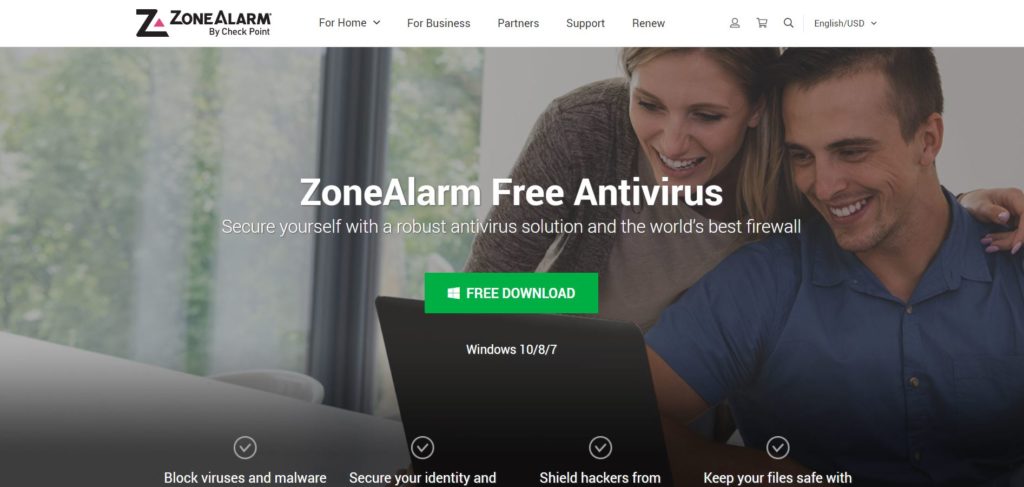
1. ZoneAlarm Free Antivirus

ZoneAlarm Free Antivirus

Not many computer users know ZoneAlarm. It is one of the best-qualified antivirus available at the moment. In fact, ZoneAlarm also has a homonymous firewall that prevents hackers from gaining illegal access to your computer and prevents certain types of malware and other attacks.

You can download the free ZoneAlarm antivirus or both: the firewall and the antivirus. I discovered that ZoneAlarm’s free firewall and antivirus work extremely well together.

2. Avast

The free Avast antivirus offers three levels of protection for your computer. They include blocking viruses and malware so they do not attack your computer and expose the threats that may arise from any Wi-Fi connection you are using and helps prevent such attacks.

Avast also protects the passwords you can use for any purpose. Therefore, your computer enjoys comprehensive protection with this best free antivirus software.

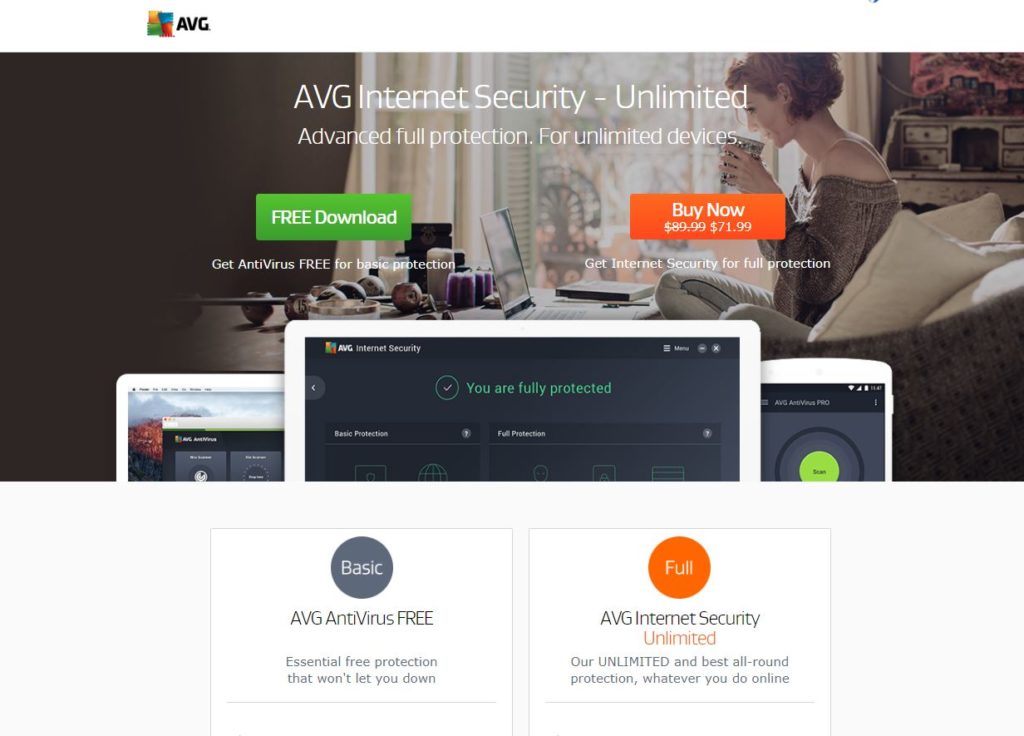
3. AVG Free Antivirus

AVG Free Antivirus

Two very powerful features of AVG antivirus are its file destroyer and provides protection against threats that arise without warning.

In addition, it comes with a series of powerful tools such as real-time scanning, automatic background scanning while busy on the Internet and prevents unwanted browser add-ons from being installed. Computer experts rate AVG Antivirus among the best in this category.

4. Baidu

Baidu

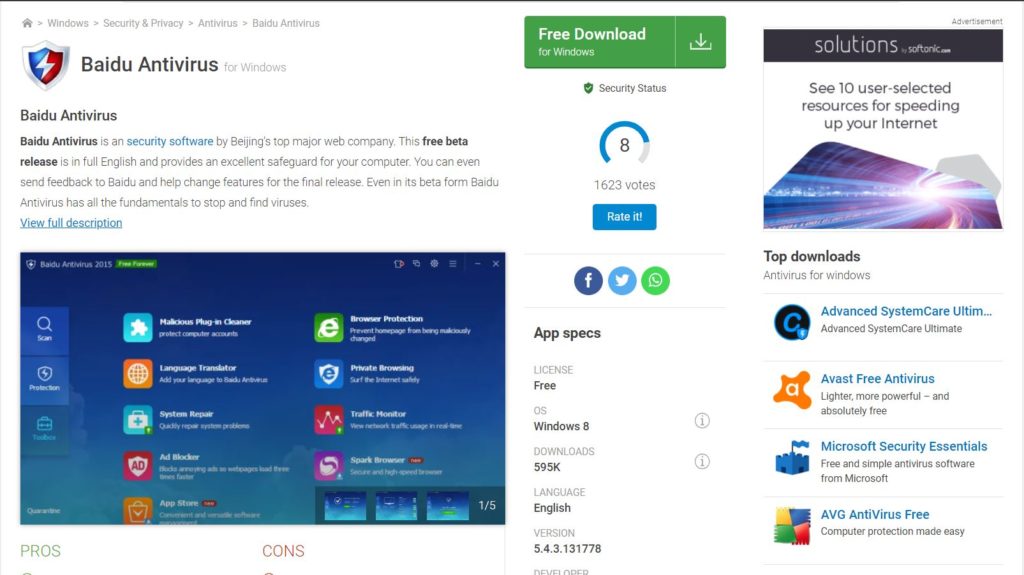
This may come as a surprise to many. The little-known Baidu Free Antivirus is rapidly rising in the ranks of the best antivirus software. The Baidu antivirus offers almost all the features of the fully paid versions of other brands.

The only disadvantage is that it does not receive alerts about real-time protection. However, Internet security experts claim that the free Baidu antivirus has all the features necessary to protect your computer against online threats.

5. Kaspersky

Kaspersky

Another excellent free antivirus is Kaspersky. In fact, Kaspersky has won several compliments for its simple and easy-to-use interface. The free version of Kaspersky Antivirus provides basic protection for your computer.

Receive instant alerts before opening an email attachment or visiting any suspicious website. Made by Kaspersky Labs, this is an excellent antivirus for a home computer.

6. Avira

Avira

With a five-star rating from CNet publishers, the free Avast antivirus is widely used in personal computers and personal laptops. The free version blocks most spyware, malware and ransomware, as well as other threats to attack your computer.

An important feature of the Avira antivirus is speed. Consider slowing down your computer and neither does a scan take more than a minute. You can use this antivirus safely with any good firewall for comprehensive protection.

7. Adaware Antivirus

Adaware Antivirus
Adaware Antivirus

Most cybersecurity experts know the Adaware antivirus. Unfortunately, previous versions were not so popular. However, the latest version of Adaware antivirus is a highly sophisticated version of its previous editions.

It has all the features to protect your computer against viruses, malware and other possible attacks. Adaware also offers real-time protection and alerts you to threats. The scans are also fast in the latest version of Adaware free antivirus software.

8. Bitdefender for Windows 10

Bitdefender for Windows 10

Bitdefender’s free antivirus has a unique feature: it can detect threats and eliminate them almost instantly. This free antivirus is ideal for PCs and laptops or home devices that require minimal protection.

Tests conducted by Internet security experts show that Bitdefender offers a high degree of online protection and easy threat removal. Therefore, any beginner can also use Bitdefender with ease. Like other free antivirus software, Bitdefender also comes with free updates and real-time protection.

9. 360 Total Security Suite

360 Total Security Suite

360 Total, previously known as Qihoo 360, is another free antivirus software recommended by Internet security experts. In fact, 360 Total perceived only one antivirus software; It is a complete Internet security package.

This means that the free version of 360 Total comes with a complete firewall that protects your computer against hackers, phishing and other online threats. And defend your computer from malicious and harmful virus attacks. Using 360 Total means that it is easy: to identify you need to take your online tutorial to use all its functions effectively.

10. Comodo Free Antivirus

Comodo Free Antivirus

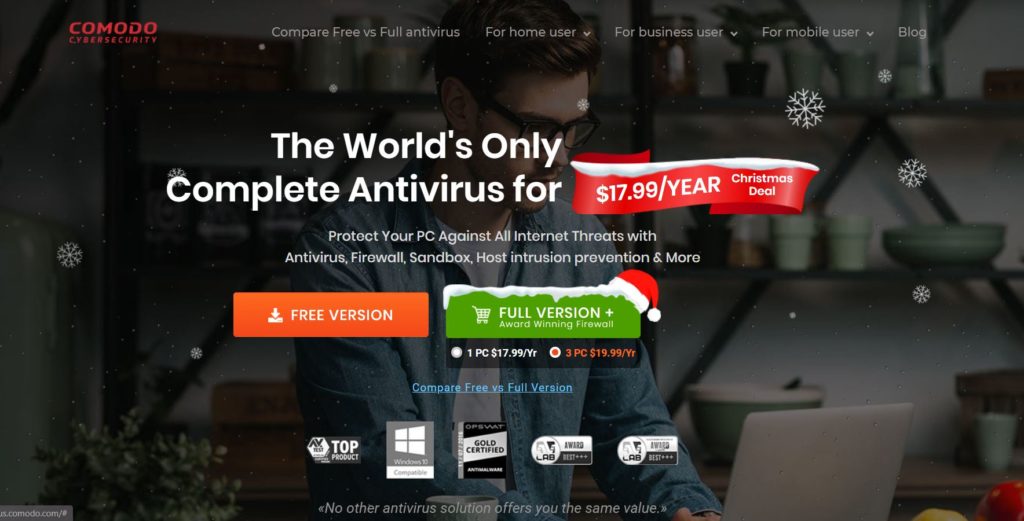
AV-Test, the leading online security organization, includes free Comodo antivirus among the best of its kind. Comodo antivirus has all the desirable features of protecting home computers. It provides updates, fast scanning, and real-time protection from online threats.

It is quite fast and does not take up much space on your hard drive. Comodo antivirus is a deal for home PC users who need a simpler and lighter solution to counter threats online.

Using Antivirus Effectively

Obviously, you might wonder what is there to learn about the use of antivirus software. Especially when it’s free. There are three main points to remember to use the antivirus effectively.

  • Keep the automatic update function activated to ensure maximum protection.
  • Activate the email scanning function. This means that any malicious attachment will also be detected by this antivirus.
  • Use free virus detection and removal tools before installing an antivirus on your Windows PC. Some malicious programs may prevent your antivirus from detecting it unless you scan it and remove it before installation.

Once you have taken these steps, a PC or laptop will be quite safe against potential and everyday threats online.

Closing Thoughts

Here is a small warning before concluding. Free antivirus software will provide very basic protection against common threats. Therefore, use only one if you are not going to use a computer for financial transactions or for commercial purposes.

It is worth remembering that the free antivirus software does not have all the features of the paid version. Therefore, evaluate your threat levels before using one of the antivirus software mentioned here for Windows 10, 11, 7, or any other version of Windows.

Ask Question #TechnoVimal

 Please Like, Comment, Share  THANK YOU!

My Response Is On My Own Website: High Quality Backlinks Strategy

0

My answer is on my own website. It is an amazing strategy to get Dofollow High Quality Backlinks. Most bloggers use it for their event blogs. Next, I will reveal the secrets. What is due and should not be done when making links through my answer is on my own website.

Stay tuned! I will share a great “list of my answer on my own website”, from where you can easily get a Dofollowlink {Yes, I am talking about the Dofollowlink:-}

Read also:

What Is ‘My Response Is On My Own Website’?

Basically, “My answer is on my own website” is a group of websites. These groups of websites allow users and bloggers to create a Dofollow backlink from these websites. You can create backlinks by providing comments on comments and blog posts.

My answer is on my own website, it is a faster way to get High Quality dofollow backlinks for your own website or for a custom website without wasting time. This is the shortest work period.

When you start an event blogging. You need some faster backlinks to boost your blog even earlier than it has been directed. And these backlinks work quickly and are also indexed very soon. Most bloggers used this way to make backlinks for their blogs.

Everyone knows that backlinking is the most important thing in SEO. It’s called SEO off the page. This is very important for the ranking of any blog. I recommend that you ensure that the backlink you are creating is of high quality and unique domain. Then your blog is more likely to rank above other blogs that have fewer backlinks.

Why ‘My Response Is On My Own Website’ Is Effective?

High Quality Backlinks

As I said in the last paragraphs, “my answer is on my own website” is very useful, beneficial, and more direct:

  • It provides quality backlinks to your site in a short period of time.
  • These sites/blogs give the backlink index very fast in search engines compared to normal backlinks.
  • Bring a large amount of referral traffic to your site.
  • These backlinks come from Hi Da Pa sites, which will increase the domain of your site and the authority of the page,
  • You even get the nofollow backlink, but it has more benefits than a normal dofollow backlink.

Steps to Get Backlink from My Response Is On My Own Website

To make this article readable and easy to understand, I had to use simple sentences and I have also used HD photographs. Let’s start:

Step 1: Search on Google

Simply open Google.Com (avoid using a specific location for a search like a google.co.in or google.co.de, etc.).

And search “My answer is on my own website“, then you will get a lot of the article in the search.

But if you want to point to a specific niche, then I recommend you go with a particular keyword search like

Particular Keyword
“My answer is in the technology of my own website”
“My answer is on my own education website”
“My answer is on my own travel website”
“My answer is on my own digital marketing website”
“My answer is on my own SEO website”
“My answer is on my own plywood website”
“My answer is on my own Edu website”
“My answer is in the news of my own website”

I already told you that you can change according to your required category!

Step 2: Search for high DA, PA sites

If you are very interested in collecting information about different sites, use the two useful Chrome extensions, which will help you get in touch with each report of a place like DA, PA spam score, etc.

The minimum statistics for a site should be:

  • Domain Authority(DA):30+ [Min: 15]
  • Page authority(PA):20+ [Min: 10]
  • Worldwide rank: 3,00,000
  • Region Rank: 80,000
  • Backlinks: 20,000

Make sure that the website you are selecting for your category matches these statistics or is higher than the statistics listed above.

Step 3: Less Spammy Backlinks

Make sure that, when creating a backlink from a site, be sure to check once on the website’s spam score (you can verify this with the help of the Moz extension), the spam score should be Zero or one%.

As a result, if you create a backlink from sites with a high spam score, this can lead to an increase in the spam score of your own site due to the interconnection of spam backlinks.

Step 4: Complete the Requirements and Submit Your Backlink

Then, before sending a backlink to “My answer is on my own website“, you should prepare some things like title, URL, author’s name, expert, etc.

  • Title of the Article
  • URL of the article
  • Excerpt of Article
  • Name of the Main Site
  • URL of Main Site
  • Author Name

In my case, I have given a different screenshot. Just for example: how the filling form looks accurately for sending backlinks.

Make sure; The complete information must be correct. Otherwise, if you enter the wrong information, that will lead to a broken backlink in the future.

High Quality Backlinks Site List

I search a lot and I also create backlinks through these websites. I tried my best to provide you with a High Quality Backlinks list of My answer is my own website.

I hope you probably like it and it will be very useful to create quality backlinks through My answer is my own website.

If you have a problem in any field or anything, you can contact me by commenting below or by contacting us. I will do my best to help you. You can share it with your lovely friends. Also, provide your valuable comments in the comment box. That will thank me very much for getting more things like that.

Conclusion

There are several ways by which you can create backward links. For that, you need to find a website that has high PA and DA. Once you get these websites, add content in the same structured way as explained above. You can use some extensions like Alexa and MOZ bars.

These extensions help you differentiate between websites that have high PA and DA as well as sites with spam. Once admins shed light on your content, you will definitely get a tracking backlink. All these steps will ultimately increase traffic to your website. I hope that this article will help you to increase “my answer on my website”.

Read also:

Ask Question #TechnoVimal

 Please Like, Comment, Share  THANK YOU!

9 Proven Ways to Earn Money From Referral

0

Today, everyone uses Android phones that have large storage. But mostly that storage remains empty. Do you know you can utilize this storage to earn money from a referral? Yes, you can.

Install online payment apps to earn money. Refer them to your friends or acquaintances. Every time a person will join this app through your referral link and makes his/her first payment. You both will get rewards in the form of money. This money will directly be added to your app wallet.

So here I am going to show you the most popular payment apps and how you can earn money from a referral or inviting a friend.

1. How to Earn Money from Google Pay?

Google which is ranked as the number one site in the world has made a payment app “Tez” which was later renamed as “Google Pay”. Here is how to earn money from Google Pay (Tez):

Referral Link/Referral Code

You can create an account on Google Pay and link your bank account with it. There is an option “Invite a friend” on clicking that option a referral link will be generated which you can send to your friends and acquaintances. When a person joins Google pay through your referral link and makes his/her first payment you both will get some money. On some days the amount for joining Google pay is 200. The money is directly be added to the respective bank accounts.

Rewards

The more you play the more you earn. After every transaction, there is a reward added to your reward section. You can pay bills, recharge your mobile, and shop using Google pay. Making money is easy with Google pay.  Sometimes you get more than you pay. There is no end to these rewards. You will keep earning from Google pay.

Security

There is full protection to your money from scams and frauds. There is no deduction of money unnecessarily. After every transaction, you will be informed by a text message on your registered mobile number.

2. How to Earn Money from Paytm?

Paytm is one of the most used digital payment apps in India and it is available in 10+ Indian languages. Paytm has billionaire investors like Alibaba and TATA group. Almost every second shop and store accept money through Paytm. Here is how to earn money from Paytm:
Paytm

It is a payment app and site. Among youngsters in colleges, it is popular. But apart from them, it is not used much. Many people don’t even know that they can earn money from Paytm. There are several ways for making money from Paytm.

Promo code

Paytm offers you some promo codes that you can use while doing any sort of payment. For example, on recharge of mobile phones, payment of electricity bills. You can earn just by making your daily payments and using the promo codes. 

Cashback tasks

you will find cashback offers on the top right of your Paytm app. Once you complete various cashback tasks you will earn money.  For example, the recharge of 10 mobile phones within a year.

Paytm shopping

If you buy anything from the Paytm shopping miss it gives you a cashback of near about 40% to 50% of the amount paid. 

Tickets booking

On your first two movie ticket booking through Paytm you can get cashback of approx. 150-200. On train tickets, bus tickets, flight tickets there is a cashback of 10%-15% of the amount paid.

Using coupon codes

You might have seen, on various things that you buy like chocolates, cold drinks, etc. It has a Paytm cashback code written on it using which you get cashback in your Paytm wallet.

3. How to Earn Money from PayPal?

PayPal is the most popular and reputed international payment app. It has an easy way to send or receive money from all around the world. It has about 20+ currencies that can be converted into your local currency when you receive payment from other countries. PayPal online payments are done within seconds and you can request payments through an email address, mobile number, and unique PayPal profile link. It deducts 5% from the payment as a service charge for exchanging currency. PayPal accounts can be made very easily. You can also earn money from PayPal through referral/inviting friends. Every minute a new user registers into PayPal. It has about 2.5 billion users worldwide.

Referral Link-

Search on Google for PayPal referral. Click on the PayPal link. You will find a ‘Refer Now’ button clicking on it will generate a referral link. Send this link via email, Whatsapp, Facebook, or any other social networking site to your friends and acquaintances. If any of your friends make an account on PayPal through this referral link, links his bank account, and make an international payment of USD 100 or a domestic payment of INR 20000, you both will get a reward of INR 400. Make sure the account is either freelancer or a business account, and then only you will get rewards.

Here are Steps for Creating a PayPal account:

  1. Sign up with PayPal.
  2. Link your bank account. Add your bank account details. PayPal will send two very small amounts varying from INR 0.10 to INR 1.00 in your bank account. You will receive these accounts within 24 to 72 hours after adding details of your bank account.
  3. Then for verification of bank account, you will have to go to PayPal site and enter the exact amount. After successful verification of your bank account will be linked with PayPal. So now u can receive the money from anywhere to direct your bank account.

4. How to Earn Money from MobiKwik?

Another online payment app that came into view is MobiKwik. It is an Indian payment app that was founded in the year 2016. Though its e-Wallet system was already launched in the year 2012. Later in 2014, it has started giving its users a small loan of INR 500 – INR 2,500. Because of which it gained more popularity. And its users increased from 1.5 million to 55 million. Back when demonetization occurred its users increased by 400%. I know nobody knows about such things because everyone uses Paytm the most. Almost every app follows the procedure of referral link to gain several users, so does MobiKwik. You can earn money by referring to this app to your friends.

a. Referral Link

Open MobikWik app, create an account. To refer a friend, click on the top right corner of the app, you will find an option “Earn up to INR 5,000”. Click on that option and then tap the “Refer” button.  When you click on this option, a referral link will generate which you can send to your friends via social networking, email, or text messages. When your friend downloads the app through this referral link and adds INR 50 to his MobikWik wallet you both will get INR 100. This amount is added to both of your MobiKwik accounts.

b. Cashback

MobiKwik gives you cashback whenever you make a payment. You can recharge mobile, DTH, book tickets, and make bill payments for electricity, gas, water, house tax, and so on. It even lets you book OLA cabs with amazing cashback.

5. How to Earn Money from PhonePe?

As you all know that the race of money-earning apps is never-ending. Every year a new app launches. So did PhonePe back in the year 2015? 

PhonePe is a domestic online payment app. Back in 2016, it was acquired by Flipkart. It’s easy to use this app and almost anyone can use it.

Just like other payment apps you can also earn money from PhonePe by referral links. When you sign up with the app and then logins. You will find the option “Refer and earn 100” on the right side. Once you click on this option, a referral link will be generated which you can send to your friends via social networking sites, email, or text messages.

When your friend downloads the app through this referral link, links his bank account, and makes his first payment you both are paid. INR 100 is added to both of your PhonePe accounts. The best part about using PhonePe is that you can do a transaction up to 1 lakh.

6. How to Earn Money from FreeCharge?

Earn just by a link. Exciting? You can earn up to INR 5000 cashback by installing FreeCharge. Money is just one step away. Axis Bank is the parent organization of FreeCharge.

FreeCharge is an Indian online payment app that can help you earn a few bucks just by referring it to your friends. Want to know how?

Open the FreeCharge app and create an account. Log in to your account. On the bottom right of the app is an option “Account”. Click on it. It will take you to the page, where you can get details of your transactions and deals. On a similar page, you will find an option “Refer N Earn”. Click on it, a referral link will generate which you can send to your friends via social networking, email, or text messages.

After they install the app through your link and make their first payment, you both will get 50 INR. You can also get amazing cashback by making payments through FreeCharge. You can get cashback in the form of coupons.

On some days, there is 50% cashback on food offers. You will get cashback on all your first payments like a recharge of mobile phones, DTH, electricity bill payments, booking movie tickets or bus tickets, and so on.

7. How to Earn Money from Payoneer?

Payoneer is another popular international payment app. Sending and receiving payment through Payoneer is easy and time-saving. Payoneer has 4 million users to date.

Every minute a new user joins Payoneer. It offers rewards for joining through a referral link. First of all, create an account on Payoneer, link your bank details then log in to your account. Create a referral code by clicking on the “Refer to friend” option.

When your friend joins through that referral link and makes his/her first payment you both get paid. You can earn USD 25 for each referral joining.  Isn’t it amazing to earn money from a referral? Though the referral joiner will have to make a payment of 1000 USD in the beginning.

8. How to Earn Money from Skrill?

Skrill is an international online payment app. You can send or receive money with just one click. Skrill offers you to earn money from the referral links to friends.

In some countries where PayPal is not used, you can use Skrill for sending and receiving money. Sending and receiving money through Skrill is as easy as making tea.

The first requirement of Skrill is that you should have an account. If you don’t have then create an account on Skrill by entering all the required details. Login to your account. You will find an option to refer to a friend. When you click on it, a referral link will be generated which you can send to your friends via social networking sites, email, or text messages.

Using the same link if your friend makes his/her account and links his bank account. You both will get 100 EURO after his/her first payment.

9. How to Earn Money from Payza?

Payza is an international online payment app.  It has about 20+ currencies that can be converted into your local currency when you receive payment from other countries.

Payza offers a flexible platform for sending and receiving money. You don’t need to go to the nearby bank or have to call someone at home for the transaction. Sending and receiving money is so easy that you can do it while sitting at your home.

Payza offers a referral program for users to earn money. But before that, you have to create an account. Sign up with Payza. Log in to your account. There you will find an Account option. Click on it. You will see a variety of options, out of which click on “Referral Program”. When you click on this option, a referral link will be generated which you can send to your friends via social networking sites, email, or text messages. If you have a blog or website of your own, you can put it there also with some catchy caption.

If your friend or anyone makes an account on Payza through this referral link and he/she links his/her bank account and makes a payment of $250, you will both earn USD 10.

Read More:-

 Please Like, Comment, Share  THANK YOU!

33+ “Best” WordPress Plugins & Tools for Your Site [Most are FREE]

0

Who doesn’t know how to write? Everybody does. And many are even capable of producing a masterpiece with their writing. According to a survey it has been observed that writing is the easiest way of earning money online with any investment that too if you are good at playing with words. But is it that easy to manage the aspects of earning money online through writing? Yes, it is and it will be once you have WordPress plugins. And yeah just to remind you all this article is solely for all those who are having a website on WordPress or who are deciding to start a blog or website on WordPress. Here you are going to find the best WordPress plugins that can help you take your site to a higher level.

For those who have relatively no idea what a plugin is and why is it used. Let me tell you the basic meaning of a plugin. In simple words, WordPress plugins are a tool used to add some more new features or maintain the functionality of the site. Particularly it provides an interface inside WordPress that saves you from coding and still fulfills your need. For example, using a Yoast Plugin for SEO can help you to add around 6-8 keywords for better searching. The reason behind using a plugin is that it distinguishes your website from others or you can say it makes your website unique. Too much of your excitement let me tell you that there are more than 50000 WordPress plugins to choose from.

Just because roses and thorns go hand in hand so do plugins and their disadvantages. Some plugins are capable of messing with your website theme. That’s the reason why I thought it is necessary for people like you to know about the Best WordPress Plugins that will suit your needs as well as will not mess with the theme of your website. Plugins come in two ways they come either as free or you have to buy a premium to use them. Freemium version for some plugins is also available

Here is the list of 30+ Best WordPress Plugins

1. Jetpack

The only way of earning money online is by generating traffic. And there are no other best WordPress plugins apart from Jetpack that can help you achieve the same. Jetpack is capable of securing the website and produce traffic in several ways. It creates site maps and whenever you publish a post. By default, it shares it with search engines hence helping you gather traffic. It also produces the ultimate website statistics. Overall it’s a package of happiness for you. It comes as a freemium that is you can use some of the features as free. And to use advanced features like backups and additional security scanning you can purchase the premium version of the Jetpack plugin.

2. Akismet

Akismet anti-spam as the name suggests is the only WordPress plugin that will help you keep the spammers farther away. It has its unique way of working it checks all the comments and filter out those comments in which spam is found. For your convenience Akismet also provides you a status history that can help you know the spam comments. It is free to download for personal sites but you have to download a premium version for all the commercial sites. In addition to this, the premium version comes with some advanced security solutions. Akismet is not so costly and hence helps you maintain a spam-free site.

3. Gutenberg

You all must be well acquainted with the father of the printing press Johannes Gutenberg; this plugin is named after his name. Therefore as the name suggests Gutenberg is a WordPress plugin used for editing. It customizes as well as helps in creating blocks. With the Gutenberg plugin, you can make use of the shortcodes and meta-boxes. It provides full site customization for the user. It is one of the Best WordPress plugins that are in use for several years.

4. Classic Editor

Another editing plugin that’s been in view for the last few years is the Classic Editor plugin. It provides some add-on features for the flexibility of use for editing.

5. Yoast SEO

Search Engine Optimization or SEO helps you get more and more visitors to your site daily either from search engines or from social media. Yoast SEO is one such most popular WordPress plugin that fulfills all your needs related to SEO. At every step, it will guide you to create better content by letting you add the focused keywords. It will also check and inform you wherever there is a weakness of SEO. With the help of Yoast SEO, you can add the meta tags to look for better headlines which in turn will increase the click-through rates (CTR) of the site. it also helps in connecting the site to the google search console and generating the sitemaps.

It is available in both fa ree and premium versions. In free premium, you can add around one to two keywords and with the premium version, you can add around 6 to 8 focused keywords.

6. MonsterInsights

MonsterInsights is a WordPress plugin that connects you with Google Analytics so that you come to know about the important stats of your visitors. The main advantage of using the MonsterInsights plugin is that it tells about the no of visitors visiting your site their country and what they are interested in. it also tells you about which keyword the visitors have used most to reach your site or who has referred them. It helps you in creating the content that is liked by your audience most. More than one billion people are using MonsterInsights for their websites. You should use it too.

7. Google XML Sitemaps

google XML sitemaps plugins

You all are very well acquainted with the need for correct SEO and the plugins are made to make this work of yours easy. Google XML Sitemaps is an SEO plugin that helps various search engines like google bing yahoo to index your site by creating some special XML sitemaps. When you install this plugin and activate it by default it will create an XML sitemap of your site for better indexing. Every time you publish a new post it notifies all the search engines about it hence gathering several visitors or in other words gathering traffic. It helps you in achieving a good rank worldwide.

Note:

Don’t use Yoast plugin with Google XML Sitemaps plugin due to confliction. I would recommend using the “Yoast”.

8. Virtual Robots.txt

It’s really important to know about the index keywords and make use of them appropriately. And such indexes are added to your robot.txt file. It contains a set of rules for indexing the website. Here you add the data you want to allow being searched by the search engine and deny the permissions for those indexes which you don’t want to be searched. The virtual Robots.txt plugin helps you to manage the robot.txt file.

9. Schema – All In One Schema Rich Snippets

You often have visited other’s websites and seen some extra information that is not present on your site. That extra information or a rich snippet can be anything like start rating product or site review catchy images videos events author photo etc. Where do you think this information comes from well for adding such information to your site Schema – All In One Schema Rich Snippets plugin is used. These snippets give the search engines the specific information required by the user and it then helps in generating traffic. It helps in increasing the click-through rates for your site.

10. AMP for WP – Accelerated Mobile Pages

AMP for WP adds the accelerated mobile pages feature to your website on WordPress with just a single click. In simple words, it means that this plugin will help you to add a feature that will help in the faster loading of the pages on mobile phones. The faster loading sites get more priority than a slow loading site by the user. Most people use smartphones for almost every work. Therefore it is essential to generate Accelerated Mobile Pages for gathering more traffic.

11. WP-Optimize

There is a huge requirement of plugins like WP-Optimize that helps in the management and cleaning of the WordPress database. Once enabled it automatically removes the cache data or unwanted data spam comments trash posts etc. There is no need for running manual queries with WP-Optimize. You don’t have to do it yourself time-to-time. It creates space for the new edited database while deleting the old one. It optimizes your database and helps you in getting a much better and faster performance. Take it as friendly advice but when you install this plugin to make a backup of your database for any future query.

12. WP Fastest Cache

Cache are those unwanted files or recently used data that minimizes the working speed. To not let this happen WP Fastest Cache plugin was introduced. As the name suggests it’s the fastest cache removing the plugin. It has its way of managing cache by creating a static HTML file and saves. It removes the desktop cache and browser cache as well.  As soon as the post is published all the cache files are automatically deleted. You can also set a specific time for time to time cache deletion or let it be done at the default time. You may as well delete the size of the page and CSS. It also reduces the page load time for the visitors who repeat again and again hence making itself user-friendly.

13. Broken Link Checker

There are a couple of times when a visitor clicks on the link and it takes them to a broken page. Have you ever wondered how faster it will degrade your ranking because the search engine notices everything? Well to not let such conditions arise WordPress has introduced the Broken Link Checker plugin. As the name suggests this plugin checks for the broken links in your comments posts and scans the complete website if any broken link is found it notifies you. Not only this it also prevents the search engine from following such links. As soon as it is installed it will start looking for broken links automatically without much manual work. Install it today and prevent your website from nasty comments.

14. Pretty Links

Managing the links and putting them at an appropriate place to gather traffic is extremely important to earn money online. The links can be any starting from affiliate links redirects to backlinks. Pretty links plugin can 100% help in managing the links. The bloggers, as well as the site handlers, share their links on various social platforms to gather traffic and the pretty links plugin manages such links centrally. It uses your domain name and to provides you complete control over how your links will look like. The pretty links plugin ensures that you have a clear vision of how your links are performing.

15. Redirection

Many times it happens that your sites end up having some loose ends without you noticing it. When you change the permalinks of your site it happens that in a hurry you forget to redirect them. But your visitors who are unaware of such a thing when clicking on this old URL will face a 404 error because the page that they have requested will not be available anymore which will give them a bad impact on your website. For handling such cases Redirection plugin is made it is capable of handling all your 404 Errors and 301 redirections. Whenever you change any URL redirection plugin automatically adds a 301 redirection. This plugin also provides a feature of manually adding 302 303 307 redirections. With this, you can increase your site ranking.

16. Contact Form 7

If you are looking for a plugin that can help you manage multiple contact forms then your search will stop here. Contact Form 7 uses the special re-captcha verification for both preventions and it enables customization. It is also used with those WordPress themes that have some integrated contact forms. It is used for generating forms. Contact Form 7 plugin also protect from any sort of spam.

17. WPForms

WPForms is the most popular inquiry form plugin. It provides the users with many necessary functionalities which include forming templates building Drag & drop forms providing protection from spam providing a 24-hour notification facility and an easy make payments option. These were the features of the free version. The premium version holds some advanced functionalities like building multi-page forms Order forms payment forms conversational forms creating custom captchas creating surveys & polls etc. It offers you more than 150 form templates. In addition to this WPForms plugin allows you to form landing pages for creating distraction-free form pages.

18. OptinMonster

Have you ever wondered why after so many efforts your website is unable to gather subscribers? The answer can be any but how about if I tell you the solution to this problem. Well, the only solution is OptinMonster which is one of the Best WordPress plugins for creating beautiful email forms and templates.  It provides you a Drag & Drop building option for creating forms like in-line forms after post forms scroll-triggered forms etc. You can also create forms of your own with the information related to the interest of your user. It will help you be in touch with your audience.  OptinMonster is also integrated with many major email marketing software like Aweber MailChimp GetResponse etc. Also, it provides you with some important stats of your user.

19. SumoMe

SumoMe WordPress plugin helps you in growing your email list and provides popups from time to time. In addition to this, its other services include SumoMe scroll box SumoMe list builder SumoMe smart bar SumoMe Welcome Mat, and Google Analytics too.

You can also use the sharer feature with which you can set a share button for sharing the post or image or any of your content on social networking sites. Apart from OptinMaster SumoMe also integrates with Aweber MailChimp etc. It is good because as soon as a subscriber joins your site SumoMe sends him/her a welcoming letter.

20. Wordfence

Providing security from malware spam and hackers is the foremost responsibility of the site owner. And Wordfence plugin made this job easy. It will take an ounce of a minute for the hackers to destroy the work of years. To not let this thing happen Wordfence provides your site firewall protection from malware and spams and blocks any unnecessary or harmful content for the site. it limits the logging attempts makes you set a strong password and checks for malware in the files themes and other plugins. Also, it provides two-factor authentication for more security. 

21. Sucuri

Another WordPress plugin that is capable of providing security from Malware by creating a Firewall. It offers various facilities for security that includes Auditing Monitoring and Scanning. The main aim of the Sucuri plugin is to protect t the system from brute force attacks malware threats spam and from all sorts of attacks. Sucuri will prove to be a very good firewall for such threats. Something that will excite a WordPress user is that Sucuri is free of cost. 

22. UpdraftPlus

Imagine what happens if one day all your database gets crashed or someone hacks your site well just imagine and come to reality. Nothing like this will happen if you will use the UpdraftPlus plugin. This plugin will never let anything happen to your database. UpdraftPlus is the most popular backup plugin used by 70% of WordPress users. It just takes one click for backing up all your files and database to Google drive Rackspace cloud etc. it provides you more than 50 cloud options for backup. UpdraftPlus provides some advanced features in the premium version like incremental backups database encryption multi-network compatibility etc.

23. WooCommerce

For all the sellers who want to set up an online store to sell anything, the online WooCommerce plugin is the perfect eCommerce platform. If you wish to sell something online it’s obvious that you have to provide shipping too WooCommerce provides you several options that vary from providing free shipping to local pickups. You can sell almost anything using WooCommerce. It offers several payment options for the convenience of both the seller and the purchaser. With this plugin, you can sell anything like physical or digital goods and services.

24. WP Google Maps

For the flexibility of users to find directions WordPress provides a plugin for setting the directions that are WP Google Maps plugin. This plugin allows you to set a google map on the pages. It also provides a map widget option to provide a side view which you can add anywhere on the screen and the user can take the benefit from it without even leaving the site. It comes in both a free and premium version. The premium version comes with very exciting features which include customizable maps that display the map layers and draw shapes.  

25. Smush

Smush is one of the most popular WordPress plugins for image compression. It is capable of compressing and resizing any image without compromising its quality. For example, it can compress the 200-300 KB image to 20-25 KB. Because we all very well that a 200 KB image will take much time to load and nobody wants to be on a page that takes minutes just for loading.

26. Imagify

Another image compression plugin is Imagify. It compresses the image for faster page loading without degrading the image quality. Though a much stronger compression can lead to the degradation of the image quality. But still, if there is an immense need for stronger compression you can make use of the lossy algorithm. It will prevent the image from degrading. After enabling it whenever you use an image it will automatically be optimized.  A maximum of 200-250 images can be optimized in the free version of Imagify for more you need to buy the premium version.

27. NextGEN Gallery

Today while smartphones are offering 64 GB storage space it has become so difficult to manage the space in the gallery. Have you ever wondered how difficult it is to manage the space in the WordPress Gallery? But the NextGEN Gallery plugin has reduced your work it is capable of adding deleting sorting and rearranging photos with a single click. Not only this it is also capable of editing thumbnails uploading the photos and importing the metadata. It lessens your workload all you need is to install it.

28. Disable Comments

If you are tired of getting nasty comments or spam comments on your posts and looking for a way to stop them then Disable Comments plugin will help you do the same. Disable comments plugin will either disable the comments from all the posts or specific post type pages and attachments. In addition to this, it also provides you a flexible way to remove the comment-related items from the Dashboard Widgets and Admin menu.

29. Easy Affiliate Links

For some websites the major source of income if Affiliate Marketing and the management of the affiliate links is a major issue of consideration. Easy Affiliate Links plugin is definitely one hundred percent use for such management. Many times people don’t click on the affiliate links thinking that it might be a scam or of no use for them. Easy Affiliate Links gives you a chance to represent the links smartly and turn them into pretty links. You can create short links assign categories to your link export your links to XML using this plugin. Also, it lets you know about the important stats like monthly clicks and lifetime clicks.

30. AddThis

Sharing the content to various social networking sites emails etc helps a lot in gathering traffic to a site. But the question arises on how to do it you can do it simply by using the AddThis Share Buttons plugin. It helps you in increasing traffic by allowing you to share your content with WhatsApp Facebook Twitter LinkedIn Pinterest etc. You can make use of the Sidebar and Inline share buttons according to your choice. More than I million people are using this plugin. Not only this it allows sharing the content through 100+ apps.

31. Better Click To Tweet

Everyone doesn’t interested in lengthy content. Some people like short quotes or short tweets. And there is no better way of getting such tweets than the Better Click To Tweet plugin. It helps you in creating those quote boxes that you might have seen on other sites. You can also add the no-follow links using this plugin. Also, you can customize your tweet box.

32. Related Posts For WordPress

As the name suggests with the Related Posts For the WordPress plugin you can link the related posts to each other. You just need to install the plugin activate it and the rest of the plugin will do itself. You may as well manually add edit remove the related posts. Also, you can manually set the number of posts to relate. It provides you a widget using which you can display the related posts either in the sidebar or at the bottom of the page. The main advantage of using this plugin is that it works relatively faster than the other plugins and does not slow down the website. Its premium version includes slack and slide option transitioning etc.

33. Keyy Two Factor Authentication

Security is what we look for every time we think of setting up a site because we know that hacking attempts have become common in today’s world. For providing security from such hacking threats Keyy Two Factor Authentication plugin is best suited. It provides safety from brute force hacks weak credentials and key-logging. Also, this way it provides website safety from unauthorized access.

When you are installing this plugin it will enable you to log in to your WordPress account through your smartphone. Download the app for your device and create a password either a fingerprint or a 4-pin code. The simplest part is that when you log in you just have to on the phone towards that code on the screen. Hence it’s the safest mode of providing security. It’s easy to use a feature that is not typing the password, again and again, which has made it even more popular.

» How To Create A Custom WordPress Dashboard With Elementor

Wrapping Up:

There is an abundance of plugins available on WordPress. It’s completely your choice to chose them. But why not go for something better well why even better why not go for the best? The above-presented list is the list of 33+ Best WordPress Plugins. I hope this article is a welcoming one and useful for the new WordPress users. If you have any more suggestions about the Best WordPress Plugins don’t forget to share them in the comments. Please Like, Comment Share,  THANK YOU!SHARE.

How to Start a Blog using Blogger – A Step by Step Guide

0

If you also wanted to start a blog but don’t know how to?  you are not alone the best way to get your foot into the door is to publish your first blog with one of the free services that are a blogger. So, friends in this article I will tell you how to start a free blog at blogger Simple Step.

Read Also: How To Start A Blog on WordPress?

Start a Blog Follow these Simple Steps

Step 1:

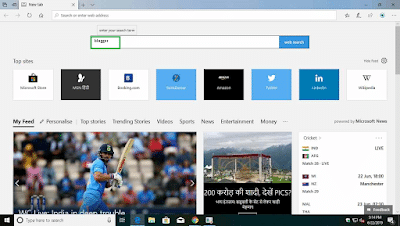
  • open your web browser.  
web browser in pc
Chrome

Step 2:

microsoft edge Blogger
Microsoft edge

Step 3:

  • Here, click on the blogger official website link.
blogger official website link
blogger official website

Step 4:

  • Click on create your blog if you already have an account then click on sign in.
 blogger website
blogger website

Step 5:

  • Choose your account to continue.
account continue Blogger
account continue

Step 6:

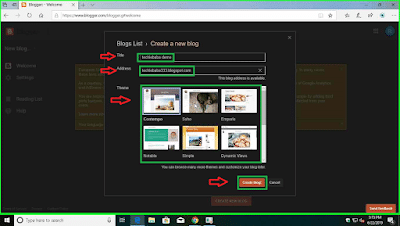
  • Next click on create a new blog and give your title and address then select a theme and click on create a blog.
 title and address Blogger
title and address

Step 7:

  • After fill up you can choose your domain name if you don’t want to choose from there you can click on no thanks.
Domain Blogger
Domain

Step 8:

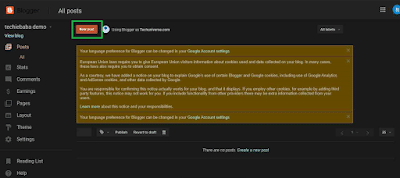
  • After that click on a new post to create your new post
create your new post Blogger
create new post

Step 9:

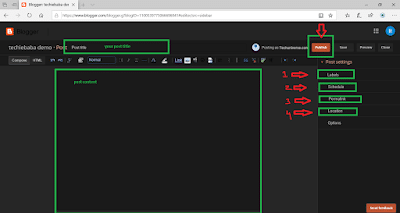
  • Here give your post title and post content. In the post, settings give your post labels example Android, windows, in the schedule option-click on a set date and time, in permalink choose custom permalink and in location give your location.
post content Blogger
post content

Step 10:

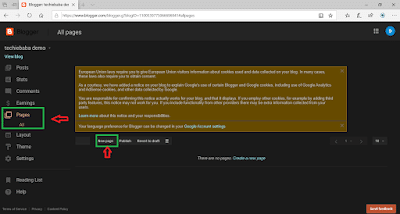
  • Next, click on pages and click on new pages to create pages like privacy policy, terms and conditions, contact us, these pages are very very important for your blog.
poge content Blogger
page content

Step 11:

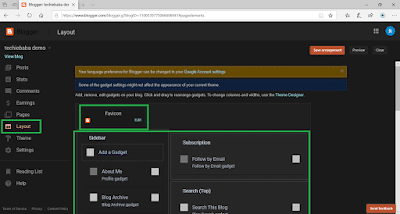
  • Click on the layout where you can customize your blog theme. Choose your favicon can add gadgets in the sidebar and remove waste things from your template.
blog theme Blogger
blog theme

Step 12:

  • In the theme option, you will get advanced customization options. In edit HTML  you can paste or edit different codes.
 customization options Blogger
customization options

» Top 5 Blog Writing Skills & Tips for Better Blog Posts

» How To Remove Date From Blogger Post URL – Make Blogger Permalink Format Like WordPress

Step 13:

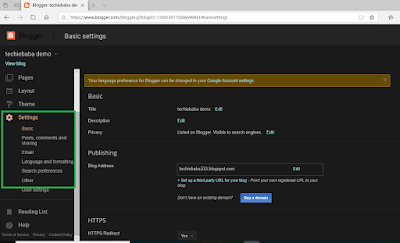
  • Click on settings where you will get all the settings for your blog. In basic settings give title, your blog description, in blog address you can set up a third-party URL for your blog such as .com, in search preference you will get settings related to Search Engine Optimisation.
Domain Settings Blogger
Domain Settings

So, friends, you have seen how easy  it is to create a blog on blogger.com

How to Add a Custom Domain to Blogger

  1. Buy a domain name from a domain registrar.
  2. In Blogger, go to Settings → Publishing → Custom domain and enter your domain with www, for example www.yourblog.com.
  3. Blogger shows two CNAME records. Add both records in your domain registrar’s DNS settings.
  4. Wait for the DNS to update (it can take up to a few hours), then save the custom domain in Blogger.
  5. Turn on HTTPS availability and HTTPS redirect in Blogger settings.

Make Your Blogger Blog SEO Friendly

  • Go to Settings → Meta tags, turn on Enable search description and write a short description for your blog.
  • Add a search description to every post from the post settings panel.
  • Use a fast, mobile-friendly theme. See 20+ Best Blogger Themes.
  • Submit your blog to Google Search Console so your posts get indexed faster.

Can You Earn Money With Blogger?

Yes. Once your blog has enough original content and traffic, you can apply for Google AdSense from the Earnings section in Blogger. Read How to Make Money From Google AdSense for the details.

Frequently Asked Questions

Is Blogger free?

Yes. Blogger is a free blogging platform by Google. You only pay if you want a custom domain name.

Blogger or WordPress: which is better?

Blogger is free and simple, which makes it good for a first blog. WordPress gives you more control over design, plugins and SEO. Read How to Start a Blog to compare the two.

Read Also: How To Make Money From Google AdSense

 Please Like, Comment, Share  THANK YOU!

List Of 30+ High Authority .Gov & .Edu sites To Get Backlinks

0

Edu Backlinks Sites List. Are you looking for the best .edu sites for backlink? Or are you looking for the best list of comment sites for educational blogs? If so, you landed on the best website. In today’s post. I will share an incredible list of backlink websites from where you get free Edu backlink.

But, Before that, we must understand what these Edu backlinks are and, Why this list of Edu sites for backlink is important for your blog. Are you curious to know? I know you are!

Let’s dive into that.

What Are Edu Backlinks?

.Edu backlink is the backlink that arrives at your site from an educational website. Either a university website or a university website.

These types of backlinks are the most authorized and reliable backlink in the eyes of Google.

You should read:

The DA PA is very high and the spam score is much lower. Being on the list of education blog comment sites can increase the ranking of your website in SERPs. If your site is new and you want to rank it faster in search engines, So this free list of Edu backlinks is one of the best options you can have. Backlink education sites are high-quality links that generally show value and trust.

All bloggers know the power of the main backlink of Edu websites. But, taking backlinks from the best Edu sites is not that simple. These educational backlink are really difficult to obtain because these sites do not allow anyone to easily create backlinks.

You can’t even create a profile creation backlink from these sites. However, they did not allow anyone to create a connection on their website because these areas identify with educational organizations,

Therefore, commercial customers and bloggers enthusiastically need Edu’s free backlinks from these sites. Some people imagine that they can basically buy a higher education website and get a backlink,

However, this is not such a direct strategy. These dofollow .edu backlinks sites really work. Bloggers and advanced advertisers are biting the dust to get Edu backlink.

Also Read:

They are even ready to pay for these educational site backlinks.

The list of high-quality blog comment sites for SEO is one of the best methods to create a high-quality backlink.

Through the comments on the blog, can also lead to the target audience and helps build connections. Blog comment sites are not only for backlinks but also for thoughts or opinions on a specific topic or blog post.

Why Is it important to get .edu and .gov backlink to get good ranking?

30+ Free .Edu Backlinks Sites List  Free .Gov Site Backlinks List

It’s good to have .edu, and .gov backlinks to get good rankings. .Edu and .gov sites have good public relations, so the number of users on those sites is large so that if a website gets backlinks from .edu and .gov sites of this site can get a good ranking on Google.

Top 20+ .EDU Backlinks Sites List

The unidirectional links of the Edu & gov websites are considered vote and recommendation on their website. The unidirectional link is the most effective search engine optimization link and can have an immediate effect on SERPs with the appropriate SEO method. Pinnacle-free list of. Edu websites, list of.Edu and.Gov websites, list of unzipped educational websites.

S.NO..EDU Backlinks Sites List
1https://ualr.edu/
2https://blogs.miamioh.edu
3 https://www.health.harvard.edu/blog/
4http://blogs.cimav.edu.mx
5 https://blog.smude.edu.in/smude.html
6https://marketingfarmaceutico.bsm.upf.edu/beyond-the-pill/
7 https://www.vhcc.edu/
8 https://www.stevenshenager.edu/blog
9 http://jdunn.journalism.cuny.edu/
10http://blog.nus.edu.sg/pc1221sem20910/2010/02/20/rotating-wheel/comment-page-3/#comment-2219
11http://elconcept.uoc.edu/2009/09/elearning-definition-project-begins.html
12http://blogs.stlawu.edu/jbpcultureandmedia/2013/10/14/blog-entry-6-the-obama-administration-and-the-press/comment-page-1882/?unapproved=197830&moderation-hash=d87709fd1db4bb00cd64c3c13efbe29d#comment-197830
13http://newsservice.gordon.edu/2014/02/civil-rights-film-series-launches-at-ssu.html
14http://blog.nus.edu.sg/pc1221sem20910/2010/02/20/crash-cushions/comment-page-3/
15https://scout.wisc.edu/Weblog/20110608?page=2#comment-814
16 https://www.swccd.edu/
17https://blogs.providence.edu/
18http://blogs.stlawu.edu/jbpcultureandmedia/2013/12/02/blog-entry-11-the-nfl-and-player-concussion/comment-page-2629/#comment-200857
19https://blogs.yu.edu/news-and-views/2017/11/07/alfred-and-evelyn-h-solomon-rare-book-room-formally-dedicated/
20http://events.lls.edu/event/volunteer_and_help_feed_the_homeless#.XMPl-OgzbIU
21 http://blogs.babson.edu/
22http://worldview.edgecombe.edu/2013/06/day-six-bosnia-herzegovina.html
23http://newsservice.gordon.edu/2014/03/new-beverly-indoor-playground-offers.html
24http://knsz.prz.edu.pl/forum/member.php?action=profile&uid=150789
25http://sites.gsu.edu/mdoctor1/2014/03/20/blog-3-aca-march-20/comment-page-331/
26https://webdev2.fs.illinois.edu/services/utilities-energy/production/solar-farms/images/default-source/utilities/solar-farm-aerials/phantom-006
27http://www.gulfstreampark.com/home/live-races-casinos-shops-and-restaurants-all-in-one-place-couldn’t-ask-for-more-
28 http://blog.antiochschool.edu/
29https://www.warner.edu/
30 https://www.baystate.edu/blog/
31 https://onlinelaw.wustl.edu/
32http://strategicplanning.dartmouth.edu/working-groups/graduate-education-for-the-future/question-11

» What Are Backlinks and How to Get More Backlinks?

Conclusion

So, the guys above are the list of high-quality .edu link sites.

If you liked this list of Edu backlinks, share it on your social media channels and I’ll see you next time.

Read also: