Microsoft has recently launched its new desktop operating system – Windows 11. Users who have joined the Windows Insider Program can now install a preview build of Windows 11 through System Settings.
However, the problem with release previews is that they are full of bugs and glitches. Windows 11 is still under testing, and Microsoft is constantly trying to improve the operating system.
In such a situation, it becomes necessary to keep your operating system updated. New Windows 11 updates fix bugs, add new features, and patch security vulnerabilities to protect your computer from new malware.
So in this article, we will share a detailed guide on how to update Windows 11 operating system. The process is going to be very easy; Just follow some simple steps given below.
Step 1. First, click on the Start button and select ‘Settings‘.
Step 2. On the Settings page, click on the Windows Update option. The Windows Update icon is located in the left pane of the screen.
Step 3. Now on the right pane, click on the ‘Check for Updates’ button.
Step 4. Now Windows 11 will automatically search for available updates. If an update is found, you will get the option to download it. Simply click on the ‘Download Now‘ button.
Step 5. Now, wait for the update to be downloaded to your system. Once downloaded, click on the ‘Restart Now‘ button.
Step 6. If you want to turn off the update notification, click on ‘Pause for 1 week‘ button on Pause Updates section.
This much only! You have done This is how you can update Windows 11 operating system.
So, this guide is about how to update Windows 11. I hope this article helped you! Please share this with your friends also. If you have any doubt related to this then let us know in the comment box below.
SEO या (Search engine optimization) आपकी online website की content की Visibility और गुणवत्ता बढ़ाने की प्रक्रिया है, ताकि सर्च इंजन (जैसे कि google, bing और yahoo) आपके द्वारा बताई गई उपयोगी content को आसानी से समझ सकें और फिर दिखा सकें एक महान परिणाम के रूप में इसे Searching रहे लोगों के लिए उपरोक्त कीवर्ड (या जानकारी)।
यह समझने के लिए कि SEO का वास्तव में क्या मतलब है, आइए पहले जानते हैं कि किसी भी website को SEO की आवश्यकता क्यों होती है?
आज की तारीख में, किसी भी website ट्रैफ़िक का सबसे बड़ा स्रोत Searching है।
एक उदहारण के तौर पर सोचिये, अगर कोई आम आदमी Blogging के बारे में कुछ जानना चाहता है तो वह सीधे कोई भी website नहीं खोलता है, वह सबसे पहले Google Home Page पर जाता है और अपने Search Keywords टाइप करता है, उसके बाद जो results पहले पेज पर आते हैं उन्हें ही open करके read करता है | इसे हम internet पर traffic उत्पादन भी कह सकते हैं|
इस रिपोर्ट के अनुसार, web पर लगभग 60% ट्रैफिक गूगल सर्च से शुरू होता है। और अगर आप अन्य लोकप्रिय सर्च इंजन (जैसे बिंग, याहू और यूट्यूब) से भी ट्रैफिक जोड़ते हैं, तो पूरे web ट्रैफिक का 70.6% इन्हीं सर्च इंजनों से आता है।
दिसंबर 2018 में, Google Searching औसतन प्रति सेकंड 40,000 अनुरोधों की सेवा कर रहा था, अब आप इसका अनुमान लगा सकते हैं कि इस पूरी दुनिया में कितने लोग प्रतिदिन Google Searching पर निर्भर हैं।
इस भारी मांग के लिए पर्याप्त आपूर्ति भी है। जिस तरह से आप अपना ब्लॉगपोस्ट लिखते हैं, उसी तरह और भी बहुत से लोग ब्लॉगपोस्ट लिखते हैं। क्या आप जानते हैं कि प्रत्येक व्यक्ति प्रतिदिन कितने ब्लॉग पोस्ट प्रकाशित करता है?
2016 में, टॉर्कमैग द्वारा प्रकाशित एक रिपोर्ट में कहा गया था कि दुनिया भर में वर्डप्रेस साइट्स प्रति सेकंड 24 पोस्ट प्रकाशित करती हैं, यानी एक दिन में 20 लाख ब्लॉगपोस्ट, और हर महीने 6 करोड़।
और यह उस समय केवल वर्डप्रेस यूजर्स की गिनती थी। यदि हम आज के सभी ब्लॉग पोस्टों को गिनें तो निश्चित रूप से यह संख्या और भी अधिक होगी।
अब आप ही सोचिये की गूगल को अपने आप कैसे पता चलेगा कि उन 20 लाख पोस्ट में से कौन सी पोस्ट सही और ज्ञानवर्धक है? Google उन सभी लोगों में से सर्वोत्तम परिणाम प्रस्तुत करना चाहता है जो Search Engine पर आए हैं और इसलिए यदि आप अपने ब्लॉग को सफल बनाना चाहते हैं, तो भीड़ से बाहर खड़े होना आवश्यक है। 75% लोगों को फ्रंट पेज के अलावा कोई दूसरा पेज नहीं दिखता।
Google के मुख्य पृष्ठ पर आने से किसी भी ब्लॉग या व्यवसाय के लिए यह तय होता है कि वे बड़ा बनना चाहते हैं या सिर्फ online रहना चाहते हैं।
Google के मुख्य पृष्ठ पर आना मुश्किल हो सकता है, लेकिन असंभव नहीं है, और यही कारण है कि SEO आपकी मदद करता है।
चलिए अब आसान शब्दों में समझते हैं कि SEO क्या है?:–
SEO Pillar
1. Content गुणवत्ता:
यदि आप (Apple) सेब बेचने वाले किसान हैं, लेकिन Google आपको Apple कंप्यूटर का विक्रेता मानता है, तो यह उन लोगों को आपकी website पर पुनर्निर्देशित करेगा, जिन्हें Apple कंप्यूटर की आवश्यकता है, यह आगंतुकों को भी निराश करेगा (क्योंकि वे Apple हैं)। सर्च कर रहे थे) और अगर आपको सही जानकारी नहीं मिलती है, तो वे वापस आ जाएंगे और Google को लगेगा कि आपके द्वारा दी गई जानकारी संतोषजनक नहीं है, इसलिए वे अगली बार उन लोगों (या नए लोगों) को दूसरी website पर रीडायरेक्ट कर देते हैं। संतोषजनक जानकारी दे पाएंगे, इससे आपकी साइट पर आने वाला ट्रैफिक कम होगा, जो आप कभी नहीं चाहेंगे।
इसके बजाय अगर Google आपकी website पर सेब (फल) की Searching करने वाले लोगों को भेजता है और वे आपके द्वारा बताई गई content से संतुष्ट हैं, तो Google आपकी website पर और लोगों (जिन्हें समान जानकारी की आवश्यकता है) भेजेगा। रीडायरेक्ट करेगा, इससे आपके विज़िटर्स की संख्या बढ़ेगी और सर्च पेज रैंकिंग भी।
2. Website की Visibility:
सर्च इंजन कई webpage, वीडियो और स्थानीय लिस्टिंग को अपने साथ क्रॉल करके रखता है। Searchingकर्ताओं के लिए सर्वोत्तम परिणाम प्राप्त करने के लिए, वे कई जटिल कारकों (उर्फ रैंकिंग एल्गोरिदम) को ध्यान में रखते हुए उन webpage का विश्लेषण करते हैं और विभिन्न Searching कीवर्ड के लिए webpage की उपयोगिता के आधार पर ऑर्डर करते हैं।
Google संतोषजनक और लोकप्रिय webpage को क्रम में दिखाता है और असंतोषजनक परिणाम क्रम में दिखाता है। इस तरह, सही SEO और संतोषजनक content के साथ, आपके पोस्ट Searching परिणामों में उच्च बने रहते हैं और आपकी साइट लोगों को अधिक दिखाई देती है।
प्रो टिप: Google को पहले पांच परिणामों में सभी क्लिकों का ६७% प्राप्त होता है। अब आप इससे समझ सकते हैं कि गूगल के मेन पेज पर आना कितना जरूरी है।
3. Organic Traffic Results:
विज्ञापन के जरिए आप लोगों को अपनी website के बारे में बताकर भी कॉल कर सकते हैं, लेकिन ऑर्गेनिक ट्रैफिक वह ट्रैफिक है जिसके लिए आपको कुछ भी भुगतान नहीं करना पड़ता है। सभी Searching इंजन (गूगल, बिंग और याहू), सभी webpage, वीडियो और स्थानीय लिस्टिंग को प्राथमिक (मुख्य) Searching निर्देशिका में रखा जाता है और उपयोगकर्ताओं को दिखाया जाता है।
ऑर्गेनिक और सशुल्क परिणाम क्या हैं?
Searching इंजन परिणाम पृष्ठ को दो अलग-अलग वर्गों में विभाजित किया जा सकता है: जैविक और भुगतान किए गए परिणाम।
ऑर्गेनिक Searching परिणाम (सापेक्ष और विश्वसनीय)
ऑर्गेनिक Searching परिणाम (या “प्राकृतिक” के रूप में संदर्भित परिणाम) प्राकृतिक परिणाम हैं जो 100% योग्यता के आधार पर रैंक करते हैं।
दूसरे शब्दों में, ये ऐसे Searching परिणाम हैं जिनके पास उच्च रैंक के लिए Google या किसी अन्य Searching इंजन को भुगतान करने का कोई तरीका नहीं है। Searching इंजन सैकड़ों विभिन्न रैंक एल्गोरिदम के आधार पर ऑर्गेनिक Searching परिणामों को रैंक करते हैं, लेकिन सामान्य तौर पर Google द्वारा समुद्री परिणामों को किसी भी विषय पर सबसे विश्वसनीय और आधिकारिक माना जाता है।
ऑर्गेनिक सर्च ट्रैफिक विशेष रूप से कोई भी अनपेड ट्रैफिक है जो SERPs (सर्च इंजन पेज रिजल्ट यानी सर्च पेज रिजल्ट) से आता है। आप अधिक आगंतुकों को आकर्षित करना चाहेंगे जो वास्तव में आपके द्वारा प्रकाशित content में रुचि रखते हैं।
भुगतान किए गए परिणाम (सशुल्क Searching परिणाम)
पेड सर्च रिजल्ट ऐसे विज्ञापन होते हैं जो ऑर्गेनिक रिजल्ट के ऊपर या नीचे दिखाई देते हैं, बड़ी कंपनियां उन्हें दिखाने के लिए Google को भुगतान करती हैं। जितनी अधिक प्रतिस्पर्धा, उतना ही महंगा कीवर्ड।
सशुल्क विज्ञापन ऑर्गेनिक परिणामों से पूरी तरह भिन्न हो सकते हैं. सशुल्क विज्ञापन अनुभाग में, किसी विशेष कीवर्ड के परिणामों का क्रम विज्ञापनदाताओं के भुगतान पर निर्भर करता है। अधिक भुगतान करने वाले व्यक्ति के विज्ञापन पहले दिखाए जाएंगे (आप इसे “पे प्रति क्लिक विज्ञापन” के रूप में जानेंगे)।
आइए अब जानते हैं कि On-Page SEO vs Off-Page SEO Deferent क्या हैं?
On-Page SEO
On-Page SEO यह सुनिश्चित करता है कि Google आपके webpages को ढूंढे ताकि वे उन्हें Searching परिणामों में दिखा सकें। इसमें अच्छी तरह से विस्तृत और उपयोगी content है जिसे आप दिखाने की कोशिश कर रहे हैं।
टिप्पणियों के लिए उपयोगकर्ताओं को प्रोत्साहित करें।
साइट पर उपयोगकर्ता द्वारा बिताया गया समय बढ़ाएँ
Off-Page SEO
Off-Page SEO Google को बताता है कि अन्य website आपकी साइट के बारे में क्या सोचती हैं। यह आपकी website को अन्य website से बैकलिंक बनाने या उनकी content को अधिक उपयोगी और पूर्ण बनाने पर केंद्रित है और “लिंक बिल्डिंग” को इसका एक महत्वपूर्ण हिस्सा माना जाता है)।
अभी के Time में जो मोबाइल पर सबसे ज्यादा उसे होने वाला ऑपरेटिंग सिस्टम है वो है एंड्राइड क्यों की इसमें हमें किसी भी दूसरे मोबाइल ऑपरेटिंग सिस्टम से ज्यादा फीचर इसमें मिलते है. और हम जैसा कहे वैसे हम इसको कस्टमाइज कर सकते है.
अगर आप Android फ़ोन कुछ टाइम से उसे करते है तो आपको USSD Codes के वेयर में तो पता ही होगा और आप कुछ Codes पहले से जानते भी होंगे.. जिनकी मदद से हम अपने ऑपरेटिंग सिस्टम की और भी फीचर को अनब्लॉक कर सकते है.
उस्सद मीनिंग होता है “Unstructured Supplementary Service Data” जिसको हम सीक्रेट कोड और क्विक Codes की तरह भी इस्तेमाल करते है. ये जो कोड होते है वो फ़ोन की कुछ एक्स्ट्रा फीचर को फ़ोन में अनब्लॉक करने के लिए होते है.. जो के डायरेक्ट हमें किसी मेनू में इसका ऑप्शन नहीं मिलता.
USSD Codes का उसे नोर्मल्ली गस्म फ़ोन्स में उसे होता था जिसमे हम सिम का डाटा और वैलिडिटी देख सके. पर अब जो नई जनरेशन फ़ोन आते है उनसे भी उस्सद कोड की मदद से हम बहुत से फ्यूचर अनब्लॉक कर सकते है जो नोर्मल्ली यूजर से हाईड करके रखे जाते है.
किसी भी सिम ऑपरेटर का उस्सद कोड आपको यहाँ मिल जायेंगे और आज इस पोस्ट में जैम मोबाइल के ६० सीक्रेट उस्सद कोड के वेयर में जायेंगे.
List Of All Secret Phone USSD Codes in Hindi
अभी में आपसे जो Codes शेयर कर रहा हु वो मोबाइल कंपनी हमसे हाईड करके रखती है क्यों की कही न कही वो नहीं चाहते की हम फ़ोन के उन् फीचर को भी उसे करे.. परहम इन् सीक्रेट Codes की मदद से इनको भी देख सकते है या अनब्लॉक कर सकते है.
USSD Codes Phone Information Check करने के लिए
ये जो उस्सद कोड है इनको आप डायल करके अपने फ़ोन की डिटेल्स को देख सकते है.
##7594## Changes the power button behaviour.
##273283255663282##* Backup all media files stored on your device.
##197328640## This opens the Service Mode
##4636## Shows Information about phone, battery and also usage stats.
##7780## Factory Reset your smartphone.
27673855# Hard Reset & Reinstall the Firmware.
##34971539## Displays Information about the camera.
ये जो सीक्रेट कोड है उनकी मदद से आप फ़ोन के जोफेअतुरे है उनको चेक कर सकते है की वो सही से वर्क कर रहे है के नहीं और उनकी डिटेल देख सकते है.. ये जो सीक्रेट एंड्राइड उस्सद कोड है वो हमारे जब भी बहुत काम आ सकते है जब हम किसी से पुराण फ़ोन खरीद रहे हो.. तो हम इन् Codes को डायल करके आसानी से पता कर सकते है की कही फ़ोन में कोई प्रॉब्लम तो नहीं.
##232339## or ##526## Test the state of Wireless LAN
##232338## Display the MAC Address of WiF
##232331## Test the Bluetooth sensor of your device.
##232337#*# This Shows the Bluetooth Device address.
*##44336##* Display the Build time.
##1234## Displays the PDA and Phone Firmware Info
##0588## Tests the Proximity Sensor
##1472365## This Tests the GPS functionality
##0##* Test the phone’s LCD Display
##0673## or ##0289## Test the Audio of your smartphone
##0842##Tests the Vibration and Backlight
##8255## Google Talk Service Monitoring.
##2663##Displays the Touchscreen version.
##2664## Allows you to perform a touch screen test
USSD Codes RAM/Software/Hardware Information देखने के लिए
ये जो सीक्रेट एंड्राइड उस्सद कोड है इनकी मदद से हम फ़ोन की जो भी सॉफ्टवेयर दारद्वारे राम की इनफार्मेशन है वो देख सकते है.. तो फिर हमें किसी से पूछने की जरुरत नहीं की इस फ़ोन की राम कितनी है.. हम कोड डायल करके आसानी से देख सकते है.. और इससे अगर कोई फ्रॉड कंपनी होगी तो उनकी चोरी भी आसानी से पकड़ा जाएगी अगर मान लो राम २गब दे रहे और कह रहे की 4GB है.
##3264##Displays RAM information
##1111## Displays the software version.
##2222##Displays the hardware version.
*#06# It Displays the phone’s IMEI number
*#2263# Displays the RF band selection
*#9090# Shows the Diagnostic configuration.
*#7284# This opens the USB 12C mode control.
*#872564# This shows the USB logging control.
*#745# This opens the RIL dump menu.
*#746# This opens the Debug dump menu.
*#9900# Opens the System dump mode.
*#03# NAND flash serial number
*#3214789# This shows the GCF mode Status
*#7353# Opens the Quick test menu
*#0782# This performans a Real-time clock test.
*#0589# This performs Light sensor test.
USSD Codes Specific Phones के लिए
ये जो सीक्रेट कोड है वो सभी फ़ोन के लिए नहीं है कुछ कंपनी के फ़ोन में ही ये काम करते है.
##7764726 Opens the hidden service menu in Motorola DROID phones
1809#990# Opens the LG Optimus 2x hidden service menu
3845#920# Opens the LG Optimus 3D hidden service menu
#0# Opens the service menu in Galaxy S3.
USSD Codes Call Information निकलने के लिए
ये जो उस्सद सीक्रेट कोड है इनकी मदद से आप फ़ोन नंबर की डिटेल चेक कर सकते है जैसे कितना डाटा बचा है पुक लॉक है या अनलॉक कॉल फॉरवार्डिंग चालू है या बंद.
*#67# Displays your Call forwarding
*#61# Displays additional call forwarding information
*646# Displays Available minutes (AT&T)
*225# Check your bill balance (AT&T)
#31# Hides your phone from caller ID
*43# Activates the Call Waiting feature
*##8351##* Enables voice dialing log mode.
##8350## Disables voice dialing log mode.
05*# Execute from Emergency dial screen to unlock PUK code.
*#301279# Opens the HSDPA/HSUPA control menu.
*#7465625# Displays the phone lock status.
ये जो सीक्रेट कोड है एंड्राइड फ़ोन के इनमे कुछ कोड ऐसे भी है जिनका उसे करके फ़ोन ब्लॉक हो सकता है या पूरा डाटा डिलीट हो सकता है.. या सॉफ्टवेयर डिलीट हो सकता है.. इसलिए आप किसी भी कोड को उसे करे तो अपने रिस्क पर करे.. क्यों की अगर आपके फ़ोन में इन् कोड को उसे करने से कुछ होता है वो कंपनी आपको सायद वार्रन्टी में फ़ोन को तीख ना करे. क्यों की वो ये Codes हाईड करके रखते है.
उम्मीद है आपको ये सीक्रेट कोड में जरूर कुछ उसेफुल कोड भी मिले होंगे जिनसे आप अपने फ़ोन उसे करने का जो एक्सपीरियंस है वो और ज्यादा बढ़ा पाएंगे.
अगर लिस्ट में कोई कोड रह गया हो जो आपको पता हो तो कमेंट में जरूर शेयर करे और आपको ये जानकारी किसी लड़ी वो भी जरूर बताये जिससे हम आगे भी आपके लिए ऐसी उसेफुल इनफार्मेशन लेट रह.
Make an incredible news site with our newspaper layout. This bestseller theme is excellent for blogging and news, newspaper, magazine, publication, or review sites. It supports YouTube videos. AMP and Mobile-Ready.
GDPR agreeable, the subject is quick, basic, and simple to use for cryptographic money, style, News, nourishment, way of life, current, individual, travel, extravagance, viral, insignificant, negligible ventures, and the sky is the limit from there.
Integrated with Instagram, bbPress Forum, BuddyPress, and WooCommerce, it utilizes the best spotless SEO rehearses. The newspaper supports responsive Google advertising and AdSense.
Why ChooseNewspaper v11.2Theme
We choose to buy Themes / Accessories with the most popular/reliable/best-selling standards in the market.
We are attentive and regularly present a new version of Themes / Complements. If you cannot find the latest version of the product on the site, contact us.
Our prices are much lower than the developers. Fast and secure payments.
You have the opportunity to buy a premium product at an affordable price!
100% clean original files without implemented advertising, viruses or malicious code. We trust thousands of customers around the world!
Download all free Themes / Add-ons for the Members Club, Join now!
Unlimited downloads, you download the product directly from our website without waiting or advertising!
Unlimited use, you can install them on any site with full premium features available.
Free updates for life for a single purchase or until you cancel your subscription.
All Themes / Complements presented on the website are published under the GNU General Public License.
Start A Blog: Many new bloggers may feel that they do not need to know how to write a blog post, after all, it is not just writing how hard it is?
Well, there is a lot more that goes into blog post writing than you originally thought, especially if you want to get traffic.
In this post, we will look at the important aspects that you need to do when crafting your articles before you hit the published article. let’s get started.
How to Research for a Blog Post?
Before writing a single word, you should spend time properly researching the topic or subject you want to cover. Now a lot depends on what your post might be about, but whether you are writing about yourself or your personal experiences, research can be done.
The first thing you should look closely at is which keyword or keyphrase you want to target. This is something that a lot of bloggers forget about, yet I cannot stress enough how important it is.
For people to find your post online, you need to understand what people are typing into the search engine, what they are looking for.
The best place to start is the Google Keyword Planner tool that lets you research keywords and key phrases that you can use for your articles.
Spend some time looking at existing posts on the topic you want to cover yourself. This does not mean copying what other people have written (you do not want to do that!), Instead, you are looking for what all these posts are saying.
There may already be a million posts that cover the same topic you want to write about, but if you can do something different or approach it from a different angle, you can get out of the crowd Can help yourself.
Plan the Structure of Your Blog Post
Once you finish researching your article, it is time to plan the structure of your post. Just as you plan a beginning, middle, and end when writing a story, you need to plan the way your article flows.
Everyone does it differently, but I always try to come to terms with my subjectivity. This way I can turn my posts into easy-to-use sections without repeating myself.
I think it also helps when writing has divided my posts in such a way that instead of trying to write about everything at once.
Write it Down
It should be easy, so I don’t need to say much about it here. If you have done your research and planned to structure your post before, this should make the whole writing process even easier.
Add a Title, Introduction, and Call to Action
Probably the most important step is next because you need a decent title, introduction, and call to action. Many of you may do this during the writing or planning phase of your article, but I think it does not help so far.
This stage is so important because most people will see these first and decide on the rest of your article based on them.
To find people and even think about clicking your post, you will need a good title. It needs to be interesting, enticing, contains keywords/keyphrases that you are targeting, and immediately explain what your post is about.
Coming up with a good title is by no means easy, but always remember this: a bad post with a good title will always get more clicks than a good post with a bad title.
Your introduction needs to be similar to your title, only you have more words to play. You have a pair (at most) of paragraphs to learn about your posts without taking away the entire game and encourage them to continue reading.
If your introduction is up to scratch, people will simply click back and navigate elsewhere. Think of your introduction as a synopsis on the back of a book that you read before you buy it.
Your call to action has to be added at the end of your post. Its purpose is to encourage viewers who have read that to stay on your site and/or promote it. You can do this in many ways;
Encourage them to leave a comment
Point them in the direction of other relevant posts on your site
Tell them about the offer/competition/service/product on your site
Ask them to subscribe to your email newsletter
Get them to share your posts with your friends via social media
Your call to action requires all of the above to be done, this is just an incentive for them to take further action after your post. The last thing you want is someone to navigate a way through the entire post and forget about your site never returning.
Add Picture/Video
I always like to see this next step as adding window dressing to your article. No matter how good your overall post is, you need to have some appealing appeal in it to attract the attention of the audience.
Adding pictures is the simplest way to do this. This helps to break up your post and make it more interesting rather than a large mass of text.
Videos are equally good at doing this, especially when they are informative and relevant to what you are writing about.
Edit
When you feel you have finished your post then remember to spend time editing and going on what you have written. This is a good time to add things like inbound and outbound links, or even affiliate links. Is where appropriate.
Publish
Only when you are 100% happy and read and re-read your post thoroughly to check for any errors or mistakes, you can press the publish button.
Always be aware of the fact that your blog posts are a reflection of you and your website, you need to make sure that they are up to your high standards before you upload them.
Your Turn
So that’s what I think, what about you?
How do you go about writing your blog post? Do you do anything differently?
I would love to hear from you so please leave a comment below.
Aero WhatsApp Latest Version APK Download: You can Download Aero WhatsApp APK on your phone from this post. We will tell you how you can use Aero WhatsApp on your phone. Many companies, applications, and websites are modifying their services so that they are also often compatible with mobile phones.
In today’s world, social networks and instant messaging applications are available for people to stay connected to each other. Applications such as FM WhatsApp, OG WhatsApp, GB Whatsapp, and WhatsApp Plus are also available for download on our website, but for today’s article, let’s talk about Aero WhatsApp and its amazing features.
Similarly, once we refer to messaging the first instant messaging application that catches everyone’s attention is WhatsApp Messenger. WhatsApp is one of the popular and widely used messaging platforms that allows you to send images, videos, location, audio, contacts, documents along text messages. Many features are still missing in WhatsApp but it will be updated as scheduled.
Aero WhatsApp APK is a modified and improved version of the original WhatsApp. Although there is no error in the original it still lacks some features and sometimes it is annoying to use the application. Aero WhatsApp is a version that provides useful functions that are not present in the original application. It doesn’t matter if we are using a native or a modified application, we always look for the best application that gives us the best features.
There are tons of WhatsApp MOD APK available on the Internet some of them are fake or just a copy of the original application that does not include any new features. Therefore we decided to collect such WhatsApp modifications from several reliable sources and make them readily available. For today’s article, we have discussed some features of WhatsApp Aero with its direct download link. Try the latest version of Aero WhatsApp APK and enjoy all those amazing features.
DownloadAero WhatsApp APK Latest Version 2021
Amazing Features Of Aero WhatsApp
If you can get more why settle for less? With the growing demand for adjustments related to new features and privacy users use third-party. WhatsApp versions instead of the original version. It is always said that a modified application is always better than the original.
This is due to the features it provides that are not present in the normal application. And that is why we have mentioned here some of the most special features of Aero WhatsApp. I am sure that if you review all these features, you can try the Aero WhatsApp application.
Components
Privacy
You can hide your blue tick, 2nd tick, online information, status, listen to the sent audio files, “Recording …”, “Writing …”.
Mightiness
With the ability to prevent messages from being deleted, even if people retrieve their messages, they will not be deleted from you.
Content
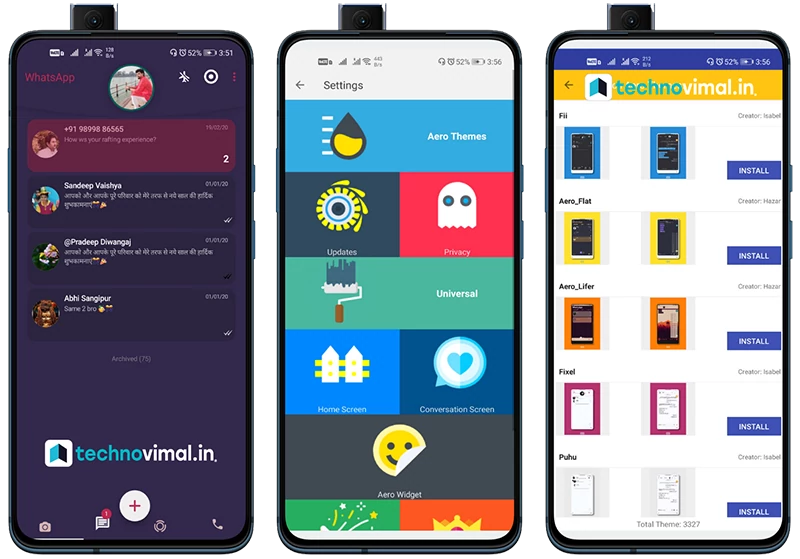
WP Aero, which hosts more than 3000 themes, can instantly download the theme you want or you can create your theme professionally.
Logs
Find out who is online and offline, who has changed their profile and status photo.
Enhanced Media
WP Aero allows you to share 700 MB of video and 50 MB of images.
Lock
WP Aero allows you to take advantage of the enhanced blocking options to keep your chat safe until fingerprints.
Customize
WP Aero has more fonts, bubble styles, brand styles, and different personalities than any other WP mod.
Support
You can get immediate answers to your questions and make suggestions from our Telegram group and the WP support number. The required details can be found in WP Aero> Support.
Aero Widget
Thanks to this widget that comes with WP Aero, you can access the Aero Mod page and profile without logging in to WP, connecting and disconnecting, checking its status and name.
Emojis
You can choose between WP emojis, Facebook emojis, Emoji One V3 emojis, Android nougat emojis, and Android Oreo emojis.
Offer
WP Aero; It is compatible with Turkey, Azerbaijan, Arabic, English, Spanish, Italian, Portuguese (Brazil), German, Indonesian, Marathi, Bahasa Malaysia.
Hidden media
With WP Aero, you can hide all incoming and outgoing videos, images, and GIFs from your gallery and view them only from WP.
How ToBackup WhatsApp
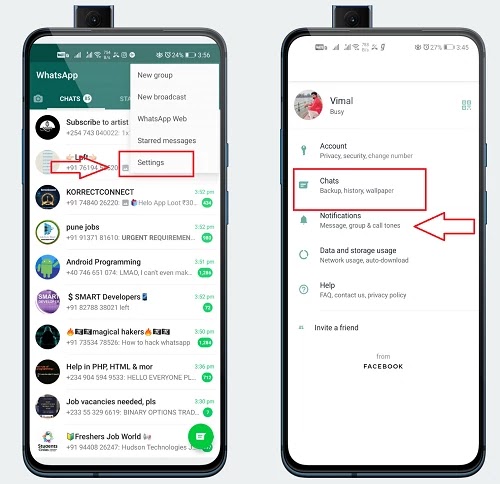
Step:1 First of all Backup WhatsApp data
Step 2. Then Tap on chats.
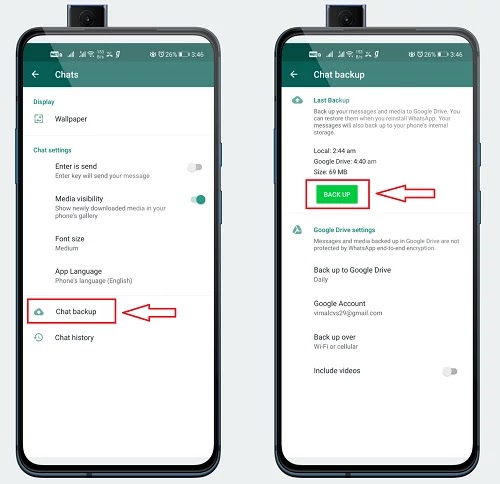
Step 3. Select Chat backup
Once completed you should see a backup to confirm.
How To Install WhatsApp Plus Update
First of all, uninstall or disable the official WhatsApp or older WhatsApp Plus APK (if installed).
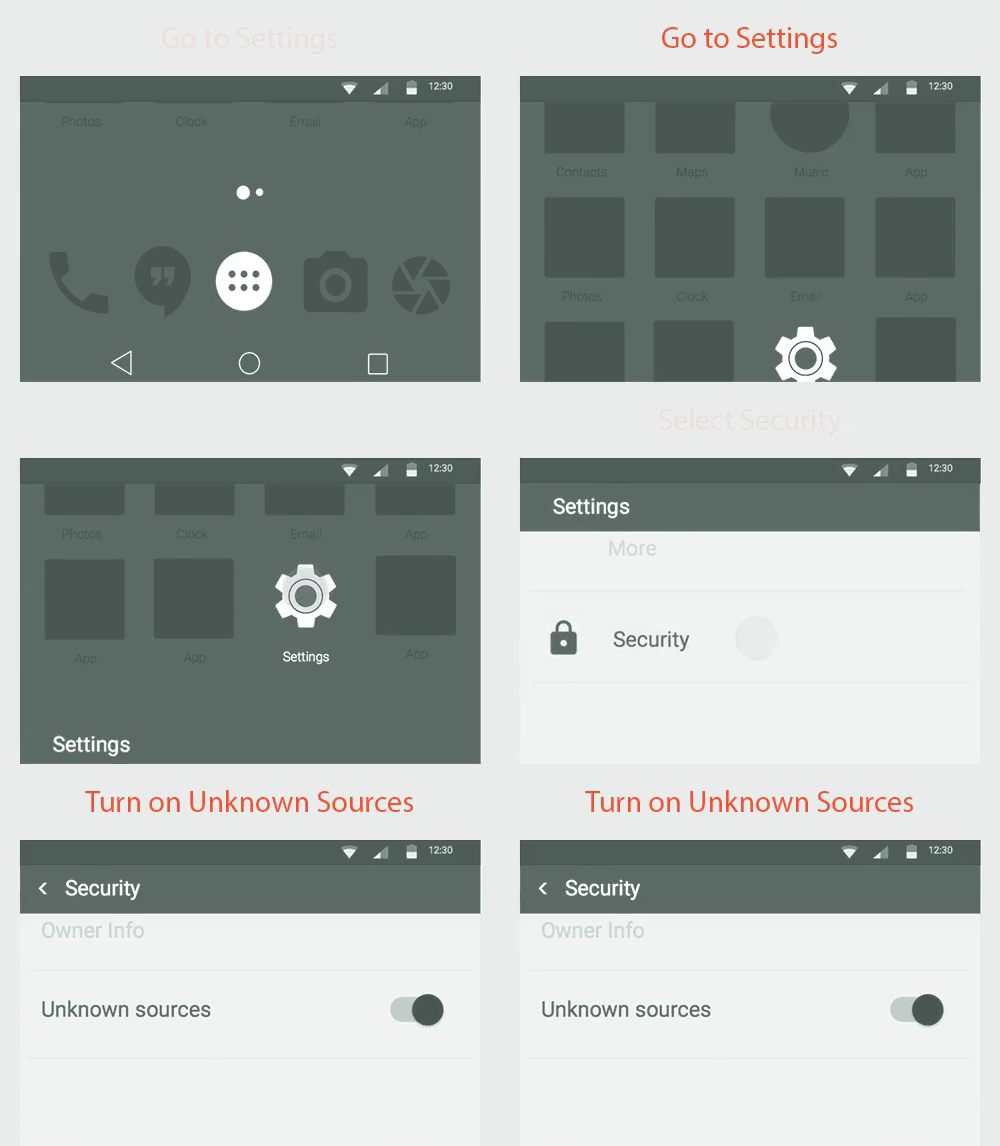
Enable the choice that says “install apps from unknown sources”.
install apps from unknown sources
Click install and wait for the installation to finish.
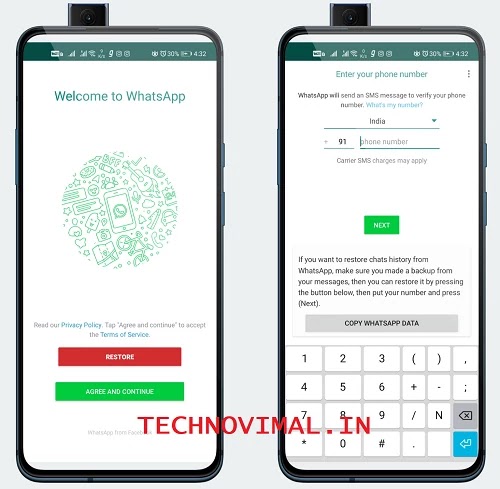
Once this is done, open the app and register with your mobile number.
For Banned Users:
Installation instructions:
Remove/uninstall Old Aero and all versions of WhatsApp from your device.
Delete the WhatsApp folder. If you have important data, you can move this folder to another location.
Install Whatsapp Arrow on your device. The use of WP Aero in the name of the original package is recommended. Touch me (if you need to uninstall the original WhatsApp to find out) if you don’t know where to download it.
Verify your number. Never restore old backups (chats) (V7.96 and earlier backups) in newer versions (V7.98 and later). Installation from scratch is recommended, restoring the backup (chat) is very risky.
If the WP Aero application issues an alert such as Google Play Services during the initial setup, simply press the Back button on your device.
Conclusion
WhatsApp has always been with us for an extended time, and that we like to use it but being a politician version it has some limitations. There are a few things that we were presenting for but unfortunately, WhatsApp could not add all those sought-after features for some reason. Then the question arises here that once you can get a lot from an equal app. “AeroWhatsApp” easily surpasses the official version of WhatsApp with its amazing features.
Many features such as Aero WhatsApp are taken to the replacement level to disable the last seen freeze, forward append message and hide view status. It is like giving complete freedom to the users. So go give it a try, trust me, you won’t shut it down once you use it. Now download FM Whatsapp from the link given in the middle of the article.
जमीन का बंटवारा का नियम: अगर आपके परिवार में तीन से चार भाई हैं और परिवार में बंटवारा होने वाला है या बंटवारे को लेकर संशय है तो वो कौन सी बातें हैं जिनका ध्यान रखना चाहिए ताकि आपको अपने हिस्से का हक मिल सके। अपने दादा के परदादा की भूमि पर और भविष्य में आप एक सुखी जीवन व्यतीत करें।
इस कार्य को पूरा करने के लिए आपको जमाबंदी करनी होगी, अगर आपके नाम पर जमाबंदी नहीं है, तो आपको उस जमीन का स्वामित्व कभी नहीं मिल सकता है, उस जमीन पर कर्ज भी नहीं मिलेगा। जमाबंदी के लिए 50 रुपये का स्टांप पेपर उपलब्ध है। जो कोई भी इस कागज को बेचता है, हमें 100 रुपये देने होंगे। आइए जानते हैं कि बंटवारा किस तरह की परिस्थितियों में मान्य होता है
जमीन का बंटवारा का नियम और कितने प्रकार का होता है?
आज हम बात करेंगे कि परिवार कैसे बंटेगा। आप किसी भी संपत्ति का आपसी विभाजन कर सकते हैं। हम इसी के बारे में बात करने जा रहे हैं, चाहे वह आपकी जमीन हो या कोई संपत्ति, आप इसे आसानी से बांट सकते हैं। संपत्ति को मुख्य रूप से 3 तरीकों से बांटा गया है।
1)आपसी सहमति बंटवारा:-
आपसी सहमति बंटवारा
यह सबकी सहमति से होता है। इसमें परिवार के किसी सदस्य को दिक्कत नहीं होती है। पहले के लोग इस बंटवारे पर इतना महत्त्व नहीं देते थे क्यूंकि इसमें परिवार के भाई और कुछ अन्य सदस्य मिलकर फैसला करते थे की वह कौनसी जगह ले और किस तरफ ले। पर आजकल के समय पर यह ज्यादा परिपक्व हो गया है क्यूंकि किस जगह हाईवे आ जाये या बड़ा मार्किट बन जाए जिसके वजह से उस इलाके की कीमत बढ़ जाए फिर हर कोई उस इलाके की मांग करता है ऐसे में सहमति बटवारा ज्यादा कारगर नहीं साबित हो रहा है।
2)पंचायती स्तर का बंटवारा:-
पंचायती स्तर का बंटवारा
इसमें पंचायत के लोगो के हस्ताक्षर और सहमति होती है। इसमें पंचायत के लोग जरूर आते है। इस स्तर पर काफी लोग आते है। दरअसल इसमें यह कहानी हो जाती है की पंचायत से जो आता है उसकी घर की स्थिति खुद सही नहीं होती है तो वह दूसरो को ज्ञान किस तरह से देगा की आप वहाँ रहो और तुम यहां रहो यु कहें की पंचायती फैसला जिसकी लाठी उसकी भैंस के बराबर है। तो पंचायती बंटवारे को भी खारिज करा दीजिए। यहां पर जमाबंधी भी नहीं चलती है। यह भी ना कराये तो अच्छा रहेगा।
3) तहसील में बंटवारा:-
तहसील में बंटवारा
यदि आप लोग तहसील में बाँट दें तो यह विभाग आपके लिए बहुत ही आसान और बहुत सस्ता बना देगा और बहुत जल्द बंटवारा हो जाएगा। ऐसे में संपत्ति भी आपके लोगों के नाम पर बनेगी, यानी जितना अधिकार आपको मिल रहा है, संपत्ति के नाम पर सरकार के घर में दस्तावेज भी तैयार होंगे और होंगे। अपने लोगों के नाम एक जमाबंदी और रसीद आपको अपने नाम पर मिल जाएगी। जमीन भी काट सकते हैं। इस वितरण को करने के लिए आप अपनी तहसील में आवेदन कर सकते हैं, और इसमें ₹1000 तक का खर्च आएगा, इसमें अधिक खर्च नहीं होगा और अधिकतम 1 सप्ताह के भीतर आपको संपत्ति आवंटित हो जाएगी।
4) रजिस्ट्री बंटवारा:-
रजिस्ट्री बंटवारा
सबसे मजबूत और ठोस बंटवारा रजिस्ट्री बंटवारा होता है। यदि आप रजिस्ट्री का बंटवारा करते हैं, तो यह आपको अधिक खर्च करेगा। आपकी संपत्ति के मूल्य के अनुसार खर्च भी आपको उठाना होगा। परिवार के सभी सदस्य आपसी सहमति से रजिस्ट्री कार्यालय में जाकर इस बंटवारे को बांट सकते हैं। यह बंटवारा एक ही दिन में पूरा हो जाएगा और सभी लोगों को संपत्ति से जुड़े अलग-अलग दस्तावेज दिए जाएंगे। यह वितरण आप ऑनलाइन भी करवा सकते हैं, फिर भी खर्चों में कोई अंतर नहीं आएगा।
जमीन का बंटवारा का नियम:-
पुश्तैनी जमीन बेचने से पहले करना होगा परिवार का बंटवारा, जमीन दाखिल कर अस्वीकृत करना होगा। भूमि पंजीकरण दस्तावेज में अपनी संपत्ति का पूरा ब्योरा देना होगा। लेकिन इस पूरी प्रक्रिया में बेटियां हकदार नहीं होंगी। अगर भाई जमीन बेचना चाहते हैं तो बहनों के हिस्से की रक्षा की जाएगी या उनकी सहमति जरूरी होगी।
अपने बाप दादा के नाम की जमीन को अपने नाम पर कैसे करे ?
जमीन का बंटवारा
People Also Ask:-
पुश्तैनी मकान का बंटवारा कैसे करें?
पैतृक संपत्ति में बाप-बेटे का हिस्सा: पिता (पैतृक संपत्ति का मौजूदा मालिक) और उसके बेटे का प्रॉपर्टी पर बराबर हक होता है. हालांकि पहली पीढ़ी का हिस्सा (पिता और उसके भाई-बहन) पहले तय होता है. इसके बाद की पीढ़ियों को पुरखों से मिले हिस्से को बांटना पड़ता है.
जमीन अपने नाम कैसे करवाएं?
इन 3 तरीकों से आप किसी और के नाम कर सकते हैं
सेल डीड या बिक्रीनामा: सबसे ज्यादा यही तरीका इस्तेमाल किया जाता है।
गिफ्ट डीड: इस दस्तावेज के तहत बिना पैसों के लेनदेन के आप अपनी चल और अचल संपत्ति किसी को तोहफे में दे सकते हैं।
त्याग नामा: अगर आप किसी संपत्ति में सह मालिक हैं और अपने अधिकार छोड़ना चाहते हैं तो त्यागनामा सबसे बेहतर विकल्प है।
दादा परदादा का जमीन अपने नाम कैसे करें?
अपने दादा के परदादा की जमीन अपने नाम कराने के लिए आपको कोर्ट या सर्कल ऑफिसर (CO) के अधीन करवाना होगा। उदाहरण के लिए, मान लीजिए कि आपके चार भाई हैं। ठीक है, तो चारों भाइयों का अपना-अपना हिस्सा है। आप कोर्ट में अपनी हिंसा अपने नाम से लिखवा सकते हैं या फिर सर्किल ऑफिसर (CO) से लिखवा सकते हैं।
मेरे नाम पर कितनी जमीन है?
अगर आप यह पता लगाना चाहते हैं कि किसके नाम पर कितनी जमीन है तो आप इसे ऑनलाइन देख सकते हैं। राज्य के सभी राजस्व विभागों का आधिकारिक वेब पोर्टल उपलब्ध है। वहां आप भूमि की जानकारी जैसे-भूलेख, जियो मैप, अकाउंट खतौनी कॉपी आदि के रिकॉर्ड की जांच कर सकते हैं। इससे आप यह भी जान सकते हैं कि जमीन किसके नाम पर है।
जमीन की तक्सीम कैसे की जाती है?
उन्होंने कहा कि घरेलू खांगी के लिए संबंधित आम खाताधारकों को अपने लाइटर पटवारी के पास एक आवेदन जमा करना होगा, जहां से वह संबंधित माल अधिकारी (तहसीलदार/नायब तहसीलदार) को भेजेंगे. उसके बाद 45 दिनों में उनके पक्ष में एक समझौता दर्ज किया जाएगा और प्रत्येक मालिक/खाताधारक का अलग माल खाता होगा।
जमीन का जमाबंदी क्या है?
जमाबंदी एक उर्दू शब्द है। इसे दस्तावेज़ और रिकॉर्ड भी कहा जा सकता है। यह एक दस्तावेज है जिसमें भूमि से संबंधित सभी जानकारी होती है। इसे भूमि अभिलेख भी कहा जा सकता है, जिसमें भूमि का स्थान, उसकी लंबाई और चौड़ाई, मालिक का नाम, भूमि उपयोग आदि का उल्लेख होता है।
निष्कर्ष:
तो इस पोस्ट में आपको जमीन का परिवारिक बंटवारा कैसे करें? के बारे में पता चला। इसके साथ, आप जानते हैं जमीन का बंटवारा कितने प्रकार का होता है,और मैंने इसके बारे में लगभग सब कुछ बता दिया है। अगर आप इससे संबंधित अधिक जानकारी चाहते हैं, तो नीचे कमेंट करके पूछ सकते हैं।
WhatsApp Plus Latest Version APK Download: Maybe a very fashionable modded version of WhatsApp this is often as famous as GBWhatsApp Plus (WhatsApp plus) and employed by many users. If you’re trying to find GBWhatsApp’s latest version then you’ve got come to the simplest place during this article.
I’m getting to share with you WhatsApp Plus APK’s latest version, information about this, and tips & tricks. TechnoVimal is that the only site that gives WhatsApp Plus and a few famous WhatsApp Mods including, GB Mod, YoWhatsApp, and more.
Download the Latest Version WhatsApp Plus APK File From this Site
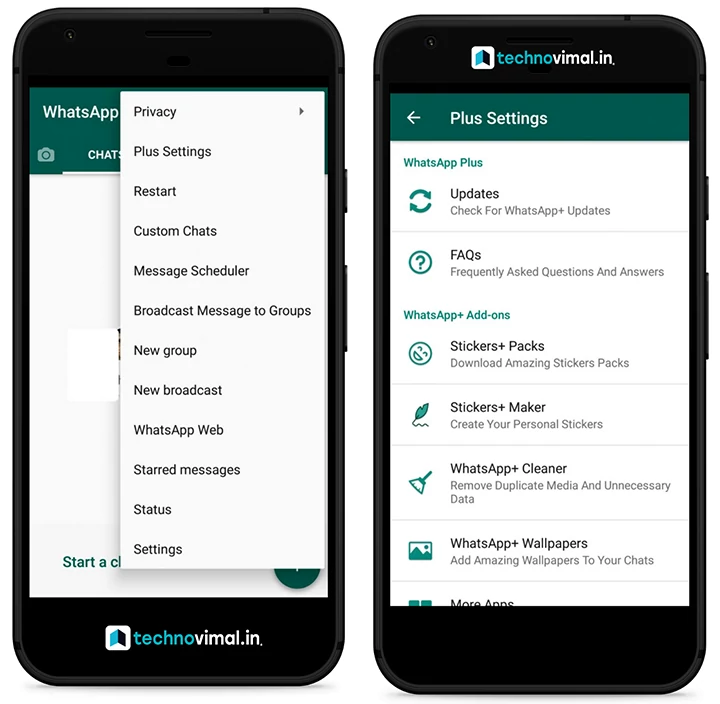
WhatsApp Plus or Foud WhatsApp is a WhatsApp application MOD developed by an independent developer called Foud Mokkad. The application was introduced to help people get rid of WhatsApp limitations and prohibit excessive use. In addition to the increasing range, WhatsApp Plus for Android also has many other privacy and personalization features available.
Currently, this application is only available for Android devices and cannot be used with official WhatsApp. There are some security concerns related to the application, but the developer fixes them in each update. This application is not available in the Google Play Store, so you must download the WhatsApp Plus application for Android APK and then install it manually on your device.
What’s new in the latest version of WhatsApp Plus 2021
What’s New
Based on 2.19.291.
Added attention while enabling Airplane mode.
Added Instagram like stories, Enable it from Home Screen -> Header.
[Re-Add] Save profile picture
[Fixed] contact online toast
[Fixed] send Full resolution isn’t working.
[Fixed] Preview color when having a photograph background
[Fixed] Proximity sensor (when disabled) not working
[Fixed] crash for Android 4.4 users
[Fixed] always online isn’t working
[Fixed] 80% some face status download issue. (download previous status).
Method to switch from official WhatsApp to WhatsApp+
This application is not available in the Google Play store. This is why you have to download it from the official plus website. Download the application and install it. Then you should do the following procedure. Here are the steps.
Step 1: Back up WhatsApp
Step 2. Then Tap on chats.
Step 3.Select Chat backup
Once completed you should see a backup to confirm.
How To Install WhatsApp Plus Update
First of all, uninstall or disable the official WhatsApp or older WhatsApp Plus APK (if installed).
Now click on the above link to try to WhatsApp Plus remake APK download.
Save the APK to enter your device storage.
Open Android Settings then Security Settings.
Scroll down and find Device Administration options.
Enable the choice that says “install apps from unknown sources”.
install apps from unknown sources
If you find a pop-up, click OK.
Navigate to the download folder and tap on the FM WhatsApp APK file.
Click install and wait for the installation to finish.
Once this is done, open the app and register with your mobile number.
Requirements and additional information:
Minimum operating system requirements: Android 4.0.3.
Conclusion
If you are looking for new types of themes and larger file-sharing options WhatsApp+ may be right for you. On the contrary, if you value your security over appearance WhatsApp+ cannot satisfy it. Therefore you should weigh the pros and cons and then make a decision.
Secrets of Professional Writer: Writing is considered an easy job. Well, it must be considered easy probably by those who are themselves good at writing. But what about that 60 % of the struggling writers, who have an amazing imagination and innovative ideas but they somewhere lack in putting them into words.
Most of the time what happens is that the writer has that urge of writing, and in their mind, they are almost ready with the topic. But as soon as they start writing, their mind went blank, they keep gazing at the screen. This is not the problem of one or two, this is the problem of many. That’s the reason they keep searching for professional content Writing tips to write an article.
Write an Article as a Professional Writer
Sometimes they are ready with the words and through their hard work, they are even able to come up with the content. But, well you will always have to face this “But” if you really want to do something amazing. People write, they write well, but their content is not up to the mark, though the words are satisfying, the quality of the content isn’t. I hope you did if not this article will definitely make you understand what I am actually trying to convey.
From previous comments, I have realized that many of my lovely readers are finding some difficulties in writing, and this article is for them. I hope you know who you are. Here I am going to share with you guys the “best 12 tips to write an article as a professional content Writing”, and trust me if in every post you will follow these tips, it will surely come out to be a masterpiece.
Here are 12 Awesome Tips to Write an Article as Professional
1. Focus Keyword
You might not be sure what is really meant by the focus keyword. It is the one that must be present in the introductory paragraph of an article for SEO-friendly content. For example, if you are writing an article about “Top 10 Richest People in the World” or if it is the title of the article. Then, the keyword “top 10 richest people” must be present in the introductory paragraph or the first paragraph of the article.
Many times it happens that we drown in writing and as a result, we end up writing an introduction of around 400-500 words. And this is not the correct way of writing an introduction. “Complete introduction” shouldn’t be more than 300 words i.e. before giving the main points do complete the introduction in a maximum of 300 words.
3. Keyword Density
Good content demands good SEO and for good SEO you need to use the focused keyword a minimum of 6 times in the article. This is known as keyword density. For example, (top 10 richest people) must be present at least 6 to 8 times in the whole article (Depending upon words count. If article length is 1500 words, it should be 6 to 8 times).
4. Sentence Length
Don’t be so engrossed in writing that you increase the length of sentences. The sentences should not have more than 20 words. You can break the sentence line with a full stop (.) And then continue writing.
5. Paragraph Length
Tips are a mixture of dos and don’ts though this one is a few don’ts so don’t write long paragraphs. The paragraphs shouldn’t have more than 100 to 150 words depending on the article length. You can break the paragraph or change the paragraph if it is going beyond 100 words and can write from the next paragraph.
6. Transition Words
I hope you are well acquainted with the transition words (and, but, so, as, because, therefore, however, moreover, further, meanwhile, during, subsequently, likewise, similarly, after that, above all, in addition, in conclusion, in short, in other words, on the other hand, for example, most importantly, certainly, firstly, secondly). There is a definite need for transition words in the article. They must be present between sentences because it makes it easier for the reader to understand how thoughts and ideas are connected to each other. Transition words show your reader the relationship between phrases, sentences, and even paragraphs. So, you must include transition words between the sentences.
7. Consecutive Sentences
They shouldn’t be present anywhere in the article. The consecutive sentence means that any specific word shouldn’t be repeated 3 times continuously in sentences. For Example, She is a girl. She loves to eat good food. She is pursuing her degree from a reputed university. (repetition of “she” shouldn’t be there).
8. Passive Voice
I don’t how, either due to lack of practice or some other reason most of the people make great use of passive voice. This isn’t the right way of writing. The sentences shouldn’t be present in the passive voice in the article. Try to use Active voice sentences. For example,
Active voice: I checked your writing skills.
Passive voice: Your writing skills are checked by me.
9. Make Use of Synonyms
To make the content look catchier don’t go with those words which the common people have never heard of. Use the words with “simple meanings” and sometimes new meanings. You must also make use of easy “synonyms words” between the sentence.
Firstly, a writer must consider the uniqueness of the content. None of the sentences should be copied from anywhere. Just do research on Google about any topic and read at least 5 sites for understanding and then try to write an article by yourself.
11. Article Length
Don’t make the article too long to make the readers bore. The minimum article length should be 900 words and a maximum of 4500 words.
12. Beginning and Ending
Do focus more on the beginning, to keep the reader keep on reading. And the endings should be good too so that it will leave the reader wanting for more posts.
Conclusion: Make your writing readability easy for your audience. This article might not help much but definitely a little bit for a better understanding to write an article. I’ll keep writing the posts for my readers. And I hope you people will keep showering your love.
Every computer on this planet can face a virus attack at any time. Therefore, it is better to have antivirus software installed on your computer. Obviously, good and powerful antivirus software will cost you some money. Fortunately, there are 10 very reliable and best antivirus that are also available outside the Internet.
Selecting the best antivirus software depends on two main factors: the region where you live and the operating system such as Windows 10 or Mac.
Let me explain this a little more. That would allow you to select the best free antivirus software for your PC.
How to Choose the Best Antivirus Software
Now let’s get this clear. It’s a sheer myth to believe that Apple or Mac computers as we know them are immune to virus attacks. No, they’re not. Since there’re fewer Apple computers, the number of virus attacks is relatively lower.
About 77 percent of computers use the Windows operating system. Hence, they are common targets for virus attacks.
You will also have to select antivirus software according to your region. That’s because all antivirus programs need updates. When an antivirus company detects a threat in your area, it will release an update or patch to protect your computer.
That doesn’t mean you should download an update merely because hackers aren’t targeting your region. Computer viruses can strike anywhere. Hence, you need that update too.
Before downloading this antivirus, I recommend you read an excellent guide on how to defend your computer.
Now that you know the basics, I will guide you through the best free antivirus software for Windows 10 in the world.
10 Best Free Antivirus Software (Top Rated for 2021)
Before telling you about the best free antivirus software, here is something you should know. Usually, each operating system comes with its own antivirus software as well.
For example, the Windows operating system comes with Windows Defender, it is excellent software. But if you want to use another antivirus, these are some of the best.
1. ZoneAlarm Free Antivirus
ZoneAlarm Free Antivirus
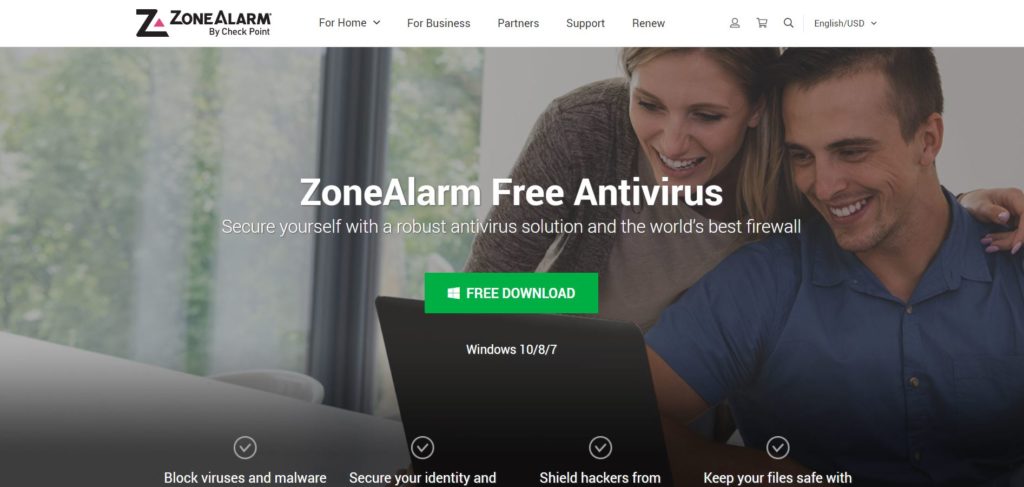
Not many computer users know ZoneAlarm. It is one of the best-qualified antivirus available at the moment. In fact, ZoneAlarm also has a homonymous firewall that prevents hackers from gaining illegal access to your computer and prevents certain types of malware and other attacks.
You can download the free ZoneAlarm antivirus or both: the firewall and the antivirus. I discovered that ZoneAlarm’s free firewall and antivirus work extremely well together.
2. Avast
The free Avast antivirus offers three levels of protection for your computer. They include blocking viruses and malware so they do not attack your computer and expose the threats that may arise from any Wi-Fi connection you are using and helps prevent such attacks.
Avast also protects the passwords you can use for any purpose. Therefore, your computer enjoys comprehensive protection with this best free antivirus software.
3. AVG Free Antivirus
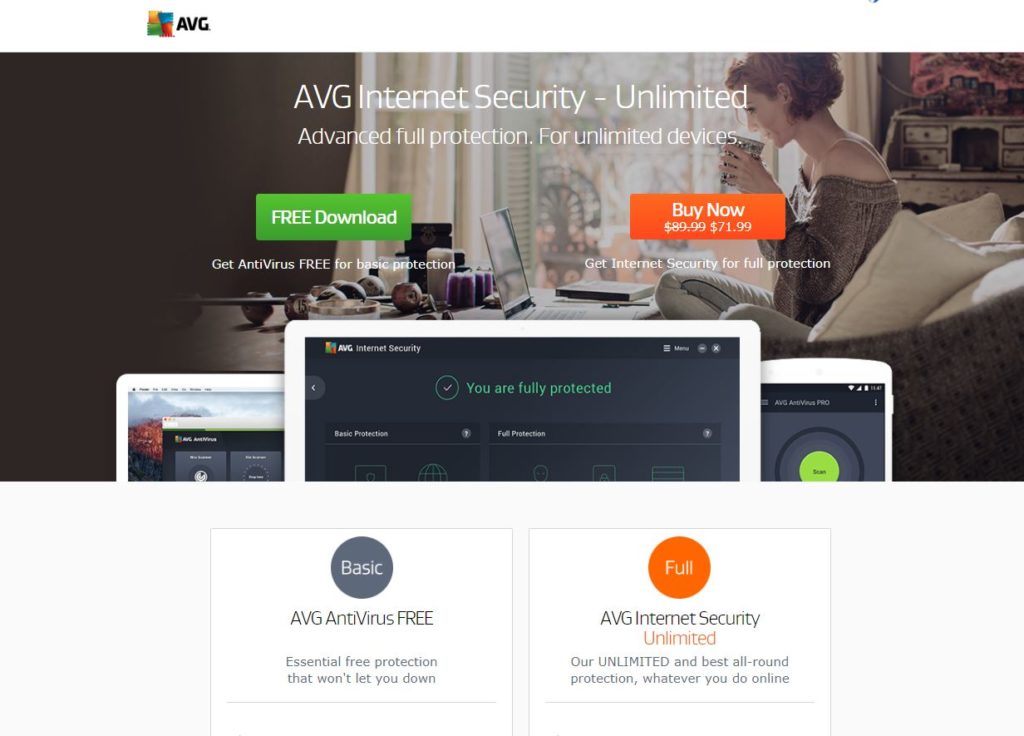
Two very powerful features of AVG antivirus are its file destroyer and provides protection against threats that arise without warning.
In addition, it comes with a series of powerful tools such as real-time scanning, automatic background scanning while busy on the Internet and prevents unwanted browser add-ons from being installed. Computer experts rate AVG Antivirus among the best in this category.
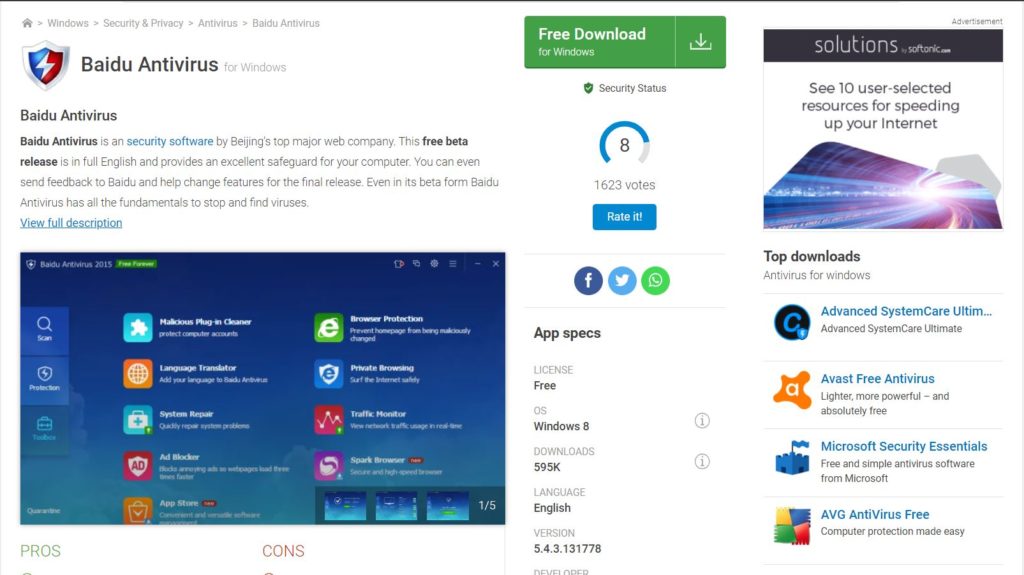
4. Baidu
This may come as a surprise to many. The little-known Baidu Free Antivirus is rapidly rising in the ranks of the best antivirus software. The Baidu antivirus offers almost all the features of the fully paid versions of other brands.
The only disadvantage is that it does not receive alerts about real-time protection. However, Internet security experts claim that the free Baidu antivirus has all the features necessary to protect your computer against online threats.
5. Kaspersky
Another excellent free antivirus is Kaspersky. In fact, Kaspersky has won several compliments for its simple and easy-to-use interface. The free version of Kaspersky Antivirus provides basic protection for your computer.
Receive instant alerts before opening an email attachment or visiting any suspicious website. Made by Kaspersky Labs, this is an excellent antivirus for a home computer.
6. Avira
With a five-star rating from CNet publishers, the free Avast antivirus is widely used in personal computers and personal laptops. The free version blocks most spyware, malware and ransomware, as well as other threats to attack your computer.
An important feature of the Avira antivirus is speed. Consider slowing down your computer and neither does a scan take more than a minute. You can use this antivirus safely with any good firewall for comprehensive protection.
7. Adaware Antivirus
Adaware Antivirus
Most cybersecurity experts know the Adaware antivirus. Unfortunately, previous versions were not so popular. However, the latest version of Adaware antivirus is a highly sophisticated version of its previous editions.
It has all the features to protect your computer against viruses, malware and other possible attacks. Adaware also offers real-time protection and alerts you to threats. The scans are also fast in the latest version of Adaware free antivirus software.
8. Bitdefender for Windows 10
Bitdefender for Windows 10
Bitdefender’s free antivirus has a unique feature: it can detect threats and eliminate them almost instantly. This free antivirus is ideal for PCs and laptops or home devices that require minimal protection.
Tests conducted by Internet security experts show that Bitdefender offers a high degree of online protection and easy threat removal. Therefore, any beginner can also use Bitdefender with ease. Like other free antivirus software, Bitdefender also comes with free updates and real-time protection.
9. 360 Total Security Suite
360 Total, previously known as Qihoo 360, is another free antivirus software recommended by Internet security experts. In fact, 360 Total perceived only one antivirus software; It is a complete Internet security package.
This means that the free version of 360 Total comes with a complete firewall that protects your computer against hackers, phishing and other online threats. And defend your computer from malicious and harmful virus attacks. Using 360 Total means that it is easy: to identify you need to take your online tutorial to use all its functions effectively.
10. Comodo Free Antivirus
AV-Test, the leading online security organization, includes free Comodo antivirus among the best of its kind. Comodo antivirus has all the desirable features of protecting home computers. It provides updates, fast scanning, and real-time protection from online threats.
It is quite fast and does not take up much space on your hard drive. Comodo antivirus is a deal for home PC users who need a simpler and lighter solution to counter threats online.
Using Antivirus Effectively
Obviously, you might wonder what is there to learn about the use of antivirus software. Especially when it’s free. There are three main points to remember to use the antivirus effectively.
Keep the automatic update function activated to ensure maximum protection.
Activate the email scanning function. This means that any malicious attachment will also be detected by this antivirus.
Use free virus detection and removal tools before installing an antivirus on your Windows PC. Some malicious programs may prevent your antivirus from detecting it unless you scan it and remove it before installation.
Once you have taken these steps, a PC or laptop will be quite safe against potential and everyday threats online.
Here is a small warning before concluding. Free antivirus software will provide very basic protection against common threats. Therefore, use only one if you are not going to use a computer for financial transactions or for commercial purposes.
It is worth remembering that the free antivirus software does not have all the features of the paid version. Therefore, evaluate your threat levels before using one of the antivirus software mentioned here for Windows 10, 11, 7, or any other version of Windows.